Claude Code Practical Guide: Installation, Permission Modes, and Productivity Tips
A practical workflow covering Claude Code installation, permissions, commands, and context management.
Based on a Bilibili creator's hands-on sharing, this article introduces Claude Code's positioning and value as a domain-specific coding agent, with a brief comparison to Codex and Cursor. It focuses on why NPM installation is recommended in the domestic environment, the preparation steps, and the importance of verifying the version before logging in. It then outlines the complete workflow formed by permission modes, slash commands, CLAUDE.md, MCP, and Subagents, and shares experience on avoiding ban risks through registration-free login. The overall goal is to help developers avoid common pitfalls and build stable, efficient agent habits.
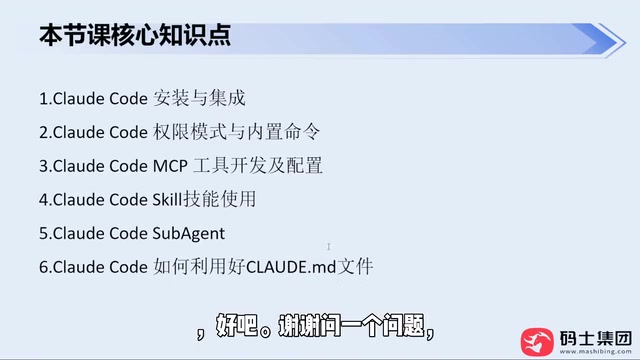
For developers, Claude Code is no longer an unfamiliar name. But many people still use it only at the level of simple conversation, without truly tapping into the potential of this coding agent. Based on a hands-on sharing from a Bilibili creator, this article systematically covers Claude Code's installation methods, permission modes, built-in commands, and context management techniques, helping you avoid common pitfalls and build a stable, efficient workflow.
What Claude Code Is and Why It's Worth Your Attention
Claude Code is essentially a domain-specific coding agent. Unlike general-purpose chatbots, it can read your codebase, edit files, run commands, and integrate deeply with your development tools. This means it doesn't just "answer questions" — it genuinely participates in the coding workflow.
According to the creator's view during the livestream, among domestic programmers, the most widely used webcoding tools are currently Claude Code, Codex, and Cursor. Cursor has a lower barrier to entry, while Claude Code and Codex perform more impressively in generating code and documentation. This judgment comes from personal practical experience and isn't an absolute standard, but it can serve as a reference when choosing tools.
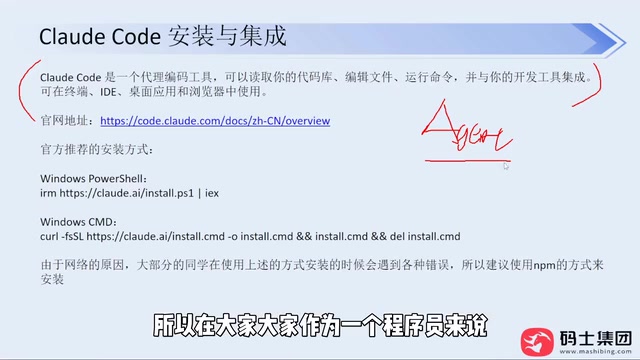
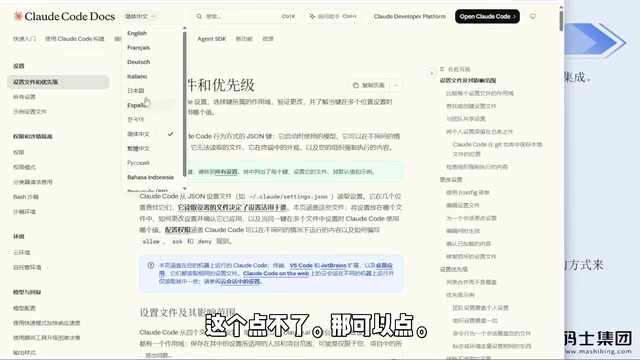
For anyone who wants to systematically learn a new tool, reading the official documentation first is the most efficient path. The Claude Code official website offers Simplified Chinese support, and the documentation covers installation commands, configuration instructions, integration methods, and other complete information.
Installation: Why NPM Is Recommended
The official website usually provides a one-click installation command, but in the domestic network environment, directly executing these commands will most likely result in permission errors or network timeouts. The creator explicitly mentioned during the livestream that even with a VPN enabled, some carrier networks can still cause installation failures.
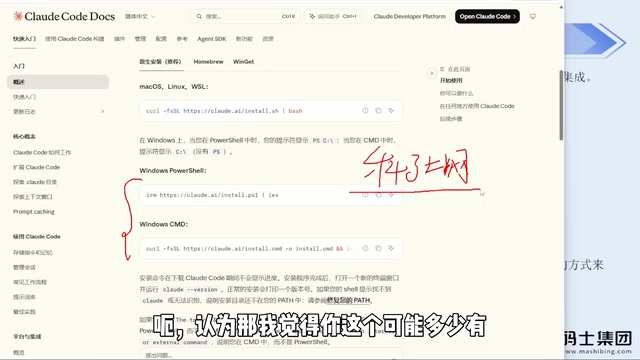
A more reliable approach is to install via NPM. According to the creator's experience, the NPM method has a very high success rate — he once used it to install Claude Code for non-programmer colleagues with virtually no failures.
Before installing via NPM, a few preparations are needed:
- Install Git using the standard steps
- Install Node.js, paying attention only to modifying the installation directory during setup
- Enable a VPN tool
After completing the above preparations, run the corresponding NPM command to finish the installation. Once installed, don't rush to log in. It's recommended to first enter claude --version (or a similar version query command) in the terminal to confirm the version information and verify that the installation succeeded. The creator specifically emphasized that this step is a prerequisite for stable use — verify first, then log in, which can avoid many subsequent problems.
NPM (Node Package Manager) is the package management tool in the Node.js ecosystem, installed alongside Node.js. Installing CLI tools via NPM essentially means downloading the corresponding package from the NPM registry and linking it to the global executable path. Domestic network access to the official NPM registry can sometimes be unstable, so you can configure the Taobao mirror (npm config set registry https://registry.npmmirror.com) to speed things up. Additionally, global installation (npm install -g) requires administrator privileges on some systems. If you encounter an EACCES error, you can switch to a version management tool like nvm or modify the NPM global directory permissions, rather than simply using sudo, to avoid subsequent permission confusion.
Permission Modes and Built-in Commands
In the creator's course outline, permission modes and built-in commands are one of the core segments. Claude Code's permission modes determine the agent's degree of freedom when executing operations — such as whether it's allowed to automatically edit files or run shell commands. Understanding the differences between these modes helps you find a balance between efficiency and safety.
Built-in commands (slash commands) are key to boosting efficiency in daily use. They cover scenarios such as session management, context control, and configuration viewing. Although the original material doesn't elaborate on each command in detail, the creator listed this as a separate chapter, indicating that this content is used very frequently in practice and is worth taking the time to study systematically.
Slash commands are instructions in the Claude Code interface that start with /, such as /help to view help, /clear to clear the current session context, /config to view or modify configuration, and /model to switch models. What distinguishes them from ordinary natural language input is that slash commands are parsed and executed directly by the client, consume no model inference, respond instantly, and behave deterministically. It's worth memorizing the commonly used commands first, as this can significantly reduce the cost of repeatedly describing requirements; also remember to use /clear promptly when the context gets too long, to prevent irrelevant history from interfering with the quality of subsequent responses.
CLAUDE.md and Context Management
CLAUDE.md is the file in a Claude Code project used to carry context and instructions. The creator placed it as the final segment of the course, alongside MCP tool configuration, SQL skill usage, Subagent, and other topics. This reflects that Claude Code's capabilities go far beyond "writing code" — through configuration files, tool integration, and sub-agent orchestration, it can take on more complex engineering tasks.
The core of context management lies in letting the agent work within the right scope of information. CLAUDE.md provides a project-level entry point for instructions, MCP tools extend external capabilities, and Subagents allow task decomposition. Only when these capabilities are combined do they form Claude Code's complete workflow.
MCP (Model Context Protocol) is an open protocol that lets models connect to external data sources and tools in a standardized way, such as databases, file systems, and third-party APIs. After configuring an MCP server in Claude Code, the agent can call these external capabilities on demand during a conversation, without having to paste data into the context in advance. A Subagent refers to splitting complex tasks into subtasks that run in independent contexts, each focusing on a single goal, and finally aggregating the results. Combined with CLAUDE.md's project-level instructions, these two can effectively control context length and reduce mutual interference, serving as the infrastructure for building complex workflows.
The Key to Stable Use: Avoiding Account Ban Risks
The creator mentioned during the livestream a concern shared by many users: account bans. He analyzed that the root cause is Claude's official account ban policy, and noted that this is related to some of the platform's tendencies. His solution is: when logging in, choose a method that doesn't require registering an account, thereby avoiding the ban issue at the source. According to his own account, from the first day of installation to now, his Claude Code has never been banned.
This experience is a single-source practical summary, and different users' network environments and account situations may vary. But the sequence of "verify the installation first, then handle login" and the idea of prioritizing NPM installation are actionable in multiple respects.
Final Thoughts
The value of Claude Code isn't that it can converse, but that as a coding agent it can be embedded into real development workflows. The pitfalls in installation, the choice of permission modes, your fluency with slash commands, and the quality of your CLAUDE.md configuration — these details add up to determine whether you're "using the tool" or "being dragged along by the tool." For developers still hand-coding everything, spending one evening getting this workflow running is well worth the return.
Related articles

DeepSeek SuperAgent Architecture Explained: A New Multi-Task Concurrent Agent Paradigm
DeepSeek Harness proposes SuperAgent architecture: a Router+Worker two-layer team model solving context confusion, loop blocking, and local sleep in multi-task Agents.

AI Now Generates GIFs Directly: The Era of Unlimited Custom Stickers Has Arrived
AI can now generate GIFs directly. Learn how to use GPT's Images 2.6 to create sticker GIFs with reference images and story prompts, plus sprite sheet frame-level editing, real-person performances, and chat log generation.

Burned Through 1.3 Billion Tokens and Tens of Thousands of Yuan to Build 500 Websites with AI
Bilibili creator Yu Pi built Vibefather, an AI website template library with 270+ templates and 500+ live sites, consuming over 1.3 billion tokens. Each template includes full prompts and design docs, open-sourced and integrable via Claude Code, Cursor, and more.