AI + Playwright Automation Testing: Why It's Replacing Selenium

Playwright outpaces Selenium with smarter waits, easier setup, context isolation, and native AI integration.
This article systematically compares Selenium and Playwright across six dimensions, concluding that Playwright is the smarter starting point for anyone entering web automation today. Playwright requires just one command to set up, eliminates driver version conflicts, auto-handles waits, isolates test state via BrowserContext, and runs 30–50% faster. Most importantly, its official MCP and Codegen tools let AI generate and execute browser scripts directly — so learners only need to grasp the basics and let AI handle the rest.
The Decline of Selenium and the Rise of Playwright
If you're planning to get started with web automation testing this year, there's one trend you need to understand first: traditional Selenium is gradually fading from the mainstream. Based on assessments shared in educational videos, nearly all new web automation projects are now prioritizing Playwright. This isn't a simple tech swap — it's the result of a comprehensive evaluation across developer efficiency, stability, and AI ecosystem support.
For beginners starting from scratch, it's better to understand the advantages of next-generation tools rather than investing significant time in older ones. Below, we compare Selenium and Playwright across six dimensions: environment setup, wait mechanisms, context isolation, execution speed, code generation, and AI support.
Environment Setup: Three Components vs. Out-of-the-Box
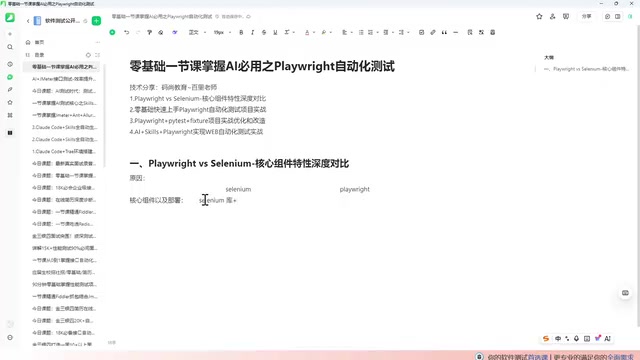
Setting up Selenium has always been a pain point for beginners. It requires installing three separate components: the Selenium library itself, a browser, and the corresponding browser driver (WebDriver). Version incompatibilities between these three are common — if the browser updates but the driver doesn't keep up, your scripts break. Many beginners spend a disproportionate amount of time just fighting with environment configuration.
Playwright radically simplifies this. You only need two things: the Playwright library and its built-in browsers. The browsers are bundled with the framework — no manual installation or driver version matching required. A single command (playwright install) handles everything. For newcomers, this dramatically lowers the barrier from installation to running your first script.
Wait Mechanisms: Manual Code vs. Smart Auto-Waiting
In web automation, "waiting" is an unavoidable core challenge — page elements take time to load, and acting too early causes failures.
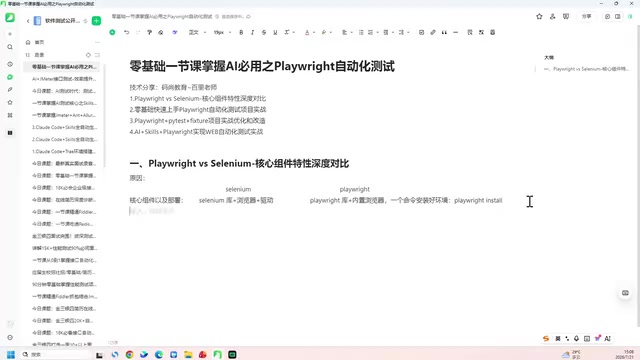
Selenium offers three types of waits: Explicit Wait, Implicit Wait, and forced waits (sleep). All of these require developers to manually write control logic, and doing it poorly leads to unstable or slow-running scripts.
Playwright has a built-in smart auto-waiting mechanism. Before interacting with an element, it automatically checks whether the element is ready and waits if necessary — no explicit wait logic required from the developer. This design significantly improves script stability and eliminates a large amount of repetitive boilerplate code.
Context Isolation: WebDriver Instances vs. BrowserContext
Context isolation is one of Playwright's standout features compared to Selenium. Selenium has essentially no native context isolation — it works through WebDriver instances, where each test typically gets its own WebDriver, but there's no isolation at the context level.
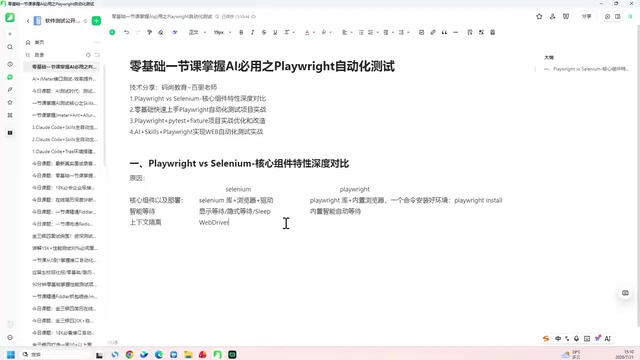
Playwright introduces the concept of BrowserContext, designed specifically for context isolation. In simple terms, different tests can run in completely independent browser contexts — their cookies, cache, and login states don't interfere with each other, yet they share the same underlying browser instance. This balances isolation with resource efficiency, making it especially valuable for concurrent testing and multi-account scenarios.
The underlying technical implementation of BrowserContext is worth understanding more deeply. Playwright's architecture has three layers: Browser (the browser process), BrowserContext (an isolated environment similar to an "incognito window"), and Page (a specific tab). A single Browser instance can host multiple BrowserContext objects simultaneously. Each context has its own independent cookies, LocalStorage, Session Storage, and network state, but shares the same underlying browser engine process — meaning the overhead of creating a new context is far lower than launching a new browser process. This design is significant for parallel testing: 100 test cases don't require 100 browser processes; you simply create 100 contexts, ensuring tests don't pollute each other's state while saving substantial system resources. Additionally, BrowserContext supports loading previously saved login states via the storageState parameter, letting you skip the re-login step for every test and further boosting test efficiency.
Execution Speed and Code Generation
In terms of execution speed, Selenium uses a multi-handshake communication model with considerable waiting overhead, resulting in lower overall performance. Playwright, by contrast, runs approximately 30% to 50% faster — a gap that becomes even more pronounced at scale.
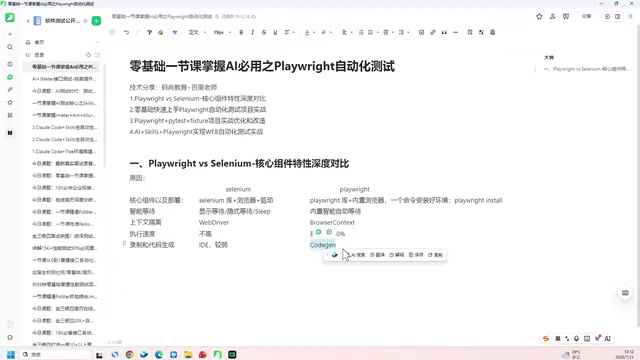
On the recording and code generation front, Selenium relies on its IDE, which is relatively limited in capability. Playwright provides a Code Generator (Codegen) tool that not only generates Python code but also supports Java, C#, and other languages — making it more versatile and friendlier for multi-language teams.
AI Support: Playwright's Real Killer Feature
If the previous points represent engineering-level improvements, then AI ecosystem support is the real reason Playwright stands out today. Selenium offers virtually nothing in the AI support space. Playwright, on the other hand, has officially released two AI-oriented tools: components related to Playwright's CRI and MCP (Model Context Protocol). These two tools make it remarkably friendly for AI to operate browsers.
This explains a key shift in the learning path that keeps coming up in educational content: in practice, you rarely need to hand-write large amounts of code anymore — most scripts can be generated by AI. What learners actually need to master is how to set up the environment, understand the framework's core concepts, and write some basic conversational prompts. The rest? Just tell the AI and let it do the work.
MCP (Model Context Protocol) is an open protocol proposed by Anthropic in late 2024, designed to provide large language models (LLMs) with a standardized "tool-calling" interface — enabling AI to interact structurally with external systems (databases, APIs, browsers, etc.) rather than just generating text. Playwright's official MCP component essentially wraps browser operations into a set of MCP-compliant tools, allowing models like Claude and GPT to directly "invoke" browser capabilities such as clicking, typing, taking screenshots, and navigating. This differs fundamentally from Codegen's "record and replay" approach: Codegen records what a human does; MCP lets AI understand the task intent and autonomously decide how to execute browser operations. Together, they form the current mainstream workflow for AI-driven automation — one for quickly generating initial scripts, the other for letting AI dynamically control the browser at runtime.
Advice for Beginners Starting from Zero
Based on all these comparisons, here's a clear direction for anyone getting into web automation this year: stop spending energy on Selenium. Get Playwright's environment set up first, understand its core concepts (auto-waiting, BrowserContext, Codegen), then use AI tools to generate and debug scripts — and you'll be productive quickly.
One important note: introductory content tends to focus on trends and high-level advantages. Specific hands-on techniques — like actually using context isolation in practice — require follow-up coding exercises to truly internalize. No matter how advanced the tools become, understanding the underlying test logic and element-locating strategies remains essential foundational knowledge.
Related articles

Amphibious Transforming Drone: Beyond 100x Power Savings, What Are the Real Needs?
Is the amphibious transforming drone just a gimmick? Starting from the 100x power difference of the M4 Morphobot, explore real application scenarios and thesis topic ideas, analyzing boundary conditions where pure drones and pure ground robots both fail.

Warhound Raises $200 Million: Genetically Engineered "War Dogs" Paired with Anduril Gear
Warhound raises $200M, backed by Ben Lamm and Palmer Luckey, to genetically engineer dogs for military and law enforcement use and equip them with Anduril gear. This article analyzes its technology direction, funding logic, and ethical controversy.

Claude API Comes to Google Cloud: IAM Integration and SDK Access Guide
Anthropic hosts the full Claude API on Google Cloud with IAM-controlled permissions and unified billing. This guide covers the Vertex AI and Anthropic-hosted entry points, IAM role configuration, and SDK access.