AI Recreates Vox-Style Viral Videos in Minutes: A Full Pipeline from Breakdown to Final Cut
A Bilibili creator demonstrates a complete AI pipeline for producing Vox-style explainer videos in one stop with Doubao Work.
Based on a Bilibili creator's test video, this article outlines a four-step process for making Vox-style explainer videos with Doubao Work: first use AI to break down reference videos in parallel to extract narration structure and shot scheduling; then generate a planning document containing narration, storyboard, image prompts, and motion requirements based on the topic; next invoke Cdream to generate static frames and Cdance to generate dynamic clips; finally automatically integrate assets into a web asset library with real-time mobile progress viewing. The author believes this pipeline connects breakdown, planning, image generation, video generation, and asset management, suitable for newcomers lacking editing and animation fundamentals, but AI assets still need manual consistency checks, and complex camera movements and high customization remain current limitations.
Title
AI Recreates Vox-Style Viral Videos in Minutes: A Full Pipeline from Breakdown to Final Cut
Meta Description
A Bilibili creator tests Doubao Work AI to produce a Vox-style explainer video: from breaking down viral video structure and generating scripts/storyboards, to Cdream image generation, Cdance video generation, to integrating a web asset library and mobile syncing—the whole process takes only minutes, and beginners can quickly get started.
Article Content
You booked a flight at 8 a.m. To catch it, you have to wake up at 5, leave home at 6, and spend an hour and a half stuck in traffic—all because the airport was built 50 kilometers outside the city. You've probably seen many videos that build scenes with stickers like this. They all share a name: Vox style. With narration as the director and stickers as the building blocks, producing such a video used to be a lot of work. But after years of AI development, as long as you pick a highly integrated AI tool, you can complete everything from script, storyboard, images, to motion assets in one stop.
In a recent share, Bilibili creator "I" demonstrated how to quickly get started making Vox-style explainer videos with Doubao Work. From breakdown analysis, planning generation, static image production to dynamic video synthesis, the entire process is compressed into minutes and supports real-time progress viewing on mobile. Based on that video, this article outlines the key steps and practical details of this AI video production pipeline.
Step 1: Use AI to Break Down Viral Video Structure
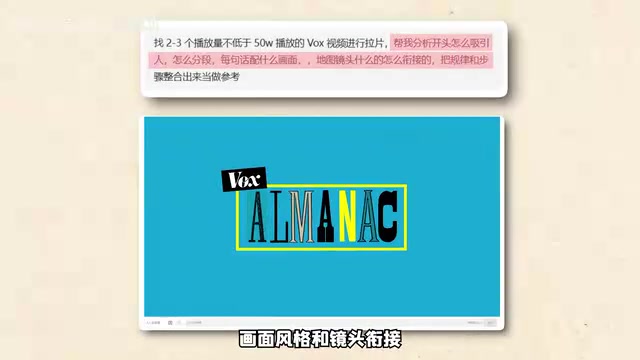
The first step in making an explainer video is "breakdown"—analyzing the narration structure, visual style, and shot transitions of reference videos. The creator handed several reference video links or transcripts to Doubao Work and requested a breakdown; the AI then processed them in parallel and compiled a reusable analysis report. According to the demo, Doubao Work not only outputs text analysis but also, through the GUI function built into its local mode, directly operates the computer, opens specified web pages to collect information, and even lets you check task progress on your phone while on the go.
With this analysis report, the AI grasps the basic rules of video structure: how map scenes are annotated, how specific shots are scheduled, how hooks are placed at the beginning, etc. For newcomers, this saves a lot of trial and error. The creator emphasizes that the key at this step is "let the AI first learn the patterns of reference videos" so that subsequent content generation can maintain a consistent style.
Breakdown (拉片) originally is a film industry term referring to watching a film frame by frame or shot by shot, recording each shot's framing, composition, camera movement, editing rhythm, and the correspondence between narration and visuals, thereby summarizing reusable creative rules. In the short-video era, breakdown is widely used to deconstruct the structural patterns of viral content—how the first few seconds set a hook, how information density is distributed, how transitions connect. Traditional breakdown requires manually pausing, screenshotting, and taking notes repeatedly; a few-minute video often takes hours. With AI processing multiple reference videos in parallel, this process can be compressed to minutes, outputting structured analysis reports and letting creators focus on creativity rather than mechanical recording.
Step 2: AI Generates a Planning Document—Script and Storyboard in One Go
After settling on a topic, the creator gives the topic along with style requirements to Doubao Work and instructs it to invoke the relevant skill to write narration and storyboards in the established visual style, with each shot accompanied by image prompts and motion requirements. After invoking the production skill, the AI outputs a complete planning document within minutes.
Take the opening hook as an example: the script uses specific time points as clues to describe a scene that takes a lot of time to reach the airport. The storyboard section breaks down the various elements in the paragraph into independent entities and connects them in time order.
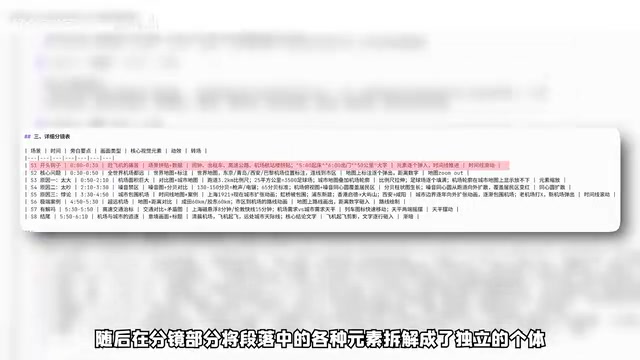
Then it further revises them into visual descriptions that can be generated: on the left is a red alarm clock showing five o'clock, in the middle is a top-down view of a taxi—the description is quite precise, and image generation prompts are attached at the end. From the classic script to the prompts used for image generation, the parts correspond one-to-one and all meet the requirements; the whole process takes only three to five minutes. The creator believes that this "script-storyboard-prompt" correspondence is the foundation for ensuring visual consistency later.
Storyboard is the intermediate step in film and television production that turns a text script into a visual plan, usually presented as a series of frame sketches, each labeled with shot size, camera position, visual content, and corresponding narration. In Vox-style videos, the storyboard is especially important because the visuals are collages of many independent sticker elements, requiring advance planning of each element's position, layering, and order of appearance. The "image prompts" output by AI when generating storyboards are essentially instruction descriptions for text-to-image models, including subject, color, composition, style, and other elements. Only when script, storyboard, and prompts correspond one-to-one can the subsequently generated static images and dynamic videos remain visually coherent, avoiding style drift or element misalignment.
Step 3: Static Image and Dynamic Video Generation
Guided by the planning document, the creator invokes Cdream in Doubao Work to generate static frames. A red alarm clock, a taxi on the highway, an airport terminal collage silhouette—the reference images almost one-to-one match the earlier requirements. The overall tone is pale yellow, and different sticker blocks form layered visuals. The creator comments that Doubao Work, relying on its powerful Skill capabilities, delivers the desired result while maintaining consistency.
With static images ready, Cdance is then used to create dynamic clips. Take the opening "city to airport" shot: since the planning document already contains dynamic video prompt descriptions, no additional prompts are needed—Doubao Work automatically invokes the earlier requirements and generates the corresponding video. In the prompt, the alarm clock unfolds as a sticker, and the video goes further—a dynamic alarm clock slowly bounces in, which feels more comfortable; the taxi moves across a paper road, the airport terminal outline slides in, and the white text appearing in sequence under the guidance of narration corresponds one-to-one—the video consistency is good.
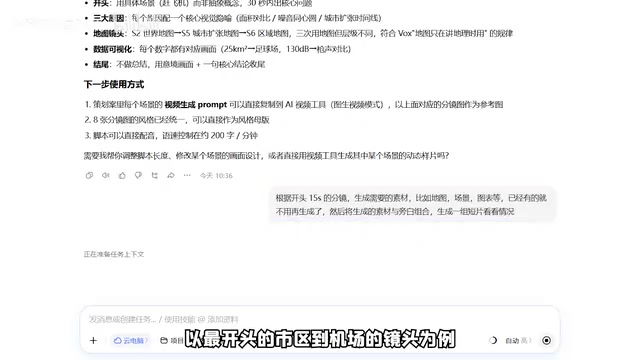
To prepare subsequent video segments, simply return to the previous process: first compare with the copy in the plan, let Doubao Work allocate copy and visual scheduling, generate the corresponding static assets, and finally generate the video. At this point, the entire pipeline for a finished Vox-style product is fully connected.
Text-to-image and image-to-video are two different types of generative models. Text-to-image models (such as Cdream mentioned in the article) directly synthesize static images from text prompts; image-to-video models (such as Cdance) use a static image as the first frame or reference and combine motion descriptions to generate several seconds of dynamic clips. The key difference lies in consistency control: text-to-image needs prompts to lock in style and elements, while image-to-video must ensure the subject does not deform and the background does not flicker during motion. Therefore, in practice, text-to-image is usually used first to establish the visual tone, then image-to-video to add motion, and the dynamic requirements from the planning document are reused in prompts to reduce repeated parameter tuning. Currently, clips generated by such models are generally short; long videos still require stitching multiple segments.
Step 4: Asset Library Integration and Mobile Work
After finishing the first video, the creator integrates the used reference images, video prompts, and other materials. Simply telling Doubao Work to "integrate the previous assets into a web asset library" makes it automatically package them—it even generated a fairly attractive web asset library based on Vox aesthetics, and the whole process requires no coding knowledge from the user.
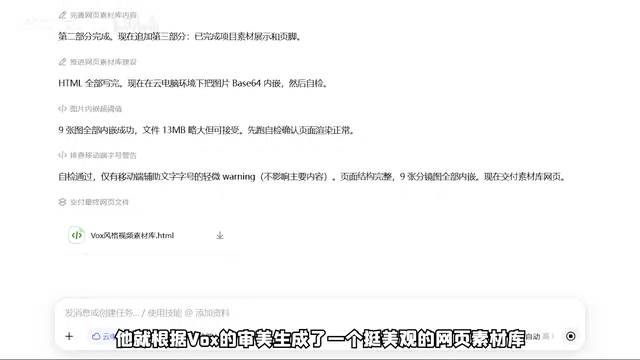
However, the creator also points out that because no specific requirements were given, this asset library simply embeds various assets and cannot be clicked to enlarge or play. After further requests, a single-asset viewing function can be added, and a search bar can be added to topic keywords so that needed content can be located more quickly next time. As assets accumulate, making similar videos will become increasingly easier.
If you suddenly need to go out, just download Doubao Work on your phone and log in to the same account, click project expansion, and open the project running on your computer to view current progress and previous work in real time—achieving mobile work.
Cloud computer and GUI agent are two underlying capabilities supporting this workflow. A cloud computer means running the operating system and software on a remote server, with users accessing it via a thin client or phone, thus synchronizing the same work environment across devices—this is exactly why "checking computer project progress on your phone while out" is possible. A GUI agent enables AI to recognize screen elements, click buttons, and open web pages like a human, thereby operating traditional software that does not expose APIs. Combined, these two allow AI not only to generate content but also to perform tedious cross-application operations on behalf of users, automating tasks like asset organization and web page building that previously required manual handling, significantly lowering the barrier for non-technical users.
Who Is This Workflow For?
The creator concludes that Doubao Work, with its vast Skill library, portable and simple interaction, comprehensive multimodal capabilities, and real-time syncing via cloud computer, allows newcomers to quickly get started and feel AI's empowerment of work. Based on the test, this workflow is best suited for content creators who want to get into explainer videos but lack editing and animation fundamentals—it connects breakdown, planning, image generation, video generation, and asset management into a low-barrier pipeline. However, note that AI-generated assets still require manual consistency checks, and the asset library function also needs clear instructions to be improved. For creators pursuing highly customized content or complex camera movements, current AI-generated videos still have limitations and are better used as efficiency tools rather than complete replacements for human work.
One-line Summary
A Bilibili creator demonstrates a complete AI pipeline for producing Vox-style explainer videos in one stop with Doubao Work.
Paragraph Summary
Based on a Bilibili creator's test video, this article outlines a four-step process for making Vox-style explainer videos with Doubao Work: first use AI to break down reference videos in parallel to extract narration structure and shot scheduling; then generate a planning document containing narration, storyboard, image prompts, and motion requirements based on the topic; next invoke Cdream to generate static frames and Cdance to generate dynamic clips; finally automatically integrate assets into a web asset library with real-time mobile progress viewing. The author believes this pipeline connects breakdown, planning, image generation, video generation, and asset management, suitable for newcomers lacking editing and animation fundamentals, but AI assets still need manual consistency checks, and complex camera movements and high customization remain current limitations.
Related articles

AI Digital Twin in Action: Using DOT to Automatically Track Bugs and User Feedback
DOTS engineers demonstrate how AI digital twin DOT collects cross-platform user feedback, categorizes issue themes, opens threads to investigate bug root causes, and submits PRs—showcasing a complete AI agent workflow for defect triage with auditable design.

Why Transistors Are No Longer Flat: The Evolution from Planar to Gate-All-Around
Transistor evolution from planar to FinFET to gate-all-around: why gates went from three-sided to four-sided wrapping to suppress short-channel effects and leakage current, extending Moore's Law.

Swarm Intelligence = a Single RL Agent? A Proof of Multi-Armed Bandit Equivalence
A paper proves that collective decision-making through local imitation in swarms is mathematically equivalent to single-agent reinforcement learning: N blind imitators act as N parallel environment samples, with an effective learning rate of 1/N. This article explains the derivation and implications of the Maynard-Cross Learning algorithm.