AI+UE in Practice: A Full Record of MCP Connections and Packaging Troubleshooting

Bilibili creator Yongzhou demonstrates using MCP to connect an AI Agent with the UE editor and summarizes pain points and lessons learned.
The article covers Bilibili creator Yongzhou's hands-on course, showing how the MCP protocol lets an AI Agent directly operate the Unreal Engine editor for blueprint creation, property attachment, and packaging troubleshooting. The core idea is that AI is a tool while humans break down tasks and verify results. In practice, the UnrealMCP and MCP Client Toolset plugins must be enabled and manually configured. Creating a blueprint subclass stalled for nearly an hour because the project was not linked to the UE5 engine folder; after fixing it with a VS Code-generated Code Workspace, it still took 28 minutes. Packaging failed due to runtime plugin port conflicts, succeeding after disabling the plugins. The author distinguishes black-box trust from collaborative review in Vibe Coding and recommends AI for simple code generation, MCP for editor operations, with human fallback.
In the wave of AI-assisted game development, how can large models actually "get hands-on" with Unreal Engine, rather than staying at the level of writing Python scripts? Bilibili creator Yongzhou's hands-on course offers a concrete path: using MCP (Model Context Protocol) to connect an AI Agent with the UE editor, and driving blueprint creation, property attachment, and even packaging troubleshooting with natural language. This article breaks down the key steps, time-consuming pain points, and lessons learned, to help you decide whether this workflow is worth incorporating into your own development process.
Core Philosophy: AI Is a Tool; Humans Break Down Tasks and Verify Results
At the start of the course, Yongzhou emphasizes that in the AI era, a game developer's core competitiveness is no longer writing code, but using workflows to guide AI in defining goals and breaking down tasks. He proposes three principles: C++ code is basically handed over to AI, while blueprints — where UI, sound, and similar elements have advantages — remain in blueprint form; humans are responsible for random code review and final effect verification; and most importantly, humans break down the overall task and perform final acceptance.
This principle directly addresses the fantasy of "generating a game with one sentence" — if complex multi-part tasks are thrown to AI all at once, there is a very high probability of muddled logic, difficulty making modifications, and runaway token costs. The workflow therefore needs to be upgraded to a distributed process of "planning, execution, verification," which is also why human intervention repeatedly appears in the later MCP hands-on work.
The MCP Plugin: A Bridge Between AI and UE
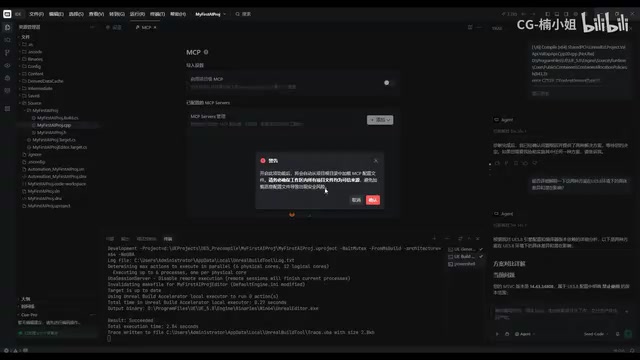
The essence of MCP is to provide large models with the "means" to operate UE. The course requires enabling two plugins: UnrealMCP and MCP Client Toolset. The former packages functions such as generating Actors, configuring lighting, and creating materials into a standard toolset — according to available information, it has as many as 50-plus toolsets and over 800 tools in total; the latter is an adapter responsible for handling the connection between the AI client and MCP. The two are complementary but are not automatically linked.
In the editor preferences, checking Auto Start Server under Model Context Protocol is a prerequisite for using MCP. Then, in the MCP settings page of the AI IDE, you must manually paste the JSON configuration to establish a connection. On the first connection attempt, the situation "shows connected but is actually not in effect" occurred; it was necessary to close and reopen the UE editor and reconnect once in the IDE before the checkmark was truly ticked.
Model Context Protocol (MCP) is an open protocol proposed by Anthropic, aimed at standardizing the way large language models connect to external tools and data sources. In traditional AI-assisted development, models can only indirectly affect a project by generating code; MCP allows models to call external tools (such as APIs in the UE editor) in a structured way, enabling direct operations on assets, scenes, and properties within the editor. MCP uses a client-server architecture: the AI IDE acts as the client, connecting via JSON configuration to the MCP server running in UE, which then translates model requests into concrete editor operations. This design enables AI to "act" rather than merely "talk," but it also requires a stable two-way communication channel between client and server — any configuration error or plugin conflict can cause the connection to fail.
Hands-on Pitfalls: Having AI Create a Blueprint Subclass
The course uses a specific task to test MCP: have AI create a C++ class named MCP Character Base in UE and generate a blueprint subclass BP Player. The first half — compiling — does not require MCP; the second half — creating the blueprint subclass — is where MCP comes into play.
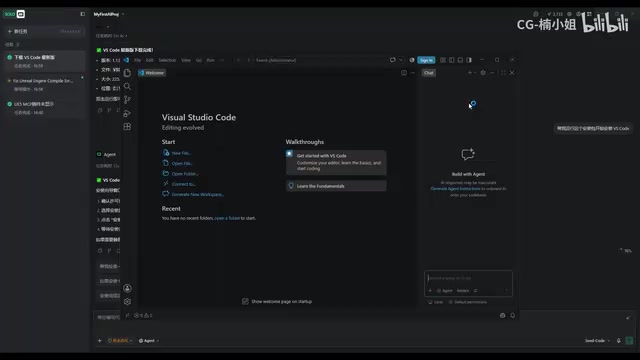
In actual execution, AI tried for nearly an hour and remained stuck the whole time. The root cause was that the project had not been associated with the UE5 engine folder in the IDE. Although AI connected to the project MCP, it did not understand UE5's own parameter context, so it could not find the class name and aborted. The solution was to install VS Code (leveraging the dependency environment created during its installation), then keep only the four key files — Config, Content, Source, and Uproject — to rebuild a clean project structure, and then refresh via Generate or Refresh Project in the right-click menu to generate the Code Workspace file. After opening the project from this entry point, UE5 appeared in the folder structure on the left, indicating that the engineering project had been successfully associated with the engine folder.
In an Unreal Engine project, the relationship between a C++ class and a blueprint subclass is: the C++ class defines the base logic and properties, while the blueprint subclass inherits from that C++ class and can visually extend and adjust default values in the editor. For AI to create a blueprint subclass through MCP, AI must be able to access the engine's class hierarchy and project context; otherwise it cannot resolve a class name like "MCP Character Base." The "Code Workspace" file in the IDE (usually generated by VS Code) records the association between the project and the engine folder, enabling AI to index UE5's source code and APIs. Without this association, AI can connect to the project MCP server but cannot obtain engine-level parameter information, causing the task to stall. Therefore, establishing the correct project structure and refreshing to generate the Code Workspace is a prerequisite for a successful MCP task.
Time and Cost: The Applicable Boundaries of MCP
After completing the association, having AI create the blueprint subclass again took 28 minutes and 49 seconds. During the process, AI encountered various obstacles such as DLL loading issues, asset registry conflicts, and API selection. This case shows that MCP is not slow for all tasks, but first-time use is indeed notably time-consuming.
Next, it tested adding a spring arm and camera to the character. AI likewise needed to understand natural-language instructions and, upon detecting that the editor was occupied, suggested using Live Coding or closing the editor. A problem arose with the rotation direction where the camera did not follow — essentially a difference between controller rotation and relative rotation. AI's understanding of UE's built-in parameters is limited and could only offer probabilistic suggestions.
Based on this, the creator concludes: in actual development, most of the time MCP will not be used to operate UE content, because having AI generate even a simple blueprint function takes more than ten minutes, whereas generating code costs fewer tokens and is very fast.
Packaging Troubleshooting: AI Reads Logs to Find the Root Cause
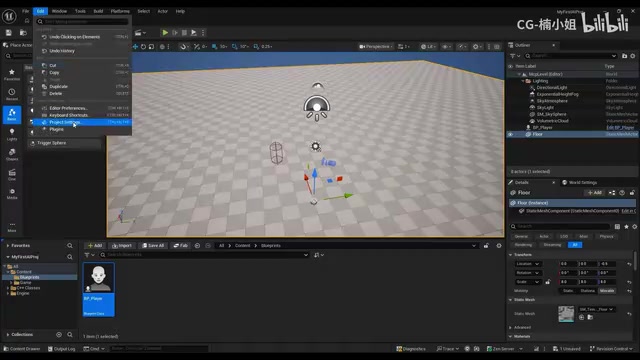
The course finally tests packaging. In Project Settings, change the build configuration to Shipping, check For Distribution, and choose a short output path with no Chinese characters. The first packaging attempt failed; the log file path was sent to the AI Agent, which identified an MSVC tool version mismatch and automatically modified the build and configuration xml. The second packaging attempt still failed, with the log showing that the log http listener could not bind to a port. After analysis, AI pointed out that the root cause was that the two MCP plugins load in any target, including the packaging stage. The simplest solution was to disable these two plugins in the plugin list; after restarting, packaging succeeded, and double-clicking the exe launched the game.
The Shipping build configuration is the packaging mode in UE used to release the final version; it strips debug symbols, disables console commands, and optimizes performance, so plugin loading behavior differs from the development stage. MCP plugins (UnrealMCP and MCP Client Toolset) load in all targets by default, including the packaged standalone program. During packaging, these plugins may attempt to start network listeners or bind ports, conflicting with packaging tools or system services and causing the "log http listener could not bind to a port" error. The solution is to disable these plugins in plugin settings, or modify the .uproject file to restrict the plugins to load only for editor targets, thereby avoiding runtime conflicts. This shows that AI can locate the root cause during troubleshooting, but the final fix still requires the developer to understand UE's plugin loading mechanism.
Takeaways: Two Ways to Use Vibe Coding
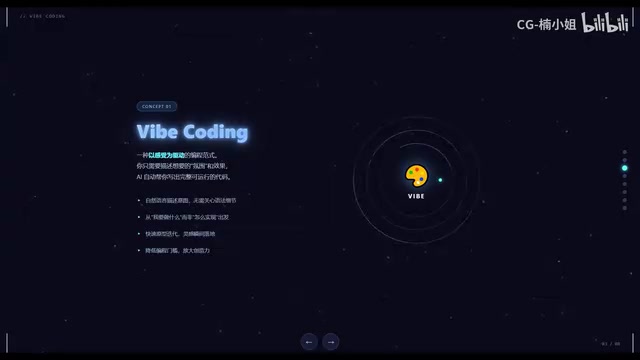
Yongzhou calls this natural-language-driven development Vibe Coding and distinguishes two forms: one is a pure black box, fully trusting AI output, suitable for rapid prototyping or personal experimentation; the other treats AI as a collaborative partner, where the developer must review, test, and understand the AI-generated code and take responsibility for the results. The course clearly adopts the latter.
For developers who want to try MCP, it is advisable to first clarify task boundaries: AI is more efficient for simple code generation; consider MCP when operations on in-editor assets are involved, and be prepared for human fallback. The plugin conflicts during packaging also remind us that although AI's troubleshooting ability is strong, final decisions still require developers to judge based on engineering knowledge.
One-line Summary
Bilibili creator Yongzhou demonstrates in practice how to use MCP to connect an AI Agent with the UE editor, and summarizes the time-consuming pain points and lessons learned.
Paragraph Summary
The article introduces Bilibili creator Yongzhou's hands-on course, showing how the MCP protocol lets an AI Agent directly operate the Unreal Engine editor to complete tasks such as blueprint creation, property attachment, and packaging troubleshooting. The core philosophy is that AI is a tool while humans break down tasks and verify results. In practice, the UnrealMCP and MCP Client Toolset plugins must be enabled and the connection configured manually. When creating a blueprint subclass, the task stalled for nearly an hour because the project was not associated with the UE5 engine folder; after resolving it by generating a Code Workspace with VS Code, it still took 28 minutes. During packaging, MCP plugins loading at runtime caused a port conflict; disabling the plugins led to success. The author distinguishes between two Vibe Coding modes — black-box trust and collaborative review — and recommends using AI for simple code generation, considering MCP for editor operations, and preparing for human fallback.
Related articles
Hermes Agent in Depth: From Deployment to Skills, MCP, and Hooks
A complete walkthrough of Hermes Agent based on a YouTube deep-dive: VPS deployment, soul.md and user.md memory layering, auto-generated skills, MCP and connectors for Notion, multiple profiles and sub-agent delegation, gateway and shell hooks, and voice call configuration essentials.

Codependency in Addiction: Let Go of the Rope So the Other Person Can Move Toward Recovery
Stanford addiction expert Dr. Anna Lembke explains how codependency sustains addiction: when families stop over-intervening, attend Al-Anon, and let go, addicted individuals are more likely to recover.

Where Does Autonomous Driving Training Data Come From? Cosmo 3 Uses Scene Graphs to Generate Multi-Sensor Data
Cosmo 3 offers a generative solution for autonomous driving training data: controlled generation via world scene graphs, synchronized RGB and LiDAR output, and continuous generation for closed-loop simulation, now open for developer trials.