Hermes Agent in Depth: From Deployment to Skills, MCP, and Hooks
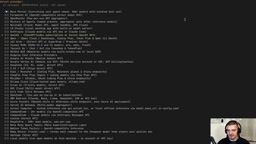
Hermes is an open-source always-on agent harness that runs 24/7, connects through multiple channels, and continuously accumulates memory and skills.
Based on a YouTube deep-dive tutorial, this article systematically walks through the open-source always-on agent Hermes from deployment to advanced customization. Hermes is a harness rather than a model, freely connecting to OpenAI, Anthropic, DeepSeek, or local models, with its core value in long-term residency, multi-channel reachability via WhatsApp, Telegram, and more, and continuous accumulation of memory and skills. It covers why to deploy on a VPS, key setup wizard choices, remote SSH desktop usage, the layered design of resident Markdown files versus on-demand skills in the `.hermes` directory, approval mode trade-offs, and skill auto-generalization with the skill curator lifecycle. It also compares MCP, connectors, and plugins, and introduces scheduled tasks, multiple profiles, sub-agent delegation, and three types of hooks, ending with the state of voice capability and who it suits.
Hermes Agent is a type of "always-on agent" that has been getting a lot of attention in the open-source community lately: it isn't tied to a single task but runs long-term on a server, is reachable at any time through chat channels, and continually accumulates memory and skills about you as you use it. This article is based on a deep-dive YouTube tutorial and reorganizes the key path from zero deployment to advanced customization. It's suited to readers who are comfortable with the terminal and want to genuinely put an agent to work.
1. What Hermes Is: Not a Model, but an Always-On Agent Framework
The tutorial opens with a key judgment: Hermes itself is not a large model—it's just a harness. You can connect it to OpenAI, Anthropic, DeepSeekAd, or your own local model, and you can even point it at third-party subscription services like OpenCode. The model is a replaceable part; Hermes handles context management, tool invocation, memory persistence, and multi-channel access.
It's fundamentally different from tools like Claude Code. The latter targets specific coding tasks and is discarded once used; Hermes runs 24/7, and you can reach it via WhatsApp, Telegram, Discord, Slack, or even voice calls to have it manage shopping lists, fitness schedules, calendars, or push a daily stock market briefing. The author likens it to OpenClawAd but emphasizes "growing with you"—which is also its core product proposition.
In terms of deployment form, the typical setup is a VPS running Hermes, with multiple devices (laptop, desktop, phone, smart devices) connecting to the same agent instance through different messaging channels, sharing the same memory and skills. An advanced usage is to run multiple Hermes instances on the same server: one as a life coach, one as a technical engineer, one as a design brainstorming partner.
The difference between a harness and an agent framework
In the agent context, a harness refers to the execution shell that wraps the model: it translates the user's natural language request into a model call, parses the model's returned tool-call intentions, actually executes the tools, stitches the results back into the context, and loops until the task is complete. The model is only responsible for judging "what to do next"; the harness handles all the other engineering details. This differs slightly from an agent framework: a framework usually refers to a library that provides abstract interfaces for developers to write agents (such as LangChain), whereas a harness is more of an out-of-the-box runtime where users customize behavior mainly through configuration rather than writing code. Hermes belongs to the latter category—its configurable surface (personality, memory, tool toggles, hooks) is the set of knobs the harness exposes to users.
How Claude Code differs in positioning
Claude Code is Anthropic's terminal-based coding agent that works at the granularity of a single task session: you enter the project directory, start it, it reads and writes files and runs tests, then exits when the task is done. It is also a harness, but its design goal is bounded coding tasks rather than long-term residency. Understanding this helps clarify Hermes's trade-offs: always-on means state (memory, skills, session history) must be persisted to disk, which leads to the design of the .hermes directory discussed later.
2. Why Running on a VPS Is Strongly Recommended
The tutorial repeatedly emphasizes not putting an always-on agent on your main computer, for three reasons.
First is permissions and autonomy. You want the agent to act autonomously, which means it needs permission to create files, delete files, and execute commands. If it runs on the machine where you store important materials and personal credentials, a single mistaken deletion or credential leak could cause real damage—even if it isn't malicious.
Second is resource usage. An always-on process continuously consumes CPU and memory, competing with your daily workflow for resources.
Third is the isolation principle. The author's advice is "separation of concerns": the agent runs on a machine dedicated to that purpose, unless certain services must run on the same machine. The tutorial demonstrates using Hostinger's KVM2 plan (2 vCPU, 8GB RAM, 100GB disk) and advocates SSH key login rather than password login—standard server security practice.
3. Installation and Key Choices in the First Configuration
The installation command itself is simple; the complexity lies in a few forks in the setup wizard.
Setup mode: The wizard offers quick setup (via the official hosted portal), a blank state, and full manual setup. The tutorial recommends full setup because only it lets you bring your own API key and keep the configuration entirely in your hands.
Model selection: You can connect a ChatGPT subscription, an OpenAI API key, DeepSeek, Z.AI, and so on. The author himself uses OpenCode's subscription service and generates an API key by creating a service account, setting the expiration to never expire for convenience—a debatable choice; in production, periodic rotation is the safer approach.
Channel access: Configure only one channel at first (the tutorial chose Telegram), and add more later. This keeps the troubleshooting scope to a minimum.
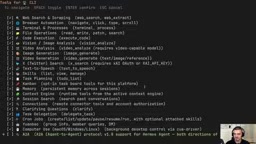
Tool toggles: Web search, browser automation, terminal operations, file read/write, image generation, speech synthesis, skills, and memory management—each can be toggled independently. Tool configuration runs separately for the CLI and messaging channels, which can feel repetitive, but it's by design.
After configuration, a few frequently used commands are worth remembering: hermes setup (re-run all configuration), hermes setup model (change only the model), hermes doctor (diagnose installation issues), hermes update (upgrade), and hermes gateway restart (restart the gateway after changes to make configuration take effect). The output of hermes doctor will include some warnings irrelevant to you, such as Docker not being installed or missing keys for a certain channel; filter them according to your use case.
4. Desktop Client: Local Install, Remote Connection
The desktop client's usage can be confusing: you also need to install Hermes locally, but not to use it—you do so to get the graphical interface and then connect back to the agent on the server via SSH.
The tutorial's steps are: during local installation, choose the blank state, skip model and channel configuration, then open the desktop client and choose "connect via SSH" in the gateway settings, entering the server host, port, and private key (be careful not to pick the wrong key). Once connected, the sessions and file directories you see in the desktop client all come from the server.
The author verifies this with a cross-client memory experiment: in the desktop client, tell the agent "remember my name is Florian," switch to the CLI, open a new session, and ask "what's my name"—it answers correctly; then ask in Telegram, and it also knows, explaining that the source is both the Telegram account information and the user.md file. Behind all three entry points is the same agent.
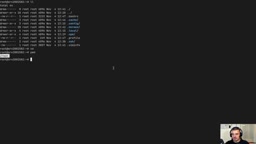
5. The .hermes Directory: Three Markdown Files Always in Context
To understand Hermes's memory mechanism, the key is to distinguish "resident context" from "on-demand loading."
The .hermes directory is the heart of the entire configuration. The soul.md within it defines the agent's personality—essentially the system prompt. The default content is "You are Hermes Agent, direct, concise, with response length matching the weight of the question" and the like; you can change it to any personality. Under memories/, user.md stores facts about you (name, age, location, etc.), and memory.md stores information not directly about you but worth remembering (e.g., "Mike works at ABC Company").
These three Markdown files share one trait: they are always in context. This means you must be very restrained about what you write into them; otherwise, every round of conversation pays for irrelevant information. By contrast, skills are loaded on demand and only enter context when relevant. This is the most important layering in Hermes's memory system.
There is also agent.md, which can hold more formal system prompts, complementing soul.md's role of describing personality. API keys are not written in config.yaml but stored in the .env file under .hermes, written automatically during configuration.
Context windows and the cost of resident content
A large model's context window is a limited token budget; every call must stuff the system prompt, resident memory, conversation history, and tool return results into it. Resident content is billed and occupies the window every round, so its size directly affects the available history length and response cost. This is why Hermes splits memory into "resident" and "on-demand" layers: soul.md, user.md, and memory.md are small and broadly applicable, worth carrying every round; skill files can run to thousands of words and are highly specialized, loaded only when relevant. In practice, keep resident files to the order of a few hundred characters and delegate the rest to skills or external files retrieved on demand.
The relationship between system prompts and personality settings
The system prompt is the highest-priority instruction the model receives before a conversation begins, defining role, tone, and behavioral boundaries. soul.md is essentially an editable system prompt file, while agent.md provides a place for more formal, structured instructions. Separating the two has the benefit that personality tweaks (changing tone, style) need not touch behavioral rules (tool usage conventions, safety boundaries), reducing the risk of accidental changes.
6. Approval Mode: Dial It to Your Risk Preference
There's a setting in config.yaml worth calling out separately: approval mode. The default is smart, where Hermes judges command risk itself, executes most commands directly, and asks for confirmation only when it deems them dangerous.
The tutorial demonstrates the other two levels. After switching to manual, operations like chmod 777 force an approval request; after switching back to smart, since you explicitly requested it, it executes directly. Setting it to off is almost fully automatic but still intercepts extremely destructive commands like rm -rf /. The author recommends keeping smart as the balanced point—a reasonable judgment, but one caveat: smart's risk assessment depends on model capability, and weaker models may not reliably identify risks, so the manual level is safer in sensitive environments.
7. Skills: Let the Agent Remember "How"
Skills are where Hermes's "grows with you" proposition lands. They are also Markdown files, can include scripts, and describe the specific workflow for completing a class of tasks.
The tutorial's example is intuitive: have the agent generate a stock market briefing covering AAPL, MSFT, and NVDA, first asking for a verbose text version, then requesting it be condensed into a table of price, change, and P/E ratio plus a simple visualization. Once satisfied, just say "from now on, when I say stock brief, give me this version of the result," and the agent automatically creates a skill, complete with runnable scripts and templates.
There are three ways to create skills: write them by hand, install them from the official skills hub, or let the agent automatically generalize from an actual execution. The third is the least effort and best embodies the product philosophy.
A skill's lifecycle is managed by a background mechanism called the skill curator: it periodically scans usage frequency, marks skills unused for 30 days as unused, archives those unused for 90 days, but never deletes them. Frequently used skills can be pinned with hermes curator pin to avoid being marked; they can also be handed back to management with adopt.
You may not have noticed the cross-channel adaptation capability of skills. The same stock brief skill outputs different formatting on Telegram than on the desktop client; the agent adjusts on its own according to the channel. If you feedback "this doesn't look good here," it writes the improvement back into the skill. This continuous iteration based on usage feedback feels closer to "raising" an agent than writing a one-off prompt.
8. MCP, Connectors, and Plugins: Trade-offs Among Three Extension Approaches
These three concepts are easy to confuse; the tutorial distinguishes them as follows: MCP servers provide tools, connectors are the managed version of MCP (via the official portal), and plugins are bundles of tools, MCPs, connectors, and skills packaged together.
Take Notion as an example. hermes mcp starts interactive configuration; after selecting Notion, it gives an authorization link. Select a workspace in the browser and confirm trust, and the callback URL carries the authorization code. Since Hermes runs on the server and the callback lands locally, the tutorial's approach is to paste the URL directly back into the terminal and let Hermes extract the authorization code—simpler than configuring a port tunnel. Once authorized, it can operate the to-do list in Notion.
Connectors take another path: hermes connectors connect notion opens the portal to complete authorization, which also works, but the configuration isn't in your own system. The author clearly prefers MCP's full control but acknowledges connectors are easier to get started with. There's no standard answer to this trade-off; it depends on how sensitive you are about data flow.
A plugin example worth mentioning is holographic, a local fact store that turns memory into an entity-attribute structure. After installing and setting it as the default memory provider, tell it in subsequent conversations that "Tom is my colleague," "Tom likes vacationing in South America," "Tom is allergic to peanuts," and these facts are entered one by one; then ask it to plan Tom's birthday party, and it can recall all three and make recommendations accordingly. After uninstalling, you need to run hermes memory setup again to switch back to built-in memory; hermes memory status confirms which one is in use at any time.
What the MCP protocol is
MCP (Model Context Protocol) is a protocol proposed and open-sourced by Anthropic for letting external programs expose tools, resources, and prompt templates to models in a standardized way. An MCP server is an independent process that communicates with the agent via JSON-RPC and declares which tools and parameter schemas it can provide; the agent calls it when needed, and the server executes and returns results. Its value lies in decoupling: the same Notion MCP server can be reused by any MCP-compatible client, without writing a separate integration for each agent. Hermes's hermes mcp command does exactly this: registers such a server and completes authorization.
The OAuth callback dilemma in server scenarios
Most third-party services authorize via OAuth: after you confirm in the browser, the service redirects the authorization code to a pre-registered callback URL. When the agent runs on a GUI-less VPS, this callback has nowhere to land; the conventional solution is to set up an SSH port tunnel locally to forward the callback to the server. The tutorial chooses to manually copy the callback URL and paste it back into the terminal, essentially making this step manual and saving the tunnel configuration, at the cost of one manual operation per authorization.
9. Scheduled Tasks, Multiple Profiles, and Sub-Agent Delegation
Scheduled tasks can be created in natural language, e.g., "send me a stock market briefing via WhatsApp every morning," and Hermes generates the corresponding cron job. hermes cron list to view, hermes cron remove to delete. The scheduled task demonstrated in the tutorial initially pushed only the table and not the chart; after feedback, it corrected itself—such small issues will be encountered frequently in actual use and require a bit of patience to tune.
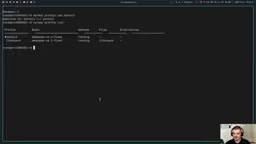
Profiles let the same server run multiple independent instances. After hermes profile create life-coach creates one, configure it separately with hermes life-coach setup; each personality has its own soul.md, model, tools, and memory. hermes profile use life-coach can set it as default. The value of the desktop client is more evident here: you can create a group chat with both the default Hermes and the life coach present, making the stylistic differences obvious at a glance.
Sub-agent delegation is another practical capability. A single sentence like "use sub-agents to research these stocks in parallel" triggers multiple background sub-agents working simultaneously, each reporting back, and then the main agent aggregates. You can also outsource coding tasks to Claude Code: after installing and logging in on the server, Hermes has a built-in Claude Code skill that submits the task in Markdown form to Claude's headless mode for execution.
10. Hooks: Attaching Custom Logic to the Agent Lifecycle
Hooks are the most technical part of the entire tutorial, divided into three types: gateway hooks, shell hooks, and plugin hooks.
Gateway hooks are read-only, used for monitoring and alerting; they can respond to events on messaging channels but cannot change model behavior or inject context. The tutorial builds a session-alert hook, writing HOOK.yaml under .hermes/hooks/ to declare the event and description, then writing handler.py for the handling logic, effective after restarting the gateway. The author hit a snag here: the initially monitored session:start event didn't fire, and the callback only arrived after switching to a session reset event—showing that such event names need to be confirmed against the documentation, not assumed.
Shell hooks are written in the hooks section of config.yaml; they are more powerful and can be attached to nodes such as pre-LLM call, post-LLM call, and pre-tool call. The tutorial gives two minimal examples: a pre-LLM hook that runs a shell script to inject "please add greetings from the hook at the end of the answer" into every round's prompt; and a pre-tool hook that uses a Python script to intercept commands containing ls, so that when the agent tries to execute, it is told "LS was blocked by your hook."
The practical uses of such mechanisms are far greater than the examples. The author mentions that in another video he used a pre-LLM hook for request routing: simple requests go directly to a preset command without entering the reasoning process, thereby shortening response time. That's where the real value of hooks lies—adding a layer of deterministic control logic outside the model.
11. Voice and Concluding Judgment
Voice capability comes in two tiers. Basic bidirectional speech-to-text and text-to-speech work out of the box: voice messages sent in WhatsApp are automatically transcribed, and after sending /voice on, the agent replies with voice. True real-time voice calls require the desktop client and configuring an OpenAI API key in the server's .env, then changing the mode from chained to gpt live in the voice settings to achieve interruptible real-time conversation. As for the wake word (default "hey hermes"), the author found latency in testing and himself says this part is buggy—something to look forward to but not yet a core dependency.
Back to the overall judgment: Hermes's barrier to entry is clearly higher than managed products like Dots and Duet; it requires you to be familiar with the terminal and willing to tinker with configuration. But the customizability it offers is something managed solutions can't provide—choose your own model, hold your own data, build your own skills, and attach hooks to the lifecycle. For engineers and those who like building their own workflows, this is one of the current open-source always-on agents worth investing time in.
One-line Summary
Hermes is an open-source agent harness framework that runs 24/7, connects through multiple channels, and continuously accumulates memory and skills.
Paragraph Summary
Based on a deep-dive YouTube tutorial, this article systematically walks through the complete path of the open-source always-on agent Hermes from deployment to advanced customization. Hermes itself is not a model but a harness; it can freely connect to OpenAI, Anthropic, DeepSeek, or local models. Its core value lies in long-term residency, being reachable at any time through WhatsApp, Telegram, and other channels, and continuously accumulating memory and skills. The article covers why it should be deployed on a VPS rather than your main computer, the key choices in the setup wizard, how to use the desktop client via remote SSH connection, the layered design of three resident Markdown files in the .hermes directory versus on-demand skills, the trade-offs among approval mode levels, and skill auto-generalization and skill curator lifecycle management. On extension approaches, it compares MCP, connectors, and plugins, and introduces scheduled tasks, multiple profiles, sub-agent delegation, and three types of hook mechanisms, finally giving the current state of voice capability and an overall judgment of who it suits.
Related articles

5.3-Inch Phone Crowdfunding: Small-Screen Revival or a $599 Compromise?
Enough Phone crowdfunds on Kickstarter with a 5.3-inch screen, 8GB RAM, and 50MP sensor at $599. The Vergecast asks: can small phones find a middle ground?
Asahi Linux Ditches MIT for GPL: A Farce Aimed at Omarchy?
Asahi Linux switched its code license from MIT to GPL V2, accusing Omarchy of stealing code and commercializing it. Analysis suggests the move is poorly justified and violates the MIT license, exposing political divisions and AI controversies in the open source community.
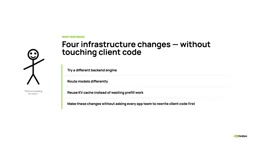
Understanding NVIDIA Dynamo Frontend in 5 Minutes: An OpenAI-Compatible Entry Point for Inference Architecture
What is the NVIDIA Dynamo frontend? Based on the official 5-minute series, this article explains how it uses an OpenAI-compatible API as a stable boundary to enable backend engine replacement, routing, and KV cache reuse in a decoupled architecture.