Anthropic's Always-On Agent Design Guide: Breaking Down the Five Core Modules
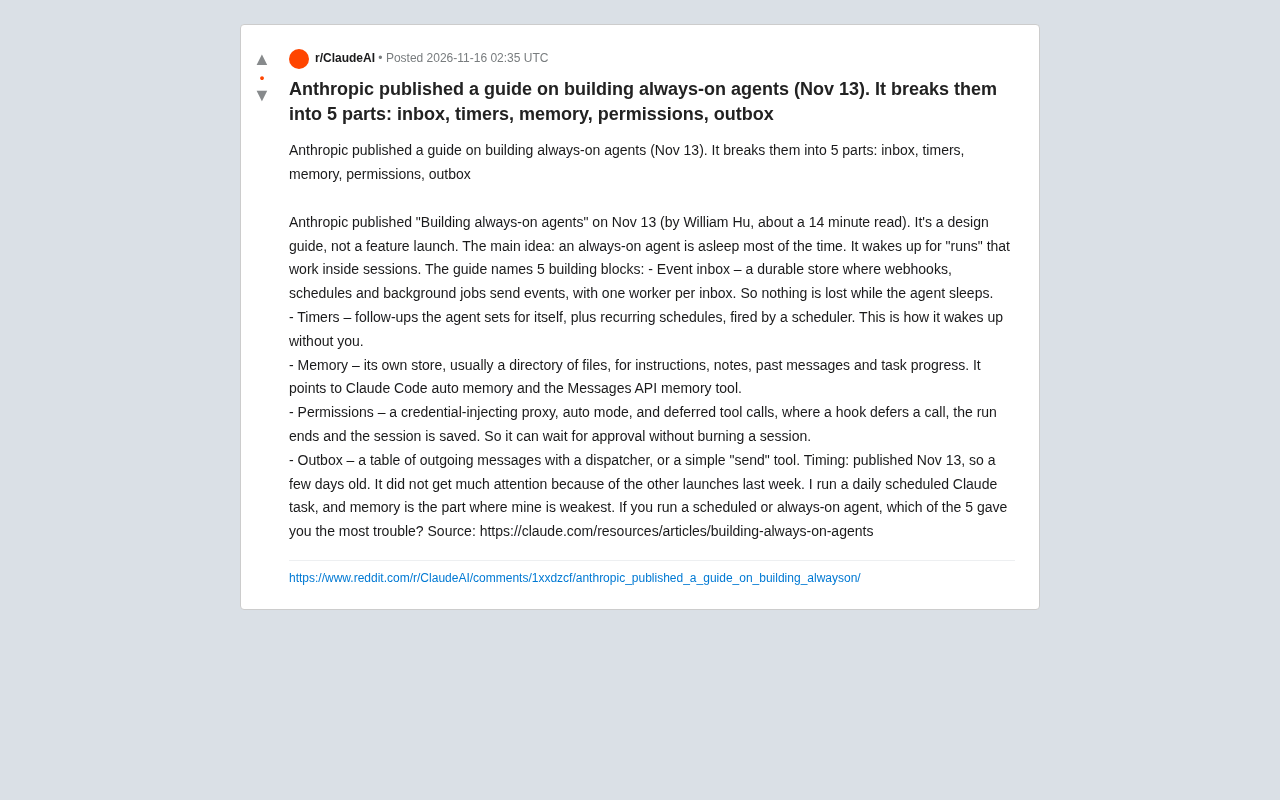
Anthropic's design guide breaks always-on agents into five modules—the core insight being they sleep most of the time.
On November 13, Anthropic published William Hu's design guide *Building always-on agents*, whose core idea is counterintuitive: always-on agents sleep most of the time, working only during event-triggered runs—essentially event-driven backend services rather than always-online chatbots. The guide decomposes always-on agents into five modules: an event inbox for external events consumed by a single worker; timers for proactive wake-up (follow-ups and recurring schedules); memory as a file directory holding instructions, notes, and progress; permissions via credential proxy, auto mode, and deferred tool calls to wait for approval without idling sessions; and an outbox ensuring reliable delivery. The author highlights memory as the weakest link per developer feedback and stresses that this decomposition maps backend patterns (queues, scheduling, persistence, authorization, delivery) onto agent scenarios, requiring trade-offs among ordering, transparency, and state-recovery complexity.
Why Always-On Agents Deserve a Fresh Look
On November 13, Anthropic published a design guide titled Building always-on agents (about a 14-minute read), written by William Hu. It's not a feature release but an architecture-level thinking document. The core idea is counterintuitive: always-on agents spend most of their time asleep. They only wake up during a "run," do their work within a session, and then go back to sleep. This perspective pulls agents away from the "continuously online chatbot" framing and back toward "event-driven background services"—valuable for anyone building scheduling, monitoring, or assistant-type agents.
According to a summary in a Reddit discussion thread, the guide breaks always-on agents into five building blocks: an event inbox, timers, memory, permissions, and an outbox. The poster noted that because of a dense week of other releases, the guide didn't get much attention—but when running daily scheduled Claude tasks himself, memory was the weakest link. That feedback also reminds us that among the five modules, memory's engineering complexity is often underestimated.
Breaking Down the Five Modules
Event Inbox: Don't Lose Messages While Asleep
While an always-on agent sleeps, the outside world keeps generating events—webhook callbacks, scheduled tasks, background jobs. The guide recommends using a persistent event inbox to receive these events, with each inbox served by a single worker. This way, even when the agent isn't running, events aren't lost and can be processed in order once it wakes up. This is essentially using a queue to decouple "event generation" from "agent processing"—a common pattern in backend systems, but when applied to agents, you need to additionally consider how events bind to sessions.
A persistent event inbox in the context of distributed systems is roughly a combination of a "persistent message queue + idempotent consumer." The key is that events are written to disk (or reliable storage) upon arrival, and the consumer advances its position via an acknowledgment (ack) mechanism—so a process crash or agent sleep won't cause event loss. Single-worker consumption naturally guarantees ordering within a given inbox, but it also caps concurrency at 1—consistent with the backend trade-off of "ordered within a partition, single consumer per partition." When migrating the queue pattern to the agent scenario, the additional problem to solve is binding events to sessions: an event might trigger a new run, or it might need to be appended to the context of an existing session. If the binding relationship is mishandled, you'll see duplicate wake-ups, context cross-contamination, or events being silently dropped.
Timers: The Agent Wakes Itself Up
Timers solve the question of "how to wake up proactively when there are no external events." The guide distinguishes two types: follow-ups the agent sets for itself, and recurring schedules—both triggered by a scheduler. This amounts to giving the agent an internal time dimension: it can set itself a reminder when a task is unfinished, or periodically inspect certain states on a fixed cadence. The poster was using exactly this capability to run daily scheduled tasks, showing the pattern already has real-world adoption.
Memory: The Most Underestimated Module
Memory is described as the agent's own storage—usually a file directory—used to hold instructions, notes, past messages, and task progress. The guide points to two specific capabilities: Claude Code's auto memory and the Messages API's memory tool. Making memory a file directory rather than a black-box vector store has the benefit of being readable, editable, and versionable, but it also introduces the engineering burden of file organization, retrieval, and expiration cleanup. The poster's own account confirms this: of the five modules, memory is the weakest link in his daily tasks.
Claude Code's auto memory refers to the persistent notes files the coding assistant maintains within a project directory (such as CLAUDE.md-style memory files). It preserves project conventions, common commands, and user preferences across multiple sessions, so subsequent runs don't need to re-establish context. The Messages API's memory tool is a capability aimed at API developers: the model can read and write an application-hosted memory store via tool calls, leaving decisions about "what to remember and when to retrieve it" to the model, while the storage backend remains under the developer's control. The shared design orientation of both is to make memory a readable and writable file rather than an opaque vector index—a contrast with the traditional RAG approach of compressing knowledge into a vector store. The former is easier to review manually and version-control; the latter is stronger at semantic retrieval.
Permissions: Wait for Approval Without Burning Sessions
The permissions module contains three things: a credential-injecting proxy, an auto mode, and deferred tool calls. The deferred call mechanism deserves a closer look: a hook suspends the call, the current run ends and the session is saved, and execution resumes once approval comes through. This lets the agent "pause" when human approval is needed, rather than keeping a session idling. For always-on agents handling sensitive operations (sending emails, modifying data, calling paid APIs), this design directly determines whether it can run unattended safely.
The credential-injecting proxy is a security pattern: the agent itself doesn't hold real keys. It issues requests to a local or internal proxy, which injects credentials and enforces access policies when forwarding. This way, even if the agent's context or memory is compromised, what leaks is only the proxy address rather than long-lived keys—and the proxy layer can uniformly record audit logs and restrict which targets can be called. Deferred tool calls borrow from the "human-in-the-loop" pause-resume mechanism found in workflow engines: what's suspended is the call intent, not a thread. At the end of a run, pending approvals are persisted along with session state, and execution resumes in a new run once approved—avoiding long-term occupation of session resources while waiting for human responses.
Outbox: Reliably Deliver Outputs
The outbox is a pending-message table plus a dispatcher, or it can be replaced with a simpler "send" tool. Its role mirrors the inbox: ensuring the agent's produced messages aren't lost due to process interruptions, while enabling retries and auditing. For agents that need to communicate externally (customer service, notifications, report generation), the outbox is key to decoupling "generating content" from "delivering content."
The Real Value of This Guide
Looking at the five modules together, they jointly answer one question: how to make an agent exhibit always-on behavior without maintaining an always-on process. The inbox and outbox handle input/output reliability, timers handle the time dimension, memory handles state continuity, and permissions handle safety boundaries. This decomposition isn't showing off—it's more like mapping backend system design patterns (queues, scheduling, persistence, authorization, message delivery) one by one onto the agent scenario.
The guide's positioning is also worth noting: it's a design guide, not a feature release, meaning these patterns can be implemented on different tech stacks—Anthropic is merely offering a reference architecture. The references to Claude Code's auto memory and the Messages API's memory tool suggest the official intent is for developers to reuse existing capabilities rather than building from scratch.
Trade-Offs in Practice
For developers preparing to build always-on agents, this guide offers not a checklist but boundaries that require trade-offs. A single-worker inbox guarantees ordering at the cost of limited throughput; file-directory memory guarantees transparency at the cost of weaker retrieval than dedicated storage; deferred tool calls guarantee sessions aren't burned at the cost of more complex state-recovery logic. The poster's question—which of the five modules is the most troublesome—has no standard answer; it depends on the task type: scheduled tasks lean on memory, external communication leans on the outbox, and sensitive operations lean on permissions.
The guide was published on November 13, only a few days ago, so community discussion is still limited. For teams running scheduling-type agents, it's worth using as an architecture reference table to check their own implementation gaps item by item.
One-line Summary
Anthropic's design guide breaks always-on agents into five modules—the core insight being that they sleep most of the time.
Paragraph Summary
On November 13, Anthropic published a design guide by William Hu titled Building always-on agents. Its core idea is counterintuitive: always-on agents are asleep most of the time, working only in event-triggered "runs"—essentially event-driven background services rather than continuously online chatbots. The guide breaks always-on agents into five modules: an event inbox that receives external events with single-worker consumption; timers that provide proactive wake-up (follow-ups and recurring schedules); memory stored as a file directory for instructions, notes, and task progress; permissions implemented via a credential proxy, auto mode, and deferred tool calls to wait for approval without idling sessions; and an outbox ensuring reliable output delivery. The author notes that memory is the weakest link according to developer feedback, and emphasizes that this decomposition maps backend patterns—queues, scheduling, persistence, authorization, and delivery—onto the agent scenario, with trade-offs needed among ordering, transparency, and state-recovery complexity.
Related articles
GitHub Daily · November 16: Agent Skills Explode, Evaluation and Security Become the New Battleground
GitHub Daily Nov 16: NVIDIA's SkillEvaluator leads growth, Claude-BugHunter packs 82 security skills, and ggml anchors local inference—agent ecosystem is stratifying.

I Built an AI Skill That Edits Videos End to End
A YouTuber turned video post-production into an AI skill: automatic denoising, audio optimization, retake removal, transcription, subtitles, plus YouTube titles/descriptions and Instagram captions and covers. This article breaks down the seven-step human-AI division of labor and how to replicate it.
The AI Era: A Recursive Starting Point
Starting from a popular Reddit thread title, this article explores the recursive loop paradigm in AI development, analyzing self-reference in data, code, and evaluation, and discussing consensus and divergence across perspectives.