Apple's New Child Safety Features Explained: How Parents Can Protect Kids Online
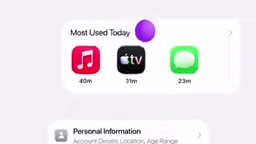
Apple unifies child accounts, app/web approvals, contact controls, content detection, and screen time into a built-in iPhone safety system.
Apple has launched a systematic child protection solution centered on Child Accounts, built directly into iPhone with no extra app required. Highlights include the new Ask to Browse feature, which extends Ask to Buy approval logic to Safari web browsing; Communication Safety's expanded detection of violent content alongside nudity, all processed on-device for privacy; parental approval of children's contacts; and flexible Time Allowances and Schedules. The design philosophy connects previously scattered features into a unified loop, lowering the barrier for parents and reflecting a platform-level shift toward structured child safety governance.
Apple has introduced a comprehensive suite of family-oriented child safety features with a clear goal: give parents a simpler, more intuitive way to manage their children's digital lives. These aren't standalone apps that need to be downloaded separately — they're built directly into iPhone. For parents who deal daily with their kids' chats, games, and screen habits, this toolkit aims to consolidate scattered controls into one coherent system.
A Safety System That Starts with Child Accounts
The foundation of the entire approach is setting up a Child Account. This account is customized based on the child's age, and once created, it automatically enables a range of age-appropriate protections. The age-based design logic is worth noting — it means parents don't have to manually configure every individual setting. The system provides a default protection baseline based on where the child is in their development.
Built on top of the Child Account, Apple offers enhanced app access controls that let parents decide which types of apps their children can use. The intent is to help kids build healthy digital habits as they grow, rather than simply imposing blanket restrictions.
A Two-Layer Approval System for Apps and Browsing
Apple has strengthened two key approval mechanisms. The first is the long-standing Ask to Buy: when a child wants a new app or game, they submit a request and the final decision rests with the parent. That brain-exploding game? Denied. Social media? Maybe when they're a bit older.

The real novelty is the new Ask to Browse feature. It extends the approval mechanism from the app level to web browsing — parents can approve or deny the websites their child visits in Safari. This closes a notable gap in previous controls: even with app installation restricted, children could still access a wide range of unfiltered content through the browser. Bringing web access into the approval chain makes the entire protection system considerably more complete.
Ask to Buy launched in 2013 alongside iOS 7, originally designed to prevent children from making accidental purchases without parental knowledge — particularly in-app purchases (IAP), which had triggered countless family disputes and even lawsuits. The feature operates through the Family Sharing system: when a child's account initiates a purchase request, a notification is sent to the parent's device for one-tap approval or rejection, with the option to block direct credit card access entirely. More than a decade later, Apple has applied the same approval logic to web browsing. The driving force behind this expansion is regulatory pressure — laws such as the UK's Online Safety Act and the EU's Digital Services Act have in recent years required platforms to take a more proactive role in protecting minors from harmful content. The launch of Ask to Browse is, in part, Apple's deliberate response to this global regulatory trend.
Contact Controls and Image Content Detection
Beyond content, Apple has also tightened controls around social connections. Parents can now approve their child's contacts, managing at the source who their child communicates with on their device. This has direct implications for preventing strangers from reaching minors.
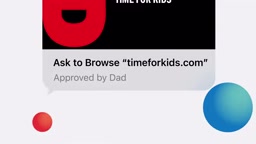
Communication Safety has also received an upgrade. Previously focused on detecting and blocking nudity in shared images and videos, it now adds the ability to detect and block violent content as well. This kind of on-device content recognition represents an attempt to strike a balance between protecting minors and preserving privacy.
Communication Safety was first introduced in iOS 15.2, with its core technology being on-device machine learning (on-device ML): image analysis is performed entirely locally, and no image content is ever sent to Apple's servers. This is a fundamental distinction from the previously controversial iCloud-side scanning approach (CSAM detection) — that plan, announced in 2021, faced intense backlash over privacy concerns and was indefinitely shelved. The on-device architecture means content detection works even without an internet connection, though it also means model updates depend on system upgrades, and detection scope and accuracy are constrained by local computing resources. The addition of violent content detection extends the same privacy-friendly architecture to a broader category of harmful content, rather than introducing any new data upload mechanism.
More Granular Screen Time Management
On the time management front, Apple has introduced new Time Allowances and Schedules, reportedly informed by expert research. Parents can customize settings by day, by hour, and by activity type — for example, keeping kids focused during school hours on Tuesday, while allowing more entertainment time on a Sunday at home.

Flexibility is the standout quality of this time management system: if it's sunny and you want the kids to go outside, you can pause screen time on the spot; on a rainy day, you can temporarily loosen things up. When a child's time for gaming, reading, or music runs out, the device guides them into a wind-down state before bed. Apple frames the ultimate purpose of this system as helping both parents and children sleep more soundly at night.
A Closing Observation
Looking at the overall design, Apple hasn't spotlighted any single "killer feature" this time around. Instead, Child Accounts, app approvals, web approvals, contact controls, content detection, and screen time management have been connected into a closed loop. This systematic approach reflects a broader shift among platform makers on the topic of child protection — moving from scattered features toward structured, holistic governance. For parents, the greatest value may simply be that it's already in your iPhone, lowering the barrier to entry and making safety protection something that requires no extra learning curve.
Related articles

Frontend to AI Agent Development: A Frontline Architect Explains Career Paths and Opportunities
A frontline AI architect explains the industry changes and practical paths for frontend developers transitioning to AI Agent development: why pure frontend jobs are disappearing, why Agent + full-stack has become mainstream in hiring, and three transformation routes—Agent development engineer, FDE, and remote contracting—along with corresponding learning strategies.

How to Choose an AI Agent Development Course: Five Pitfall-Avoidance Guidelines
A mechanical-engineering career changer's two-year pitfall-tested checklist for screening AI Agent development courses: complete delivery pipeline, resume-worthy projects, real development perspective, update frequency, and coaching feedback—with concrete judgment methods and pitfall-avoidance tips.

Coze AI Agent Building for Beginners: A Zero-Code AI Agent Development Guide
Coze, ByteDance's one-stop AI application development platform, supports zero-code drag-and-drop AI agent building. This article outlines Coze's core concepts, three advantages, differences between the domestic and international versions, and the distinction between agents and apps, helping beginners quickly get started with AI Agent development.