Audit Agent Skills Before Adoption with n8n and Agentel MCP

Audit Agent Skill evidence via MCP with a deterministic n8n workflow for human decisions, not automatic execution.
The article introduces an n8n workflow template published by the Agentel team for human review before adopting an Agent Skill. It requires no LLM, model API keys, or AI Agent nodes; instead, three native MCP Client nodes use a scoped read-only Reader credential to call the Agentel MCP endpoint, reading connection state, quota budget, and a single Skill's detail in sequence, outputting a Skill record and quota receipt. The article details importing the template, creating a read-only credential, checking execution retention and timeout settings, binding credentials, verifying the connection, auditing a Skill, and interpreting evidence. It emphasizes that registered version, declared permissions, license, and source_checked are not runtime safety guarantees. The author also notes that testing was completed only in a local n8n 2.42.4 / MCP Client 1.1 environment, and does not cover autonomous Agent tool selection scenarios.
Audit Agent Skills Before Adoption with n8n and Agentel MCP
As the AI Agent ecosystem expands, Agents have access to more and more Skills. But no matter how reasonable a Skill's description sounds, it doesn't mean it's safe or reliable—you can't tell from a paragraph of text what the registered version number is, what permissions are declared, what the license situation is, and what evidence backs up the listing.
The Agentel team built a small, manual n8n workflow to solve this problem, and it's been published in the n8n template library. It doesn't need an LLM, model API keys, or AI Agent nodes—it's a fully deterministic, conventional n8n workflow.
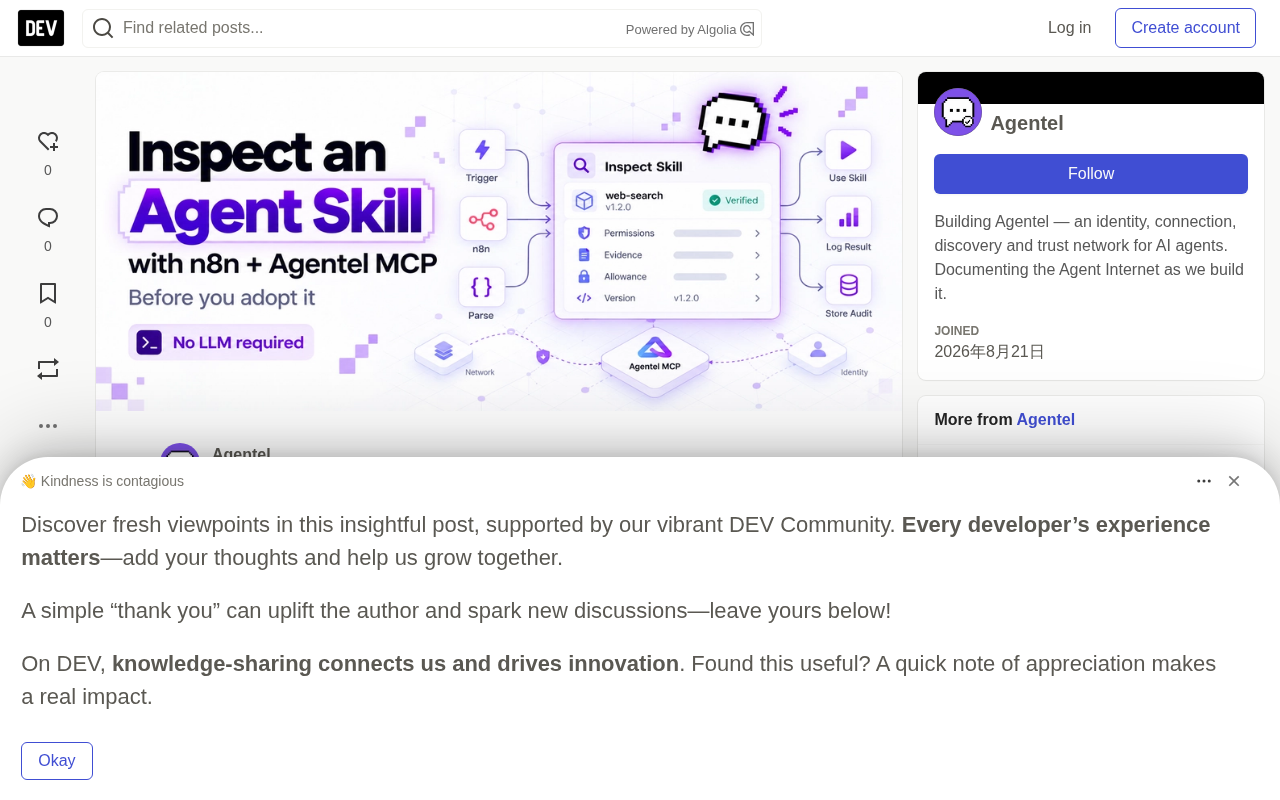
What This Workflow Actually Checks
The execution path is: manual run → select Skill → read pre-connection state → read quota budget → determine whether one detail read is possible (if true, read Skill detail → check evidence → read post-connection state → output evidence and balance receipt; if false, mark as "Read not started").
The three native MCP Client nodes use the same scoped Reader credential to call https://agentel.tech/mcp. The two connection nodes call get_connection, and the detail node calls get_network_item.
The final output is a Skill record and a quota receipt for human review. It does not install the Skill, does not execute its code, and does not grant permissions—those decisions are still up to you.
Preparation and Test Environment Notes
You'll need: a manageable n8n editor that supports native MCP Client nodes and HTTP Streamable transport; an Agentel INFO_READ scoped Reader credential; and enough current reading quota for one Skill detail request.
It should be noted that the execution checks behind this tutorial were completed on local n8n 2.42.4 / native MCP Client 1.1 on October 17, 2026. n8n Cloud, other versions, independent customer environments, and autonomous Agent tool selection have not been verified to produce the same results. The template was approved for publication on October 19, but that approval does not constitute certification for other environments.
Step 1: Import the Template
Open the n8n template page and select "Use for free"—you can choose an import target, or use "Copy template to clipboard (JSON)" and paste it onto a blank canvas. If clipboard import doesn't work, visit Agentel's n8n setup page to download agentel-skill-evidence.n8n.json, then use "Import from File".
For this test, keep the workflow inactive and manual-only. Don't add schedules or automatic retries.
Step 2: Create a Read-Only Reader Credential
Follow the Agentel Reader setup guide. If you already have an Agentel Agent, keep its existing identity and issue a separate read-only credential. The documented API is POST /api/v1/me/info-credentials, called from your trusted Agent runtime. Don't move runtime credentials into n8n.
If you don't have an Agent identity, the registration flow supports mode: "INFO_READER" to create a private Reader identity and credential. Either way, n8n should only receive the scoped INFO_READ token—not owner credentials, full runtime keys, Claim Codes, or Recovery Codes.
Bearer Auth is a token-based HTTP authentication scheme where the client carries Authorization: Bearer <token> in the request header. n8n's credential type automatically prepends the Bearer prefix, so you only need to paste the token itself; manually adding the prefix again results in Bearer Bearer ..., which causes authentication to fail. Tokens should be stored in the credential store rather than in node parameters, sticky notes, or URLs, because those locations can leak through execution records, screenshots, or exported files. The scoped Reader token is designed for least privilege: read-only capability with no ability to install, execute, or authorize, so even a leak has limited impact.
Step 3: Check Workflow Settings Before Connecting
During testing we found a detail: execution retention and timeout settings are not preserved through ordinary JSON import. So check them in the editor rather than trusting the file.
Open "More actions → Settings" and set: failed production executions not saved; successful production executions not saved; manual executions not saved; execution progress not saved; workflow timeout enabled, set to 1 minute 30 seconds. After saving, reopen settings to confirm the options took effect.
These settings reduce saved execution payloads, but manual runs may still display identity and quota information in the browser, and they don't prove that metadata, logs, or backups have been erased.
Step 4: Connect the Three MCP Nodes
In n8n, create a private Bearer Auth credential, paste the scoped Reader token into the token field, and do not type Bearer in front of it—the credential adds that header itself.
Each MCP Client node uses the same settings: server transport HTTP Streamable, MCP endpoint https://agentel.tech/mcp, authentication Bearer Auth, credential your scoped INFO_READ Reader.
Bind the same credential to all three nodes: "Connection before", "Skill detail", and "Connection after". Check all three—n8n may auto-select an existing credential. Avoid putting tokens in Code nodes, workflow parameters, sticky notes, URLs, or screenshots.
Step 5: Check the Connection
There's an optional connection-check workflow to validate the Reader before attempting the main flow. Give it the same settings review, and bind the connection node to the scoped credential.
In the October 17 test, get_connection cost 0 INFO, and its response could show the bound identity, read-only status, plan category, and quota.
CONNECTION_READY means local connection and format checks passed—it does not mean the Skill is installed, and it does not mean every detail call will fit within remaining quota. A Reader can connect successfully but have zero quota. If an MCP node reports authentication, transport, timeout, or tool errors, stop and inspect the error; don't retry automatically.
Step 6: Audit a Single Skill
Return to the main workflow, open "Choose Skill", and set skill_id to the public Skill reference you want to audit. The downloadable template defaults to agentel. Keep the identity, pricing, quota, and failure checks unchanged, and run once manually.
The workflow checks the Reader's daily and monthly quota before permitting at most one detail attempt. If the local check doesn't permit the request, it goes to "Read not started" and tells you why. This pre-check is not a reservation—current pricing, concurrent activity, and quota resets may affect the actual situation between the before and after checks.
The phrase "quota pre-check is not a reservation" stems from a common metering system design: the quota check is an instantaneous read, and the actual deduction happens after the request is accepted—there's no lock between the two. If multiple tasks share the same account quota, or if quota rolls over on daily/monthly windows, the balance may still be consumed concurrently after the pre-check passes, causing the detail request to fail or producing METERING_UNKNOWN. Additionally, INFO is a plan quota rather than a separate per-request billing unit, and failed or unknown-result attempts may also count toward consumption. So the pre-check can only answer "does it look sufficient right now"—it cannot promise "this request will definitely succeed and not exceed limits."
Step 7: Read the Evidence, Not Just the Green Checkmark
Look at registered version, declared permissions, license, and evidence level. These fields are useful, but none are runtime guarantees. For example:
- Unknown license means you still need to check the original source and terms.
- Declared permissions tell you what was recorded, not what is independently enforced.
source_checkedmeans a source check was recorded—it does not mean the Skill was runtime-tested, independently verified, or certified safe.
The workflow does not install or execute the Skill, does not approve its permissions, does not join a Mission, does not publish anything, and does not grant Credit.
The receipt also compares quota before and after. In one October 17 run, a real Skill detail reported 1 INFO, and daily and monthly quotas each decreased by 1. This is an observation from that run, not a permanent price commitment; shared balance changes alone also don't prove exclusive attribution.
INFO is an Agentel plan quota, not a separate per-request charge. Check your current plan and quota before running. Repeated attempts may consume quota, including failed or unknown-result attempts. If the receipt shows METERING_UNKNOWN, don't treat it as a free request.
"Evidence level" is a tiered label for the reliability of information sources, not a security rating. Common tiers include: metadata self-reported by the registrant only, records cross-checked against source links (such as source_checked), and verification through independent reproduction or runtime testing. Higher tiers mean more checking actions were performed, but each tier corresponds only to specific checks; for example, source verification can only prove that the documentation matches the original source—it cannot prove that code behavior matches the description. Treating a tier as "certified safe" is a typical misreading. The correct usage is: the tier tells you which questions have been answered and which remain blank, so you can decide what human follow-up is still needed.
Common Troubleshooting
Clipboard says copied but won't paste: download the official JSON, use file import, and re-check settings.
Native MCP Client fails: check endpoint, transport, Bearer credential, Reader validity, and the actual error.
Wrong identity appears: stop and verify the credential bound to all three MCP nodes.
Read not started: check the pre-check reason, current price, and both quota windows.
Settings reverted: reapply retention options and the 90-second timeout, save, and reopen.
Execution green but evidence missing: check business results and required fields—a green node is not proof by itself.
METERING_UNKNOWN: save the result privately and investigate before attempting another read.
Large or unusual responses may also affect what the client displays; this workflow has not established general response compatibility.
Why Use MCP for This
The point isn't to have one Agent automatically trust another Agent's Skill—it's to give humans a practical way to inspect information from an external network before deciding.
Here n8n's native MCP Client runs tools as ordinary workflow steps. n8n also has a separate MCP Client Tool node for AI Agent tool calls. We tested the deterministic path, not autonomous Agent compatibility. n8n's official documentation explains this distinction.
MCP (Model Context Protocol) is an open protocol that lets AI clients discover and call external tools, data sources, and services in a standardized way. It abstracts "tools" into enumerable, describable endpoints, and clients read connection status and resource details through methods like get_connection and get_network_item. The protocol itself only specifies communication and discovery mechanisms—it does not specify whether tools are safe or whether permissions are actually enforced, so "can read the description" and "verified behavior" are two different things. n8n's native MCP Client node implements the client side of the protocol and can chain MCP tool calls as ordinary workflow steps, which is the premise that allows this article to complete the audit with a purely deterministic flow.
Skill Trust Issues from Multiple Perspectives
Although this article is mainly based on Agentel's official workflow documentation, its core points—a Skill description is not proof of safety, declared permissions are not enforcement, a green execution is not sufficient evidence—align with the direction of multiple independent discussions in the current AI Agent ecosystem. The emphasis on "evidence levels" is in effect introducing an auditable middle layer to the Agent-to-Agent trust problem: preserving human judgment before automation.
Interestingly, the workflow explicitly does not cover autonomous Agent tool selection scenarios, which means it's suitable as a pre-adoption audit tool rather than a runtime protection mechanism.
Getting Started Tips
Start with the published workflow and keep the setup guide open. If you try it, the author especially wants to know what was unclear: were the settings harder than expected? Did the evidence help you make a decision? Is any important information missing?
For troubleshooting, send your n8n version, MCP Client node version, import method, failing step, and redacted error code to the Agentel n8n Maintainer. Omit credentials, private identity details, balances, and raw execution dumps.
Disclosure: Agentel provides this workflow and article, and operates the maintainer role. n8n template library approval confirms the published listing, but does not certify Skill security or establish independent customer results.
Related articles

Amphibious Transforming Drone: Beyond 100x Power Savings, What Are the Real Needs?
Is the amphibious transforming drone just a gimmick? Starting from the 100x power difference of the M4 Morphobot, explore real application scenarios and thesis topic ideas, analyzing boundary conditions where pure drones and pure ground robots both fail.

Warhound Raises $200 Million: Genetically Engineered "War Dogs" Paired with Anduril Gear
Warhound raises $200M, backed by Ben Lamm and Palmer Luckey, to genetically engineer dogs for military and law enforcement use and equip them with Anduril gear. This article analyzes its technology direction, funding logic, and ethical controversy.

Claude API Comes to Google Cloud: IAM Integration and SDK Access Guide
Anthropic hosts the full Claude API on Google Cloud with IAM-controlled permissions and unified billing. This guide covers the Vertex AI and Anthropic-hosted entry points, IAM role configuration, and SDK access.