Automatically Convert CSV to Parquet with Hugging Face Buckets and Webhooks

Use Hugging Face Buckets, Webhooks, and Jobs to automatically convert CSV to Parquet in the cloud.
The article explains how to use Hugging Face's Buckets, Webhooks, and Jobs to build a fully cloud-based data pipeline: when a new CSV file lands in an input bucket, a Webhook detects the change and triggers a predefined Job, whose script converts the CSV into optimized Parquet and writes it to an output bucket—all without downloading large files locally and re-uploading them. The demo uses NYC Taxi data: create an input bucket and a private output bucket, run the Job to get a Job ID, then use that ID and a login token to create the Webhook. In the test, a new 10,000-row file was converted in about 8 seconds, and both logs and recursive bucket listing confirmed the output. The author notes this pattern suits event-driven scenarios like log archiving, but the demo is small in scale; production use still requires error handling, resource quotas, and handling concurrent naming conflicts.
Hugging Face's Buckets, Webhooks, and Jobs can be combined to build a data pipeline that runs entirely in the cloud: when a new CSV file lands in a bucket, a Webhook automatically triggers a Job that converts the file into optimized Parquet format. The whole process requires no downloading of large files locally and re-uploading them, making this approach worth knowing for teams that regularly process time-series data files.
Why automated conversion is needed
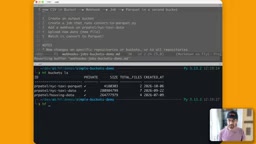
Buckets are well suited for storing files that arrive over time, such as logs, scans, and new data files. Once files enter a bucket, they usually still need data engineering tasks like cleaning and transformation. The video demonstrates with NYC Taxi data: an input bucket holds CSVs and an output bucket receives Parquet, with each bucket serving its own purpose.
If you do this manually every time, moving files and converting formats consumes a lot of time. The value of Webhooks and Jobs is that: as soon as a file arrives, an event fires, computation starts automatically, and results are written directly to the designated location. This advantage may not be obvious at small scale, but when files keep arriving, manual processes easily become a bottleneck.
Parquet is a columnar storage format designed for analytics. Unlike row-oriented text formats such as CSV, it stores data by column and includes schema, compression encodings, and statistics. For time-series data, the columnar layout means queries only need to read the columns involved, and compression ratios are typically significantly higher than text CSV, resulting in lower I/O costs when large files are scanned repeatedly. Converting raw CSV to optimized Parquet is essentially a materialization step before data enters the analytics pipeline, so subsequent reads no longer need to parse text or infer types.
Prepare two buckets
In the demo, buckets are created via the command line with a command like hf buckets create, followed by the bucket location, with the username placed before the bucket name. When creating the Parquet output bucket, the private flag was added to make the bucket visible only to yourself; without this flag, the bucket is public.
You can use hf buckets ls to view existing buckets under your account. The author's account had three buckets at the time, and the demo used nyc-taxi-data as the input bucket and nyc-taxi-parquet as the output bucket. Separating input and output makes it easier to apply independent access control and lifecycle management to the result files later.
Create a Job that can be invoked by a Webhook
The Job definition points to a script called optimized_parquet.py in the demo, which reads CSV and generates optimized Parquet files. There is a key detail here: when run directly on the Hub, a Job only executes once; the script looks for a Webhook ID, so running it before the Webhook exists effectively does nothing.
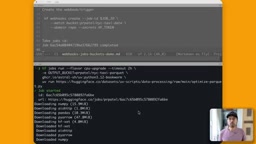
After running, you get a Job ID. This ID is the input parameter for creating the Webhook in the next step, and the author puts it into an environment variable and then passes it to the command that creates the Webhook.
A Webhook is an event-driven callback mechanism: when a specified change occurs on the monitored object, the platform initiates a call to a pre-registered receiver, rather than the consumer polling at fixed intervals. In this article, "monitoring bucket changes" means that whenever a new file appears in the input bucket, the platform triggers the Job bound to it and passes the event payload to the script. Compared with polling, event-driven approaches have lower latency and less idle work; the trade-off is that you need to handle edge cases such as duplicate deliveries and failed invocations, which is also why the script must first obtain the Webhook ID to determine its own triggering context.
Use a Webhook to monitor file changes
Webhooks are used to monitor changes to a repository or bucket under a specific user or organization. They are not only for the Webhook owner; other users on Hugging Face can also use this mechanism.
The creation command looks like hf webhooks create, and requires the Job ID, the bucket to monitor (here the input bucket nyc-taxi-data), and the Hugging Face token of the currently logged-in user. After successful execution, the Webhook is set up, and new files appearing in the input bucket will automatically trigger the corresponding Job.
Hands-on test: from upload to Parquet output
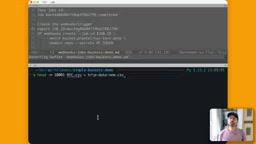
To verify the chain, the author took the first 10,000 rows from the raw data, generated a new file tripdata_new.csv, and then used hf sync to sync this directory to hf://buckets/<username>/nyc-taxi-data. The sync process was fast, using deduplication under the hood.
After the file sync completed, the Webhook triggered the Job. Using hf jobs ps -a to check status, you can see the Job status is completed, taking about 8 seconds.
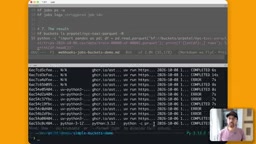
You can use hf jobs logs <job-id> to view the Job logs, and the output shows the file was written to buckets/<username>/nyc-taxi-parquet/tripdata_new.csv. Then use hf buckets ls <username>/nyc-taxi-parquet -R to recursively list the output bucket contents, and you can see the newly generated Parquet file. At this point, the entire chain from CSV landing in the bucket to Parquet output is working.
hf sync is a command in the Hugging Face command-line tool for bidirectional sync between a local directory and a remote repository or bucket. It only transfers files that differ rather than overwriting everything each time. This incremental sync relies on comparing file content or metadata to achieve deduplication, so repeated syncing of the same directory is very quick. For data pipelines, incremental sync means the cost of new files landing in a bucket is essentially independent of the amount of existing data, making it suitable for scenarios where files accumulate continuously and only a small number are added at a time.
What scenarios this approach suits
From the demo, the advantages of this combination center on three points: files flow in the cloud, eliminating large-file uploads and downloads; event-driven, with no polling; and Job definitions can be reused after being defined once. For scenarios like log archiving and datasets that arrive periodically, this pattern is more worry-free than manual scripts.
However, the demo scale is very small: a single file of 10,000 rows and about 8 seconds of processing time. In real business settings with larger files and more concurrency, you need to additionally consider Job resource configuration, failure retries, and output file naming conflicts. The video itself also does not cover error handling and permission boundaries, which are parts you need to fill in yourself before going to production.
The author provides a repository link containing notes and demo code in the video description, as well as a complete tutorial on Webhooks, suitable for readers who want to experiment further.
Related articles

Free Unlimited Claude Code Solution: Agnes AI + CC Switch Setup Guide
No paid subscription needed — pair the free AI platform Agnes AI with the open-source tool CC Switch to provide a backend for Claude Code, enabling unlimited free calls to text, image, and video models. This guide covers the full setup, test results, and usage boundaries.

A Complete Zero-Cost Guide to Getting Started with Claude Code for Beginners in China
A beginner's guide to Claude Code for users in China: two installation methods (command line and IDE plugin), full configuration steps for replacing the official API with the free domestic LongCat model, and a hands-on demo of building a small tool with natural language, plus tips.

When the NSA Gets Involved: The AI Supply Chain Crisis Behind Open-Source CVEs and API Key Hijacking
Multiple open-source projects disclosed severe CVEs in one day, PHP flaws alarmed the FBI, and Railway and OpenCode were breached with API keys stolen. This article breaks down the vulnerability window, AI-accelerated exploitation, and the AI supply chain crisis behind the API key black market, with a developer defense checklist.