Azure SQL MI New Capabilities Explained: Migration and Modernization Accelerated

New Azure SQL MI capabilities decouple migration from modernization: MI Link supports multi-database AGs, Next-Gen GP delivers 3-5x gains.
Azure SQL Managed Instance introduces new capabilities forming a complete path from migration to modernization. MI Link now supports multi-database availability groups for minimal-downtime migration with rollback; Next-Gen General Purpose shifts to instance-level storage quotas with 3-5x performance, 500 database and 32TB limits, and online-independent IOPS tuning with zero connection interruption; Update Policy is a key post-migration decision affecting portability.
Azure SQL Managed Instance New Capabilities Explained: Migration and Modernization Accelerated
In the Azure SQL family, SQL Managed Instance (SQL MI) has always occupied a unique position—it doesn't hand the entire operating system to the customer to manage like SQL Server on Azure VM, nor is it built for extreme elasticity like Azure SQL Database. Instead, positioned as "near-complete SQL Server compatibility + managed service," it has absorbed a large volume of enterprise demand for migrating from on-premises to the cloud. In a recent technical session led by Borko Novakovic, Group Product Manager on the Microsoft SQL team, several new SQL MI capabilities were systematically woven into a complete path spanning migration, resource tuning, and application modernization.
Choosing a Migration Approach: No Silver Bullet, but More Online Paths
Novakovic emphasized from the outset: no single migration method suits every scenario. The choice depends on the source environment, target configuration, and how much downtime the application can tolerate. Offline backup and restore remains valid when change windows are ample, but for systems with high availability requirements, SQL MI offers multiple online migration paths, including Managed Instance Link (MI Link) and Log Replay Service, as well as automation tooling and manual control options.
Novakovic presented a comparison of SQL MI online migration options, with MI Link standing out for its flexibility and ability to minimize downtime.
What makes MI Link unique is that it is not a one-time data transfer, but rather lets the source SQL Server and target MI work in concert over a period of time. It supports SQL Server deployed on-premises, on Azure VMs, and in other cloud environments, synchronizing data to Azure through near-real-time replication while the source continues to serve production traffic. This means that before the actual cutover, teams can already use Azure-side capabilities for read-only queries or testing, stretching "migration" from a single point in time into a plannable period.
More notably, MI Link has recently extended support to multiple databases in an existing Availability Group. Previously, migration was typically done on a per-database basis, but many enterprise applications themselves run on Always On availability groups containing multiple databases. The new capability allows an entire availability group to participate in an MI Link migration, significantly expanding the range of workloads eligible for minimal-downtime migration—especially mission-critical systems.
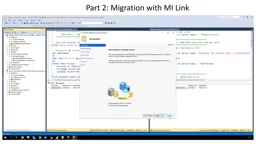
During the demo, Novakovic walked through the entire flow using the SSMS 18.1.2 wizard, from establishing the link and seeding data to the final failover. He deliberately split the demo into two steps—"establish link" and "perform cutover"—because between these two steps, teams can test data and validate the application at their own pace, rather than being forced by a migration window. During cutover, the replication mode switches to synchronous mode to ensure LSN alignment before failover, after which redirecting the application connection string completes the move to the cloud. For supported configurations of SQL Server 2022 and 2025, MI Link also provides rollback capability, which is an important safety net for migration risk control.
Managed Instance Link (MI Link) is a near-real-time replication technology Microsoft provides for migrating SQL Server to Azure SQL Managed Instance. It is built on the Distributed Availability Group mechanism, establishing a continuous data synchronization link between the source SQL Server and the target MI. Unlike traditional log shipping or backup and restore, MI Link allows the source database to continue serving traffic during migration preparation while continuously replicating changes to Azure, compressing migration downtime to only the final failover cutover phase. The technology supports SQL Server 2016 and above, covering on-premises, Azure VM, and other cloud environments.
Log Replay Service is another online migration option, primarily aimed at scenarios where Azure SQL Managed Instance restores backup files from Azure Blob storage. It achieves near-real-time data synchronization by continuously restoring log backups, making it suitable for environments where a direct network link cannot be established. Compared with MI Link, Log Replay Service typically has higher latency and does not support a bidirectional collaborative mode, but it remains a valuable complement in scenarios with network isolation or cross-cloud restrictions.
Rebalancing Cost and Performance: The Substantive Gains of Next-Gen General Purpose
After migration, how to run workloads at reasonable cost is the second core topic. The Next-Gen General Purpose service tier of SQL MI is now generally available, and Novakovic recommends it as the starting point for evaluating most workloads.
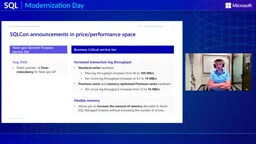
Compared with the previous version, the change in Next-Gen GP is not a single-point optimization but an overall adjustment of the storage and compute resource model: storage performance quotas shift from a per-file model to an instance-level model, with improvements in latency, IOPS, and log throughput; the maximum number of databases per instance rises from 100 to 500, and maximum storage doubles from 16 TB to 32 TB; the compute side offers more SKU choices so capacity more precisely matches actual demand. Novakovic's overall picture: 3 to 5 times performance improvement in typical scenarios, up to 5 times density improvement, doubled storage scale, doubled compute elasticity, and roughly three times better log performance.
Behind these numbers is a more practical decision logic: evaluate Next-Gen GP first, then choose SKUs based on actual workload demand, rather than provisioning for peak.
At the Business Critical tier, the log throughput improvements are equally noteworthy: the Standard series ceiling rises from 96 MB/s to 160 MB/s, reached at 16 vCores; the Premium series maintains the 192 MB/s ceiling, but the number of vCores needed to reach it drops from 16 to 12—equivalent to touching the same throughput ceiling with 25% less compute. Flexible Memory allows memory to be increased without significantly adding vCores, offering finer-grained adjustment for SQL workloads whose memory and compute needs don't grow in lockstep.
Novakovic demonstrated Next-Gen GP's dynamic IOPS adjustment capability using HammerDB.
The most striking moment in the demo was the IOPS slider: with IOPS set to minimum, the throughput of an IO-intensive workload plateaued at about 7,000 transactions/minute; after sliding IOPS to maximum and applying, the instance updated online—no maintenance window, no restart, zero connection interruption—and throughput jumped to over 70,000 transactions/minute within seconds, sustaining steadily. This 10x improvement came entirely from independent storage IOPS adjustment, with no increase in vCores or reserved storage.
The General Purpose and Business Critical service tiers are the two core architectures of Azure SQL Managed Instance. General Purpose uses remote storage (Azure Premium SSD or Ultra Disk), separating compute from storage; it suits most general-purpose workloads, with lower cost but relatively higher IO latency. Business Critical uses local SSD storage with built-in Always On availability group replicas, delivering the lowest IO latency and highest availability guarantees, suitable for mission-critical workloads with stringent performance and resilience requirements. Next-Gen General Purpose is a major upgrade over the original GP architecture, with the core change being the shift of storage performance quotas from per-file allocation to an instance-level unified pool, so that IOPS, throughput, and latency are no longer limited by the number or size of individual database files—significantly raising resource efficiency and performance ceilings.
After Migration: Update Policy and the Modernization Roadmap
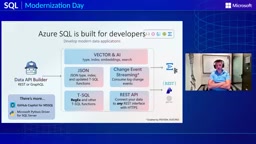
The third pillar answers "what else can you do after moving to the cloud." Novakovic listed modernization capabilities on the Azure SQL platform that can be adopted incrementally: vector and AI capabilities supporting embeddings and semantic search; JSON support for data that doesn't fit the traditional relational model; Change Event Streaming for real-time consumption of changes and building event-driven architectures; and Data API Builder for exposing data via REST or GraphQL protocols.
A Data API Builder diagram shown by Novakovic while explaining modernization capabilities—one of many optional incremental capabilities.
These capabilities can be layered onto an already-migrated database as needed, without requiring a one-time application rewrite. Alongside them is an easily overlooked but far-reaching switch: Update Policy. Choosing Always up-to-date gives the fastest access to new engine features on the Azure side, but the database format may diverge, losing the exit path of backup/restore and physical replication back to SQL Server (data-copy mechanisms such as export/import and transactional replication remain available). Choosing the SQL Server 2022 or 2025 policy keeps alignment with the corresponding engine version, preserving the relevant portability options while still receiving security fixes, performance improvements, and Azure platform ecosystem updates. Novakovic's advice is clear: choose based on your application roadmap and migration rollback needs, not by defaulting to the latest.
Novakovic summarized the entire path into four actionable steps: evaluate Next-Gen GP first and choose the right instance SKU; choose a migration method matching your availability requirements, with online migration favoring MI Link (including the newly supported multi-database availability groups); after running, independently adjust IOPS, memory, or compute based on actual bottlenecks; and consider zone redundancy when regional resilience is required. These steps need not be completed as a single project all at once—the key to this methodology is that each step leaves a credible path to the next. For teams that want to validate before committing, SQL MI offers a 12-month free trial credit, and stopping the instance when not in use preserves the monthly compute quota.
Overall, the main thread of this round of SQL MI updates is not any single feature, but rather decoupling "migration" and "modernization": complete the move to the cloud with a low barrier first, then progressively unlock platform capabilities by priority. For enterprises still planning their SQL Server migration, this splittable rhythm may offer more decision-making value than any single performance number.
Update Policy is a configuration item in Azure SQL Managed Instance that controls the pace of engine version evolution. Choosing Always up-to-date means the instance automatically receives the latest feature updates of the Azure SQL engine, and the database format may diverge with version upgrades, making it impossible to return to SQL Server via backup/restore or physical replication. Choosing the SQL Server 2022 or 2025 policy locks the engine version in alignment with the corresponding on-premises version, preserving the exit path of backup/restore and physical replication back to SQL Server while still receiving security patches and some performance improvements. This policy can be modified after instance creation, but the direction of modification is restricted, so it's advisable to decide during migration planning based on your application roadmap and rollback requirements.
Change Event Streaming is a modernization capability on the Azure SQL platform that allows change events from the database to be streamed to consumers such as Azure Event Hubs, for building event-driven architectures, real-time analytics pipelines, or cache invalidation mechanisms. Compared with traditional change tracking or CDC, it focuses more on high-throughput real-time event distribution, suitable for scenarios that need to synchronize data changes to downstream systems immediately.
One-line Summary
New Azure SQL MI capabilities decouple migration from modernization: MI Link supports multi-database availability groups, and Next-Gen GP delivers 3-5x performance gains.
Paragraph Summary
Azure SQL Managed Instance has introduced several new capabilities forming a complete path from migration and resource tuning to application modernization. On migration, Managed Instance Link now supports multiple databases in existing availability groups, significantly expanding the scope of minimal-downtime migration while retaining rollback capability; the Next-Gen General Purpose service tier moves storage performance quotas to an instance-level model, with typical performance gains of 3-5x, a database limit of 500 and storage up to 32TB, and IOPS independently adjustable online with zero connection interruption; Update Policy is a key post-migration decision—Always up-to-date buys the latest features but loses the backup/restore path back to SQL Server, while version-aligned policies preserve portability. The overall methodology emphasizes decoupling migration from modernization, executable in four steps, with a 12-month free trial credit.
Related articles

GPT-Next Leak, Gemini 4 Argon Imminent: AI News Roundup
GPT-Next leak suggests extreme efficiency; OpenAI's 28-day shipping pledge boosts speed 50%; Gemini 4 Argon nears release; Anthropic subscription value report sparks debate.

GPT-Next Leaked, Gemini 4 Argon Speeds Up, Fable 5.5 May Launch Today
OpenAI's GPT-Next model leaks, expected to be extremely low-cost and possibly part of the 28-day release plan; Gemini 4 Argon internal testing accelerates, NanoBanana 2.1 is live; Semi Analysis tests show Claude Max's equivalent API value is about 5 times that of ChatGPT Pro; Fable 5.5 may launch today.

Gemini 4 Argon Launches Globally: Key Highlights from the AI Daily Brief
Google opens Gemini 4 Argon globally across Pro and Ultra subscriptions and the API, and demonstrates robot control. This article rounds up open-source models, Agent infrastructure, cost transparency, and safety governance updates.