Berd: A Deep Dive into the Open-Source Mac Desktop AI Agent Workspace

Berd is an open-source Mac desktop AI Agent workspace designed as a persistent companion for builders.
Berd is an open-source Mac desktop AI Agent application that positions itself as a persistent intelligent companion for engineers and builders. Unlike cloud-based or browser-based AI tools, Berd offers deep local system integration with features including project and skill management, extensions, automations, multi-model provider support, and local workspace context access. Its design philosophy emphasizes fast interaction, precise context selection, and transparent Agent behavior control.
When AI Agents Move to the Desktop Workbench
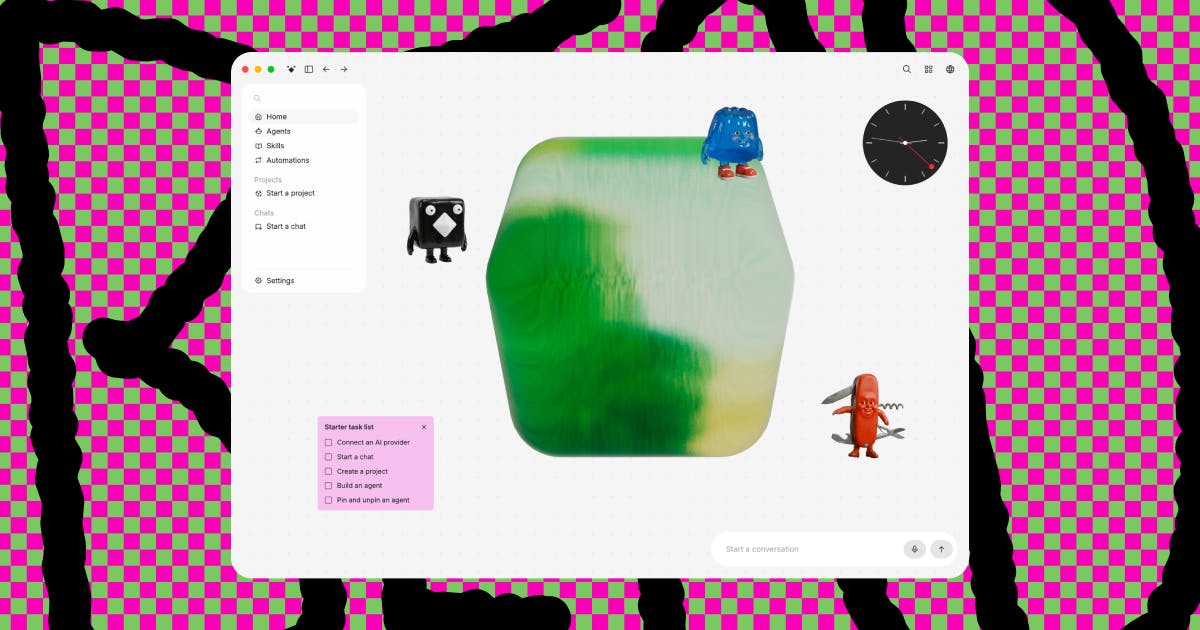
In an era where AI Agent products are blooming everywhere, most mainstream solutions on the market focus on cloud-based conversations or browser extension formats. An AI Agent refers to an AI system with autonomous decision-making and execution capabilities—unlike traditional Q&A-style AI, Agents can decompose tasks, invoke tools, and perform multi-step operations. Current mainstream Agent forms include cloud SaaS (like ChatGPT), browser extensions (various Copilots), and IDE integrations (like Cursor and GitHub Copilot). Berd, which landed at #13 on Product Hunt with 85 votes, has chosen a distinctly different path—it's a uniquely styled desktop application with a "weird, playful" personality, designed specifically for people who actually use AI Agents to get real work done.
Desktop-native Agent applications represent a relatively emerging category whose core advantage lies in direct access to OS-level resources, including the local file system, clipboard, system notifications, and more, enabling deeper system integration than browser sandboxes allow. This is the technical foundation behind Berd's choice of the desktop form factor.
Berd's target user persona is quite clear: engineers, product designers, and all kinds of "builders." Their shared need is this—they crave a persistent Agent companion, an intelligent assistant that spans the entire project lifecycle and can be summoned at any time, rather than a disposable tool that requires opening a new conversation window and re-explaining context every single time.
"Persistent Companion" vs. "One-off Tool": What's the Essential Difference?
The core concept Berd emphasizes is the persistent agent companion. Traditional chat-based AI typically operates in a "use-and-leave" Q&A mode, while Berd builds the Agent as a permanent presence in your desktop workspace—one that remembers your project context, understands your local work environment, and can step in immediately when needed.
From a technical perspective, the context window is a critical limitation in large model applications. Traditional conversational AI starts from scratch with each session, requiring users to repeatedly provide background information. Persistent Agents maintain cross-session context continuity through long-term memory mechanisms (such as vector database storage of historical interactions, project metadata indexing, etc.). This design draws from cognitive science theories of working memory and long-term memory, enabling the Agent to accumulate depth of understanding about a project—much like a long-term human collaborator.
For builders, this "always-on" characteristic is crucial. In actual work, people frequently switch between macro-level product thinking and concrete code implementation. An AI assistant that can only handle a single scenario struggles to keep up with this rhythm, and Berd aims to be the companion that seamlessly accompanies the entire "think → implement" cycle.
Berd's Core Capability Landscape
According to official descriptions, Berd has a fairly complete capability system built in, covering multiple key dimensions required for AI Agent work.
Project and Skill Management
Berd supports organizing work through projects and skills. Users can encapsulate different work scenarios into independent projects and configure specific skill sets for the Agent. This structured design makes the Agent more methodical when handling complex tasks and facilitates reuse of established work patterns.
Extensions and Automation Mechanisms
Berd provides two major mechanisms: extensions and automations. Extensions allow users to enhance the Agent's functional boundaries on demand, while automations let the Agent execute repetitive work automatically—this is precisely the core value that distinguishes Agent-based tools from ordinary AI chat products.
Multi-Model Support and Local Context Access
Berd supports configuring different model providers, so users aren't locked into a single large model and can flexibly switch based on task requirements. Multi-model support reflects an important trend in current AI tools: avoiding vendor lock-in. Different large models have distinct advantages for different tasks—Claude excels at long-text analysis and code comprehension, GPT-4o performs exceptionally in multimodal tasks, and locally-run open-source models (like the Llama series) are suitable for handling sensitive data. By abstracting a unified model invocation layer, users can flexibly choose the most appropriate model based on task characteristics, cost budget, and privacy requirements.
More importantly, Berd can access local workspace context—the Agent can truly "see" your local files and project structure, enabling it to provide advice that's relevant to your actual situation rather than generic, one-size-fits-all responses. Local context access typically involves file system monitoring, code AST (Abstract Syntax Tree) parsing, project dependency graph construction, and other technologies. Unlike cloud AI that can only process code snippets manually pasted by users, a desktop Agent can perceive project changes in real-time through file watchers and understand code structural relationships through semantic indexing. This capability allows the Agent's suggestions to be precise down to specific file paths, function signatures, and dependency relationships, dramatically improving practical utility. However, it also introduces privacy and security challenges—the Agent's access to local files needs fine-grained control.
Design Philosophy: Fast, Precise, and Controllable
Berd articulates three clear goals in its interaction design, reflecting the team's deep thinking about the essence of AI Agent tools.
Fast chat. Builders' inspiration is often fleeting—tools must keep up with the speed of thought and eliminate all unnecessary interaction friction.
Precise context selection. This is the most easily overlooked yet most critical aspect of AI Agent tools. Users need precise control over "what information the Agent should reference" rather than letting the model blindly guess within massive amounts of context. In actual engineering, a project might contain thousands of files, but the current task may only relate to a few core modules. Precise context selection not only improves response quality but also significantly reduces token consumption costs, avoiding the model's "attention dispersion" problem caused by irrelevant information.
Transparency and control over Agent behavior (confidence about what the agent can see or do). When an Agent has execution capabilities and can even manipulate local files, users' clear understanding of "what the Agent can see and do" directly relates to trust and safety. Berd makes this a core design requirement, demonstrating deep consideration for responsible AI interaction. This design principle aligns with the "Principle of Least Privilege" in AI safety—the Agent should only obtain the minimum set of permissions necessary to complete the current task, and every operation should be visible and auditable to the user.
The Strategic Choice of Open Source and the Mac Ecosystem
Berd is categorized under Mac, Open Source, GitHub, Bots—it's an open-source Mac desktop AI application. The open-source attribute means the developer community can audit the code, contribute extensions, and even build highly customized Agent workflows on top of it.
The ecosystem building of open-source desktop AI applications follows logic similar to the VS Code extension marketplace: the core team provides a stable platform architecture and API specifications, while community contributors develop various extensions based on it. In the AI Agent domain, this means the community can add new tool-calling capabilities to the Agent (such as database operations, API integrations, code generation templates for specific frameworks, etc.). The open-source collaboration model on GitHub also facilitates security auditing—when an Agent has the ability to execute code and manipulate files, code transparency is crucial for building user trust.
For the engineering community, open source is not only a guarantee of transparency but also the foundation for extensibility. Combined with Berd's own extensions mechanism, its ecosystem has the potential to rapidly enrich through community effort. Choosing the Mac platform as a starting point also aligns with the mainstream work environment of designers and engineers—according to the Stack Overflow Developer Survey, macOS usage among professional developers continues to rise, particularly dominating in frontend development, mobile development, and design fields.
The Desktop-ification Trend of Agent Tools and Future Outlook
Berd's emergence represents a noteworthy direction for AI Agent products: returning from the cloud to the desktop, evolving from tools to companions. It's not content with being yet another chat box—instead, it attempts to build a complete desktop workspace integrating project management, skill configuration, automation, and local context.
Behind this trend lies deep technical logic: as Agent capabilities evolve from "conversation" to "execution," they need deeper system access permissions—reading and writing files, running scripts, monitoring processes, calling local APIs. These operations are strictly limited within a browser's security sandbox, while desktop-native applications can naturally transcend these boundaries. A similar evolutionary path has appeared in the IDE domain: the return from online code editors to desktop IDEs like VS Code happened precisely because professional developers needed deeper local integration capabilities.
Currently, Berd is still in its early stages, and its "weird, playful" product personality shows it doesn't intend to take the serious, rigid enterprise route. But for builders who work with AI Agents daily and crave an intelligent companion that truly understands their work environment, Berd offers an open-source option worth keeping an eye on.
In the Agent era, whoever can truly nail "persistent companionship" and "controllable context" is more likely to win developers' hearts. Berd's exploration is an interesting and pragmatic attempt in exactly this direction.
Related articles

Uber Deploys ChatGPT Work Company-Wide: AI in the Workplace Enters the Scaled Implementation Phase
Uber deploys ChatGPT Work to 30,000+ employees, extending it from engineering to all roles. We analyze its expert-engineer pairing, end-to-end automation, and questions of AI control and power concentration—insights for scaling AI in the workplace.

Shift at Midnight Hands-On: When "ID Verification" Becomes Alien Hunting
Shift at Midnight blends ID verification with horror survival in a four-player co-op game. We break down its inspection mechanics and chaotic humor.

Zelensky Recounts the Outbreak of War: I Need Ammunition, Not a Ride
Zelensky recalls the first day of war in a YouTube interview: farewell to family, rejecting Biden's evacuation offer with "I need ammunition, not a ride," and how Bucha shaped his stance on compromise and peace talks.