bmux: A Browser Multiplexer Designed for the Agentic AI Era

bmux brings tmux-style multiplexing to the browser, built for human-AI agent collaboration.
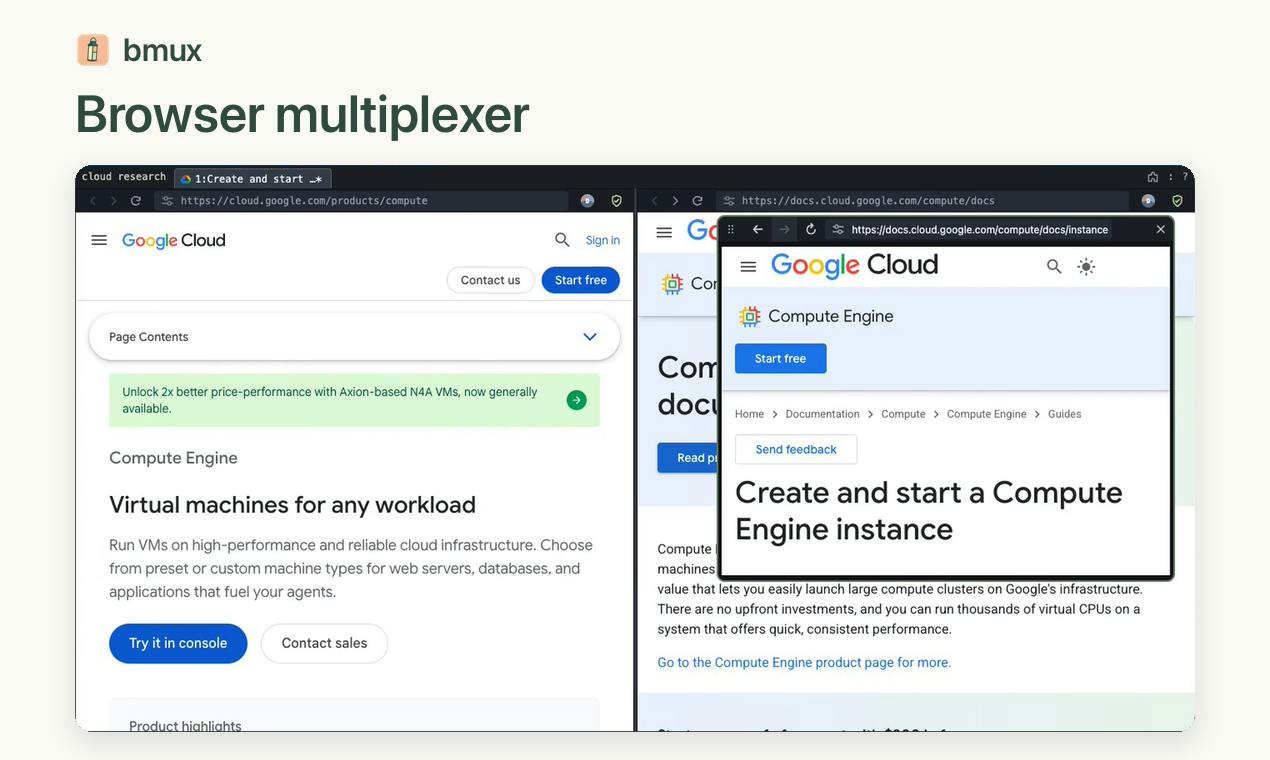
bmux is a free, open-source browser that ports the core design of the terminal tool tmux — split panes, named sessions, and separate profiles — into the browser environment, optimized for AI agent collaboration. Its key innovation is a "detach-and-attach" model: AI agents can run browser automation tasks independently in background sessions via CLI, while users browse normally in the foreground and check in whenever needed. Each session has isolated cookies, login state, and browsing data, supporting multiple accounts and clean environments for different agents simultaneously.
When the Browser Meets the tmux Mindset
If you're a developer, you've probably used a terminal multiplexer like tmux — splitting multiple panes in a single window, managing named sessions, and detaching and reattaching whenever you need. bmux takes that proven workflow and brings it to the browser, designed specifically for the "agentic era."
This is a free, open-source browser whose core value proposition is: split panes, named sessions, and separate profiles — all integrated in a single window. Developer Tõnis Tiganik launched it on Product Hunt, where it earned 63 upvotes and ranked 18th for the day, categorized under Productivity, Open Source, and Developer Tools.
tmux (terminal multiplexer) is the classic terminal multiplexing tool for Unix/Linux environments, developed by Nicholas Marriott and first released in 2009. Its core mechanism maintains persistent "sessions" on the server side — even if you disconnect from SSH, background processes keep running, and you can "attach" to resume exactly where you left off. tmux lets you split a single terminal window into multiple "panes" and manage multiple "windows" within a session, with almost entirely keyboard-driven interaction. This workflow is ubiquitous in server operations, remote development, and long-running task scenarios, and has deeply shaped how a generation of developers think about multitasking. The value bmux draws from this established paradigm is that tmux users don't need to learn a new mental model — their existing workflow intuition transfers directly to the browser.
Built for Agentic Workflows
The most noteworthy design philosophy behind bmux is that it treats "AI agents working in the background" as a first-class citizen.
Traditional browsers handling AI automation tasks typically require you to watch them execute across tab after tab. bmux takes a different approach: you can browse normally using keyboard shortcuts while agents work independently in background sessions through a CLI. Whenever you want to check on their progress, just "attach" to the corresponding session.
This "detach-and-attach" pattern is borrowed directly from tmux. For developers who need to run multiple automation tasks simultaneously without constant interruptions, this async workflow significantly reduces the cognitive cost of context switching. Agents run in the background, you work in the foreground, and you only check in when needed.
Browser automation agents are one of the most important forms of current AI applications, with notable examples including Playwright-based browser-use, OpenAI's Operator, and Anthropic's Computer Use. These agents control a browser to perform clicks, form filling, page navigation, and other actions on behalf of users. Unlike traditional RPA (Robotic Process Automation), AI-driven browser agents have natural language understanding and dynamic decision-making capabilities, allowing them to handle changes in page structure. However, mainstream browsers like Chrome and Firefox were not designed for "multi-agent parallel" scenarios — shared session state, cookie contamination, and foreground window focus conflicts all make running multiple agent tasks simultaneously quite awkward. bmux's CLI access and session isolation mechanisms are an attempt to address these pain points at the browser infrastructure level.
Three Core Capabilities Unpacked
Split Panes
Split a single window horizontally or vertically into multiple browsing regions, letting you view multiple pages or the status of multiple sessions simultaneously — no more switching back and forth between tabs.
Named Sessions
Sessions can be named and saved, similar to tmux's session concept. This means you can maintain separate browsing contexts for different projects and tasks, and restore your previous working state at any time.
Separate Profiles
Each session or pane can use mutually isolated profiles, with cookies, login state, and browsing data kept independent from one another. This is especially useful when you need to manage multiple accounts simultaneously or maintain clean environments for different agent tasks.
Browser "Profile" isolation technology is already natively supported in mainstream browsers like Chrome and Firefox, but it typically requires manual switching with a heavy UI interaction. More critically, profile switching in most browsers shares the same foreground window focus, making it difficult to display content from different profiles side by side in a single view. bmux deeply integrates profile isolation with split panes, allowing different identities (accounts) and task contexts to be displayed side by side in a single window rather than scattered across multiple separate windows. This is also meaningful for anti-fingerprinting scenarios: each session has its own independent browser fingerprint environment, effectively preventing multi-account operations from being associated and identified by platforms — a common requirement in browser automation scenarios.
Who Is It For?
bmux has a very clear positioning — it targets power keyboard users, developers comfortable with command-line workflows, and those who have already started incorporating AI agents into their daily development.
If you're building or using browser automation agents and need an environment where they can run stably in the background without interfering with manual browsing, bmux's session isolation and CLI access mechanisms are a natural fit. Being open source and free also lowers the barrier to entry, allowing developers to extend or audit the implementation as needed.
That said, based on current information, bmux is still a relatively early-stage project (with only 1 comment), and its ecosystem and stability remain to be proven over time. It reads more as an exploratory answer to the question of "how should browsers adapt to agentic collaboration" than a battle-tested tool.
A Direction Worth Watching
What makes bmux genuinely interesting isn't that it replicates tmux's interaction paradigm — it's that it identifies a transformation that's actively underway: browsers are shifting from "tools used by humans alone" to "collaborative workbenches for humans and AI agents."
As more and more tasks are handled by agents, what we need is no longer an ever-growing pile of tabs, but a new kind of interface capable of managing multiple parallel agents and flexibly shifting attention between human and machine. bmux brings proven experience from the terminal world into the browser, offering a concrete and usable solution to this problem. That cross-domain thinking alone is worth borrowing from.
Related articles

Free Unlimited Claude Code Solution: Agnes AI + CC Switch Setup Guide
No paid subscription needed — pair the free AI platform Agnes AI with the open-source tool CC Switch to provide a backend for Claude Code, enabling unlimited free calls to text, image, and video models. This guide covers the full setup, test results, and usage boundaries.

A Complete Zero-Cost Guide to Getting Started with Claude Code for Beginners in China
A beginner's guide to Claude Code for users in China: two installation methods (command line and IDE plugin), full configuration steps for replacing the official API with the free domestic LongCat model, and a hands-on demo of building a small tool with natural language, plus tips.

When the NSA Gets Involved: The AI Supply Chain Crisis Behind Open-Source CVEs and API Key Hijacking
Multiple open-source projects disclosed severe CVEs in one day, PHP flaws alarmed the FBI, and Railway and OpenCode were breached with API keys stolen. This article breaks down the vulnerability window, AI-accelerated exploitation, and the AI supply chain crisis behind the API key black market, with a developer defense checklist.