Boox Palma 3 Launches with Stylus Support and Redesigned Look
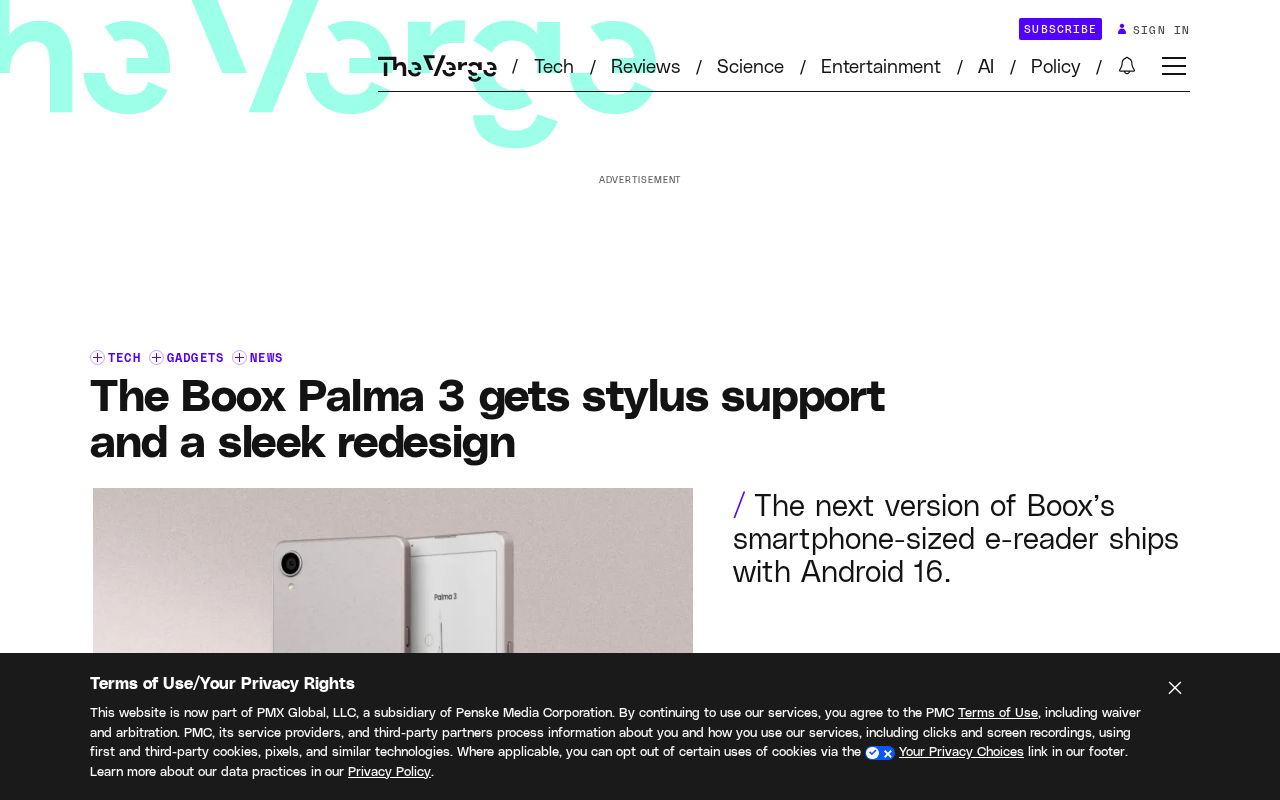
Boox Palma 3 adds stylus support and a redesigned look, but comes at a significantly higher price.
Nearly two years after the Palma 2, Boox has launched the Palma 3 — a smartphone-sized e-ink reader whose headline feature is stylus support, expanding it from a reading-only device into a portable note-taking and annotation tool. The device also sports a refined redesign. However, the price has risen notably from the Palma 2's $279.99, raising questions about upgrade value. Whether it's worth the premium comes down to individual needs: users who want handwriting capabilities may find it justified, while pure readers may not need to pay the extra cost.
A Major Upgrade for Pocket-Sized E-Ink
Nearly two years after the Palma 2, Boox has finally unveiled the next generation of its smartphone-sized black-and-white e-reader — the Palma 3. The new device brings a more refined design, expanded functionality, and a handful of incremental improvements. It also comes with a notably higher price tag, and whether that's worth it depends heavily on how you plan to use it.
The Boox Palma lineup has always occupied a unique niche in the e-ink space. Unlike conventional six- or seven-inch e-readers, the Palma adopts a smartphone-sized form factor that slips easily into a pocket. That portability makes it an ideal companion for commutes and spare-moment reading, and it has attracted users who want to step away from the high-stimulation screens of their phones and return to a more focused reading experience.
Stylus Support Is the Headline Feature
The most attention-grabbing addition in the Palma 3 is stylus support. For a pocket-sized device built around portable reading, adding handwriting input means it's no longer just a passive reading tool — it can now handle quick notes, annotations, and sketches as well.
E-ink displays already have a natural advantage when it comes to eye comfort and low power consumption. Paired with a stylus, the Palma 3 moves closer to the concept of a handheld notebook. Users can jot down notes while reading an e-book or quickly capture an idea the moment inspiration strikes. This addition broadens the use cases for the small-screen device and is one of the key differentiators from its predecessor.
Stylus implementations on e-ink devices typically fall into two categories: Electromagnetic Resonance (EMR), where the pen requires no battery and works via a sensor layer beneath the display — offering very low latency and a writing feel close to pen on paper (Wacom is the dominant supplier here) — and capacitive touch, similar to smartphone styluses but more limited by the refresh rate constraints of e-ink. For e-ink devices, screen refresh rate (typically 10–30fps, far below the 60fps+ of LCD/OLED panels) is the key factor affecting the writing experience, and noticeable ink-lag can occur. Boox has built a solid reputation for its EMR implementation on larger devices like the Note series, and bringing similar capability to a palm-sized form factor is a meaningful step forward — though real-world writing comfort on a smaller screen will ultimately need to be verified by user reviews.
Redesigned Look and Refined Details
Beyond the functional additions, the Palma 3 also features a sleek redesign with a cleaner, more polished aesthetic. While Boox hasn't detailed every hardware specification change in the announcement, the update appears to be a comprehensive refresh of both design language and user experience, rather than a simple feature bolt-on.
For e-ink devices, the feel and ergonomics of the physical design directly affect reading comfort over extended sessions. A more refined chassis combined with a pocket-friendly size remains one of the core selling points of the Palma lineup.
The Value Question Raised by the Price Increase
The price change is worth paying attention to. For reference, the Palma 2 launched at $279.99, and the Palma 3, with its added features, comes in at a noticeably higher price. That raises a practical question: is the premium justified?
The answer depends largely on individual use cases. If you value the stylus for note-taking and annotation and want a multi-purpose device that handles both reading and writing, the higher price may well be reasonable. But if you're looking for a pure pocket e-reader, the previous Palma 2 — or other more affordable alternatives — may already be more than sufficient.
In the market for palm-sized e-ink devices, the Boox Palma series currently faces almost no direct competition. Mainstream e-readers like Kindle are larger and don't support stylus input, while smartphones of the same size use high-refresh OLED screens. The price comparison therefore points more toward Boox's own lineup: the six-inch Page is around $180, while the stylus-capable seven-inch Note Air series starts above $400. If the Palma 3's new price lands between those two tiers, it carves out a new position between portability and handwriting capability — but it also means users face a third trade-off beyond "buy the cheaper pure reader" or "buy the pricier large-screen notebook." For existing Palma 2 owners, the marginal gain from upgrading comes almost entirely from the stylus, making the cost-benefit calculation especially demanding.
Who Should Consider the Palma 3
The Palma 3 carries forward Boox's distinctive position in the small-screen e-ink space, enriching the experience through stylus support and a design overhaul. It's best suited for users who prioritize portable, eye-friendly reading while also wanting the ability to jot things down on the go.
For casual readers, the upgrade decision should be weighed against actual usage frequency and budget. The value of this device isn't in spec-stacking — it's in whether it fits your reading and creative habits in mobile contexts. As e-ink technology and its ecosystem continue to mature, products like the Palma 3 that balance portability with multi-functionality are steadily finding their own well-defined corner of the market.
Related articles
Cursor 3.0 Complete Beginner's Guide: Getting Started with AI-Powered IDE Development
Cursor 3.0 beginner's guide: from download and setup to parallel sub-agents, cloud development, skills, and automations. Master model selection, design mode, and Git with this complete AI IDE walkthrough.

Codex + Playwright as a Skill: UI Automation Without Manual Commands
Wrap Playwright as a Codex Skill so AI agents run UI automation tests via natural language. Covers install, Sauce Demo walkthrough, PO pattern, and MCP vs CLI+Skill tradeoffs.

Replicate the $400/Year 'Dedao Brain' With Obsidian + AI Agents — For Free
How to replicate Dedao Brain Expert Edition (¥2,999/year) using free Obsidian + AI agents. A breakdown of Germinate, Polish, Challenge, Style Coach, and more as reusable prompt skills.