Build a Business Dashboard with AI in Minutes: Hugging Face + Codex in Practice

Turn a CSV into a shareable business dashboard in minutes using Codex and Hugging Face Hub — no coding required.
This tutorial walks business analysts through a practical workflow: using Codex or Claude Code as a coding agent alongside Hugging Face Hub's Datasets, Data Studio, and Spaces, you can transform a CSV file into an interactive, team-shareable dashboard without writing a single line of code. The key isn't the technical implementation — it's how the analyst maintains ownership by clarifying business questions, defining KPIs, reviewing a plan before building, and iterating with specific feedback. The author uses a Portuguese bank marketing dataset to demonstrate the full path from upload to private organizational sharing, and consistently emphasizes that AI produces a half-finished product; deciding what truly matters to stakeholders remains the analyst's job.
An Overlooked Business Use Case
Most people think of Hugging Face Hub as a platform for hosting and demoing models — but it's equally valuable for non-technical business users. This tutorial walks through a genuinely practical scenario: a business analyst receives a CSV dataset and, with the help of an AI coding assistant, turns it into an interactive, shareable business dashboard in just a few minutes.
The entire process requires no manual coding. Instead, it relies on a coding agent like Codex or Claude Code, combined with Hugging Face's data hosting, data chat, and Spaces hosting capabilities. One important prerequisite: this workflow depends on a Hugging Face Pro, Academia, or Enterprise account, since it uses certain paid features.
Step 1: Connect to Hugging Face
Whether you're using Codex or Claude Code, the first step is connecting your coding agent to Hugging Face.
With Codex, the process is fairly straightforward: search for the Hugging Face plugin in the plugin marketplace, install it, and authorize via OAuth — open the authorization page, enter the 6–8 digit verification code, and confirm. The author notes an important detail: if you're using a company or university account, make sure to select the corresponding organization during authorization so you can create repositories within the org scope for team sharing.

With Claude Code, the approach is slightly more involved. Rather than using MCP, it goes directly through the Hugging Face command-line tool (HF CLI), since the CLI has broader permissions for local file and repository operations. The flow involves confirming the HF CLI is installed (installation instructions for Windows, Mac, and Linux are available in the official docs), then running the login and authorization from within Claude. The author demonstrates starting from scratch with hf logout, and verifies write permissions by having the agent create and then delete a private repository.
Step 2: Upload Your Data and "Chat with It"
Imagine you're on a bank's business analytics team. Your manager hands you a CSV export from a marketing campaign and asks you to extract insights that could improve the next campaign.
You can instruct Codex to upload the CSV directly to your organization as a private dataset. This is where the permission setting matters — if the data is sensitive, be sure to set it as private; otherwise, anyone on Hugging Face can see it.
Once uploaded, the real power comes from Data Studio's data chat feature. Powered by OpenAI's open-source model GPT-OSS-120B, it lets you ask questions in plain language without ever downloading the data locally. In the demo, the author asked: "What is this dataset about, how is it structured, and what angles are worth exploring?" The agent quickly identified it as a direct marketing dataset from a Portuguese bank, recording the outcomes of phone calls promoting term deposit subscriptions, with the target variable y indicating whether the customer subscribed (1 = yes, 0 = no).
Beyond Q&A, this data agent can also run actual queries. Ask about the unique values in the education column and it will query the data and return results directly — or you can write SQL straight in the interface.
Data Studio is Hugging Face's built-in data exploration tool. It lets users run SQL queries or ask natural language questions against uploaded datasets directly in the browser, with no local database setup required. The conversational analysis capability is powered by GPT-OSS-120B — OpenAI's open-source large language model with 120 billion parameters, offering strong structured-data comprehension and code generation. Note that the "data chat" feature is part of Hugging Face's paid tier and is not available on free accounts. Crucially, data stays in the private Hugging Face repository at all times and is never exposed to third parties through queries — an important consideration for teams handling sensitive business data.
Step 3: Clarify the Business Problem Before Building Anything
The author repeatedly emphasizes a core principle: don't just tell the agent "build me a dashboard" and call it a day. You need to maintain what he calls "intelligent ownership" of the project — staying clear on what you're actually trying to accomplish.
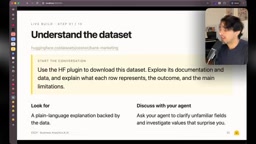
The practical approach is to collaborate with the agent step by step. First, ask it to surface a few valuable business questions based on the dataset. Within minutes, Codex returned insights like: the relationship between number of contacts and conversion rate — customers contacted only once had a 14.6% success rate, while those contacted more than five times saw it drop to 6.4%. These kinds of findings are exactly what the dashboard should highlight.
Next, ask it to define a set of KPIs for your chosen questions, with an explanation of how each metric is calculated and what it means. The author ended up with four KPIs: baseline conversion rate, segment size and share, segment conversion rate and lift, and conversion rate by number of contacts.
Step 4: Sketch First, Then Build
Before writing any code, the author asked Codex to "draft a proposal" — outlining which KPIs, charts, and filters to include for a marketing manager, with reasoning, but without implementing anything yet.

Once the plan was confirmed, he asked it to build the first working version and run it locally for review. The first version, he admits, "wasn't the prettiest thing": a few plain bar charts with limited informational value, plus a raw data table at the bottom — which is not well-suited for data visualization.
This is precisely where human professional judgment comes in. The author gave three specific pieces of feedback: replace the bar charts with heatmaps with tooltips for easier cross-segment comparison; move the filters into a collapsible sidebar to give the main charts more space; and replace the data table at the bottom with an interactive chart.
Step 5: Iterate and Refine
After about 11 minutes of work, Codex delivered a noticeably improved dashboard: the sidebar is now sticky, and users can filter by channel, job, age, education, account balance, marital status, and more.

Filtering reveals some interesting patterns: mobile channel contacts show the highest success rate in the first three calls; customers over 60 respond to marketing more positively; customers with higher account balances show a stronger tendency to convert; and marital status makes little difference.
The author is also candid about remaining room for improvement — the current version leans too heavily on the "number of contacts" dimension. Allowing users to freely select X and Y axis variables and set pre-populated filter conditions would make it significantly more useful. He reiterates: no matter how smart the model, it's the analyst who ultimately decides what matters to stakeholders.
Step 6: Share via Spaces
A dashboard running locally can't be shared with the team. The solution is to deploy it to Hugging Face Spaces. Spaces are commonly understood as a way to showcase AI models, but few people realize they can actually host any type of application via Docker.
Non-technical users can simply ask Codex to create the Space for them. The author instructed it to "upload this app to a private Space under my account," and the agent generated a shareable link once done. A reminder: for team sharing, upload to an organization and set the Space to private — access permissions are then managed at the organization level.
Hugging Face Spaces is fundamentally an application hosting platform. It supports direct deployment of Python frameworks like Gradio and Streamlit, and also supports hosting any web application via Docker containers — including dashboards built with Dash, Plotly, or React. Each Space has its own unique URL and can be set to one of three permission levels: public (accessible to anyone), private (visible only to the owner), or visible within an organization. For enterprise or team scenarios, creating a Space under an Organization and setting it to private means only organization members can access it via the link. Admins can manage member permissions centrally in the organization settings, with no need to configure access control per application. Free-tier Spaces have limited compute resources; if your dashboard needs to run continuously or handle concurrent users, you may need to upgrade to a paid persistent hardware option.
Takeaway: AI Accelerates, Humans Lead
This workflow demonstrates the full range of Hub capabilities working together: the Hugging Face plugin and CLI for identity and access, Datasets for data hosting, Data Studio's data agent for exploratory analysis, and Spaces for team sharing.
But the most valuable lesson running through the entire process is this — what AI produces is only a "half-finished" dashboard. What makes it genuinely useful is the business analyst's own professional judgment: choosing the right metrics, the right visualizations, and framing everything around what stakeholders actually care about. The coding agent handles the speed. The human provides the direction.
Related articles

GPT-Next Leak, Gemini 4 Argon Imminent: AI News Roundup
GPT-Next leak suggests extreme efficiency; OpenAI's 28-day shipping pledge boosts speed 50%; Gemini 4 Argon nears release; Anthropic subscription value report sparks debate.

GPT-Next Leaked, Gemini 4 Argon Speeds Up, Fable 5.5 May Launch Today
OpenAI's GPT-Next model leaks, expected to be extremely low-cost and possibly part of the 28-day release plan; Gemini 4 Argon internal testing accelerates, NanoBanana 2.1 is live; Semi Analysis tests show Claude Max's equivalent API value is about 5 times that of ChatGPT Pro; Fable 5.5 may launch today.

Gemini 4 Argon Launches Globally: Key Highlights from the AI Daily Brief
Google opens Gemini 4 Argon globally across Pro and Ultra subscriptions and the API, and demonstrates robot control. This article rounds up open-source models, Agent infrastructure, cost transparency, and safety governance updates.