Build a Foreign Trade Website with AI, No Coding: Claude Code + Elementor in Practice

Claude Code builds a site fully automatically via Elementor MCP; assets and instructions determine quality.
The article introduces a new AI website building workflow demonstrated by Bilibili creator Li Qi: no manual dragging in Elementor at all; instead, Claude Code directly operates the page builder through Elementor MCP to complete the entire site design. The process starts from domain, Cloudways server, and SSL binding, then moves to WordPress backend theme (OceanWP), plugins (Elementor Pro, EA series), and page structure settings. The core method is to first prepare a complete assets folder, then have AI produce 2-3 homepage options to set the direction, extend to the whole site after confirmation, and follow design rules such as "no more than three colors." The final product retains full Elementor editability and is responsive across three devices. The author also points out that Elementor MCP permissions are limited to the design layer, and admits WordPress may be phased out in the medium term, but it remains a safe choice for beginners.
Why AI Website Building Is Replacing Hand-Coding WordPress
In the past, building a foreign trade independent website meant either dragging and dropping Elementor to build pages from scratch, or paying someone to design it. Bilibili creator Li Qi (four years of foreign trade B2B experience, has closed million-yuan orders) demonstrates a new path in his latest tutorial: never touch Elementor blocks at all—just provide assets and instructions, and let Claude Code complete the entire site design through Elementor's newly launched MCP feature.
His judgment in the video is direct—under the trend of AI's rise, the model of building WordPress entirely by hand will gradually be phased out. Agents like Claude Code and Codex dramatically lower the barrier to building sites; in his current business, AI already handles 80% to 90% of the workload.
The core of this workflow isn't "AI writes copy for you"—it's the agent directly operating the page builder: reading the local assets folder, connecting to Elementor MCP, and then deciding colors, layout, and block structure on its own.
Two Pieces of Infrastructure Before You Start
Domain and Server
Before building a site, you must first sort out the domain and server. The creator has long used Cloudways, citing stability and fast customer service response—better support than SiteGround and Hostinger. For plan selection, a single site can use the $16 tier; because he has multiple websites, he chose the $30 High Frequency small plan (2GB memory), where one server can host multiple sites.
When adding an Application, choose Basic WordPress (the version not optimized by Cloudways), PHP 8.2, and use the recommended LiteStack for the tech stack. Skip the plugin add-on services entirely—plugins like Cookie can be installed for free in the WordPress backend anyway.
Domain Binding and SSL
After the application is created, enter the Cloudways panel, replace the built-in domain with your own primary domain (without the www prefix), then install the SSL certificate, and the site will switch to your own domain after refreshing. Cloudways automatically backs up daily and retains backups for 14 days, so you can roll back to any day if something breaks—this is one of the most commonly used features in practice.
Key Settings in the WordPress Backend
For theme selection, the creator installed OceanWP (the plugin page shows over five thousand reviews), and deleted the default theme after activation. Among the settings, the most worthwhile change is Site Title: if you're a machinery equipment manufacturer, write it as an industry-specific title like "XX Machinery Manufacturing"—when users search on Google, this title will appear directly in the results, which is good for SEO and looks professional. Force the URL to HTTPS, and choose Post Name for permalinks.
For page structure, you need to distinguish two types: Posts are for blogs and SEO articles, while Pages are for the homepage, About Us, Contact Us, product category pages, and product detail pages—these Pages together form the skeleton of the website, and they are exactly the main body that Claude Code will design later.
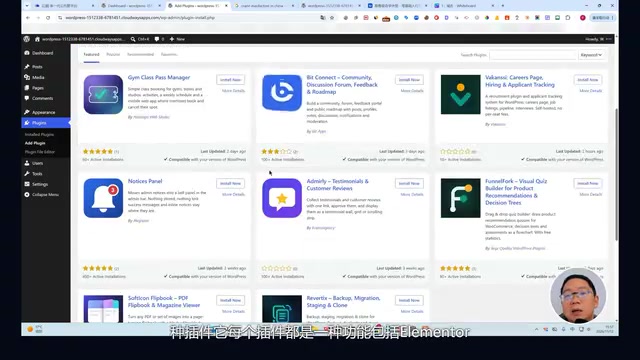
For plugins, you need to install Elementor and Elementor Pro (Pro adds forms, custom Header/Footer, and other features), then add the EA series Elementor extension plugins, as well as OceanExtra to work with the OceanWP theme.
Elementor MCP: Opening a Door for AI
MCP can be understood as a communication bridge between agents and tools. Every tool will have its own MCP in the future; the role of Elementor MCP is to let agents like Claude Code or Codex enter Elementor's permission scope and directly operate page design.
There's a permission boundary to clarify here: the creator compared another tool called Normia—Normia has higher permissions and can delete plugins, modify WordPress settings, and delete pages; while Elementor MCP only acts on the design parts that Elementor can control, and cannot change plugins or global settings. If you want high permissions, choose Normia; if you only want AI to do design, choose Elementor MCP.
There's a pitfall during connection: the prompt officially provided by Elementor doesn't work if you throw it directly at Claude Code. The correct approach is to copy the MCP URL, manually add it in Claude Code's settings under custom connectors, name it whatever you like (he used his brand name KORVAN), choose "no login required" for authentication, fill in the credentials from the Auth line in the headers, and set permissions to always allow. After connecting, you can have Claude Code check the connection status itself and confirm it can operate page design.
MCP (Model Context Protocol) is an open protocol launched by Anthropic at the end of 2024, aimed at standardizing the way AI models connect to external tools and data sources. You can think of it as the "USB interface of the AI world": in the past, every AI tool needed to write separate integration code for each external service, but MCP defines a unified client-server communication specification, allowing agents like Claude and Codex to call third-party capabilities in a consistent way. MCP servers expose three types of interfaces—"tools," "resources," and "prompts"—and agents dynamically discover and call these interfaces at runtime. Elementor MCP is the MCP server officially implemented by Elementor; it encapsulates the page builder's various operations (creating blocks, setting styles, adjusting layout) into tools that agents can call, thereby enabling "commanding AI to modify pages with natural language."
The Assets Folder Determines the Ceiling of the Final Product
This is the most memorable point in the entire tutorial: no matter how powerful the agent is, it can't produce good results without assets. Claude Code uses the project folder as its workspace; the folder must contain all materials—brand introduction, About Us, product specifications, scenario images, white-background images, logo, etc.—organized and categorized clearly.
Images need to be manually uploaded to the WordPress Media library—because Elementor MCP cannot control the media library, AI can't do this step for you.
Three-Step Design Workflow
First Produce Three Options, Then Start
The creator didn't let AI start building directly; instead, he first asked for 2-3 options, each including a logo and color scheme, and only looked at the homepage first. Claude Code gave three versions A, B, and C: version A with black and green colors, version B warmer, and version C with another color scheme. He chose version A, and only then did AI extend the homepage to the product category page, product detail page, About Us, Contact Us, and all other pages.
This rhythm of "compare drafts first, then finalize" is crucial—if you let AI build the entire site right away, the rework cost is very high if the direction is wrong.
Agent differs from ordinary chatbots in a key way: an agent can autonomously plan, call tools, read files, and iterate through multi-step tasks, rather than just single-turn Q&A. Claude Code is an agent product launched by Anthropic for the command line/desktop; it uses a local project folder as its workspace and can read and write files, execute commands, and call MCP tools. In this website building workflow, Claude Code plays the role of "executing designer": it reads brand materials and images from the assets folder, calls page building interfaces through Elementor MCP, completes color schemes, layout, and block construction according to instructions, and makes batch modifications based on feedback across multiple rounds of dialogue. This is also why "the assets folder determines the ceiling of the final product"—the quality of the agent's output depends heavily on the context it can read.
No More Than Three Colors
One source of the final product's quality comes from a simple rule: no more than three colors across the entire site. AI follows industry design rules by default when designing, so the resulting pages "look branded at a glance." The structure of the product detail page—main image plus auxiliary images on the left, title and description, feature and specification table, application scenarios, FAQ—was not explicitly told to AI how to arrange; instead, AI automatically completed it by understanding instructions and industry conventions.
Responsiveness and Editability
The generated website is fully responsive across desktop, tablet, and mobile. More importantly, all pages remain editable with Elementor: title fonts, colors, button text styles, and image replacements can all be changed manually. The creator specifically went into Elementor to verify, confirming that every Section and element is editable.
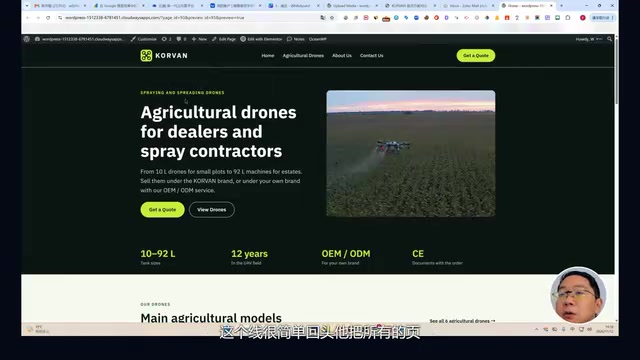
During actual operation, he found that the button text on product category pages was inconsistent. Instead of changing it manually, he directly told Claude Code to "unify all buttons to View Details," and AI made batch corrections. There was a white line at the top of the homepage coming from the OceanWP theme's Header settings; going into Customizer's Header → General → Bottom and turning it off solves it.
Finally, in Settings → Reading, set the homepage as a static page, and the entire site officially goes live.
Applicable Boundaries of This Method
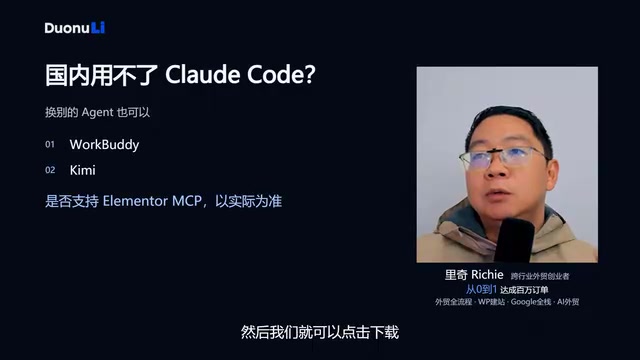
To be candid, the creator admits that WordPress may be phased out in the medium term, but for foreign trade beginners just starting out, it's still a safe choice. Claude Code has barriers to use in China; if you can't use it, you can switch to other agents that support MCP—the workflow is largely the same. In addition, Codex can also follow a similar path; he previously made a comparison episode and concluded that Claude Code performs excellently in aesthetics and front-end capabilities.
For people doing foreign trade, this path saves not only the time of dragging pages, but also the cost of design decisions—you don't need to understand layout, but you do need to understand how to articulate requirements clearly and prepare assets thoroughly.
Related articles

Pure-Code Video Generation Tested: Which AI Model Actually Follows Instructions?
A Bilibili creator tested three AI models' pure-code video generation with unified prompts and three revisions each: Xiaonaomao has a high ceiling but lacks stability, GPT 6.2 Extra models well but only follows half the instructions, and OPAS 5.5 remains the benchmark.
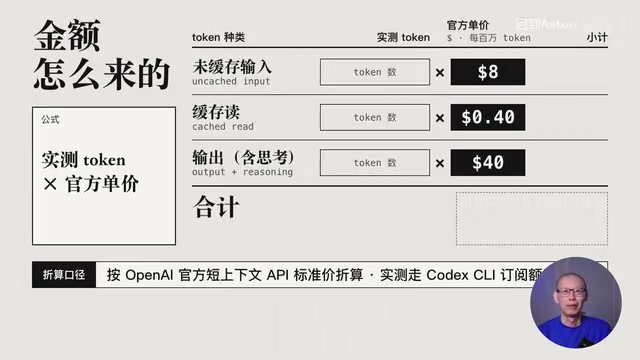
GPT-6 Six-Tier Hands-On Test: Astra Ultra Dominates but Bills Double
GPT-6 six-tier test: Astra Ultra sweeps 3:0 in 3D tasks thanks to sub-agents and runs 14% faster, but hidden backend bills make its real cost 2.6x single-threaded.

GPT-6.2 Astra vs Fable 5.2: Huge Cost-Efficiency Gap Across 12 Real-World Tests
Bilibili creator tests GPT-6.2 Astra vs Fable 5.2 across 12 real tasks: Fable wins 7-5 but costs 7.2x more and takes nearly 5x longer. Token efficiency emerges as the key selection metric.