Build a No-Code AI App Generator with n8n + Gemini in 10 Minutes

Using n8n + Gemini + GitHub Pages with four nodes, turn Telegram into a personal dev team that generates web apps in 10 seconds
The article introduces Terris, an n8n + Gemini project demonstrated by a YouTube creator: send a request in Telegram and receive a link to an AI-generated single-file web app within 10 seconds. The system is built from four n8n nodes: Telegram Trigger listens for messages, Google Gemini generates raw HTML code based on a system prompt, a GitHub node automatically creates or updates files and triggers Pages hosting, and Telegram sends back the public link. The author points out that the real barrier isn't node configuration but system prompt engineering—instruction structure determines output quality and format stability. The article also analyzes limitations: no code validation or preview, Pages build delays, and one-shot generation rather than iterative modification. Overall, it proves that the barrier to AI app development is shifting from writing code to designing workflows and prompts.
How a Telegram Bot Becomes Your Personal Dev Team
Send a message in Telegram like "make me a macaron-colored Pomodoro timer," and within 10 seconds you receive a clickable link to a web app—complete with HTML, CSS, JavaScript, already deployed and live. This is the n8n + Gemini project demonstrated by a YouTube creator, and the bot is named Terris.
Its tech stack isn't complicated: n8n handles orchestration, Google Gemini generates the code, and GitHub Pages handles hosting. The entire process requires no coding—just four nodes wired together on the n8n canvas.
What makes this approach noteworthy is that it compresses "idea → code → deployment → delivery" into the distance of a single message. In traditional workflows, even when using AI to generate code, developers still need to manually create files, push to a repository, and configure hosting. Terris automates all of this, leaving the user with nothing but a chat window.
n8n is an open-source workflow automation platform—think of it as a self-hostable Zapier/Make. It connects multiple services (such as Telegram, Google Gemini, GitHub) through a visual canvas using nodes, where each node performs a specific action (receiving messages, calling APIs, creating files, etc.), and data flows between nodes via expressions. Compared to pure code scripts, n8n's advantages are easy hosting, intuitive debugging, and support for webhooks and scheduled triggers—making it ideal for building "message in → process → result out" automation agents. It can be deployed locally via Docker or used through the official cloud service.
Google Gemini is Google's multimodal large model series. In this article, the API Key is obtained through Google AI Studio and invoked using the "Message a Model" node. Gemini supports long context and large code generation, making it suitable for outputting complete HTML files in one shot; however, different models (such as Pro vs. Flash) differ in speed, cost, and reasoning quality, so selection should depend on the scenario.
Four Nodes Wire Up a Complete Workflow
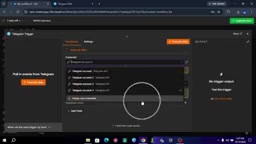
Step 1: Telegram Trigger—The Bot's Ears
Click the plus sign on the n8n canvas, search for Telegram Trigger, and select "On Message." For credentials, enter the bot Token obtained from BotFather.
This node acts as Terris's auditory system. Whenever anyone sends a text or voice message to the bot, the trigger immediately captures it and starts the workflow. In the demo, the creator emphasizes that this step is the entry point for the entire flow—a misconfigured Token will cause all subsequent nodes to fail.
Step 2: Google Gemini—The Bot's Brain
Drag a connection from the Telegram Trigger node, search for Google Gemini, and select the "Message a Model" operation. After entering the API Key from Google AI Studio, select a model and add a message.
The key lies in designing the system prompt. The creator's instruction is: "You are Terris, an expert web app developer. Create a single-file responsive HTML app with inline CSS and JavaScript. Output only the raw code, starting with [specified tag], and do not wrap it in Markdown code blocks."
The message content references data from the previous node via an expression: {{ $json.message.text }}. This means every sentence the user sends in Telegram is passed to Gemini as an instruction. At the same time, the "Simplify Output" toggle needs to be enabled to ensure the output format fits subsequent nodes.
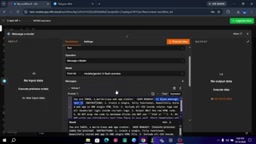
The creator specifically points out that the structure of the system prompt directly affects output quality—"it determines whether you get broken garbage or a complete, usable, high-value web app."
A system prompt is a "role + rules" instruction set for a large model before it receives user input, determining the boundaries and style of the model's response. Unlike ordinary conversation prompts, system prompts typically include identity setting, output format constraints, and prohibitions. The example in this article clearly states three things at once: "what role you are," "what format to output," and "what not to do." In practice, the clearer the constraints, the less likely the model is to "improvise"; format errors (such as wrapping in Markdown code blocks) will directly break the parsing logic of subsequent nodes, so prompts need repeated testing and fine-tuning.
Step 3: GitHub Node—Automatic Cloud Deployment
Continue connecting from the Gemini node, search for GitHub, and select "File: Create or Update." Connect your GitHub account using a Personal Access Token, then configure a few fields:
- Owner: Your GitHub username
- Repository: The repository name where the app will be stored
- File Path: Use an expression to generate a unique filename, such as
app-{{timestamp}}.html, to avoid files overwriting each other - File Content: Reference the Gemini node's output
{{ $json.text }}
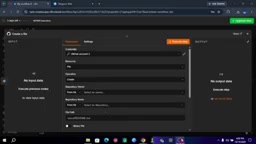
This step automatically pushes every piece of code generated by Gemini to the GitHub repository. Since GitHub Pages is enabled, the pushed file immediately gets a publicly accessible URL. Using a timestamp in the filename ensures each generation is an independent page and doesn't overwrite previous results.
GitHub Pages is a static website hosting service provided by GitHub—free, no server required. Simply push static files like HTML/CSS/JS to a specified repository branch, and you get a publicly accessible URL. It doesn't execute backend code but is perfect for the single-file web apps in this approach. Note that Pages takes some time after a push to complete its build and CDN refresh, during which a brief 404 may occur; additionally, access permissions for Pages on private repositories and repository naming rules also affect the final link format.
Step 4: Telegram Send—Delivering the Finished Product to the User
The final node returns to Telegram, selecting "Send Text Message." The Chat ID is automatically retrieved via the expression {{ $('Telegram Trigger').item.json.message.chat.id }}, ensuring the message goes back to the correct user.
The text content can be customized; the creator's template is: "Terris has built your app. Here's the online link: [GitHub Pages URL]"
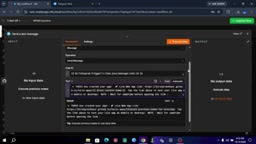
After saving and publishing the workflow, Terris is officially live. Users send requests in Telegram and receive a clickable app link within 10 seconds.
What's Really Worth Learning from This Approach
On the surface, this is a tutorial for a "no-code AI app generator." But after breaking it down, you'll find the core value isn't in the n8n node configuration—those operations can be completed simply by following the steps.
The real barrier is writing the system prompt. The creator's view is clear: "The secret to building AI bots and autonomous agents isn't learning thousands of lines of code—it's mastering system prompt engineering." The output quality of Gemini, Claude, and ChatGPT depends on how you structure your instructions.
This judgment has merit. At the current level of large model capabilities, getting a model to generate a complete single-file web app isn't difficult; what's difficult is ensuring stable output format—strictly outputting raw code every time, without adding extra explanations, without wrapping in Markdown. These constraints need to be precisely controlled through prompts, otherwise the subsequent GitHub node will fail due to formatting issues.
Another notable design choice is the "single-file app" positioning. Embedding all code into one HTML file sacrifices engineering standards but gains extreme simplicity in deployment—one file push and it's live, no build steps, no dependency management. For rapid prototyping and personal tool scenarios, this is a reasonable trade-off.
What's Missing Between a Tutorial and a Product
This workflow runs, but it's still a long way from being a reliable product.
There's no code quality verification step. Gemini-generated code is deployed directly; if there are syntax errors or logic flaws, the user's link may show a blank page. A production-grade solution needs to add code validation or preview confirmation steps.
GitHub Pages build delay is also a variable. After pushing a file, the Pages service needs time to complete the build and publish, and users clicking the link may encounter a 404. The creator doesn't address this issue in the demo.
Additionally, the current flow only supports single-round generation. If the user isn't satisfied with the result, they need to send a new message, generating an entirely new app rather than modifying the original. This makes it more of a "one-shot generator" than an "iterative development tool."
Nevertheless, as a project demonstrating n8n + Gemini integration capabilities, it clearly proves that the barrier to AI app development is shifting from "writing code" to "designing workflows and prompts." This shift itself is more worth pondering than the specific steps in the tutorial.
The key difference between an AI agent and an ordinary automation script is "whether it has automatic decision-making and feedback loops." This approach is essentially a linear pipeline—trigger → generate → deploy → reply—with no validation, retry, or self-correction. To upgrade to a true agent, you could add: code syntax checking nodes (such as running ESLint or an HTML validator), failure retry mechanisms, preview confirmation steps (first send a draft link for user confirmation before official publishing), and multi-round iteration storage based on user feedback. These improvements would double the number of workflow nodes, but reliability and user experience would see qualitative improvements.
Related articles

Free Unlimited Claude Code Solution: Agnes AI + CC Switch Setup Guide
No paid subscription needed — pair the free AI platform Agnes AI with the open-source tool CC Switch to provide a backend for Claude Code, enabling unlimited free calls to text, image, and video models. This guide covers the full setup, test results, and usage boundaries.

A Complete Zero-Cost Guide to Getting Started with Claude Code for Beginners in China
A beginner's guide to Claude Code for users in China: two installation methods (command line and IDE plugin), full configuration steps for replacing the official API with the free domestic LongCat model, and a hands-on demo of building a small tool with natural language, plus tips.

When the NSA Gets Involved: The AI Supply Chain Crisis Behind Open-Source CVEs and API Key Hijacking
Multiple open-source projects disclosed severe CVEs in one day, PHP flaws alarmed the FBI, and Railway and OpenCode were breached with API keys stolen. This article breaks down the vulnerability window, AI-accelerated exploitation, and the AI supply chain crisis behind the API key black market, with a developer defense checklist.