Build a WhatsApp AI Agent for Free with n8n: Auto-Reply and Booking

Use n8n to connect WhatsApp to an AI agent for 24/7 automation that understands intent, calls tools, and completes bookings.
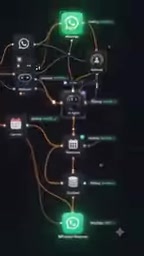
This article presents a low-cost, no-complex-coding WhatsApp automation solution: capture messages via the WhatsApp API, forward them to n8n's Webhook node to trigger a workflow, let an AI agent analyze intent and call tools like calendars, databases, and email, then send confirmations via the WhatsApp API to close the loop. It enables round-the-clock availability, instant replies, automatic booking, and freed-up manpower, ideal for service industries, e-commerce sellers, and developers exploring AI automation.
Why You Need a WhatsApp AI Agent
Manually replying to WhatsApp messages every day not only eats up a huge amount of time but also causes you to miss potential customers. As the video creator points out, many businesses are still handling every inquiry by hand, resulting in slow responses and lost leads. If you let an AI agent take over the conversation, the situation is completely different: it can understand customer intent, automatically carry out actions like booking and lookups, and stay online 24/7.

The core idea isn't complicated — connect the WhatsApp message stream to the automation platform n8n (spelled "ATEN" in the video, but it's actually n8n), and let the AI decide the next action. The whole process requires no complex coding and can be set up using free tools.
Breaking Down the Workflow: From Message to Automatic Booking
1. Message Reception and Triggering
A customer sends a WhatsApp message. The WhatsApp API captures it and forwards the content to a Webhook node in n8n. The Webhook is like a "doorbell" — as soon as data comes in, it immediately triggers the pre-configured workflow. This step is the starting point of the entire automation.
2. AI Understands Intent and Selects Tools
Next comes the core step: the AI agent analyzes what the customer said, determines what action needs to be taken, and calls the appropriate tool.

For example, if a customer says "I'd like to book tomorrow at 5 PM," the AI identifies the "booking" intent and then calls the calendar tool to check whether that time slot is free. If it's available, it automatically creates the booking; if there's a conflict, the AI suggests alternative times. Beyond the calendar, the AI can also connect to databases, email, and WhatsApp itself to handle tasks like checking orders and sending confirmations.
What Are AI Agents and Tool Calling?
An AI agent isn't just a simple "chatbot" — it's a system capable of autonomous decision-making. Its operating loop typically goes: receive input → understand intent → plan steps → call tools → observe results → decide the next step, until the task is complete. The key mechanism is called "Tool Calling" (or "Function Calling"): developers define available capabilities (such as checking a calendar, querying a database, sending email) as individual tools, each with parameter descriptions; the AI determines which tool to use and what parameters to pass based on the conversation, and the platform then actually executes it and returns the result. This way, the AI isn't just "generating text" — it can actually operate external systems. In the article, "the customer says they want to book, the AI first checks the calendar and then decides whether to create the booking" is exactly this loop in action. Note that the AI's decisions depend on prompt quality: the clearer the tool descriptions and the more well-defined the boundaries, the lower the probability of errors and "random calling."
3. Automatic Confirmation and Closing the Loop
After the booking is successfully created, n8n sends a confirmation message to the customer via the WhatsApp API. The customer receives feedback instantly, with no human intervention needed.

This instant response not only improves the experience but also prevents customer loss caused by delays. As mentioned in the video, the entire process can be fully automated — from receiving the message to sending the confirmation, all in one go.
What Is n8n?
n8n is an open-source workflow automation tool, often compared with Zapier and Make. Its core feature is "node-based" orchestration: each node represents an action (such as receiving a Webhook, making an HTTP request, querying a database, calling an AI), and nodes are connected by lines that define the data flow, chaining multiple services into an automated pipeline. n8n supports both self-hosting (the community edition is free) and a cloud version. The community edition has no execution limits, making it suitable for individuals or small and medium-sized businesses with limited budgets. It comes with a large number of built-in nodes and can also be freely extended with code nodes, so it can be set up with "zero-code" drag-and-drop or handle complex logic. The "AI agent" mentioned in the article is exactly an AI Agent node in n8n: it can receive user input, autonomously decide which tools to call based on the prompt, and combine the results returned by the tools to generate the final reply — fundamentally different from traditional automation with fixed "if-else branches."
What This Solution Delivers
The author summarizes several direct benefits:
- Round-the-clock operation: The system is online 24 hours a day, and can respond at night and on holidays too.
- Instant replies: Customers don't have to wait, and the experience is close to that of a human customer service agent.
- Automatic booking: Reduces back-and-forth communication and locks in times directly.
- Frees up manpower: Repetitive work is handed over to the AI, allowing the team to focus on higher-value tasks.
One detail worth mentioning: the video emphasizes building this "for free," meaning you can start with the n8n community edition and WhatsApp's free API quota, making it suitable for small and medium-sized businesses and individual developers to test the waters.
WhatsApp Business API and "Free Quota"
To let a program send and receive WhatsApp messages, you must use the official WhatsApp Business API (now provided by Meta). It's different from the regular personal version of WhatsApp: you need to bind a business entity, apply through the Facebook Business Manager platform, and configure a publicly accessible Webhook URL to receive message events. Meta usually provides a certain free conversation quota (billed by 24-hour sessions), and charges per conversation beyond that, so "starting for free" is feasible in low-inquiry scenarios. For individual developers, the main barrier is business verification and phone number review; if you're just testing, you can first connect through a sandbox environment from third-party providers like Twilio and then migrate to the official API. Understanding this is the only way to grasp why the article stresses that "Webhook configuration must be secure" — the Webhook is the only entry point from the outside world into your workflow, and once leaked, anyone can forge messages to trigger the process.
Practical Advice and Cautions
Although the video doesn't go into technical details, several key points can be inferred from the workflow description:
- Webhook configuration must be secure: Ensure that only the WhatsApp API can trigger the workflow and prevent malicious requests.
- AI prompts must be clear: Explicitly tell the AI the available tools and the boundaries of its actions to prevent it from "making random decisions."
- Calendar integration requires authorization: When connecting tools like Google Calendar, pay attention to permission management.
- Test before going live: First run the entire workflow with a test number, then connect it to the production environment.
Also, the video spells n8n as "ATEN" and "NATEN," which may be speech recognition errors. When actually building it, be sure to follow the official n8n documentation.
Who It's For
This solution is especially suitable for:
- Service industries that handle a large number of bookings (beauty, consulting, repair, etc.)
- E-commerce sellers who want to automatically reply to common questions
- Individual developers who want to try AI automation at low cost
If you're already familiar with the basic operations of n8n, you can build a prototype in about half an hour by adding an AI node and a calendar tool. The video creator also encourages viewers to draw inferences and apply this pattern to other AI automation scenarios.
One-line Summary
Use n8n to connect WhatsApp messages to an AI agent for a 24/7 automation solution that understands intent, calls tools, and completes booking confirmations.
Paragraph Summary
The article introduces a low-cost WhatsApp automation solution that requires no complex coding: capture customer messages via the WhatsApp API and forward them to n8n's Webhook node to trigger a workflow, then have an AI agent analyze customer intent and call tools like calendars, databases, and email to perform specific actions, and finally automatically send a confirmation message through the WhatsApp API to close the loop. This solution enables round-the-clock availability, instant replies, automatic booking, and freed-up manpower, making it suitable for service industries like beauty, consulting, and repair, e-commerce sellers, and individual developers who want to try AI automation at low cost. The article also offers practical tips on Webhook security, clear prompts, calendar authorization, and testing before going live, and reminds readers that "ATEN/NATEN" in the video is actually a misspelling of n8n.
Related articles

GPT-Next Leak, Gemini 4 Argon Imminent: AI News Roundup
GPT-Next leak suggests extreme efficiency; OpenAI's 28-day shipping pledge boosts speed 50%; Gemini 4 Argon nears release; Anthropic subscription value report sparks debate.

GPT-Next Leaked, Gemini 4 Argon Speeds Up, Fable 5.5 May Launch Today
OpenAI's GPT-Next model leaks, expected to be extremely low-cost and possibly part of the 28-day release plan; Gemini 4 Argon internal testing accelerates, NanoBanana 2.1 is live; Semi Analysis tests show Claude Max's equivalent API value is about 5 times that of ChatGPT Pro; Fable 5.5 may launch today.

Gemini 4 Argon Launches Globally: Key Highlights from the AI Daily Brief
Google opens Gemini 4 Argon globally across Pro and Ultra subscriptions and the API, and demonstrates robot control. This article rounds up open-source models, Agent infrastructure, cost transparency, and safety governance updates.