Build Invoice OCR Automation with n8n + AI: Push Receipt Data Straight into Google Sheets

Use n8n with OpenAI vision to build a five-step invoice OCR auto-entry workflow.
The article presents an invoice OCR automation solution based on n8n and OpenAI, solving the high cost of manual invoice entry in food service, retail, and logistics. The five-step workflow lets users upload invoice images via a form, uses an OpenAI node to extract structured data, processes line items with a Loop node, formats them into a table structure with a code node, and writes the results into Google Sheets. Tests show the AI can recognize handwritten receipts, handle quantity multiplication and tax calculation, and skip missing vendor fields. The author highlights its low barrier, customizability, and commercialization potential.
Every day, businesses face mountains of paper invoices, forcing dedicated staff to enter them one by one into Excel or Google Sheets—an extremely common yet costly scenario in industries with heavy invoicing like food service, retail, and logistics. A YouTube creator (channel Trip Tech Solution) demonstrated in a hands-on video how to use n8n and AI's OCR capabilities to compress this into "upload an invoice image → structured data automatically lands in the sheet within seconds."
The Problem: How Painful Is Manual Invoice Data Entry?
The video opens with a real observation: while paying at a restaurant, the author noticed an employee entering all of the day's bills into a spreadsheet line by line. According to the manager, this employee would spend nearly an entire day just processing the previous day's accumulated receipts and invoices.
This scenario isn't limited to food service. According to the video's analysis, any industry with high invoicing volume—logistics, warehousing, retail—faces the same dilemma:
- Manual entry is highly error-prone: as numbers pile up, decimal point positions and 1 vs. 2 confusion become possible
- Serious processing delays: yesterday's documents only get entered today, so finance never has "same-day" reports
- Operating costs stay high: large enterprises often need three to five or more people dedicated solely to data entry
These three points form the core pain of invoice processing and the value of automation solutions.
The Solution: Build an AI Invoice OCR Workflow in Five Steps
The author summarized the whole approach as "small steps, big output"—no complex systems needed, just five steps to close the loop.
The core idea: users upload invoice or receipt images through a form, AI handles recognition and extracts structured data, n8n handles orchestration, and the final results are automatically written into Google Sheets. The entire process can be completed in seconds to a minute.
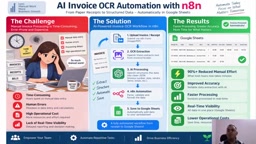
The author demonstrated a workflow preview (workthrough) in the video: click through, upload a receipt, submit, and the data immediately goes through the processing pipeline—within seconds, three structured records are produced, including item name, quantity, unit price, etc., with subtotal and tax automatically calculated.
n8n is an open-source workflow automation platform, essentially a "self-hostable Zapier": users drag and drop nodes to chain different services, APIs, and logic steps into an automatically executing pipeline. Its core advantage is being open-source and supporting self-hosting, so data doesn't have to pass through third-party SaaS servers—especially important for handling sensitive financial information like invoices. n8n provides a rich set of built-in node types, including form triggers, HTTP requests, code execution, loop control, and integrations with various third-party services. In this solution, the form entry, OpenAI call, and Google Sheets writing are all done through nodes—no need to write a full application.
Key Steps Breakdown: How n8n Nodes Chain Together
Form Trigger: On Form Submission
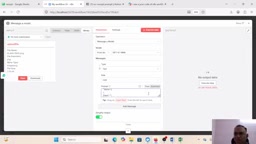
The first step of the workflow is n8n's On Form Submission node, configured with a title and description, and a file-type form element added for users to upload invoice images. This is a lightweight but practical entry design—no need to develop a separate frontend page.
AI Recognition: OpenAI Node for OCR
The core recognition step uses the OpenAI node. In the video, the author selected an appropriate GPT model, passed the image to the AI, and used a carefully designed prompt to constrain the output format.
Key points of the prompt include:
- Extract all line items from invoices and receipts
- Return strictly in JSON structure, with no markdown and no explanatory text
- Keep monetary fields in numeric format
The author particularly emphasized that different businesses need different column structures, so readers should customize the prompt and output structure according to their actual needs—practical advice, since invoice formats vary greatly across regions and industries.
OCR (Optical Character Recognition) traditionally refers to technology that converts text in images into editable text; early tools could only do "pixel-to-character" transcription. This solution uses vision-LLM-based OCR—the model not only recognizes text but also understands layout structure, determines which content is an item name versus quantity or amount, and outputs structured formats like JSON as needed. This "semantic-level OCR" is far more tolerant of skewed, handwritten, and inconsistently formatted receipts than traditional approaches, which is the key reason it can recognize handwritten "5+3" and calculate correctly.
In prompt engineering, constraining the model to "return strictly in JSON structure, with no markdown, no explanatory text" ensures the output can be directly parsed by subsequent nodes. By default, large language models reply in natural language with code blocks, which would break if fed directly to a downstream parser. Forcing a JSON schema allows n8n's code node or Sheets-writing node to reliably extract fields by name, avoiding the common breakpoint where "the AI said it right, but the program can't read it." This is also a general practice when integrating large models into automation pipelines.
Loop Processing and Structuring
Since a single invoice may contain multiple line items, the workflow uses a Loop node to process each item returned by the AI one by one, then a code node formats the data into the column structure of Google Sheets. The author mentioned that this part doesn't require much code—just define the format by column.
The Loop node is used to handle "one-to-many" data relationships: a single invoice may have multiple line items, the AI returns an array, and each row in Google Sheets can only hold one record. The Loop node iterates through each item in the array, letting subsequent nodes execute for each record, ultimately splitting multiple line items into multiple rows in the sheet. The code node handles field mapping, aligning the JSON fields output by AI to the target sheet's column definitions. This logic is simple but determines whether the entire pipeline can reliably write to the sheet.
Write to Google Sheets
The final step writes the structured data into Google Sheets. The author pre-defined the column structure (item name, quantity, unit price, amount, tax, total, etc.), and the entire data flow fills it in automatically.
Test Results: Even Handwritten Receipts Can Be Recognized
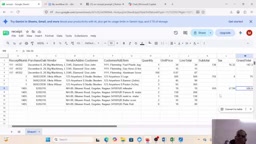
The most convincing part of the video is the accuracy demonstration. The author uploaded a receipt image containing handwritten text; the AI not only accurately extracted dish names like grilled fish, cheese, and curry, but also recognized quantities (including handwritten expressions like "5+3") and automatically performed multiplication and total calculation, ultimately outputting the final price and GST tax.
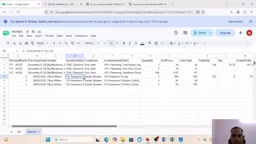
The author noted in the demonstration that even when some numbers in the original image aren't fully legible, the AI could still complete reasonable recognition and calculation. For receipts without a vendor name, the AI would skip that field rather than fabricate it—this "fill if present, leave empty if not" approach is especially important in financial scenarios.
Use Cases and Commercialization Ideas
This solution has a fairly broad scope. The author explicitly listed several types of potential users:
- Small and medium merchants in food service, retail, etc.: large numbers of bills to aggregate every day
- Logistics and warehousing companies: huge volumes of waybills and expense documents
- Accounting firms and finance departments: according to the video, CAs usually need reports in specific formats, and this solution can output them quickly
In the second half of the video, the author directly offered commercialization advice: if you master this n8n + AI workflow-building capability, you can pitch this solution to industry clients who need it, showing "what the problem is, how the solution works, and how good the results are," thereby winning project opportunities.
Why This Solution Is Worth Noticing
From a technical perspective, this workflow isn't complex—essentially n8n's form trigger + OpenAI's visual recognition + loop processing and Sheets writing. But it reveals an important direction: the value of AI implementation often lies not in how advanced the model is, but in whether it can be precisely embedded into specific business processes.
Invoice OCR isn't a new concept, and there are plenty of mature tools on the market. But this solution's advantages are its low barrier to entry, customizability, and controllable cost—using an open-source automation platform like n8n to chain AI capabilities means small and medium teams can quickly build a processing pipeline that fits their own needs without buying expensive SaaS services or developing from scratch.
If you're also troubled by invoice entry, try starting with this five-step workflow.
One-line Summary
Chain OpenAI visual recognition with n8n to build a five-step invoice OCR auto-entry workflow.
Paragraph Summary
The article introduces an invoice OCR automation solution based on n8n and OpenAI, aimed at solving the high cost of manual invoice-by-invoice entry in industries like food service, retail, and logistics. The entire workflow needs only five steps: users upload invoice images through a form, the OpenAI node recognizes and extracts structured data, a Loop node processes line items one by one, a code node formats them into the sheet's column structure, and finally they're automatically written into Google Sheets. In testing, the AI could recognize handwritten receipts, automatically complete quantity multiplication and tax calculation, and skip missing vendor fields rather than fabricate them. The author believes the core value lies in its low barrier to entry and customizability: SMBs can build their own pipeline without buying expensive SaaS, and it has the potential to be commercialized for industry clients.
Related articles

Free Unlimited Claude Code Solution: Agnes AI + CC Switch Setup Guide
No paid subscription needed — pair the free AI platform Agnes AI with the open-source tool CC Switch to provide a backend for Claude Code, enabling unlimited free calls to text, image, and video models. This guide covers the full setup, test results, and usage boundaries.

A Complete Zero-Cost Guide to Getting Started with Claude Code for Beginners in China
A beginner's guide to Claude Code for users in China: two installation methods (command line and IDE plugin), full configuration steps for replacing the official API with the free domestic LongCat model, and a hands-on demo of building a small tool with natural language, plus tips.

When the NSA Gets Involved: The AI Supply Chain Crisis Behind Open-Source CVEs and API Key Hijacking
Multiple open-source projects disclosed severe CVEs in one day, PHP flaws alarmed the FBI, and Railway and OpenCode were breached with API keys stolen. This article breaks down the vulnerability window, AI-accelerated exploitation, and the AI supply chain crisis behind the API key black market, with a developer defense checklist.