Building a B2B Research Chain with LangChain: How to Avoid Tool Bloat?
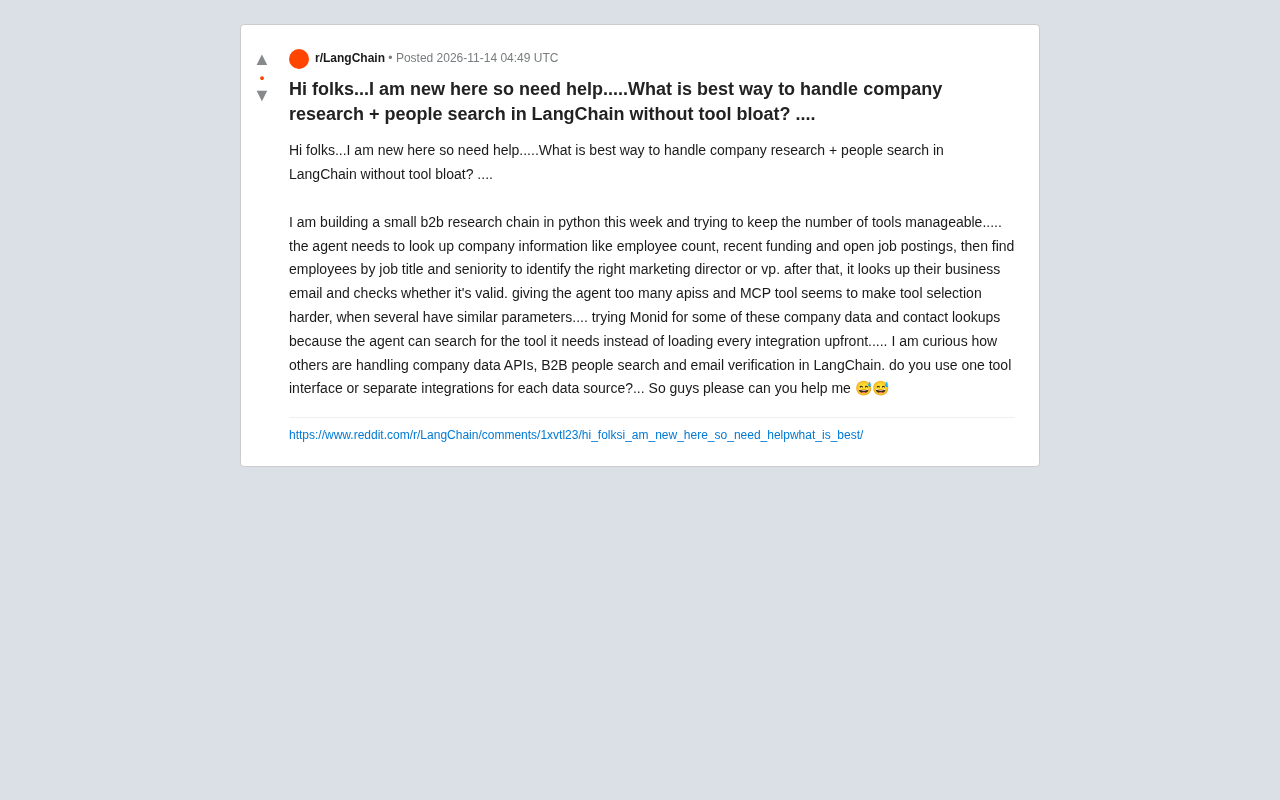
Tool bloat in B2B research agents can be mitigated through unified interfaces, tool retrieval, or splitting by task stage.
The article addresses tool bloat when building B2B research agents with LangChain. When company lookup, people search, and email verification are wrapped as separate tools with similar parameters, agents easily get confused. The author compares two paths: a unified tool interface converges entry points and reduces decision space but sacrifices flexibility; tool retrieval loads on demand and suits scenarios with many data sources and uneven call frequency but introduces retrieval uncertainty. Community practice favors splitting tools by task stage rather than data source. Email verification, being boolean, is best placed as a final independent step. Beginners should start with a minimal toolset and consider retrieval only after call patterns are clear.
When building a B2B research agent in LangChain, a common pain point is tool bloat: company info lookup, employee search, and email verification each hook up to a separate API, with similar parameters and overlapping functionality, and the agent's decision paralysis follows. A developer's question on Reddit is quite representative—he needs to find a company's employee count, funding status, and open positions, locate a marketing director or VP by role and seniority, and then verify whether their business email is valid. With so many tools, it becomes hard to know which one to call.
Where Tool Bloat Comes From
LangChain's Agent relies on tool descriptions to decide which function to call. When multiple tools have similar parameter structures (for example, all accepting query or company_name), the model easily gets confused. This developer mentioned that he tried using Mondi for some company data and contact lookups because the agent can search for the tools it needs on demand rather than preloading all integrations.
This exposes a design trade-off: should every data source be wrapped as an independent tool, or should a unified retrieval layer manage the tools? Each approach has its use cases; let's unpack them below.
LangChain Agent tool selection essentially stuffs each tool's name, description, and parameter schema into the system prompt, and the LLM outputs the function name and parameters to call during reasoning. The more tools there are, the longer the prompt, and the harder it is for the model to distinguish between similar descriptions—a phenomenon often called "tool overload." OpenAI's function calling and Anthropic's tool use follow the same paradigm, so the problem is universal. There are usually three types of mitigation: reduce the number of tools, improve description distinctiveness, and introduce tool retrieval (such as LangChain's ToolRetriever or vector-retrieved tool subsets). Understanding this mechanism helps determine when to merge tools and when to split workflows.
Approach 1: A Unified Tool Interface
The core idea of a unified interface is to converge the entry points—use one search_company tool and one search_people tool, and internally route to different data sources based on parameters.
The advantage is a controllable number of tools, a smaller decision space for the agent, and higher selection accuracy. The cost is reduced flexibility: if different data sources return very different fields, the unified interface's schema becomes bloated, which in turn increases comprehension cost.
When implementing, you can use LangChain's StructuredTool to define clear parameter descriptions and spell out in the docstring which data source each parameter corresponds to. The key is to let the tool description itself carry the routing responsibility rather than making the model guess.
StructuredTool is the class in LangChain for defining tools with structured parameters. It accepts a Pydantic model as args_schema, thereby explicitly exposing each parameter's type, whether it is required, and its description to the model. Compared with a plain Tool that only uses a string description, StructuredTool lets the model construct parameters more accurately and also makes runtime parameter validation easier. In the unified interface approach, you can design "data source" as an enum parameter and pair it with a Literal type to restrict values, so the model clearly knows which routes are available instead of guessing. This also means the docstring and field descriptions effectively serve as the routing manual—the more specific they are, the lower the chance the agent chooses wrong.
Approach 2: Tool Retrieval Instead of Full Loading
The developer's mention of "the agent searches for tools on demand" belongs to another path: instead of stuffing all integrations into the tool list, first let the agent retrieve available tools, then load only the relevant few.
This suits scenarios with many data sources and uneven call frequency distribution. Company info lookup and email verification have completely different call patterns: the former may require multiple attempts with different query terms, while the latter is usually a one-time validation. Putting them in the same tool pool allows the retrieval layer to dynamically filter by task stage.
However, tool retrieval itself introduces a layer of uncertainty: if retrieval results are inaccurate, subsequent calls have no foundation. So the quality of descriptions in the retrieval layer must be higher than that of ordinary tool descriptions.
The common implementation of tool retrieval is to vectorize each tool's description and store it in a vector database. The agent first uses a natural language query to retrieve the Top-K tools, then injects them into the current tool list. In the LangChain ecosystem, vector stores (such as FAISS and Chroma) can be combined with a retriever to accomplish this layer, and Anthropic has also proposed a similar "tool search" idea. The cost is that retrieval recall directly determines the upper bound of downstream capability: if the target tool is not recalled, the agent cannot call it no matter how smart it is. Therefore, retrieval-layer descriptions need to be closer to the natural language phrasings users might use than ordinary tool descriptions, and recall should be evaluated regularly using real call logs.
Consensus in Community Practice
From the discussion, most practitioners prefer splitting tools by task stage rather than by data source. For example, divide the workflow into three stages: "company profiling," "people discovery," and "contact verification," and expose only the tools needed at each stage.
The logic is that the Agent's reasoning steps are themselves staged; once the tool list aligns with the reasoning stages, selection difficulty naturally decreases. By contrast, simply reducing the number of tools while mixing stages has limited effect.
The Special Nature of Email Verification
Email verification has an essential difference from other queries: it is a boolean result—failure is failure, with no intermediate state. This makes it better suited as an independent step at the end of the workflow rather than a tool parallel to other queries.
If it is placed at the same level as people search, the agent may try to verify an email before finding the person, causing invalid calls. Moving the verification step later can significantly reduce this kind of waste.
Business email verification usually includes syntax checks, domain MX record lookups, SMTP handshake probing, and other steps. Some services also return intermediate states such as catch-all and greylisting, so it is not strictly a binary result. The "boolean" mentioned in the article refers more to how results are adopted at the business level: usable or not usable. In actual integration, it is recommended to retain the raw status codes at the tool layer and let the agent or post-processing logic decide whether to retry or degrade, avoiding misjudging server-side "uncertain" as "invalid" and thereby wrongly eliminating potential contacts.
Practical Advice for Beginners
If you are building your first B2B research chain, start with a minimal toolset: one company lookup, one people search, and one email verification. First get the workflow running with a unified interface, then decide based on actual call logs whether to introduce a tool retrieval layer.
Tool bloat is not a problem to solve from the very beginning; it is something worth optimizing only after call patterns become clear. Premature abstraction often hides uncertainty even deeper.
Related articles
Daybreak Red Deployment Guide: A Reference Architecture for Supervised Security Investigation
A breakdown of the Daybreak Red reference architecture: security control design, deployment configuration process, and runtime monitoring for supervised security investigation.
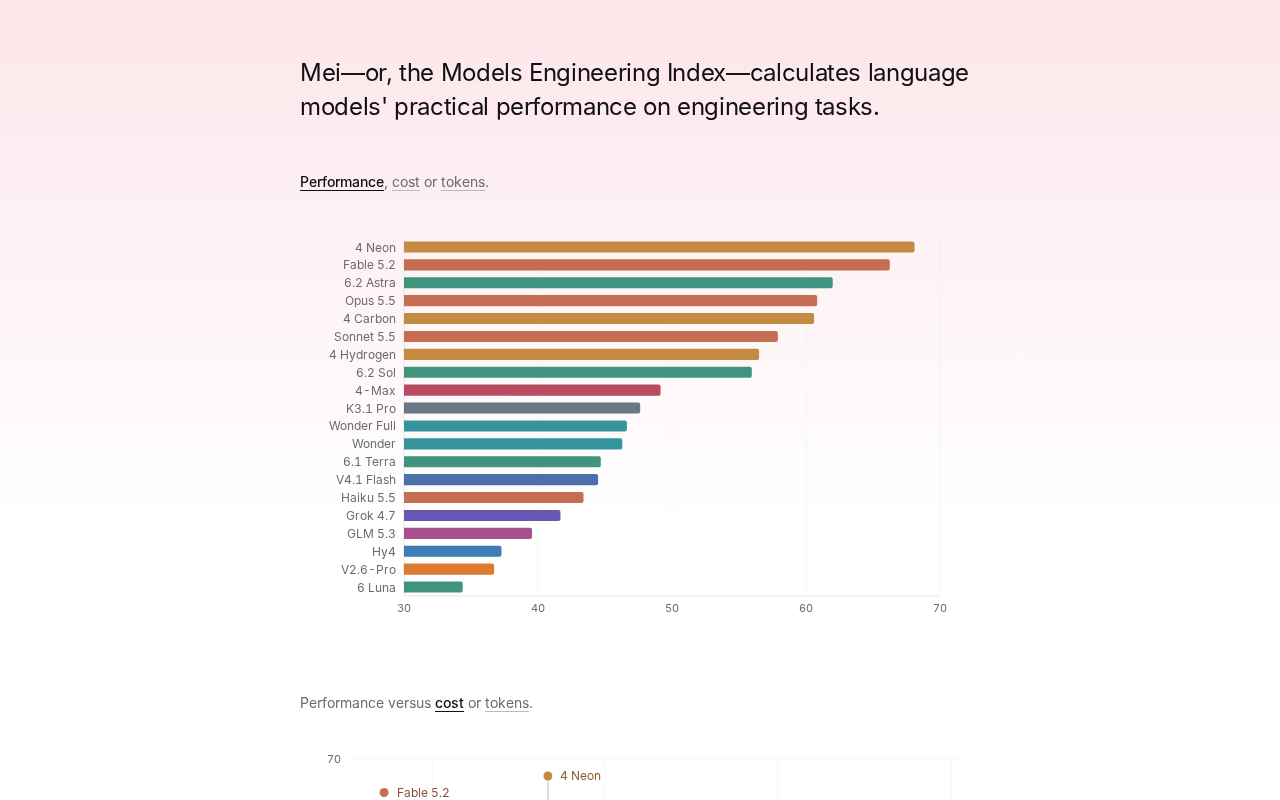
Gemini 4 Neon Tops the Models Engineering Index
Gemini 4 Neon tops the Models Engineering Index, sparking Hacker News debate over ranking credibility and evaluation methods. Here's what it means for developers.

Apple's Self-Developed AI Agent: An Agent That Can Operate Your Mac Is Coming
Apple is reportedly developing an AI agent that can operate a Mac, targeting Meta Muse, Claude, OpenAI Dots, and others. This article analyzes Apple's system-level advantages, the competitive landscape, and likely rollout paths in the agent race.