Building a Local AI Video Generator with GPT and Grok — Does It Actually Work?
Non-engineer builds a working local AI video app using only GPT, Grok, and Cursor — no professional code written.
A blogger took on the challenge of building a local AI video generation app from scratch using only GPT, Grok, and Cursor — no professional coding required. The project produced a complete Python package with a frontend UI and an offline Kokoro 82M voiceover module. Using the classic "Will Smith eating spaghetti" benchmark, the initial model output was uncanny, but switching to a 14B parameter backbone delivered a clear quality leap — though finger anatomy remained a persistent flaw. The experiment reveals the real limits of "using AI to build AI": scaffolding is now accessible to anyone, but generation quality is still dictated by model scale and hardware, with 12GB VRAM only enabling inference, not training.
A overseas blogger took on a fan challenge: build a locally-running AI video generation app from scratch, without writing a single line of professional code — just GPT, Grok, and Cursor. The result was surprisingly successful. This AI-assembled project actually completed the full pipeline and generated the classic "Will Smith eating spaghetti" benchmark video.
Step One: Understand Your Hardware Before Touching Code
The blogger's first move was to use ChatGPT to clarify requirements — not to start coding. The model responded with a series of key questions: What's your hardware? What video generation approach will you use? How will audio be handled?
The final plan: local text-to-video generation with AI voiceover narration. This immediately surfaced the most realistic constraint in the entire project — the blogger's GPU had only 12GB of VRAM. The model's verdict was blunt: "12GB is enough to run a decent local inference pipeline, but nowhere near enough to train a modern video foundation model from scratch."
This conclusion cuts right to the core barrier of AI video generation. The blogger openly admitted he wasn't an AI engineer — his understanding of image generation stopped at "Gaussian denoising": the model adds noise to an image at each timestep, then learns to reverse it. Video generation extends this across multiple frames. This basic understanding actually represents the starting point for most everyday users, and explains why "using AI to build AI" sounds appealing but is full of pitfalls in practice.
A Quick Primer on Gaussian Denoising and Diffusion Models
The "Gaussian denoising" the blogger mentioned refers to the core mechanism of diffusion models. Training involves two processes: the forward process gradually adds Gaussian noise to the original image until it becomes pure noise; the reverse process trains the neural network to remove noise step by step and reconstruct the image. During inference, the model starts from random noise and generates new image content through a series of "denoising steps." Video generation adds a temporal dimension, requiring motion coherence between frames — and the computational cost scales dramatically. This is why 12GB of VRAM can handle inference but falls far short of training: a modern video foundation model can have billions of parameters and requires hundreds of high-end GPUs running for weeks to train.
Building in Phases: A Complete App Emerges in Cursor
With the requirements defined, the blogger dropped the prompt — "build a production-grade local application that generates fully narrated videos from text prompts" — into Cursor and settled in for a long wait. The project was broken into three phases (Phase 1/2/3), with different models including GPT-5.6 used along the way.
What surprised the blogger was how complete the output was. It wasn't just a standalone Python script — it was an installable Python package with all the necessary files and even a frontend UI. By the end of Phase 3, system verification confirmed: Kokoro narration running fully offline, positioned in the browser, with the acceptance script confirming TTS could run cleanly after the video model was unloaded.
The finished app UI was fairly minimal, with modules including: Generate Clips, Narration, Models & Settings, Hardware Diagnostics, and a Mock Generation page for testing the encoder. The hardware diagnostics section flagged missing PyTorch and the need to install FFmpeg — dependency management issues that are unavoidable with local deployment.
First Generation: That Familiar Uncanny AI Video Feel
The blogger chose the iconic benchmark — "Will Smith eating spaghetti" — one of the earliest test cases for video generation. With settings at 5 seconds, 9:16 portrait, 480p standard quality, he hit generate.
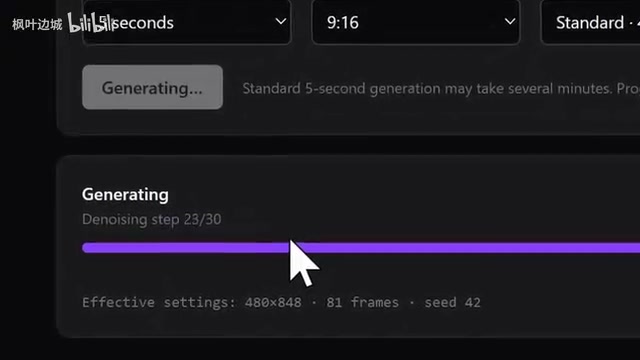
The result was rough: the generated figure "was absolutely not Will Smith," and the footage had that distinctive uncanny quality of early AI video. The blogger put it well — the model understands that humans have heads, faces, and two arms, but consistently struggles with details like fingers and mouths. Human anatomy remains an unsolved problem. He also tried generating video with text overlays, which failed just as expected: if it can't handle spaghetti properly, text rendering is a pipe dream.
Upgrading the Backbone: The 14B Model Changes Everything
The real turning point came when the blogger swapped in a larger model backbone — a 14 billion parameter (14B) version. The process wasn't smooth. He stayed up all night without getting a successful video generation, then the next day, after updating his system and drivers, it inexplicably worked. He couldn't even tell what had fixed it.
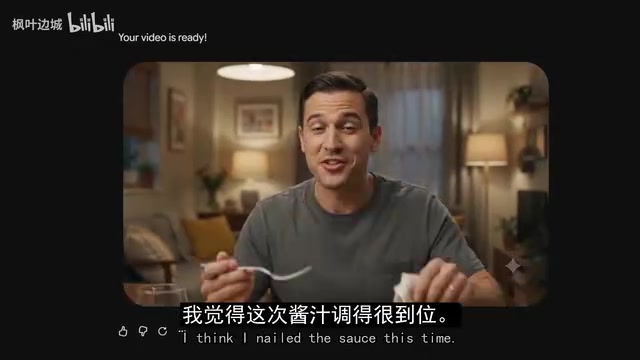
The quality improvement with the larger model was visible to the naked eye. Using the same "Will Smith eating spaghetti" prompt, the new version was far richer in detail: a bottle appeared in frame — the model "understood" this was a dining scene and that there should be a drink on the table. It even added a female character on its own initiative. What really surprised the blogger was that despite the prompt only saying "Will Smith," the generated character's race matched. The food this time actually looked appetizing — the blogger said outright, "I would genuinely eat that."
The old problem persisted, though — fingers were still awkward. This reinforces a consistent pattern: scaling up model size brings sweeping improvements overall, but the finest physical and anatomical details remain a shared weakness across the entire field.
Model Parameter Count and Generation Quality
"14B" means the model has approximately 14 billion learnable parameters. Parameter count is a key measure of model capacity: more parameters means the model can encode richer visual patterns, semantic associations, and physical rules. In video generation, larger parameter counts generally translate to stronger "world understanding" — the model can more accurately infer scene composition (like a drink on a dining table), character appearance (like racial consistency), and dynamic details. However, increased parameters also bring linear or even superlinear growth in VRAM requirements, which is exactly the bottleneck for consumer-grade GPUs. Anatomical details like fingers and teeth remain difficult even for larger models because these local structures vary enormously in training data, deform in complex ways, and require extremely high model capacity and data volume to model reliably — a shared challenge across the entire field.
The Narration Module: Local TTS Surprises and Limits
The app also had a narration page that hadn't been shown yet, powered by the Kokoro 82M parameter model. Its operating logic was thoughtfully designed: the engine loads, synthesizes, and unloads on request, never competing for GPU resources when a video task is running.
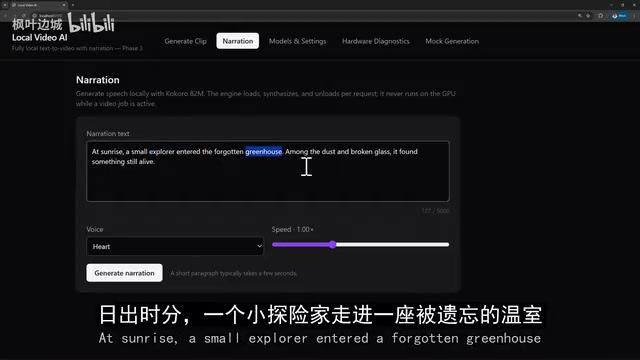
The blogger tested it with a sample passage ("At sunrise, a young explorer entered a forgotten greenhouse..."), and the 8-second narration was "surprisingly good." But he pointed out an expectation gap: he had assumed you could upload a video and get automatic voiceover or even lip-sync. In reality, it simply generates audio — like ElevenLabs — with no synchronization to the visuals. After auditioning multiple voices, he found one called Nicole to be the most consistent; others were noticeably hit-or-miss.
Kokoro and Local TTS: Background
Kokoro is a lightweight open-source text-to-speech (TTS) model. At 82M parameters, it can run smoothly on CPU or even low-end GPUs, making it ideal for staggered use alongside video inference tasks. It's based on a streaming acoustic model architecture capable of synthesizing multiple voice styles and tones. Compared to cloud services like ElevenLabs, local TTS offers complete offline operation, no API costs, and data that never leaves your machine. The trade-offs are inconsistent voice stability and no lip-sync capability — the latter requires a separate driving network (such as SadTalker or Wav2Lip) to align audio waveforms with facial landmark animation, which is an entirely separate research direction and far more complex than audio synthesis alone.
What This Experiment Actually Tells Us
Beyond the entertainment value, this experiment offers a few genuinely thought-provoking takeaways. Using AI to orchestrate and Cursor to implement, someone without an engineering background really can build a fully functional, full-stack local video generation app — something that would have been nearly unimaginable a few years ago. But the output quality still trails noticeably behind current mainstream models like Wan Video, and the blogger acknowledged that with his hardware, continuing to train and improve on this foundation is essentially impossible.
In other words, "using AI to build AI" has dramatically lowered the barrier to assembling the scaffolding — but it hasn't circumvented the two real moats: compute and data. The ceiling on generation quality is ultimately determined by the underlying model and hardware. For hobbyists who want to experiment, this makes for a fun weekend project. But producing output at a usable quality level? That gap remains very wide.
Related articles

9 AI Subscription Plans Compared: The Real Cost Per 100M Tokens Revealed
Bilibili creator tests 9 AI subscription plans from Volcano, Alibaba, Tencent, Baidu, Zhipu, Xiaomi, MiniMax and more, converting them all to real cost per 100M tokens, breaking down fixed-quota vs. three-tier coefficient billing and how caching, time-of-day discounts, and window limits affect actual quota.
Vibe Coding for Beginners: Expressing Intent Instead of Handwriting Code
What is Vibe Coding? A 137-episode Bilibili course defines it: the core is expressing intent, not writing code. This article analyzes Vibe Coding's productivity logic, target audience, and entry expectations to help beginners decide if it's worth learning.

LangChain Beginner's Guide: An Agent Development Roadmap from LangGraph to Deep Agents
Clarify the encapsulation relationship among LangChain, LangGraph, and Deep Agents, and master the learning path and selection logic for agent development frameworks—suitable for beginners in large model development.