Building a Multi-Agent AI Team with Coze: From Concept to Practice
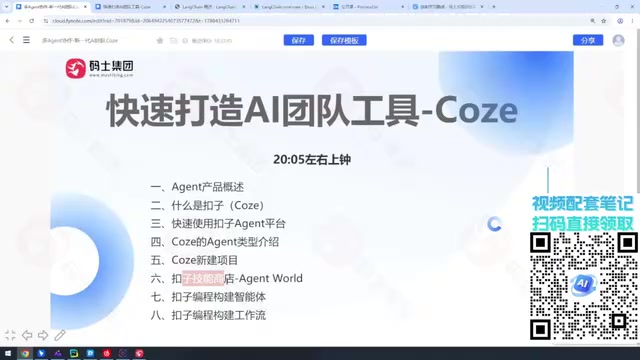
A practical intro to Coze's multi-Agent platform, from product categories to hands-on setup.
This article categorizes AI Agent products into three types — tool platforms (Coze, Dify), Agent software (Cursor, Claude Code), and dev frameworks (LangChain, Spring AI) — then dives into Coze as a Chinese-built Agent platform. Key highlights include multi-Agent collaboration for cloud orchestration plus local execution, a Skill Store for extending agent capabilities, visual workflows, and custom programming. The article closes with a clear onboarding path for both non-technical users and developers.
Coze is a Chinese-developed AI Agent platform that has become a go-to tool for developers and businesses looking to quickly deploy intelligent agents and workflows. This article is based on a hands-on walkthrough shared by a Bilibili creator, covering everything from Agent product categories to practical usage of the Coze platform — helping users of all skill levels understand what this tool can do and how to get started.
Three Categories of AI Agent Products: Know What You're Learning
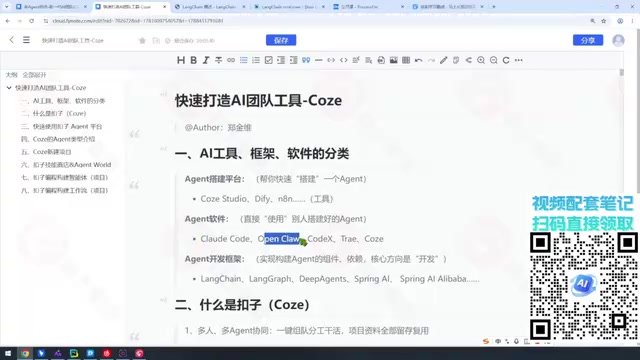
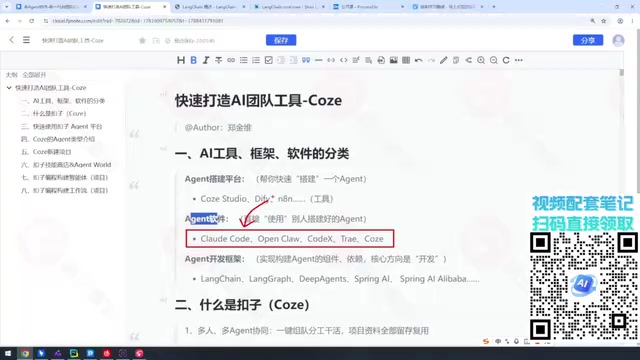
Before diving in, it helps to understand how AI Agent products are currently categorized. The creator breaks them down into three broad types, giving learners a framework for positioning any tool they encounter.
The first category is tool-based platforms — platforms that help you build the Agent you want. Key examples include Coze, Coze Studio, Dify, and n8n. The core value of these tools is lowering the barrier to entry: you don't need to know how to code to build an intelligent agent. Coze leans toward out-of-the-box usability (some features are paid), while Coze Studio requires a bit more technical ability.
The second category is Agent software — products that actually get work done, such as Claude Code, Codex, and Cursor for coding tasks, as well as various WebCoding tools. The main challenges here are installation, configuration, and expressing your requirements precisely. It's worth noting that with Coze's 3.0 iteration, it has evolved from a purely tool-oriented platform to something closer to Agent software.
The third category is Agent development frameworks — the core domain for programmers. This includes the LangChain ecosystem (LangChain, LangGraph, DeepAgents) and Java-oriented frameworks like Spring AI and Spring AI Alibaba.
The creator's advice is straightforward: if you work in IT, you should eventually be familiar with all three categories — the only question is priority. Tool platforms like Dify can be adopted selectively based on company needs; Agent software depends on expense reimbursement policies and personal habits; but Python-based LLM development frameworks (LangChain, LangGraph, DeepAgents) are essential long-term skills. As the creator puts it, "Adults don't get to pick just one."
What Is Coze: Hand Your Work to an Agent
Coze's official tagline is "Let Coze handle the work" — at its core, it's a platform that lets users leverage intelligent agents to handle everyday tasks. Whether you work in programming, accounting, or design, Coze's rich skill ecosystem can help share the workload.
A practical tip: going directly to coze.cn takes you straight to the workspace, with no product overview in sight. To understand what Coze actually is, check the official documentation page (available via coze.com's related ovio address). The creator notes that Coze's homepage has been redesigned frequently, and the once-prominent "Docs" link is now harder to find — so bookmarking the documentation URL directly is recommended.
Coze supports multi-platform usage across web, mobile, and desktop, making it highly flexible. It can even serve as an intermediary layer to connect with platforms like Claude Code for coding tasks — a feature with considerable potential for developers.
Multi-Agent Collaboration: Build Your AI Team
One of Coze's most compelling capabilities is multi-person, multi-Agent collaboration on tasks. Within the platform's Agent list, each agent can take on a distinct role — combined, they function like a well-organized AI team with a clear division of labor.

The creator shared his own setup: after logging into Coze, there's a default agent (named "Coze" by default — he renamed his "Wang Gang"), plus an additional Agent connected to a local Windows machine running Claude Code. This Agent can access local documents and invoke the locally installed Claude Code via CMD to handle coding tasks. This "cloud orchestration + local execution" combination is precisely where multi-Agent collaboration shines — different agents handle different responsibilities, all working toward a shared project goal.
Core Modules of Coze: Agents, Projects, and the Skill Store
The Coze platform offers three types of Agents, all of which can be used flexibly depending on your needs. The purpose of each Agent is to solve a specific problem, and those problems revolve around "projects" — what you're trying to build and which Agents need to work together determines your entire setup approach.

The Skill Store is where your agents get their capabilities. What an Agent can do largely depends on which skills you assign to it from the Skill Store. The creator does note that Coze's Agent World feature is not yet available — the team has likely held it back for security reasons.
When the Skill Store's off-the-shelf capabilities aren't enough, Coze programming opens up custom extension options, allowing developers to build highly tailored agents. Workflows also support customization, enabling more flexible orchestration of complex tasks. Together, the "Agent + Skills + Workflow + Project" combination forms a complete capability matrix for enterprise-grade applications built on Coze.
Who Should Use Coze, and How to Get Started
From this walkthrough, Coze's positioning is pretty clear: it caters to non-technical users (no coding required to build agents) while also offering Coze programming and custom workflows for developers who want deeper control. For enterprises, the combination of multi-Agent collaboration, the Skill Store, and workflow orchestration is more than capable of supporting 20+ real-world project scenarios.
A recommended onboarding path: start with the official documentation to understand the platform's positioning, then explore the default agent to get a feel for the experience. Gradually work through the three Agent types, then configure skills and build workflows around your actual projects. For developers, connecting local tools (like Claude Code) into Coze for cloud-side orchestration is a particularly practical direction worth exploring.
One caveat: this article is primarily a framework overview for beginners. The hands-on details of specific project builds and the full implementation of 20+ enterprise-level cases will require actual practice to fully grasp.
Related articles

Firebase AI Logic + Gemini Nano 4: A Practical Guide to Android AI Development
How Firebase AI Logic and Gemini Nano 4 help Android developers ship generative AI: App Check and prompt templates ensure security, hybrid routing cuts latency and cost, Spend Caps control budgets, and AI monitoring provides observability.

Microsoft AI Agent Breakthroughs: More Efficient, Better at Code and Weather Forecasting
Microsoft Research Focus Issue 97: ForkPilot cuts agent inference costs, Cabra reveals coding agents' code-understanding gap, Teletune learns workflows from logs, PBC improves extended forecasts, BioEMU-2 opens preview.

Prime Intellect Releases Prime Mega MoE: Trainable Fused MoE Kernel with 3.11x Forward Speedup
Prime Intellect releases Prime Mega MoE, adding backpropagation to DeepSeek's fused Mega MoE kernel for trainability. Up to 3.11x forward speedup and 34% faster Qwen3 MoE training steps in prime-rl.