Building a Test Case Generation Agent from Scratch: A Deep Dive into Testing Agents and Intelligent Testing Platforms

Workflows + RAG + knowledge graphs are the true path to high-coverage AI test case generation.
Based on a live session by Hogwarts Test Development Academy, this article maps out four main directions in intelligent testing and breaks down the path from a simple Web automation agent to a full testing platform. Key takeaways include using DeepSeek Harness for natural-language-driven browser automation, switching to No-Thinking mode to cut execution time from 3 minutes to 1 minute, and a five-level test case generation framework — from single-agent prompts (30% coverage) to integrated workflows, RAG, knowledge graphs, and intelligent exploration (90%+ coverage). A real-world attendance check-in example demonstrates 63 test cases generated from a single instruction.
AI-powered testing is moving from concept to large-scale adoption. In a recent live session, Hogwarts Test Development Academy systematically broke down four major directions in intelligent testing and delivered a hands-on walkthrough — starting from the simplest Web automation agent and gradually building toward a complete testing agent and platform. This article distills the core methodology to help test engineers understand the real value of agents, workflows, and knowledge graphs in production testing environments.
The Four Main Directions of Intelligent Testing
AI applications in the testing industry currently center on four directions: component simulation, knowledge graphs, test case generation, and test case execution — along with intelligent exploration, targeted defect mining, and the intelligentization of the R&D testing workflow itself. According to the presenter, their team has fielded inquiries from over 100 potential clients on how to implement intelligent testing, signaling that AI-driven testing has entered a phase of large-scale real-world use.
It's worth emphasizing that these directions are not isolated. Test case generation relies on adequate domain knowledge, and that knowledge in turn depends on intelligent exploration to fill documentation gaps. They are mutually reinforcing, forming a complete closed-loop ecosystem.
Start with the Simplest Web Automation Agent
For beginners, jumping straight into platform development is too steep a climb. The right path is: learn agents first, then learn tools, and finally build a testing-specific agent. The session used DeepSeekAd's officially released Harness tool as an example, demonstrating how a single natural-language instruction can drive a browser to complete an automated task.
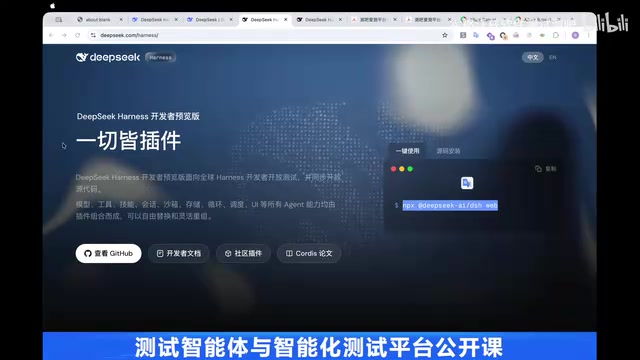
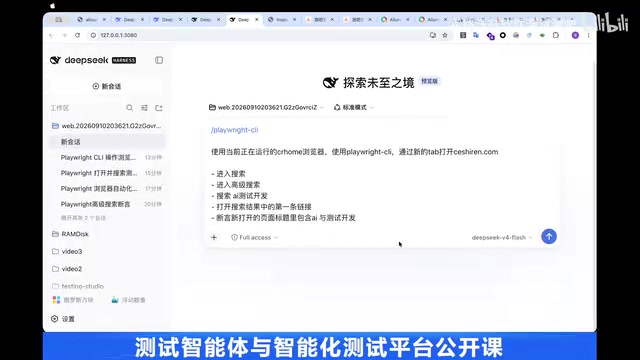
The workflow is straightforward: install DeepSeek Harness, create a workspace (Workspace Write permissions recommended), pair it with a browser automation tool like Playwright, and provide a prompt such as "open the Testers website, go to advanced search, search for a keyword, click the first result, and assert the page title." The agent will autonomously execute the entire sequence. The core logic here is simple — find an agent, leverage browser automation tools, and let the AI learn to use those tools to complete the task on its own.
Why Are Agents Slow? How to Optimize
One recurring practical issue throughout the session was agent execution speed. The presenter offered a systematic diagnostic approach — arguably the most valuable part of the entire talk.
Using DeepSeek Harness's "trajectory (duration)" view, you can inspect the time cost of each step along with input/output token counts and time-to-first-token metrics, allowing you to pinpoint bottlenecks. In real testing, bringing the browser window to the foreground took roughly 14–18 seconds, and parsing the page structure was also slow — these are inherent overhead costs at the tool-call layer.
The more impactful optimization lies at the model layer: the default Thinking mode causes the LLM to over-reason on deterministic operations. After the presenter switched to No-Thinking mode, the same workflow dropped from roughly three minutes to about one minute. The optimization strategies proposed include: improving system prompts, improving tools, improving context management, and using multi-agent/sub-agent architectures to distribute workload. Additionally, an LLM gateway lets you observe token consumption and cost per step — in practice, each operation consumed roughly 40,000 tokens at a cost of about ¥0.001.
The difference between Thinking mode and No-Thinking mode stems from different design choices in LLM reasoning architectures. Reasoning models like the DeepSeek-R1 series generate an internal Chain-of-Thought before producing a final answer, stepping through the problem — which is highly beneficial for tasks with deep uncertainty like mathematical proofs or code debugging, but significantly increases time-to-first-token and total token consumption. No-Thinking mode disables this reasoning process and has the model output results directly. For automation steps with deterministic execution paths — like "click a button" or "fill out a form" — the chain-of-thought is not only unnecessary but introduces noticeable latency and cost overhead. Intelligently distinguishing task types and enabling reasoning mode only when needed is a key decision in agent engineering for reducing both cost and execution time.
The Four-Layer Architecture of the Testing Platform
The presenter showcased a proprietary intelligent testing platform called "Aice," which uses a four-layer structure: the top layer manages all agents and LLMs (the platform layer), followed by the testing agent layer, and then the automation layer. The platform has a built-in LLM gateway that uniformly integrates models such as GLM Flash and DeepSeek, with No-Think models specifically added to accelerate execution.
The platform's core capabilities manifest in two areas: test case generation and test case execution. Execution supports both manually written and AI-generated test cases — simply select an agent, an LLM, and an execution node, then run. The session demonstrated a Snowball Fund APP login scenario, deliberately entering a wrong verification code to show a complete assertion-failure report. The report follows an Allure-style format and includes step-by-step screenshots, operation records, and video playback.
The presenter specifically noted that the Web/APP automation agents demonstrated are, strictly speaking, "not testing agents" — they are external automation agents. A true testing agent must be able to distinguish between test cases, test steps, test assertions, and test reports, and must also maintain a runtime context (such as a page state graph) and an execution context. This distinction is what many companies should be focused on.
Five Progressive Levels of Test Case Generation
Test case generation seems simple but is actually the hardest part, because high coverage depends on comprehensive documentation, design prototypes, and background systems — and most companies' documentation is incomplete to begin with. The presenter outlined five approaches with progressively increasing coverage:
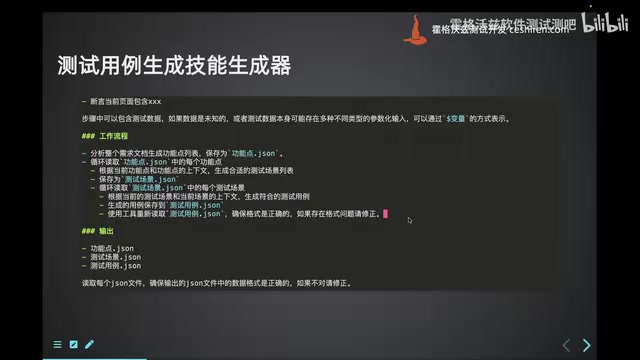
- Single agent + prompt/skill: Use DeepSeek to first generate enriched prompts, then produce feature points and test points in a second pass. Easy to implement, but coverage is only around 30%, and a single agent's context can easily overflow.
- Introduce RAG: When documents are too long to fit in the context window, use Retrieval-Augmented Generation to recall relevant content, pushing coverage higher.
- Workflow approach: Multiple agents collaborate — feature point splitting, scenario generation, and test case generation each run independently. Context is never constrained, and coverage can reach around 80%.
- Add a knowledge graph: Use GraphRAG to build business knowledge associations for more precise retrieval, pushing coverage even higher.
- Exploratory learning: Let the agent explore a real website, producing more complete documentation — the system gets smarter over time, achieving 90%+ coverage.
The presenter explicitly stated they are "not bullish on pure skills," because skills are essentially just prompts. A single agent will inevitably face the problem of oversized context, losing critical information during compression. The real key to getting this right is adopting workflows and integrating workflows, RAG, knowledge graphs, and intelligent exploration together.
Understanding the boundaries of these five levels requires a basic grasp of the context window. The total amount of text an LLM can process in a single inference pass is limited (measured in tokens). Once the window is exceeded, the model will compress or truncate earlier content, causing critical requirement information to be lost. In the single-agent approach, feature points, test scenarios, and test cases are all crammed into the same context, which quickly hits the limit once documents grow long. The workflow approach splits the task into independent steps that execute serially or in parallel — each step only needs to process its current stage's inputs, keeping the context within a manageable range. This is why the presenter emphasized that "the workflow approach is never context-constrained" — it's not that the LLM has become more capable, but that the architectural design keeps each node's information density reasonable.
Clarifying the Concepts: Agents, Workflows, and Knowledge Graphs
To aid understanding, the presenter drew distinctions between several core concepts. An agent is essentially an LLM plus tools plus a loop (Agent Loop) — it is a special form of workflow. A workflow is a lower-level, more complex concept that supports parallel execution, serial execution, conditional branching, Map-Reduce, and other mechanisms. Workflows are suited for logically deterministic scenarios (where humans know exactly what each step should do — fast and high-performance), while agents are suited for scenarios requiring dynamic decision-making.
Multi-agent orchestration patterns include: sub-agents (a primary agent delegates to multiple sub-agents), relay mode (execution passes to the next agent upon completion), Skills (a single agent with skills), router mode (preset execution paths), and custom workflows.
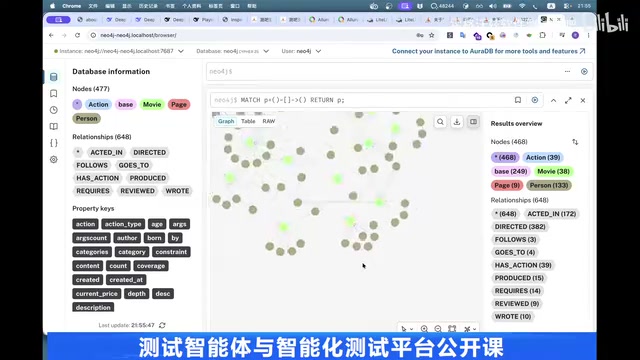
Regarding knowledge graphs, the presenter recommends isolating them by project rather than by file — projects share a knowledge base within the same project, but different projects are kept separate. A knowledge graph is essentially the full picture of business knowledge represented as "states + events," and its structure (nodes + edges) matters more than the specific tooling. Neo4j, NebulaGraph, NetworkX, and even relational databases can all implement one. On the technical side, GraphRAG is recommended — any business data is modeled by AI into a graph, and precise business knowledge is then retrieved on demand.
RAG (Retrieval-Augmented Generation) is a foundational concept for understanding much of this article. The core idea is: split external documents into small chunks, vectorize them, and store them. When the LLM needs to answer a question, it first retrieves the most relevant text fragments from the vector store, then includes those fragments in the prompt so the model generates answers based on real documentation rather than training memory. This dramatically reduces hallucinations and overcomes the model's context length limitations. GraphRAG is the graph-enhanced version of RAG: ordinary RAG only performs similarity-based retrieval and cannot perceive relationships between concepts. GraphRAG first uses AI to extract entities and relationships from business documents and builds a knowledge graph; during retrieval, it performs multi-hop reasoning along the graph's edges to find deep associations across documents and concepts — which is precisely what enables precise identification of "cross-rule combination test cases" in the attendance check-in example.
Real-World Results: 63 Test Cases Generated from a Single Instruction
The presenter showcased a real attendance check-in business scenario: given a check-in PDF document, the system automatically breaks it down into feature points, test scenarios, and test points, ultimately generating complete test cases. By querying the knowledge graph, it identified 9 configurations, 39 Actions, 15 check-in concepts, and 7 special check-in rules (photo check-in, makeup check-in, special dates, non-working-day remote check-in, off-site check-in, etc.) — generating 63 test cases from a single instruction, covering cross-rule combinations, regression cases, and multiple other dimensions.
This result far surpasses what simple document lookup could achieve. The fundamental reason for the accuracy improvement is that clear strategy — the integration of workflows, RAG, and knowledge graphs.
Summary
This session clearly mapped out the implementation path for intelligent testing: start with the simplest Web automation via DeepSeek Harness, understand how to diagnose and optimize slow agent execution, then progressively grasp the essential distinction between a testing agent and an automation agent, and finally achieve high-coverage test case generation and stable execution through a combination of workflows, RAG, knowledge graphs, and intelligent exploration. For test engineers, rather than fixating on the endless array of "skill" prompts, it's far more worthwhile to invest energy in building a business knowledge base and designing robust workflows. That is the true moat in AI-powered testing.
Related articles

Free Unlimited Claude Code Solution: Agnes AI + CC Switch Setup Guide
No paid subscription needed — pair the free AI platform Agnes AI with the open-source tool CC Switch to provide a backend for Claude Code, enabling unlimited free calls to text, image, and video models. This guide covers the full setup, test results, and usage boundaries.

A Complete Zero-Cost Guide to Getting Started with Claude Code for Beginners in China
A beginner's guide to Claude Code for users in China: two installation methods (command line and IDE plugin), full configuration steps for replacing the official API with the free domestic LongCat model, and a hands-on demo of building a small tool with natural language, plus tips.

When the NSA Gets Involved: The AI Supply Chain Crisis Behind Open-Source CVEs and API Key Hijacking
Multiple open-source projects disclosed severe CVEs in one day, PHP flaws alarmed the FBI, and Railway and OpenCode were breached with API keys stolen. This article breaks down the vulnerability window, AI-accelerated exploitation, and the AI supply chain crisis behind the API key black market, with a developer defense checklist.