Building a Testing Agent with Coze: Understanding Agents and Workflows from Scratch

Build a real AI testing agent in Coze — understand agents, workflows, and prompt engineering from scratch.
This article uses the Coze visual platform to systematically introduce AI agent concepts and practical applications for software testing professionals. It covers the core difference between agents and ordinary LLMs, Coze's three agent modes and when to use each, key workflow pitfalls like variable referencing and streaming output, model selection trade-offs, and prompt engineering basics — all culminating in a full test case design agent with intent recognition, requirement analysis, risk assessment, and document generation, while clearly defining Coze's cloud-based limitations and pointing to local agents as the next step.
For software testing professionals, the barrier to adopting AI is dropping fast. You don't need to become an algorithm expert — platforms like Coze give you a visual interface to embed AI capabilities directly into your day-to-day web and API automation testing workflows. This article is based on a hands-on beginner tutorial that walks through what agents (Agents) actually are, the differences between three agent modes, and how to build a working test case design agent using workflows.
The Fundamental Difference Between Agents and Ordinary LLMs
A lot of people can't quite tell the difference between an "agent" and the AI models we use every day, like DeepSeekAd or Doubao. The tutorial offers a very intuitive comparison: when you use DeepSeek directly in a browser, your input is text and its output is text — and beyond that, it's essentially powerless in the real world. It doesn't know today's actual weather, can't run code, and can't generate a zip file or spreadsheet for you.
The first core characteristic of an agent is the ability to use external tools and interact with the real world. In Coze's resource library, plugins, workflows, knowledge bases, cards, and databases form the foundational capability layer of an agent. Take weather queries as an example: an ordinary LLM can't answer questions about real-time weather, but an agent with a weather plugin will actively call that tool and return results that reflect reality.
The second core characteristic is the ability to autonomously drive a task through to completion. Ordinary LLMs work in turns — you ask, it answers, that round ends, and you have to manually intervene to push things forward. An agent, by contrast, can make decisions based on the previous output and continue progressing on its own, without someone watching over it the whole time. These two traits are what fundamentally distinguish agents from conversational AI.
From a technical architecture perspective, the core of an agent is a Perception-Planning-Action Loop. The LLM serves as the "brain" for reasoning, while tool calls (Tool Use / Function Calling) act as the "hands and feet" connecting to the real world. When a user makes a request, the agent first determines whether a tool needs to be called, which tool to use, and with what parameters. After execution, it incorporates the tool's returned results back into context and continues reasoning — looping until the task is complete. This "ReAct (Reasoning + Acting)" paradigm is the theoretical foundation of most mainstream agent frameworks, and is central to the designs of OpenAI, Anthropic, LangChain, and others. Understanding this loop helps explain why agent results can sometimes be unstable — each reasoning step relies on probabilistic sampling, and errors accumulate across multiple steps. This is also the fundamental reason why the conversational flow mode (fixed process orchestration) exists.
The Three Agent Modes in Coze
When creating an agent in Coze, you have three modes to choose from. Understanding their differences is key to building something actually useful.
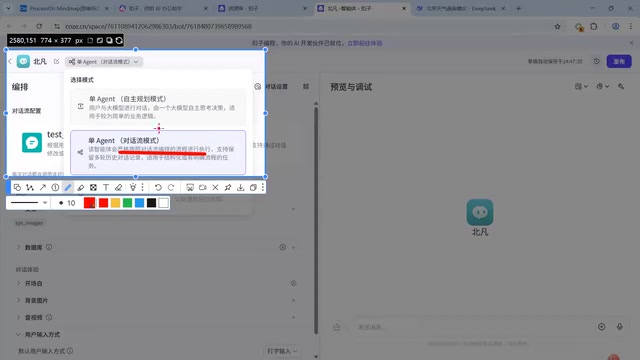
The first is Single Agent (Autonomous Planning) mode. It uses the LLM as its core. You attach a set of plugins, and the AI independently decides whether and which tools to use. This mode is the easiest to understand and puts the most demands on the quality of the underlying model. Because LLMs are probabilistic by nature, each decision may differ slightly, making results somewhat non-deterministic and open-ended.
The second is Conversational Flow mode. It requires minimal setup — the core is simply binding a pre-orchestrated conversational flow. The biggest difference from autonomous planning is that there's no "autonomous" element: it strictly follows the orchestrated process. The upside is stability — it won't go off-script and has fewer variables, making it well-suited for enterprise scenarios. The tradeoff is a loss of autonomy, which places higher demands on the flow designer, since you're making many of the decisions that would otherwise be left to the AI.
The third is Multi-Agent mode, designed for complex scenarios where multiple agents collaborate (e.g., one does the work, another supervises). The tutorial suggests treating this as advanced material and mastering the first two modes before moving on.
The selection logic is straightforward: use autonomous planning for early exploration and rapid validation; switch to conversational flow once you have a clear process, defined goals, and need stable output for real business use. Both modes can be switched between at any time in Coze, so there's no need to worry about locking yourself in.
Using Workflows to Keep Agents Working
Regardless of whether you're using autonomous planning or conversational flow, both rely on workflows to achieve the "keep driving the task forward" characteristic. The concept behind workflows is similar to a data flow diagram in software engineering — there's a start point, an end point, and arrows between nodes establish the data flow.
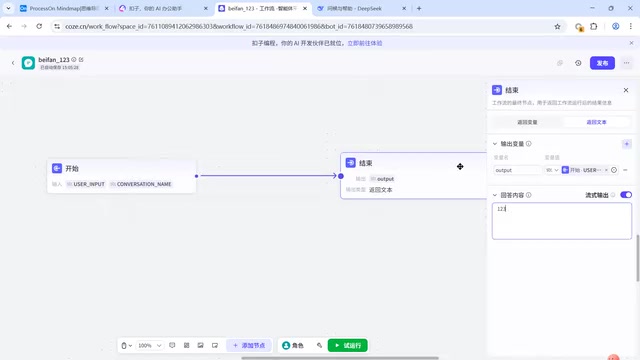
The tutorial starts with the simplest possible example — an "echo machine": a start node receives user input (stored in the url input variable), and an end node outputs it. There's a trap here that beginners almost always fall into: a node receiving data is not the same as using that data. If you hardcode "123" in the output, the workflow will return 123 no matter what the user inputs. You have to actually reference the variable to pass the received content through — only then does "return what was entered" work correctly.
Another practical detail is streaming output. When enabled, AI-generated content appears word by word — like watching DeepSeek type — rather than being held back until everything is generated and then dumped all at once. The tutorial recommends enabling this wherever possible, as it noticeably improves the user experience.
By inserting an LLM node between the start and end, a workflow graduates from a dumb echo machine to a genuine AI-powered conversation. More complex business tasks require adding more nodes and attaching plugins — weather queries, news searches, map lookups, PDF generation, Feishu spreadsheet uploads, and more. The tutorial specifically cautions: prioritize official plugins, as third-party plugin quality tends to be inconsistent.
Model Selection and Prompt Engineering
There's a lot going on inside an LLM node's configuration. Coze defaults to lower-tier models, but stronger, higher-tier versions are usually available. The tutorial offers a simple but practical rule of thumb: higher numbers mean stronger capabilities, but often slower speeds — because more capable models do more reasoning.
Model selection therefore requires balancing your needs: use lightweight (light) models for unimportant or nearly error-proof tasks; reserve high-tier models with reasoning (deep thinking) capabilities for complex, high-stakes steps. Pay attention to model tags as well — models labeled "image understanding" or "video understanding" are multimodal. In test case design, if all you have is a prototype image with no requirements document, you must choose a model that can read images (DeepSeek, for instance, doesn't support image understanding — send it a prototype and it won't be able to extract the content).
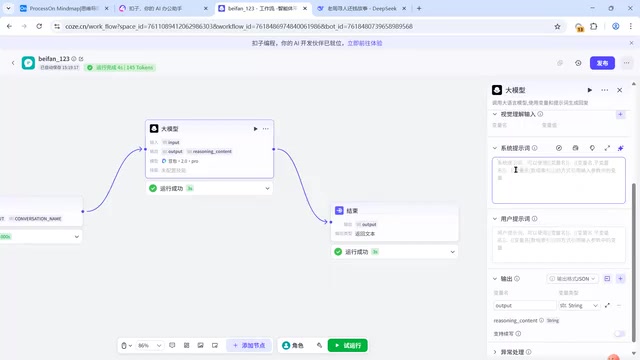
Prompts come in two flavors: system prompts and user prompts. System prompts define the AI's rules and constraints — for example, "keep your response under 10 words" — and once set, the model will try to honor those constraints on every output. User prompts carry the actual input received in the current workflow run. In a test case design scenario, you can use the system prompt to specify: whether to consider security testing and performance testing, whether to label each test case with a priority, sequence number, and estimated effort — these constraints directly determine output quality. This is what's meant by prompt engineering.
Prompt Engineering refers to the technique of carefully designing input text to guide an LLM toward producing expected outputs. Its core principles include: defining a role (telling the model who it is), describing the task (what to do), constraining the output format (e.g., requiring JSON or a Markdown table), providing examples (few-shot), and specifying edge cases. In a test case design context, the system prompt essentially gives the AI the professional perspective of a "test engineer," constraining it to output structured fields like priority, test steps, and expected results — rather than generating free-form text. Enforcing a specific output format (such as JSON) is especially important — it not only makes results easy to parse by downstream nodes, but also indirectly reduces the uncertainty that comes from the model "going off-script." The Temperature parameter is also worth noting: lower temperatures make model outputs more deterministic, which suits structured tasks; higher temperatures introduce more creativity, better for brainstorming scenarios.
A Real-World Test Case Design Agent
The tutorial showcases a more complete hands-on example: a functional test case design agent. Its workflow isn't a simple linear pipeline — it starts with intent recognition, determining whether the user is submitting a requirement, supplementing a requirement, modifying a test case, or just chatting, then routes accordingly.
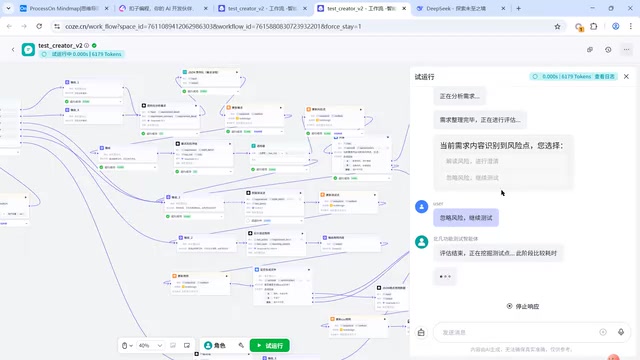
The full business chain looks roughly like this: understand requirement → analyze requirement → assess risk → identify test points → design test cases → generate document. The requirement analysis step requires JSON-formatted output to prevent the AI from sometimes using tables and other times using paragraphs, which creates non-deterministic results. The risk assessment step introduces human intervention — when the AI detects incomplete or contradictory requirements, it prompts for clarification. But in practice, many requirements are inherently incomplete, so the workflow allows a human to choose "ignore risk and proceed," embodying the design principle that "humans are still more important than AI."
On the question of "should you dump all steps to the AI at once," the tutorial compares three approaches:
- Direct output: Fastest, good for early business validation, but the AI may miss things;
- Single model, step-by-step output: Use one LLM to execute steps sequentially — a quick way to improve output quality, functionally similar in principle to "deep thinking" mode;
- Multi-model distributed output: Each step uses an independent LLM with a single responsibility, giving each step its own full context — highest quality, but slowest and most token-intensive.
The three approaches represent tradeoffs between speed, cost, and quality: use the first for early validation, the second for a balanced approach, and the third when token cost isn't a concern and quality is the priority.
Coze's Capability Boundaries and What Comes Next
One final important insight: the limitations of Coze. While it can interact with the outside world, everything — workflow orchestration, plugins, knowledge bases, databases — runs in Coze's cloud-based web environment. It can't directly read requirements documents on your local machine, and it can't write generated automation code to your computer and execute it. If your test environment is deployed on an internal network, Coze's HTTP requests simply can't reach it.
Coze is therefore best suited as an "assistant-tier" tool — strong at test case design, requirements organization, and reporting (with integrations for Feishu and WeCom). Scenarios that require reading local files, generating and executing automation code, or accessing internal network environments call for locally deployed agent tools (like local agent runtimes similar to OpenClawAd). That's the next step for testing professionals looking to level up.
For testers, mastering a visual platform like Coze is the first step toward understanding and harnessing AI agents — you have to first get clear on what an Agent is and how to orchestrate workflows before AI can genuinely take on the repetitive work of test case design and requirements analysis in real business contexts.
The core difference between local agent tools and cloud-based platforms comes down to the "sandbox boundary." Everything that runs on cloud platforms like Coze executes on the service provider's servers — for security isolation reasons, it can't proactively reach into a user's local network or file system. Locally deployed agents (such as those built on LangChain, AutoGen, OpenDevin, or various IDE plugins) run directly on the developer's machine and can read and write local files, execute shell commands, launch browsers for UI automation, and access test environments only reachable from the internal network. For testing professionals, typical use cases for local agents include: reading local requirements documents to auto-generate test scripts, running Playwright/Selenium for end-to-end tests, and connecting to internal company APIs for assertion-based validation. The two types of tools aren't mutually exclusive — cloud platforms excel at collaboration, visual process design, and lightweight assistance; local agents are better suited for deep integration into CI/CD pipelines and private testing infrastructure.
Related articles

Free Unlimited Claude Code Solution: Agnes AI + CC Switch Setup Guide
No paid subscription needed — pair the free AI platform Agnes AI with the open-source tool CC Switch to provide a backend for Claude Code, enabling unlimited free calls to text, image, and video models. This guide covers the full setup, test results, and usage boundaries.

A Complete Zero-Cost Guide to Getting Started with Claude Code for Beginners in China
A beginner's guide to Claude Code for users in China: two installation methods (command line and IDE plugin), full configuration steps for replacing the official API with the free domestic LongCat model, and a hands-on demo of building a small tool with natural language, plus tips.

When the NSA Gets Involved: The AI Supply Chain Crisis Behind Open-Source CVEs and API Key Hijacking
Multiple open-source projects disclosed severe CVEs in one day, PHP flaws alarmed the FBI, and Railway and OpenCode were breached with API keys stolen. This article breaks down the vulnerability window, AI-accelerated exploitation, and the AI supply chain crisis behind the API key black market, with a developer defense checklist.