Building a Tool Site with Claude Opus: 130+ Tools Launched and Monetized in One Month

Use Claude Opus to batch-generate front-end tools and launch 130+ pages with ad monetization in a month.
This guide presents a complete methodology for building a monetized tool site with the help of AI. The approach: plan 100+ simple online tools around a vertical theme, use Claude Opus with precise prompts to rapidly generate HTML/CSS/JavaScript code, review and publish in bulk, and scale to 130+ pages through consistency — then monetize via Google AdSense and affiliate marketing. The real value is reducing the front-end coding barrier to near zero, enabling non-developers to produce functional tool pages at scale. The article closes with a candid caveat: search engines are increasingly wary of homogeneous bulk pages, so tools must be genuinely useful and themes sufficiently focused — AI should be a productivity multiplier, not a shortcut to passive income.
Why Tool Sites Are a Low-Barrier Monetization Strategy in the AI Era
The logic behind tool sites is straightforward: build a large collection of simple, practical online tools around a well-defined audience, and let users find and return to them through search engines. These pages have several natural advantages — single-purpose functionality, fast load times, and solutions to very specific problems that users can pick up with virtually no learning curve.
The core argument of this guide is that by using a large language model like Claude Opus to auto-generate front-end code, a single person can launch over 130 tool pages within a month and achieve initial monetization through ads and affiliate marketing. It's essentially the "content at scale" playbook applied to "tools at scale," with AI handling the most time-consuming part: writing the code.
Step 1: Plan a Focused Tool Matrix
What truly determines success isn't the technology — it's the upfront planning. The author recommends listing 100+ tools your target audience genuinely needs: calculators, text converters, format validators, and other ready-to-use utilities.
The key word here is "focused." A site built around a specific theme, where tools relate to one another, feels like a complete "toolkit" to visitors rather than a random collection of pages. A clear theme also keeps you on track during bulk production. In other words, the quality of your topic selection directly determines how professional and search-worthy the final site feels.
Step 2: Set Up a Lightweight Site Framework
For the framework, the author recommends WordPress or a simple HTML template, with one guiding principle: clean, lightweight, and easy to navigate. For a tool site with potentially hundreds of pages, load speed is critical — users expect these kinds of small utilities to be "open and ready," and any lag will directly cost you traffic.
A minimal layout has another hidden benefit: it's easy to duplicate pages and maintain a consistent user experience. When you're generating 100+ tools, a reusable page template dramatically reduces ongoing maintenance costs.
Step 3: Generate Tool Code with Claude Opus
Now for the core step. Open Claude Opus and write a clear, specific prompt asking it to generate complete HTML, CSS, and JavaScript code for a given tool in one shot. The author emphasizes repeatedly: the more precise your prompt, the higher the output quality.
A good prompt should clearly specify the tool's functional logic, interaction behavior, and a visual style consistent with the rest of the site. Once generated, copy and paste the code into your site editor as a new page or custom HTML block — and your first tool is live.
The value of this workflow is compressing "build a front-end tool" from several hours down to a few minutes, enabling non-developers to produce functional interactive pages.
Claude Opus is the most capable model in Anthropic's large language model lineup, excelling at complex reasoning and long-context tasks, with particularly strong code generation performance. It can understand natural-language feature descriptions and output complete, logically coherent HTML/CSS/JavaScript code — no deep programming background required. For the tool site use case, its key advantage is the ability to handle UI styling, interaction logic, and edge cases simultaneously, producing a fully runnable page from a single prompt rather than just code snippets. It's worth noting that prompt quality directly impacts output: clearly describing a tool's input/output format, calculation logic, and visual style yields significantly better code than vague requirements, reducing the need for manual revisions afterward.
Step 4: Quality Check Before Publishing
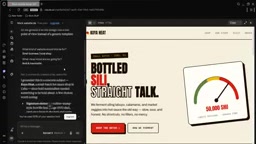
Generating code doesn't mean you're done. Always do a quick check before publishing to make sure the tool looks correct and works as expected. Even a brief review can prevent layout breaks and broken interactions that would ruin the user experience.
AI-generated code isn't 100% reliable — edge cases, style conflicts, and script errors can all appear. Treating human review as a non-negotiable step in the workflow is the baseline for maintaining overall site quality.
Step 5: Scale to 130+ Pages Through Consistency
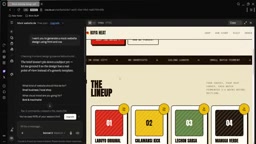
From here, it's repetition: keep generating, reviewing, and publishing using the same process until you've built up over 130 active pages. The author treats "consistency" as the critical factor — sustained output is what transforms a small project into a resource library with real weight.
As the page count grows, the site's value to both users and search engines increases in parallel. More pages means broader coverage of long-tail needs, which means more entry points for organic traffic. This is classic "scale effect" thinking: a single tool has limited value, but 130 interconnected tools forming a library creates a whole far greater than the sum of its parts.
Step 6: Monetization and Traffic Generation
Once your tools are live, you can apply for Google AdSense or join relevant affiliate programs, and place ad banners and promotional links naturally throughout your pages. The author specifically cautions: ad placements should blend in naturally and must not interfere with the tool's core functionality — because if the experience breaks down, no amount of traffic will stick around.
The final step is submitting your sitemap to search engines and sharing your resource library on social media to start driving organic traffic. At this point, you've completed the full cycle of an AI-assisted monetized tool site.
Google AdSense is Google's display advertising program. Once a site owner is approved, Google automatically serves contextually relevant ads in designated spots, paying the site owner based on impressions or clicks. Affiliate marketing is another common model: site owners embed promotional links for third-party products or services, earning a commission when visitors make a purchase through those links. Both are passive income models well-suited to small tool sites with stable traffic but limited staff. Note that AdSense has clear content quality and originality requirements — bulk-generated tool pages must deliver genuinely functional tools, not just empty page shells, or you risk rejection or account suspension.
A Sober Assessment
The appeal of this methodology is its low barrier to entry and replicability — but it's worth being clear-eyed about its limitations. AI-generated tool sites at scale are fundamentally competing on "volume" and "SEO," and search engines are increasingly alert to low-quality, homogeneous bulk pages. Simply stacking up numbers won't necessarily translate into stable rankings. The sites that actually break through tend to be those where the tools genuinely work well, the theme is sufficiently vertical, and the owner is committed to continuously refining the experience. Treating AI as a productivity tool rather than a passive income shortcut is the more realistic mindset.
Search engines' ability to detect "mass auto-generated content" is continuously improving. Google's search quality evaluation framework explicitly lists "content created for search engines rather than users" as grounds for demotion. If a bulk tool site's tools are highly similar in function and pages are excessively uniform in structure, it's likely to trigger algorithmic filtering for homogeneous content. Tool sites that actually survive SEO competition tend to share these characteristics: the tools address long-tail problems with real search demand but low competition; pages include sufficient original explanatory text rather than just embedded code; and the site accumulates backlinks and user behavior signals over time. Think of 130 pages as a starting point, not an endpoint — continuing to iterate on tool quality after scaling up is the sustainable path to maintaining stable search rankings.
Related articles

5 Practical Ways Real Estate Agents Can Use AI to Boost Efficiency (2026 Edition)
How can real estate agents use AI to boost efficiency? Based on a YouTube walkthrough, this breaks down five methods — ChatGPT for listing descriptions, Canva for marketing materials, forms for open house leads, Zapier for automated follow-up, and seller meeting prep — and flags risk boundaries like fair housing laws, photo authenticity, and price verification.

Grok Bot vs ChatGPT Agent: Which AI Agent Is More Powerful?
How does Grok Bot differ from ChatGPT Agent? This comparison examines how they work: Grok Bot has a cloud computer and runs persistently inside tools to execute multi-step tasks automatically; ChatGPT Agent operates web pages in a browser and is more mature at general tasks. Includes selection advice.

Walmart Agent Gateway: AI Shops for You Automatically—Why Is Amazon Going the Opposite Way?
Walmart's Agent Gateway lets ChatGPT, Gemini and other AI assistants access its product catalog to search, compare and add to cart, with spending limits and per-purchase approval. Amazon blocks external AI agents—two retail giants, opposite paths. Currently US-only, India may follow.