Building AI Agents with n8n Without Code: Triggers, Memory, and Web Search in Practice

n8n wraps LangChain into a low-barrier AI Agent builder via visual nodes, but prompts and human review still decide success.
The article shows how to build AI Agents with the open-source automation platform n8n. Positioned between Zapier and code frameworks, n8n wraps LangChain/LangGraph and emphasizes being AI-first, with self-hosted and cloud options. Workflows start from triggers, with nodes split into application actions, data transformation, flow control, basic primitives, and human review. A minimal usable Agent needs just four pieces: an AI Agent node, Chat Model, Memory, and Web Search — memory fixes context loss, search fixes missing real-time data. It also demos a multi-Agent case where a main Agent orchestrates a Deep Research sub-Agent and writes results to Google Sheets. The author stresses that while visualization lowers the barrier, prompt quality, memory strategy, and human review still determine the outcome.
Why Choose n8n to Build AI Agents
n8n is an open-source automation platform positioned somewhere between Zapier and code frameworks. According to the introduction by Dr. Aki, co-founder of TyLabs, in the video, its biggest feature is being "AI-first" — designing capabilities like RAG, classification, and Agent loops as first-class citizens rather than patching them on afterward. It wraps the LangChain and LangGraph ecosystems underneath, and provides a visual node canvas on top.
For people who don't want to write code but still want to quickly validate Agent ideas, n8n offers two paths: self-hosted deployment, or using the cloud version directly to skip operations work. Dr. Aki emphasized that you can "build the Agent on the canvas, then immediately run it and connect it out."
LangChain is an open-source framework for building large language model applications. It provides a series of abstraction layers including model calls, prompt templates, tool calls, and memory management, so developers don't have to wrap low-level logic from scratch. LangGraph is a graph-structured orchestration framework further proposed on top of LangChain, describing multi-step, loopable, stateful Agent workflows through "nodes + edges." It's especially suited for complex scenarios requiring repeated reasoning, tool invocation, and conditional branching. n8n directly reuses these two ecosystems under the hood, meaning the AI nodes on the canvas are actually calling these mature abstractions. Behaviors like "Agent loops" and "tool sets" that users drag out ultimately correspond to specific objects in LangChain/LangGraph, so developers familiar with this stack have very low migration costs.
Triggers: The Starting Point of Every Workflow
Every workflow starts with a trigger. Trigger types in n8n include scheduled execution, Webhook calls, form submissions, and more. Dr. Aki suggests beginners start with the Chat Message trigger, because it lets you input and see feedback instantly — best for experimentation.
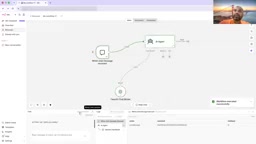
After selecting the trigger, you can double-click the node and enter a message. Nothing happens at this point because no subsequent nodes are connected yet, but the node turns green, indicating the instruction has entered. This step seems simple, but it's key to understanding "how data flows between nodes": the trigger catches the input, and subsequent nodes handle the processing.
Webhook is an HTTP callback mechanism triggered by external events: n8n generates a unique URL for a workflow, and any third-party system can start that workflow by sending a request to that address, with data carried in the request automatically becoming input for subsequent nodes. Its difference from scheduled execution lies in "passive waiting" — it doesn't poll by time, but is invoked when an event occurs, making it better suited for form submissions, payment callbacks, chat platform messages, and similar scenarios. The Chat Message trigger can be understood as a Webhook specifically packaged for conversation scenarios: it has a built-in chat interface and message format parsing, so what the user types enters the workflow directly as a standard message structure, saving you the trouble of defining the request body yourself. This is also why it's most suitable for beginners doing instant experiments.
Node Categories: A Complete Toolbox from Apps to Code
After triggers come nodes. n8n divides nodes into several major categories, which Dr. Aki went through one by one:
- Application Actions: A large number of third-party integrations like Asana, Apollo, AWS, and more — most common tools can be found.
- Data Transformation: Converting and shaping data between different nodes — a core capability for building practical workflows.
- Flow Control: Branching, conditional logic, loops, error handling. Control flow possible in Python can also be achieved here with visual nodes — deciding which path to take based on upstream node values.
- Basic Primitives: The Code node and HTTP Request node. When preset tools aren't enough, you can use these two "foundations" to assemble things yourself, plugging in API calls and other general computational capabilities.
- Human in the Loop: After the Agent completes a task, send an email or Slack message asking a human to confirm, and only proceed after approval.
Dr. Aki specifically noted that human review is "very important" — in real business contexts, fully hands-off Agents are often unreliable, and having humans gatekeep at key points is a necessary design.
AI Components: The Truly Interesting Part
Entering the AI category, since the foundation is the LangChain ecosystem, you'll see many familiar tools: LLM Chains, information extractors, preset LLM AI architectures, and more — all directly reusable. On the model side, Google Gemini, Anthropic, and others are supported, with some offering free quotas.
The barrier to building a minimal Agent is extremely low: drag in an AI Agent node, which is itself an Agent loop, but it must have at least one Chat Model configured to function. Dr. Aki demonstrated live: with only a model connected, asking "hi" gets a reply — that's the simplest chat component plus LLM.
But when asked "what's the weather like," the model can only give a rough estimate, not real-time data, because it has no internet access. Asking "where is it" then completely stumps the model, which can't determine which location is being referred to. This exposes two flaws: no memory system, so each call is independent; and no real-time information source.
Agent loop refers to the large language model no longer doing just one "input—output," but repeatedly iterating through "think → choose tool → execute → observe result → think again" until it considers the task complete or reaches a stop condition. In this loop, the model decides for itself which tool to call next and what parameters to pass, rather than having the flow hardcoded by a human in advance. The Chat Model is the loop's "brain," responsible for reasoning and decision-making; tools are the "hands and feet" the loop can use. This also explains why an Agent with only a model attached can chat but can't look up the weather — it can reason, but has no external tools to call for real-time data, so the loop can't unfold.
Filling in Memory and Web Search
The fix is to add two accessories:
- Memory: Attach a Simple Memory node so the Agent remembers prior conversation context, solving the "doesn't know what you just said" problem.
- Web Search: Attach the built-in Web Search tool to the AI Agent so the model can proactively retrieve real-time information when needed.
With these two added, asking again "what's the temperature in San Francisco right now," the Agent can pull real-time weather and give the correct answer. Dr. Aki summarized that this is already the simplest usable Agent form — a trigger, a model, a piece of memory, and a search tool.
Multi-Agent in Practice: Automatic Research and Writing to Sheets
The second half of the video demonstrated a more complex multi-Agent system: a main Agent with Simple Memory, hanging multiple sub-Agents (like a Deep Research Agent) and a Google Sheet tool beneath it, with sub-Agents connected to the main Agent through tool sets.
Dr. Aki entered a person's name (e.g., Elon Musk). The main Agent first triggered the Deep Research sub-Agent to do the research, then the research results were passed back to the main Agent, and subsequently written automatically to Google Sheet. In the demo you could see the conversation flowing between multiple Agents, and the generated sheet adding a new row containing fields like name.
There were also amusing moments along the way: the sub-Agent couldn't find the person's LinkedIn information, and Dr. Aki joked "he's clearly not job hunting." Testing with other names also hit cases where "the prompt wasn't good enough," leading to less-than-ideal output. This precisely illustrates one point: visualization lowers the barrier to building, but prompt design (Prompt Engineering) remains the key to quality.
After building, you can publish the workflow. Double-clicking a node gives you a URL, which you can directly connect to any external application. The entire process requires no code — all done on the canvas.
The division between main Agent and sub-Agents is essentially a task delegation pattern: the main Agent faces the user, responsible for understanding intent and deciding which part of the work to hand to whom; sub-Agents focus on a single responsibility, such as a Deep Research Agent that only does information retrieval and organization. They connect through "tools" — in n8n, sub-Agents are mounted onto the main Agent in the form of tools, and calling them is like calling an ordinary function; the sub-Agent runs and returns its result as a return value. The benefit of this is that each Agent's prompt and goal are more focused, less likely to lose direction during a very long reasoning chain. The cost is a longer chain and more complex debugging — any poorly written prompt in the chain drags down overall output quality.
Who It's For and Its Boundaries
n8n's positioning is clear: to let teams and professionals who can't write code also build usable AI workflows. It wraps the LangChain abstractions into visual nodes, translating general programming concepts like API calls, data transformation, and conditional branching onto the canvas. For rapid validation, internal automation, and lightweight Agent scenarios, it's extremely efficient.
What needs to be clear-headed about: edge cases not covered by preset tools still require going back to Code and HTTP Request nodes — essentially still requiring engineering thinking. Additionally, prompt quality, memory strategy, and where to insert human review all depend on the builder's judgment — the tool itself won't decide for you.
One-line Summary
n8n wraps LangChain into a low-barrier AI Agent building platform through visual nodes, but prompts and human review still determine success or failure.
Paragraph Summary
The article explains how to build AI Agents using the open-source automation platform n8n. n8n is positioned between Zapier and code frameworks, wrapping LangChain/LangGraph underneath, emphasizing "AI-first," and supporting self-hosted and cloud deployment. Workflows begin with triggers, and nodes are categorized into application actions, data transformation, flow control, basic primitives, and human review. Building a minimal usable Agent only requires four pieces: an AI Agent node, Chat Model, Memory, and Web Search — memory solves context loss, search solves the lack of real-time information. The article also demonstrates a multi-Agent case where a main Agent orchestrates a Deep Research sub-Agent to research a person's information and automatically write it to Google Sheet. The author emphasizes that while visualization lowers the building barrier, prompt quality, memory strategy, and human review points still determine the final result.
Related articles

How Big Can Stars Really Get? The Physical Limits of the Largest Stars
Red supergiants are the largest stars by volume, with radii up to 2,000 times the Sun, engulfing the inner solar system. But there is no precise upper limit on stellar size—models predict up to 15,000 solar radii. The most massive blue stars are far smaller than red supergiants—biggest and heaviest are two different things.

Apple HomeView Smart Display Full Feature Breakdown: Wall-Mount or Desktop, $299
Apple launches HomeView, a $299 smart display with wall-mount and desktop options, 12MP camera for facial recognition, smart home control, music playback, and recipe step-by-step cooking. Full breakdown of watch faces, apps, privacy, and cooking integration.

Where Did the Promised New Studio Go? Craft Computing Answers After Five Years
Craft Computing's host responds to viewer questions: the new studio promised five years ago was shelved as construction costs soared from $30,000 to $75,000, and was replaced by a 168-square-foot garage conversion.