Building AI Animated Videos with Claude Code: A Hands-On Local Toolchain Guide

Using Claude Code to orchestrate local tools like Kokoro and Remotion, a complete video with narration, animation, and background music can be generated in 2 minutes.
Based on a developer's hands-on demo, this article shows how to use Claude Code as "glue" to connect local open-source tools Kokoro (text-to-speech) and Remotion (React video framework) to generate a complete video with narration, kinetic typography animation, and background music in minutes. The entire workflow runs locally, with only Claude Code requiring a subscription. The developer writes detailed prompts so the AI automatically handles speech synthesis, code generation, image downloads, and music synchronization, then iterates to optimize visuals. The article analyzes the approach's efficiency (core production in just 2 minutes) and limitations (prompt design still requires manual effort, complex animations need manual coding, TTS emotional expression is limited), and provides reproduction steps.
AI-generated video is becoming increasingly common, but most people may assume it requires expensive cloud services and complex operations. In reality, with local open-source tools and Claude Code, you can produce a complete video with narration, animation, and background music in just a few minutes. Based on a developer's hands-on demo, this article breaks down the entire workflow and analyzes the technical choices and limitations behind it.
Toolchain: A Local-First AI Video Generation Solution
The developer used the Arch-based CachyOS distribution, but emphasized that these tools are available in the software repositories of most Linux distributions. The core components include:
- Claude Code: Acts as an AI programming assistant, responsible for parsing prompts, invoking system commands, and generating video code.
- Kokoro: A local text-to-speech (TTS) engine used to generate narration.
- Remotion: A React-based video creation framework that lets you preview and edit the video timeline in the browser.
- Whisper (optional): Used to convert human recordings into subtitles; not used in this example.
- System dependencies: Node.js, NPM, UV, eSpeak, FFmpeg, Git, etc.
The biggest feature of this approach is that it runs entirely locally—apart from Claude Code, which requires a subscription, all other tools are free and open source. The developer notes that these tools can almost all be installed with a single command via the system package manager, and FFmpeg and Git are preinstalled on most systems.

For users accustomed to a graphical interface, Remotion Studio provides a video-editor-like interface where you can drag the timeline and preview effects in real time. Claude Code, meanwhile, interacts with the system via the command line or an editor plugin (such as Emacs), automatically handling file creation, dependency installation, code generation, and other steps.
Kokoro is a lightweight open-source text-to-speech (TTS) model characterized by its small model size (about 82M parameters) but relatively high naturalness. It supports multiple preset voices (such as "American Michael" and "American Onyx" mentioned in the article) and can run in real time on a CPU, making it well suited for localized, low-latency speech synthesis scenarios. Unlike cloud TTS services, Kokoro works entirely offline, requires no network requests, and avoids the cost issues of per-character billing.
Remotion is a programmatic video creation framework based on React that allows developers to describe each frame of a video using familiar web technologies (JSX, CSS, Canvas, etc.) and to control it precisely via a timeline. Remotion's core advantage is "video as code"—video animations, transitions, and text effects can all be composed using components and functions, and it supports real-time preview in the browser (Remotion Studio). This allows AI-generated code to be directly converted into a renderable video without manual GUI operations.
From Prompt to Video: Claude Code's Workflow
The developer's process is very simple: prepare a text file (the prompt) in the project directory, then have Claude Code read and execute it. The prompt contains detailed specifications for the video:
- Narration voice: Specify a blended voice of Kokoro's "American Michael" and "American Onyx", with a speaking rate of 0.95.
- Animation style: Use a bokeh animation for the background and kinetic typography for the text, i.e., words popping up one by one in sync with the speech.
- Pronunciation correction: Specifically request that "GNU/Linux" be read as "GNU slash Linux", and emphasize that "core libs" be read separately.
- Content text: The famous GNU/Linux copypasta (a humorous text about the relationship between GNU and Linux).
After receiving the instructions, Claude Code automatically invoked Kokoro to generate the speech and wrote Remotion code to composite the text, speech, and animation. The developer describes that from pressing Enter to generating a previewable video took only 1 minute and 18 seconds. He then asked to add background music (using an existing local free audio track), which took Claude Code another 18 seconds.
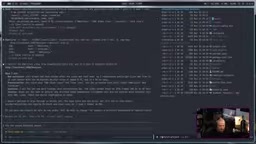
One detail worth mentioning: Claude Code demonstrated strong contextual understanding during this process—it was able to locate specific lines in the prompt file, execute sed commands to modify them, and adjust the animation based on feedback. For example, when the developer asked to change the background to "images of GNU FSF and Richard Stallman", Claude Code proactively asked about the image source and suggested using free resources from Wikimedia Commons.
Kinetic typography is an animation technique that treats text as a dynamic visual element, with words appearing, scaling, shifting, or changing color one by one in rhythm with the speech, thereby enhancing the pacing and appeal of information delivery. In Remotion, this effect is typically achieved through interpolation functions (interpolate) and spring animations (spring), combined with audio waveforms or timestamps to synchronize the timing of text appearances.
Bokeh animation is originally a photography term referring to the out-of-focus light spots in the background. In video, it is often used as a soft dynamic background, creating atmosphere through blurred, moving circular light spots to avoid a monotonous background. In Remotion, bokeh can be simulated using CSS filters (blur) and randomly moving circular elements, achieving a low-cost implementation with a natural visual effect.
Iteration and Optimization: AI's Autonomous Decision-Making and Limitations
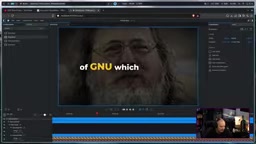
In the first generated video, the developer was satisfied with the kinetic typography and bokeh background but felt the background did not match the theme. So he modified the prompt to request images of GNU FSF and Richard Stallman. Claude Code downloaded 5 relevant images from Wikimedia and automatically adjusted the image transition timings, taking 2 minutes in total.
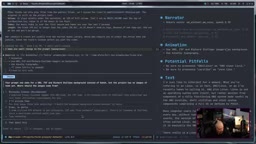
However, the new version had a problem: the FSF logo contained text, which, when overlaid with the kinetic typography, affected readability. The developer adjusted the prompt again, requesting only photos of Richard Stallman. This modification took only 34 seconds, and the final video's visual effect was noticeably improved.
The developer specifically pointed out one detail: Claude Code automatically aligned the end of the background music with the end of the narration, making the video's ending feel natural. This "intelligent" behavior exceeded his expectations and demonstrates AI's potential for multimedia synchronization.
Despite the satisfactory results, the developer admits that prompt design still requires manual effort—he estimates he spent about 10 minutes crafting the prompt, while the AI execution took only 2 minutes. In addition, the AI's pronunciation handling is not perfect; "GNU/Linux" needed explicit correction, otherwise it would be read as "GNU Linux".
Efficiency Comparison and Controversy: What Does AI Video Generation Mean?
The developer compared this with traditional methods: before the advent of LLMs and AI tools, producing a simple animated video could take several hours. Now, the core production time is compressed to a few minutes. He believes this efficiency gain is enormous, especially for content creators.
But he also anticipates controversy: some will criticize such videos as "AI slop", arguing that AI makes creation too easy. His attitude is clear—he likes the convenience and believes the tools themselves are not to blame.
From a technical perspective, this case demonstrates the maturity of the local AI toolchain. Kokoro provides usable TTS quality, Remotion makes video programmatic, and Claude Code acts as the "glue" that connects text, speech, animation, and music. The entire workflow requires no cloud video generation services, offering advantages in data privacy and cost control.
However, this approach still has limitations: it relies on Claude Code's code generation capabilities, and for more complex animation requirements (such as 3D effects or fine transitions), more specialized manual coding may be needed. In addition, although the TTS voice naturalness is good, emotional expression still falls short of human voice acting.
Practical Advice: How to Reproduce a Similar Workflow
If you want to try a similar project, you can start with the following steps:
- Prepare the environment: Install basic tools such as Node.js, FFmpeg, and Git, and ensure Claude Code is available (subscription required).
- Install Kokoro and Remotion: Configure local TTS and the video framework according to the official documentation.
- Write the prompt: Clearly specify the video's text, voice style, animation type, and background elements. It is recommended to write all requirements in a text file first, then have Claude Code read it.
- Iterate and optimize: Use Remotion Studio for previewing, adjust the prompt based on the results, and let the AI regenerate.
- Pay attention to pronunciation and synchronization: For proper nouns, annotate the pronunciation in the prompt in advance; the length of the background music can be automatically aligned by the AI.
The developer finally mentions that using Claude Code in Emacs is a very smooth experience and is worth trying for developers who frequently use LLMs.
The barrier to AI video generation is rapidly lowering, and the maturation of the local toolchain gives creators more control. Whether you want to quickly produce explainer videos or explore the possibilities of AI-assisted creation, this case provides an actionable starting point.
One-line Summary
With Claude Code coordinating local tools like Kokoro and Remotion, a complete video with narration, animation, and background music can be generated in 2 minutes.
Paragraph Summary
Based on a developer's hands-on demo, this article shows how to use Claude Code as "glue" to connect the local open-source tools Kokoro (text-to-speech) and Remotion (React video framework) to generate a complete video with narration, kinetic typography animation, and background music in just a few minutes. The entire workflow runs locally, with only Claude Code requiring a subscription. By writing detailed prompts, the developer lets the AI automatically handle speech synthesis, code generation, image downloads, and music synchronization, and iterates to optimize the visual effect over multiple rounds. The article analyzes the approach's high efficiency (core production in just 2 minutes) and limitations (prompt design still requires manual effort, complex animations need manual coding, TTS emotional expression is limited), and provides reproduction steps.
Related articles

Gemini 4 Neon's Comeback: How Google's 'American Doubao' Shipped Five Models in Two Weeks
Google shipped five models in two weeks. Gemini 4 Neon ranks third globally and first on the coding agent leaderboard, at half the cost of Opus 5.5. A Bilibili creator breaks down the three-layer comeback story: regulatory relief, sparse MoE architecture, and in-house TPUs—plus Carbon promo savings tips and AntiGravity quota rules.

What Is Hermes Agent? An Always-On AI Agent That Grows With You
Hermes Agent is an always-on AI agent running on a VPS, reachable via WhatsApp, Telegram, and Discord. It manages lists, calendars, and scheduled tasks and grows with use.

Chess.com Crosses Over as a Gaming Giant: Classic Games Platform Goes Live
Chess.com launches Classic Games platform with 10 new classic games including Backgammon, Go, Mahjong, and Sudoku, expanding from a chess platform to a comprehensive gaming hub.