Building an AI Employee with Kimi Claw + Obsidian: Knowledge Base and Automation Workflow in Practice

Build a local AI employee with memory and automated tasks using Kimi Claw + Obsidian.
The article presents Bilibili creator BlinkAI's solution: building a local AI employee with Kimi Claw (an OpenClaw-based delegated Agent) plus Obsidian. It first outlines three stages of AI interaction—web chat, Claude Code-style tool use, and OpenClaw-style long-running delegation—noting that only the third stage has cross-conversation memory and proactive execution. Kimi Claw was chosen because the K2.6 model is comparable to Claude Opus 4.6 and suited to long automation runs. The hands-on section demonstrates three Skills: Load to Daily saves chat summaries to Obsidian with one sentence and generates journal links; My Context turns Obsidian into an AI external brain for managing background and projects; Follow Builders automatically collects AI news daily and archives it into the journal. The bonus is the Claude for Kimi plugin, enabling direct K2.6 calls from Obsidian's sidebar. It concludes by suggesting readers start with archiving a single Q&A.
An AI in a web chat box is essentially just an advanced search engine—it answers one question at a time and leaves no trace once you close the page. To turn AI into an "employee" that actually does work for you, you need to connect it to your knowledge base and workflows. Bilibili creator BlinkAI shares a complete solution for building a local AI employee using Kimi Claw (called Kimi Call in the video) + Obsidian, covering everything from chat persistence to automated tasks, with all Skills configured in plain language.
From Conversational to Delegated: The Three Stages of AI Agents
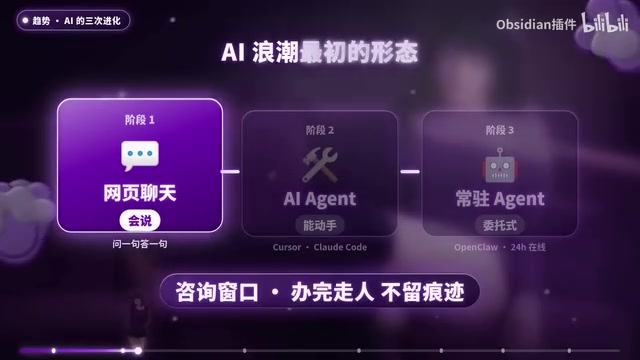
BlinkAI breaks down the evolution of AI interaction into three stages. The first stage is web chat, which works like a consultation window with no cross-conversation memory—the project background and requirement constraints you painstakingly explained in one conversation are all wiped clean when you start a new one. Valuable discussions end up scattered across chat histories, hard to find and hard to reuse.
The second stage is AI Agents represented by Claude Code, which evolve AI from "can only talk" to "can take action": reading files, writing code, operating tools—but still requiring you to issue instructions one by one.
The third stage is the delegated interaction pioneered by OpenClawAd: online 24/7, with memory, able to proactively execute tasks, and responsive across devices. To leverage AI productivity in real work, you need this kind of long-running Agent.
What is an AI Agent?
In the AI field, the term Agent refers to a system that can autonomously perceive its environment, make decisions, and take actions to accomplish goals. Unlike traditional chatbots, an Agent not only generates text but can also invoke external tools (such as search engines, code interpreters, and file systems), maintain memory, decompose complex tasks, and execute them step by step. Its core capabilities typically include: Planning, Tool Use, Memory, and Reflection. Both Claude Code and OpenClaw mentioned in the article fall under the Agent category, differing in their degree of autonomy and persistence. Understanding this general definition of Agent helps grasp the technical essence of the "conversational to delegated" evolution described in the article.
Why Kimi Claw for the Demo
Domestic "lobster" products based on OpenClaw have similar foundational capabilities, with differences mainly in the large models. BlinkAI chose Kimi Claw for the demo because Kimi's released K2.6 is broadly comparable to Claude Opus 4.6, particularly excelling in programming automation and Agent collaboration—able to work continuously for over ten hours, autonomously completing everything from gathering materials and reading long documents to writing reports, making PPTs, and building web pages in one go.
Practice 1: Save Chats to Obsidian with a Single Sentence
To solve the problem of scattered conversation results, BlinkAI created a Skill called Load to Daily that summarizes and saves chat content to Obsidian with a single sentence. The demo scenario has Kimi Claw analyze Tesla's Q1 2026 financial report—when you're satisfied with the content, you just say "record it," and Kimi creates the financial report summary as a note, simultaneously adds an entry to that day's journal, and wittily replies "I've recorded it." In Obsidian, clicking the bidirectional link in the journal jumps to the financial report analysis summary page.
The mobile app supports this too—a single sentence saves the chat summary to Obsidian, generating both a journal digest and a summary note. As notes accumulate, you can use Obsidian's bidirectional links, Bases, and AI plugins for further organization and output.
Obsidian's Bidirectional Links and Daily Notes Mechanism
Obsidian is a personal knowledge management tool based on local Markdown files. Its core feature is Bidirectional Linking: when you type [[Note B]] in Note A, the system automatically records a backlink from Note A in Note B, forming a knowledge network rather than isolated folder-style storage. Daily Note is a common Obsidian practice, automatically creating a note named by date each day for recording that day's events and thoughts. When AI creates a financial report summary as a standalone note and inserts a link to it in the journal, users can quickly trace back all the knowledge outputs generated that day through the journal as a "time entry point"—this is precisely the value of the Load to Daily Skill demonstrated in the article.
Practice 2: Give AI an External Brain
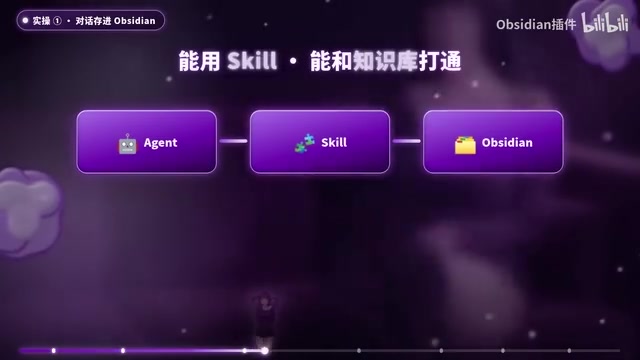
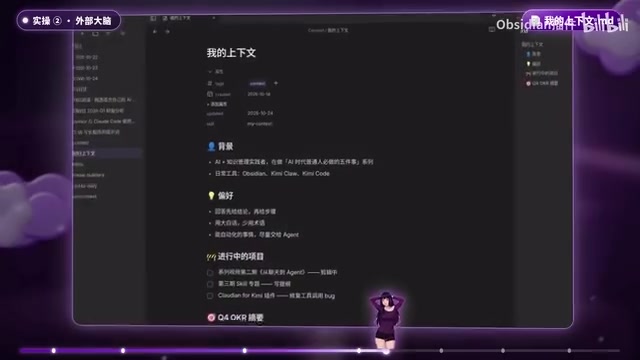
Kimi Claw already has a complete long-term and short-term memory mechanism, automatically recording your information and what you're working on each day through Memory.md—asking it "what project have you been working on recently" gets a direct answer. On top of this, you can add a more powerful external brain: maintain a document in Obsidian that manages your background information, preferences, and summaries of ongoing projects or OKRs, then create a Skill called My Context that lets AI read your background and project status when needed, or even help you update project progress in reverse.
Creating a Skill is actually not complicated: tell Kimi the Skill's name, goal, background, process, and reference materials, and it can generate a ready-to-use version—you just need to review and optimize. By codifying your way of working, AI will understand you better the more you use it.
What is a Skill?
In Agent products like Kimi Claw and Claude Code, a Skill is an encapsulation of a set of predefined operation instructions, processes, and reference materials—essentially "programming" the Agent's behavior. Users don't need to write code; they just describe the skill's name, goal, trigger conditions, execution steps, and available tools in natural language, and the Agent can convert it into a reusable workflow. The difference between a Skill and a traditional "prompt" is: a prompt is a one-time conversational input, while a Skill is a persistent, repeatedly invocable, composable modular capability. Load to Daily, My Context, and Follow Builders in the article are all instances of Skills—they codify repetitive work, transforming the Agent from "re-explaining every time" to "configure once, execute long-term."
Practice 3: Tasks That Run Automatically Every Day
Kimi Claw supports creating automated tasks on your computer. BlinkAI gives an example: every morning, the Follow Builders Skill automatically collects the latest tweets from dozens of AI Builders—the original creator is Sijiaruizhang, who aggregates tweets, blogs, and official blogs from dozens of AI Builders, summarizing the latest information daily and sending it to instant messaging tools. BlinkAI added Obsidian integration on top of this: in addition to sending to instant messaging tools, it also automatically writes into Obsidian's daily note each day to form an archive. Delegating such routine actions to an Agent for daily automatic execution is highly valuable.

Bonus: Chat Directly with Kimi Inside Obsidian
Many Obsidian users want to chat with Claude directly within their vault, but configuration is troublesome and tokens are expensive. BlinkAI developed Claude for Kimi based on an open-source plugin, letting you use Kimi directly in Obsidian's right sidebar, including the latest K2.6 model, without fiddling with third-party configurations. Install the Kimi Code plugin and the self-open-sourced Claude for Kimi plugin, and you can collaborate seamlessly with AI inside Obsidian. The plugin has implemented tool calling and Skill calling—there may still be bugs, and feedback is welcome.
The K2.6 Model and What "Comparable to Opus" Means
Kimi K2.6 is a large language model version released by Moonshot AI. The article's claim that it is "broadly comparable to Claude Opus 4.6" means it approaches Anthropic's flagship Opus series in benchmark capabilities such as programming, long-context understanding, and multi-step task execution. For ordinary users, this means that in Agent scenarios (such as working continuously for over ten hours, automatically reading long documents and producing reports), Kimi K2.6 can provide sufficiently reliable reasoning and tool-calling capabilities, while offering advantages in domestic access and cost. This also explains why BlinkAI chose Kimi Claw rather than other OpenClaw-based products for the demo—when the foundational framework is similar, the capability differences of the underlying model directly determine the Agent's actual productivity.
One Thing You Can Do Right Now
Open Kimi Claw, have a Q&A session, and save the conclusion to Obsidian. From web chat to building workflows with Agents, start with this step. This is the second of BlinkAI's "Five Things Ordinary People Must Do in the AI Era," belonging to leverage-layer efficiency; the next episode will discuss Skills in detail, and why everyone should publish their own Skills.
Related articles

Zero-Cost Local Jarvis: Open-Source Voice Cloning and Task Automation in Practice
AI Workshop shows how to build a zero-cost local Jarvis with Ollama and Voice Studio: local model switching, open-source voice cloning, file retrieval, and tool-calling tests, with setup steps and hardware trade-offs.

Mistral Large 4 Released: 1T-Parameter MoE Tops Western Open-Source Leaderboard
Mistral releases its flagship Mistral Large 4: a 1T-parameter MoE architecture activating only 49B parameters at inference, trained from scratch on 3,800 Grace Blackwell GPUs, topping the Western open-weight leaderboard with third-party endorsements in law, finance, and cybersecurity.

Mistral Large 4 Review: Can Europe's Strongest Open-Source Model Challenge the US and China?
Mistral Large 4 (L-Charm) review: trillion-parameter MoE, standout cybersecurity benchmarks but behind Kimi K3 in software engineering, 3,800 GPUs, a key step for European sovereign AI.