Building an MCP Server from Scratch: Let AI Apps Call Your Agent Tools

Hand-write an MCP server from scratch with version negotiation, tool discovery, and invocation.
Based on a YouTube tutorial, this article explains how to implement an MCP server from scratch so AI apps like Claude Desktop and VS Code can call your Agent's tools. The core `handle` function reads a request's ID, method, and params and returns a reply, treating messages without an ID as notifications. Modern MCP is stateless with version info in `params._meta`, returning `-32022` for unsupported versions; legacy clients use the `initialize` handshake. The three core methods are `server/discover`, `tools/list`, and `tools/call`, with stdio transport and pytest covering all edge cases.
Why You Need an MCP Server
A common requirement in AI Agent development is letting other AI applications (like Claude Desktop or VS Code) call the tools owned by your Agent. MCP (Model Context Protocol) is a communication protocol designed exactly for this. This article is based on the YouTube tutorial "AI Agents Tutorial: Build an MCP Server from Scratch" and walks you through implementing an MCP server from scratch, supporting tool discovery, invocation, and version negotiation.
The MCP protocol has multiple versions, each named after its release date. The server in this tutorial supports the modern version from July 2026 and the legacy version from November 2025. Each request carries version information via params._meta, and the server uses this to determine compatibility.
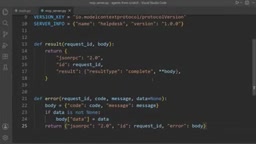
JSON-RPC 2.0 is the remote invocation specification underlying the MCP protocol. It defines a lightweight message format: a request object contains jsonrpc: "2.0", id, method, and optional params; a successful response contains id and result; a failure response contains id and error (which includes code, message, and optional data). The id is used to pair responses with requests, so a message without an id is by convention a notification that requires no reply. JSON-RPC also reserves a set of standard error code ranges, such as -32700 for parse errors, -32601 for method not found, and -32602 for invalid params. Each protocol can extend these with custom codes (such as MCP's -32022). Once you understand this layer of the specification, all the request/reply structures and error codes in this article are no longer scattered memorization points but conventions with a unified origin.
Core Implementation: From JSON to Server
Handling Requests and Replies
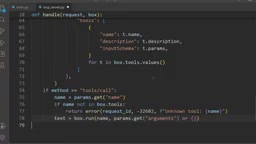
The handle function is the heart of the server: it receives a request and returns a reply. It reads the ID, method, and params, and calls the toolbox to execute the corresponding tool. Messages without an ID are treated as notifications (such as the client indicating "ready"), in which case handle returns None and no reply is sent.
A successful reply contains a result field and is marked type: complete; a failure reply contains an error object with an error code and message. The two are mutually exclusive and never appear together. For example, for a request with ID 7, the success and error replies look like this respectively:
**JSON Schema** is the standard for describing the structure of JSON data, and in MCP it is used to declare the input parameters of each tool. Each tool returned by `tools/list` carries an `inputSchema`, which typically includes `type: "object"`, `properties` (per-field type, description, enum values), and `required` (the list of required fields). After the client (such as Claude Desktop) reads this schema, it knows which params to pass and what type each param is, allowing the model to generate valid invocation parameters; the server can also use it to validate params, returning `-32602` when invalid. It's fair to say the schema is key to making a tool "discoverable and correctly invocable," and it's the common language MCP uses to expose tool capabilities to heterogeneous AI applications.
# Success reply
{"jsonrpc": "2.0", "id": 7, "result": {"type": "complete", "body": {...}}}
# Error reply
{"jsonrpc": "2.0", "id": 7, "error": {"code": -32602, "message": "Invalid params"}}
Version Negotiation and Compatibility
Modern MCP is stateless, and each request carries its own version metadata. If the version specified by a request is not supported, the server does not guess but returns error code -32022 (unsupported protocol version) and lists the supported versions in the data field. For example, a request for version 1900-01-01 receives this error, with data explicitly listing 2026-07 and 2025-11.
Legacy clients still use the initialize handshake, and the server responds directly with the legacy version (November 2025) and server information. This step is completed before the version check, so no version number is needed.
A stateless protocol means the server does not keep any session context with a client in memory, and each request carries all the information needed to complete processing. The modern version of MCP adopts this design: the version number is passed with each request via params._meta, and the server does not need to first "remember" the version negotiated during the handshake. The benefits are that the server can scale horizontally, requests can be handled by any instance, and reconnection after disconnection requires no session recovery; the cost is that each request must repeatedly carry the metadata. By contrast, the legacy mode relies on the initialize handshake to establish session state, which is exactly the form the stateless design seeks to escape, and this is the fundamental reason the tutorial has two coexisting modes with different processing paths.
The Three Core Methods
Every MCP client calls the following three methods:
- server/discover: Must be implemented by modern servers. The client can call it first to learn in one shot the versions, capabilities, and identity the server supports.
- tools/list: Returns the name, description, and input schema (JSON Schema) of each tool in the toolbox. The order matches the order in which tools were added, because Python dictionaries preserve insertion order.
- tools/call: Executes the specified tool. If the tool does not exist, returns protocol error
-32602; if the tool execution fails (such as a refund not approved), still returns a normal result but marks it withisError: true, allowing the model to adjust its strategy accordingly.
Unknown methods return -32601 (method not found).
Transport Layer and Error Handling
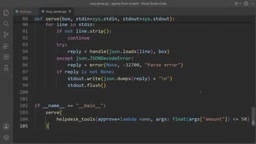
The server communicates with the client over standard input/output (stdio), with one JSON message per line. The serve function reads input line by line, skipping empty lines. Non-JSON lines return -32700 (parse error) with ID null and continue processing the next line without crashing. Replies are flushed immediately to avoid making the client wait.
Test Verification: Why Hand-Write Instead of Using the SDK
The official mcp-python-sdk is available, but this tutorial chooses a hand-written implementation to reveal the details hidden by the SDK decorators: metadata checks, the -32022 error, and result type. The test file test_mcp_server.py uses pytest and covers scenarios including discovery, listing, successful invocation, failed invocation, protocol errors, version rejection, legacy initialization, and notifications. Running all tests (including the 33 tests from the previous lessons) passes, ensuring regressions are caught in time when modifying the reply structure.
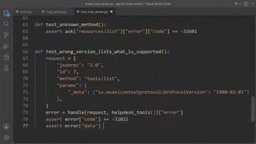
pytest is the most mainstream testing framework in the Python ecosystem, centered on the functional style and assert assertions, paired with fixtures to manage test dependencies and parametrization (parametrize) to cover input combinations in bulk. In this tutorial, since the server logic is a pure "request in, reply out" function, tests can directly construct JSON request dictionaries, call handle, and then assert on the returned result or error structure, without starting a real process or network connection. This design, which decouples protocol logic from the transport layer, lets boundary scenarios (error codes, version rejection, notifications with no reply) be covered cheaply and deterministically, and is an incidental benefit of the hand-written implementation over the SDK that makes fine-grained testing easier.
Extension and Next Steps
You can try adding a resources capability, listing help articles, and testing tools/list and the new methods. The next lesson moves into context engineering to help your Agent adapt to the token budget.
Quick check:
- What does error code
-32022mean? — Unsupported protocol version;datalists the supported versions and the requested version. - What reply does a notification without an ID get? — Nothing; only requests with an ID get a reply.
One-line Summary
Hand-write an MCP server from scratch that supports version negotiation, tool discovery, and invocation.
Paragraph Summary
The article, based on a YouTube tutorial, explains how to implement an MCP server from scratch so that AI applications like Claude Desktop and VS Code can call tools from your own Agent. The heart of the server is the handle function: it reads a request's ID, method, and params and returns a reply; messages without an ID are treated as notifications and get no reply. Successful replies carry result and are marked type: complete, while failures return an error with an error code, and the two are mutually exclusive. Modern MCP is stateless, with version information passed with each request via params._meta; when unsupported, it returns -32022 and lists the available versions, while legacy clients still go through the initialize handshake. The three core methods are server/discover, tools/list, and tools/call; a failed tool execution still returns a normal result marked isError: true. The transport layer processes JSON line by line over stdio. The tutorial chooses hand-writing over the SDK to reveal details hidden by decorators and uses pytest to cover all boundary scenarios.
Related articles

The Truth Behind Titanic's Sinking: Key Decisions and Communication Failures in the National Geographic Documentary
National Geographic's The Unsinkable Ship uses survivor testimony to reconstruct Titanic's fatal decisions—from the missing MSG telegram prefix and the broken boiler-room-to-bridge link to how 'unsinkable' thinking delayed damage control and evacuation.

74M-Parameter Open-Source Model Partially Outperforms Jev AI in Testing
Fastino AI's Glider 2.5 models, with just 74M–300M parameters, reportedly outperform Jev AI in some guardrail benchmarks per YouTube testing, run on consumer hardware, and even play Doom. We analyze small models' competitiveness and deployment value on specific tasks.

Gemini 4 Argon Hands-On: Aggressive Pricing, 3D Capabilities Need Coaching
Gemini 4 Argon hands-on: limited-time $2/$10 pricing, million-token output, strong 3D and reverse-engineering work, but weak front-end aesthetics and zero-shot ability need coaching.