Building Vidman with Claude in Five Minutes: A Real-World CLI Tool for Video Man Pages

DistroTube built a video man page CLI tool with Claude in five minutes, then audited and debugged it live.
Linux creator DistroTube handed Claude a single-paragraph prompt and received a complete bash script, Makefile, and Arch PKGBUILD for Vidman — a CLI tool to retrieve video man pages — in about five minutes. Claude asked four clarifying questions to lock in scope, and even added an unrequested config file mechanism. DT then walked through the code line by line, fixed a missing execute permission, corrected a master-to-main branch rename, and updated a stale PKGBUILD checksum. The case illustrates LLMs as engineering force multipliers: fast scaffold generation paired with human judgment and auditing.
A Overlooked Pain Point: Video Man Pages
DistroTube (DT), a veteran Linux content creator, has spent the past year working on an interesting project — Video Man Pages. These are short five-to-ten-minute videos focused on GNU core utils and other standard Linux shell tools, covering common flags, options, and typical usage patterns. Recent entries include commands like nl (line numbering), yes, and basename.
He's now built up a library of 36 video man pages, with plans to reach 50 and ultimately 100. But as the database grows, a new problem emerged: how can users quickly find and pull up these videos from within a Linux system? Manually browsing a YouTube playlist isn't exactly efficient. So he decided to build a CLI tool — vidman — that lets users type vidman cat in a terminal and immediately access the video or accompanying documentation for the cat command.
The Existing Infrastructure: GitLab Repo and Org Docs
This tool didn't come out of nowhere. DT already maintains a vidman repository on GitLab, where the README.org on the main page renders a table listing every covered command, its YouTube link, and a corresponding org-format document link.
Under the docs directory, each command has its own org file — for example, awk.org contains all the commands demonstrated in his awk video. This means the videos and readable documentation are in one-to-one correspondence: you can watch a video while following along with the actual commands in the doc. This well-structured repository is exactly what made vidman feasible to build quickly.
The org format (.org) is a plain-text markup language widely used in the Emacs ecosystem. It's syntactically similar to Markdown but more feature-rich, with native support for outline folding, tables, code blocks, and task management. Both GitLab and GitHub can render .org files as formatted web pages. In a terminal environment, org files are essentially plain text, readable directly with standard tools like less or cat — no special parser required. That's precisely what makes it a good cross-environment documentation format. DT's choice of org over Markdown likely reflects his long-term use of Emacs/Doom Emacs, as well as the cultural affinity with the GNU toolchain.
No Coding Required — Just Ask Claude
This is arguably the most thought-provoking part of the whole story. DT openly admits he could have spent a few hours writing the bash script himself, along with a Makefile and an Arch PKGBUILD for installation. But his choice was: just hand the requirements to Claude.
He described what he wanted in a single paragraph. Claude then asked four or five clarifying questions — and this interaction is worth examining in its own right:
- Which language? Bash, since it's available on most Linux machines by default, though Python was also an option. DT chose bash.
- How to watch videos? Open the link in a browser, or use a media player like MPV? DT's answer: both.
- How to read org docs? What to use in a terminal or TTY environment? Answer: standard
less. - Where does the data live? Fetch from GitLab on the fly each time, or download the org docs locally at install time? Local installation made more sense.
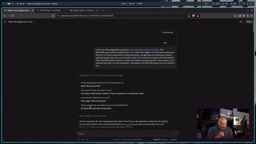
About five minutes later, Claude produced a complete script, a tar archive containing all the files, and detailed explanations for each component. DT barely had to do anything else.
The "reverse questioning" behavior Claude demonstrated here reflects a typical LLM strategy for handling ambiguous requirements: rather than generating code based on assumptions that might be completely off-base, it first asks a small number of high-value questions to eliminate critical uncertainties. The four questions — language choice, video playback path, documentation reading method, and data storage strategy — map directly to the tool's core dependencies and distribution logic. Getting any one of them wrong would require a structural rewrite, not a minor tweak. This questioning strategy is essentially a low-cost way to "lock in scope" before writing a single line of code.
The Code Is Auditable: LLM ≠ Black Box
Facing the common objection that "you have no idea what Claude is actually doing," DT's response was straightforward: he knows bash, could have written it himself, and simply didn't want to spend time on scripting and programming he doesn't enjoy. More importantly, the generated code is fully auditable.
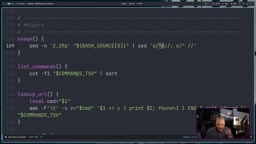
He walked through the vidman script line by line on screen: starting with the #!/usr/bin/bash shebang, then set -euo pipefail for error handling, followed by a program name variable and help text in the comments. Further down are several functions — resolve_share_directory for locating the directory containing commands.tsv, and resolve_docs_directory for finding each command's org file, both using for-loops to iterate over candidate directories. "Not complicated at all," he noted.
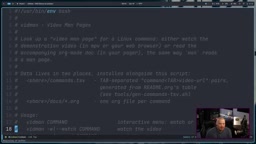
One detail that genuinely surprised DT: Claude proactively added a configuration file mechanism (.config/vidman/config, using key=value format) to support customization options like video player choice — something he never asked for in his prompt. He remarked that this is exactly where LLMs add value: they think of reasonable design decisions you wouldn't have thought of yourself. The data side includes a commands.tsv (tab-separated values) file, generated by a script in the repository that automatically extracts and sorts entries from README.org.
Real Pitfalls: Two Small Issues During Installation
This part of the walkthrough is refreshingly honest — it preserves the full "things went wrong" and troubleshooting process, which is far more instructive than a smooth success demo.
The first issue appeared during Makefile installation with a "permission denied" error. Investigation revealed that the gen_commands.tsv generation script in the tools directory was missing execute permissions (it had been set to executable only for nobody). Adding owner execute permissions fixed it, and sudo make install completed successfully — a local environment issue, unrelated to Claude's generated code.
The second issue involved the Arch PKGBUILD. Claude defaulted to assuming the GitLab main branch was still called master, but GitLab had long since renamed the default branch from master to main — a historical change Claude hadn't fully internalized, requiring a manual correction. Additionally, makepkg -si initially failed a "validity check" because the SHA-256 checksum in the PKGBUILD hadn't been updated. DT installed the pacman-contrib package and used its updpkgsums command to refresh the checksum, after which the Arch package installed successfully.
PKGBUILD is the script file used by Arch Linux and its derivatives (such as Manjaro and EndeavourOS) to describe a package's build process. The makepkg tool reads it and automatically handles downloading source files, verifying integrity, compiling, and packaging — ultimately producing a .pkg.tar.zst file manageable by pacman. The SHA-256 checksum (the checksums field) is a security mechanism that verifies downloaded source files haven't been tampered with or corrupted. Any time the source file content changes — even if it's just a branch name change causing a different tar archive to be pulled — the checksum must be updated accordingly. pacman-contrib is a companion toolset for pacman; its updpkgsums command automatically recalculates and writes in the correct checksums, saving you the manual hassle of running sha256sum and pasting the result yourself.
The Tool in Action: watch, browser, and read
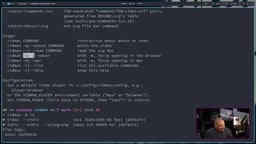
Once installed, running vidman with no arguments or vidman -h prints the help text, listing six flags: -W (watch, plays via MPV by default), -R (read, opens the org doc), -B (browser, must be combined with -W), -M, -L (list all covered commands), and -H (help).
In practice, vidman -W ls fetches and opens the ls command video in MPV; adding -B switches to opening it in a browser instead. Typing vidman cat with no flags brings up an interactive menu asking whether you want to watch in MPV, watch in a browser, or read the org doc with less. DT chose to read the doc, and less immediately opened the cat command documentation matching the video content.
Both the Makefile and PKGBUILD installation paths were verified successfully. vidman is now both an installable Arch package and something that can be installed on any distribution via Makefile. Want to know which commands are covered? A single vidman -L lists everything.
A Closing Observation: LLM as an Engineering Force Multiplier
Beyond the tool itself, this case study reflects a pragmatic approach to using LLMs in real development: not replacing a developer's judgment, but amplifying their execution efficiency. DT understood the code throughout, audited it line by line, and was able to identify and fix the real-world issues Claude missed — the branch rename, the missing permissions, the stale checksum. Claude's role was to rapidly translate a clear set of requirements into a working scaffold, while also surfacing reasonable design suggestions along the way.
For technical users who don't program for the joy of it and just want to get things done, this collaboration model — one prompt, four clarifying questions, five-minute output, then human audit — may be the most grounded, practical way to work with LLMs for coding today.
Related articles

AI Compute Is the New Oil, But the Market Mechanism Has Yet to Take Shape
Hacker News compares AI compute to the new oil, noting the lack of price discovery, concentrated supply, and no hedging tools. The article analyzes structural issues in compute trading and explores a possible three-tier market of spot, contracts, and derivatives, plus the real impact on AI practitioners' cost management.

Running Full iOS 16.5 Firmware on Android Devices: Technical Demo or Marketing Gimmick?
A Hacker News post claims full iOS 16.5 firmware can run on Android, with 315 upvotes. This analysis argues it is more likely a web UI simulation than a true firmware port, and explores the value and risks of such projects.

Etsy Cracks Down on AI Slop: Addressing Buyer and Seller Anxieties
Etsy introduces stricter rules limiting AI-generated content in listings, addressing buyer confusion over AI products and seller fears of original work being diluted by AI slop.