Buzz Shared Compute Hands-On: Running AI Agents for Free on Community Members' Idle Computers

Buzz Shared Compute lets AI Agents run free on community members' idle Macs via peer-to-peer connections.
Buzz's Shared Compute feature, powered by the open-source MeshLM project, enables community members to share idle Mac computing power for AI inference through encrypted peer-to-peer connections—no API keys or cloud bills required. This article provides a complete setup guide, explains the privacy architecture, tests multi-machine configurations, and highlights key pitfalls including Mac-only sharing, a startup bug, and model selection tips.
Borrowing Community Idle Computing Power: A Disruptive Way to Run AI
Facing bills from OpenAI or Anthropic every time you run an AI Agent is a universal pain point for developers. This article demonstrates a radically different approach: running your AI Agent on idle computers belonging to other community members—no API keys, no bills, and the hardware doing the work isn't even yours.
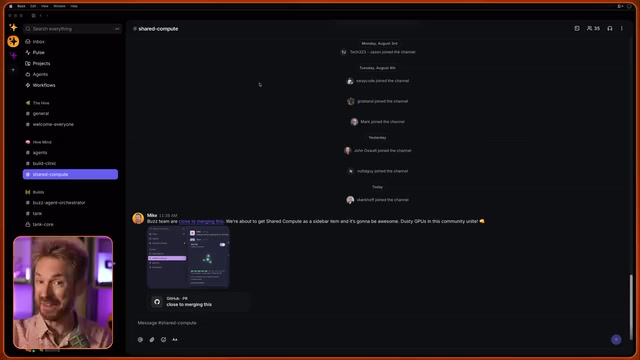
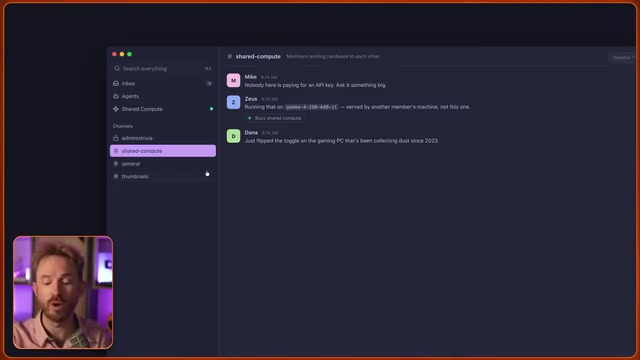
The entire concept can be summed up in one sentence: people within the same community lend each other their dusty, unused computers. This feature is called Shared Compute in the Buzz app, and it's powered by an open-source project called MeshLM.
MeshLM is an open-source framework focused on distributed large language model inference, with its design philosophy rooted in classic distributed computing paradigms. Prior to this, projects like Petals already allowed users to collaboratively run large models over the internet, but MeshLM's unique approach lies in its focus on local networks and trusted community scenarios—transmitting inference requests through peer-to-peer encrypted communication rather than exposing them on the public internet. Under the hood, it employs Pipeline Parallelism, distributing different layers of a model across different devices to collaboratively complete inference tasks.
Block (formerly Square) integrated MeshLM into Buzz and published a related blog post. Block was founded by Twitter co-founder Jack Dorsey and has deep roots in decentralized technology—including the Spiral team focused on Bitcoin open-source development, the decentralized identity project TBD, and the Bitkey hardware wallet. Integrating shared compute into Buzz aligns perfectly with Block's consistent philosophy of reducing centralized cloud service dependency and letting communities own their own infrastructure. However, Block's blog post didn't include a single command, which is why a complete hands-on configuration guide is the core value of this article.
Three Capabilities Buzz Shared Compute Enables
This mechanism actually enables three different capabilities, with the first being the one most likely to be used by regular users:
Community Shared Single Model
When someone in the community runs an AI model locally, all community members can call upon it. This is the most straightforward and practical scenario—you don't need powerful hardware, just a trusted community member willing to share.
Multi-Agent Blend
Sending the same question to multiple models simultaneously and then synthesizing their answers. This is essentially a collective intelligence approach that combines the judgment of multiple models to improve response quality. In academia, this is known as "Model Ensemble," based on the theoretical foundation that different models excel at different types of problems. Aggregating outputs from multiple models (via voting, weighted averaging, or having another model synthesize) often produces more reliable results than any single model. In traditional ensemble learning, this typically requires running multiple models on the same server; in a distributed shared compute scenario, different community members running different models naturally form a heterogeneous ensemble.
Distributed Layer-Split Running of Ultra-Large Models
The most ambitious option: when a model is too large for any single machine, you can use multiple 16GB RAM Mac minis to split the model's layers across different machines for distributed inference.
The technical principle behind this approach is based on the Transformer architecture of modern large language models. An LLM consists of tens to hundreds of stacked Transformer Blocks, each containing self-attention mechanisms and feed-forward networks. The essence of layer-split running is: the first device processes the first N layers, then transmits the intermediate hidden states (a floating-point matrix) to the second device to continue processing subsequent layers, and so on until the final layer outputs the token probability distribution. For a 1-trillion-parameter model, the weights alone require approximately 2TB of storage at FP16 precision—far exceeding the capacity of any single consumer device. But when split across 60-70 devices, each only needs to hold a small portion of the layers' weights.
According to the developers, the team has even tested models with up to 1 trillion parameters using this method. This means a cluster of consumer-grade devices can theoretically support models that previously only data centers could handle. Of course, network latency from transmitting intermediate states between devices is the main bottleneck, making this approach better suited for latency-insensitive batch processing tasks rather than real-time conversations.
Privacy Architecture: Where Do Your Prompts Actually Go?
This is the question most likely to raise privacy concerns, and it's also key to understanding the entire architecture.
Buzz has a Relay—your community's server. But a common misconception needs to be clarified: the relay functions like a phone book—it's only responsible for recording who's sharing, who's a member, and which models are online and available. That's it.
Your prompts do not pass through the relay server. Instead, they're transmitted directly to the target machine via an encrypted peer-to-peer connection, and answers come back directly to you. This P2P connection is likely implemented using WebRTC or similar NAT traversal protocols. In traditional client-server architecture, all data is forwarded through a central server, giving operators the ability to view communication content. P2P connections let two devices establish an encrypted channel directly—the relay only plays a "matchmaker" role during the initial connection phase, providing each party with the other's network address before exiting the data transmission path. The encryption layer typically uses protocols like DTLS, ensuring that even if intermediate network nodes intercept data packets, they cannot decrypt them. This design fundamentally eliminates the privacy risks of a central server at the architectural level.
Trust Prerequisites You Must Understand Before Using
One point must be emphasized: the owner of the machine answering your request can theoretically read what you send. This isn't a vulnerability—it's how the mechanism works. The reason is that data must ultimately be decrypted on the receiving end for the model to process it (models cannot perform inference on encrypted ciphertext), so the device owner running the model can indeed access the plaintext content. While technologies like Homomorphic Encryption can theoretically compute directly on ciphertext, their computational overhead currently exceeds plaintext inference by several orders of magnitude, far from practical use.
A development engineer used an apt analogy: it's like neighbors sharing power tools—ultimately, it's a trust issue. This is precisely why Buzz strictly limits sharing scope to your community membership—only your community members can access your Mesh network, not the entire internet.
Complete Configuration Tutorial: Enabling Shared Compute from Scratch
The configuration process is surprisingly simple. The core path is: Settings → Compute → Share Compute, then flip the switch.
Buzz automatically selects an appropriate model based on your hardware:
- 64GB or more RAM: Recommends Gemma series 26-billion parameter model, approximately 17GB disk usage
- Smaller capacity: Recommends smaller models (e.g., 2B level)
- Completely incompatible: No model recommended
Gemma mentioned here is an open-source large language model series released by Google DeepMind, with the name derived from the Latin word for "gem." The Gemma series includes multiple scale versions—2B, 7B, 9B, 27B—all built on the same research technology as Google's flagship Gemini model, using a decoder-only Transformer architecture and supporting multiple quantization formats including GGUF. The 17GB disk usage corresponds to the 4-bit quantized version—by compressing model weights from FP16 (2 bytes per parameter) to INT4 (0.5 bytes per parameter), storage and memory requirements are reduced by approximately 75% with only minimal precision loss. Buzz likely recommends Gemma because of its strong performance-efficiency balance at its parameter scale, and its open-source license permits community sharing use.
Something you might not have noticed: even if your machine can't contribute compute (doesn't match any model), you can still use others' compute—you just can't contribute back. After enabling, the system automatically downloads the corresponding model (in testing, a small Gemma model was downloaded on an Apple M1 Max with 24GB RAM), and it only needs to be downloaded once.
The Critical Step: Point Your Agent to the Shared Model
Simply sharing a model won't do anything by itself—you must create an Agent and point it to shared compute:
- Go to Agents in the sidebar and create a new Agent
- Agent instructions can be left blank
- In custom AI configuration, select Buzz Agent as the agent framework (to use community compute resources)
- Select Buzz Shared Compute as the LLM provider
The entire process requires no API keys—it uses purely community-shared compute resources. Once created, add this Agent to a channel's member list, ask it a question, and you'll receive a completely free response generated by someone else's machine.
Multi-Machine Real-World Test: Turning a Studio into a Mini AI Cluster
The tester simultaneously ran three machines sharing compute in their studio:
- MacBook Pro: Sharing toggle enabled to contribute compute
- Original Mac Studio: Running MeshLM and sharing
- Mac Studio M3 Ultra (256GB RAM): Capable of running larger models, even joining distributed tasks larger than what a single machine could handle
The reason these Mac devices are particularly well-suited for local AI inference comes down to Apple Silicon's Unified Memory Architecture (UMA). In traditional PC architecture, CPU and GPU have separate memory pools—running AI models requires shuttling data between system memory and VRAM, and consumer GPUs typically cap at 24GB VRAM. Apple Silicon shares a single high-bandwidth memory pool across CPU, GPU, and Neural Engine—M1 Max supports up to 64GB, M2 Ultra up to 192GB, and M3/M4 Ultra up to 512GB of unified memory. This means consumer Macs can load entire model weights into GPU-accessible memory for inference without expensive professional GPUs. The 256GB Mac Studio M3 Ultra mentioned could theoretically run 4-bit quantized models exceeding 100B parameters on a single machine.

As members join, the community's available compute numbers keep climbing. Imagine four members in different houses all enabling sharing simultaneously—that constitutes a true decentralized local AI cluster.
Coming Soon: Visual Compute Network Interface
A Pull Request currently in development will redesign the entire feature interface. The new interface will appear in the sidebar (below Inbox and Agents), using colored dots to intuitively display network status:
- Green: You're sharing compute
- Blue: You're using someone else's compute
- Orange: Connection being established
- Small gray dots: Community members who haven't enabled sharing yet
A more clever design detail: dot size represents the RAM capacity of the borrowed machine, nodes closer to you (local network) respond faster, while members on the other side of the world are positioned on the outer ring. This design hints at an important physical reality: P2P connection latency is highly correlated with physical distance—devices on a local network can achieve millisecond-level latency, while intercontinental connections might reach hundreds of milliseconds, which significantly impacts user experience for LLM inference that generates tokens one at a time.
Also, there are no data packet animations sliding along connection lines in the interface—because the software itself doesn't know exactly which machine each request goes to. Rather than creating a fake animation, the team chose to show nothing. This is considered a thoughtful piece of engineering honesty.
Three Pitfalls You Must Avoid
Amid the excitement, three things must be known in advance:
Sharing Is Currently Mac-Only
The ability to contribute compute (connecting your own device) is Mac-only—Windows and Linux users cannot share their devices yet—but they can still use community compute. This limitation likely relates to the inference advantages of Apple Silicon's unified memory architecture: at equivalent price points, Mac devices offer far more usable "VRAM" capacity than traditional PCs, making local large model execution practically viable. Additionally, macOS frameworks like Core ML and Metal Performance Shaders provide highly optimized low-level support for local inference. The team ships updates rapidly, so check your version before getting started.

Watch Out for the Unfixed Startup Bug
The sharing toggle sometimes gets permanently stuck on "Starting" with no error message from the app. If it's stuck for more than 10 minutes, that's the bug—not something you did wrong.
Model Selection: Don't Go Big, Use the Recommended One
The tester initially tried to be clever by selecting the largest model their machine could barely fit, but Buzz's official code doesn't recommend this. Just use the system-recommended model. The reason: recommended models are direct-answer types, while reasoning/thinking models consume massive amounts of tokens in the background, making Agent responses sluggish.
This involves an important model type distinction. "Direct-answer" models (like standard Gemma, Llama) generate answers immediately upon receiving a question; while "reasoning" models (like DeepSeekAd-R1, QwQ, etc.) first perform long chains of internal thinking (Chain-of-Thought), generating hundreds or even thousands of intermediate reasoning tokens before providing a final answer. In local inference scenarios, each token's generation speed is limited by device compute power, and reasoning models may consume hundreds or thousands of tokens during the "thinking" phase alone, causing wait times to multiply. In shared compute scenarios, fast answers matter more than slow deliberation—because you're occupying someone else's device resources, and prolonged inference not only makes you wait longer but also blocks other community members' requests.
Summary: A Decentralized AI Experiment Behind a Single Toggle
Buzz Shared Compute can be distilled to a few sentences: it's just a toggle; it auto-selects a model for you; it only allows your community members to join; your prompts are transmitted peer-to-peer without passing through a relay server; but the machine answering you can read your content—so only share with people you trust.
The real significance of this approach isn't saving a few dollars on API costs—it's providing a community-driven, decentralized AI infrastructure paradigm: those servers under the stairs, dusty gaming PCs, and old Macs in drawers can all become part of a cluster again. When trust becomes the prerequisite and idle compute is activated, individuals and small communities can access inference capabilities that once belonged only to big tech.
From a broader perspective, this represents a possible evolutionary direction for AI infrastructure: complementing the current inference market that's highly concentrated among a few cloud providers. Just as the early internet evolved from the centralized mainframe era toward distributed personal computer networks, AI inference capabilities may also partially flow back from centralized data centers toward edge device networks. While Buzz Shared Compute is still in its early stages, it validates the technical feasibility of this path—what remains is whether community trust and network effects can truly scale.
Related articles

Free Unlimited Claude Code Solution: Agnes AI + CC Switch Setup Guide
No paid subscription needed — pair the free AI platform Agnes AI with the open-source tool CC Switch to provide a backend for Claude Code, enabling unlimited free calls to text, image, and video models. This guide covers the full setup, test results, and usage boundaries.

A Complete Zero-Cost Guide to Getting Started with Claude Code for Beginners in China
A beginner's guide to Claude Code for users in China: two installation methods (command line and IDE plugin), full configuration steps for replacing the official API with the free domestic LongCat model, and a hands-on demo of building a small tool with natural language, plus tips.

When the NSA Gets Involved: The AI Supply Chain Crisis Behind Open-Source CVEs and API Key Hijacking
Multiple open-source projects disclosed severe CVEs in one day, PHP flaws alarmed the FBI, and Railway and OpenCode were breached with API keys stolen. This article breaks down the vulnerability window, AI-accelerated exploitation, and the AI supply chain crisis behind the API key black market, with a developer defense checklist.