Claude Code Core Decoded: Implementing an Agent Loop in 30 Lines of Code

Claude Code's agent kernel decoded: a while loop + one Bash tool = a fully functional AI agent in 30 lines.
This article dissects Claude Code's core Agent Loop mechanism, revealing how fewer than 30 lines of code can create a minimal autonomous agent. The loop is driven by two signals from the model's stop_reason field—tool_use to continue and end_turn to exit. By using a single Bash tool as the unified entry point, the agent gains OS-level capabilities without complex architecture, proving that agent intelligence comes from the model itself while engineering simply provides the feedback loop.
Starting from a Common Pain Point
Have you ever encountered this scenario: you ask a large language model to read a directory, modify a file, or run a script, and it quickly gives you a command—then just stops. The command never actually executes, the results never make it back to the model, and you're left manually copying and pasting, then asking again. With every round-trip, you're acting as the "middleware" between the model and the real world.
The root cause of this experience is that the model lacks a mechanism for continuous action. It has the ability to reason, but no channel for execution or feedback. The solution isn't to pile on longer, more complex prompts—it's to give the model a minimal Agent Loop: let the model decide the next step, and let the host environment handle tool invocation, action execution, and feeding results back.
The Agent Loop is an engineering pattern derived from the "perceive-decide-act" paradigm in reinforcement learning. In traditional LLM conversations, interaction is single-turn or multi-turn Q&A—the model has no ability to take autonomous action. The Agent Loop places the model in a continuously running control loop, enabling it to repeatedly observe environmental state, make judgments, and take actions like an autonomous agent. This concept gained widespread attention in 2023 with projects like AutoGPT and BabyAGI, but Claude Code's implementation distills it to its essence, proving that the core mechanism doesn't require complex architectural support.
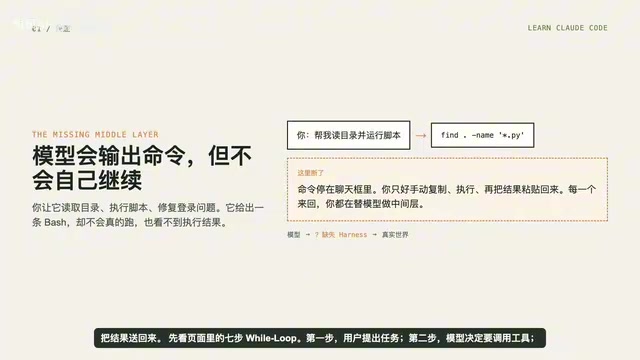
This is exactly the core design philosophy of Claude Code's kernel. Surprisingly, the minimal implementation of this kernel takes fewer than 30 lines of code.
Seven Steps of the Agent Loop
To understand the Agent Loop, let's break it down into seven clear steps:
- User submits a task — hand the requirement to the model;
- Model decides to call a tool — the model determines it needs to perform an action;
- Host executes the tool — an external program actually runs the command;
- Tool results return to the message list — execution results are appended to the conversation context;
- Model reads the results and decides again — based on real feedback, it determines the next step;
- If there are more actions, continue — the loop repeats the above path;
- Model signals end turn — task complete, loop exits.
The essence of the entire agent is simply repeating this path continuously. The key insight: let the model see real-world feedback, then decide what to do next.
This seven-step loop shares a striking resemblance to the classic "OODA Loop" (Observe-Orient-Decide-Act) from control theory. The difference is that in the traditional OODA Loop, the decision-maker is a human commander, while in the Agent Loop, the decision-maker is the large language model. The model's "observation" comes from tool-returned results, its "decision" is made through reasoning capabilities, and its "action" is carried out via tool calls.
Two Signals Drive the Loop
When you translate the seven steps into code, you'll find that what actually drives the loop is just two signals, both from the stop_reason field in the model's response:
- When
stop_reason == tool_use, the model is "raising its hand" saying: I need to use a tool. The host then executes the tool, collects results, appends messages, and returns to the next iteration; - When
stop_reasonis nottool_use, the model considers "I'm done," and the loop exits immediately.
stop_reason is a key field in the Anthropic Claude API response that indicates why the model stopped generating. Common values include: end_turn (model naturally finished its reply), max_tokens (hit the token limit), and tool_use (model requests a tool call). This design stems from Anthropic's Tool Use feature launched in 2024—the model learned during training to emit structured tool call requests at appropriate moments, rather than merely outputting descriptive text. This is conceptually similar to OpenAI's Function Calling mechanism, though the two have different design tradeoffs at the protocol level.
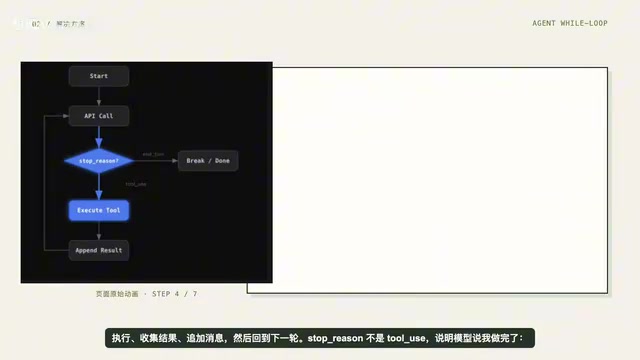
Here's a cognitive point worth emphasizing repeatedly: the model doesn't become smarter because of the loop. The loop itself doesn't enhance the model's reasoning ability. But without this loop, the model never gets the chance to see real-world feedback—it can only guess blindly, unable to verify or iterate. The loop's value lies in connecting "judgment" and "execution" into a closed loop.
It's like a chess player: no matter how skilled they are, if they can't see their opponent's moves, they can't play good chess. What the loop provides isn't intelligence, but "visibility"—enabling the model to make subsequent decisions based on real state, rather than reasoning in imagination.
Minimal Implementation: Code Logic in Five Steps
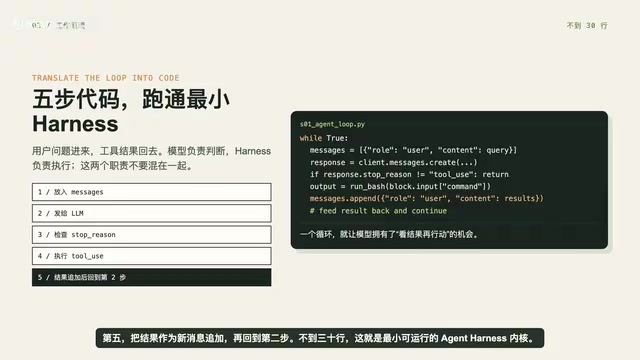
To turn the above logic into code, the working principle breaks down into five steps:
- Place the user's question into
messages(the message list); - Send the messages along with tool definitions to the model;
- Append the model's response, check if it requested a tool;
- Find
tool_use, run the corresponding tool (e.g., Bash), collect each tool's result; - Append the results as new messages, return to step 2.
Essentially, this is a while True loop plus tool invocation. The entire code is under 30 lines—a minimal runnable Agent kernel. No complex class hierarchies, no additional planning frameworks, just a few functions and a unified tool entry point.
It's worth noting that the messages list serves as "memory" here. The input and output of each tool call round is fully preserved in the message history, allowing the model to "recall" what it did before and what results it obtained when making the next decision. This short-term memory mechanism based on the context window is simple, but effective enough for most task scenarios. Only when tasks are complex enough that message history exceeds the context window limit do you need to introduce external memory or summarization mechanisms.
Why a Single Bash Tool Is Enough
In our experiment, we first validate using a safe temporary directory: install dependencies, run the Python SDK, then input three prompts—create hello.py, list Python files in the current directory, and check the current Git branch.
The focus isn't on how pretty the model's output is, but on clearly seeing: when it calls a tool, and when it stops.
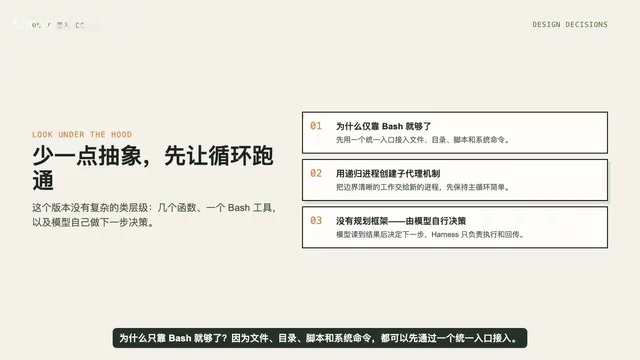
Digging into Claude Code's design, you'll discover why a single Bash tool is sufficient. The reason: file I/O, script execution, and system commands can all be accessed through a unified entry point. Even "sub-agents" can be spawned by recursively creating processes. There's no separate planning module here—the model decides its next step entirely based on tool-returned results.
Choosing Bash as the sole tool entry point embodies Unix philosophy—"do one thing, and do it well." In Unix/Linux systems, virtually all operations can be accomplished through Shell commands: file operations (cat, echo, cp), process management (ps, kill), network requests (curl), text processing (grep, sed, awk), and more. This means a tool that can execute Bash commands theoretically possesses OS-level complete capability. This design avoids the complexity of defining independent tool interfaces for each operation, and avoids the confusion models experience when tool counts proliferate—research shows that when available tools exceed a certain number, models' tool selection accuracy drops noticeably.
This is the tradeoff philosophy of minimal implementation: less abstraction, get the loop running first.
One Tool Plus One Loop Equals a Minimal Agent
Remember this statement: One tool + one loop = one minimal Agent.
This is the foundation of the entire agent development stack. All the more complex capabilities that follow—tool permission management, richer tool sets, multi-agent collaboration—will be layered on top of this loop. Once you understand this 30-line kernel, you've grasped the operational essence of Claude Code and virtually all AI agents.
Tool Permission is the critical security mechanism for taking Agent systems from experimentation to production. When an Agent has the ability to execute Shell commands, it can theoretically delete files, access networks, modify system configurations, or even execute malicious code. Therefore, in actual deployments, a tiered permission system must be established: which commands can auto-execute (e.g., ls, cat), which require user confirmation (e.g., rm, pip install), and which are completely forbidden (e.g., sudo, curl | bash). Claude Code controls risk through sandboxed environments, command whitelists, and user confirmation prompts—which is also why the experiment demo deliberately uses a temporary directory rather than a real project directory.
Many people learning agent development get overwhelmed by various frameworks and abstract concepts—LangChain's Agent Executor, AutoGen's multi-agent communication, CrewAI's role definitions—mistakenly believing that an agent's "intelligence" comes from complex architecture. But the truth is exactly the opposite: intelligence comes from the model itself, and what engineering needs to do is simply give it a minimal closed loop for continuous feedback and continuous action. Frameworks provide convenience and extensibility, but if you don't understand the underlying loop mechanism, no amount of frameworks will be anything more than black boxes.
In the next section, we'll build on this loop foundation and connect more genuinely useful tools to it.
Key Takeaways
Related articles

Chain of Thought Isn't Just for AI: How Humans Can Use CoT to Improve Thinking Quality
Chain of Thought isn't just a prompt trick for large models. Starting from a Hacker News discussion, this article analyzes why CoT works for human thinking too, breaks down actionable ways to transfer it, and highlights the key differences between human CoT and machine CoT.
Cloudflare Teams Up with OpenAI: Closi…
Cloudflare Teams Up with OpenAI: Closing the Loop from Vulnerability Discovery to Defense with AI
Cloudflare uses OpenAI Daybreak to investigate security vulnerabilities and generate reviewable remediation plans, while developers use Codex to boost coding efficiency and quality.

Orca Multi-Agent Orchestration in Practice: A Guide to Parallel Collaboration with Claude and Codex
Orca is Stable AI's free open-source agent workbench supporting 34 agents like Claude Code and Codex in parallel. Learn its Git worktree isolation, multi-model orchestration, and mobile management.