Claude Code Cost Varies 11.9x: A Guide to Saving Money with Effort Subagents

Claude Code's Effort tiers can cause nearly 12x cost differences for the same task; defaults and subagent tiering are key to saving money.
Claude Code's Effort (thinking budget) setting hides huge cost differences: with High as the baseline, Low costs only 0.47X while the deepest tier reaches about 11.9X—nearly 12x for the same task. Defaults differ by model (5.5 series Medium, Opus 4.7 X High), so without setting it you keep burning money. The new mechanism lets you specify Effort per subagent—Low for search, High for refactoring. Three pitfalls: default isn't Low, older models silently run at High, and Max only applies to the current session. Control costs by checking tiers, writing Effort in subagent definitions, using environment variables, or setting a ceiling for automatic downgrading.
Title
Claude Code Cost Varies 11.9x: A Guide to Saving Money with Effort Subagents
Meta Description
Claude Code's official cost table revealed: Effort thinking budgets are tiered, and the same model on the same task can cost 11.9x more. This article breaks down the cost index of each tier, how to assign work to subagents individually, and three default-setting pitfalls, plus three practical commands to help you finely control AI coding expenses.
Article Content
Same model, same task—yet the cost can differ by nearly 12x. The difference comes down to a single setting most people overlook: Effort (thinking budget). After Claude Code's official cost table was revealed, this hidden parameter became the key to controlling AI coding expenses.
According to an analysis by Bilibili creator "Mingjing and Diandian," Effort in Claude Code is divided into multiple tiers, and the official documentation labels each with a relative cost index (with High as the baseline): Low is 0.47X, High is 1X, Max is 5.59X, and the deepest tier reaches a cost index of 11.92. This means that if the default setting is wrong, a single code generation could burn nearly 12x the money.
Effort Tier Cost Table: Lower Tiers Save Money, Higher Tiers Burn It
The official cost table shows that Effort tiers do not grow linearly. The mildest tiers differ by only 2.3x, while the jump from High to Max steepens to 5.59x, and the deepest tier approaches 12x the baseline.
| Tier | Cost Index (High as baseline) |
|---|---|
| Low | 0.47X |
| High | 1X (baseline) |
| Max | 5.59X |
| Deepest tier | ~11.9X |
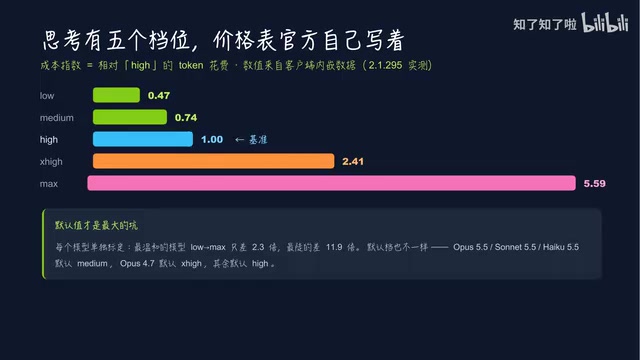
Different models also have their own calibrations. For example, Opus 4.7 defaults to X High, while the 5.5 series defaults to Medium, and other models default to High. In other words, if you don't set it yourself, it will keep consuming your budget at the default tier.
Assigning Work to Subagents: One Task, One Budget
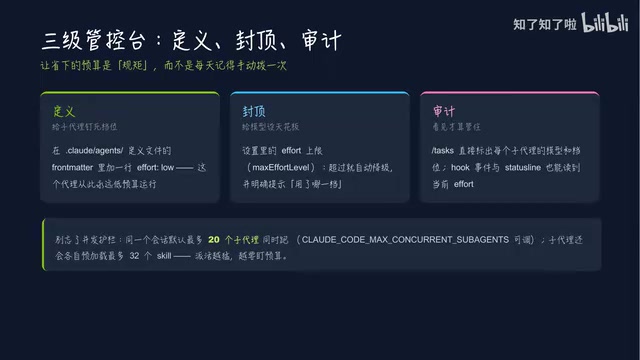
Claude Code's new mechanism allows you to specify the Effort parameter individually for each subagent. Previously, the entire session had only one global tier; now you can allocate finely by task type: give search-type subagents Low, refactoring-type High, and you can explicitly name X High for certain types.
This tiered approach solves the previous "one-size-fits-all" waste—not all tasks require deep thinking. Lightweight work such as searching and material organization is sufficient at Low, while refactoring and complex reasoning need High or above.

According to the creator's summary, Effort's override chain has four layers: environment variables can override a single call's parameters outright; settings remain effective after Resume; the definition file field can lock in the tier; and writing one line of Effort in the Agent definition file can make that agent always low-budget. The three implementation approaches are the definition layer (hardcoded in the Agent definition file), the cap layer (set an Effort ceiling in settings, automatically downgrading when exceeded), and the audit layer (Tasks shows the model and tier of each subagent).
The subagent mechanism is an architecture in Claude Code that breaks down complex tasks and delegates them to independent execution units. The main session is responsible for overall planning and result integration, while subagents run in isolated contexts for specific subtasks (such as code search, file organization, refactoring suggestions). Each subagent has its own prompt, tool permissions, and parameter configuration, so you can specify the Effort tier individually to achieve "budget allocation by task type." This design avoids the resource waste caused by a single global tier—lightweight tasks are not forced to use high-cost reasoning, while critical tasks still get sufficient compute. Subagent results are returned to the main session, which decides whether to adopt them or ask further, optimizing expenses while ensuring overall quality.
Three Common Pitfalls: Default Settings Are Quietly Burning Money
The first pitfall is that the default tier is not Low. The 5.5 series defaults to Medium, and Opus 4.7 defaults to X High; if you don't set it, it keeps burning money at the default.
The second pitfall involves silent dispatch. Older models at the start don't have an X High tier, so naming it will silently run at High. You might think you've given a low budget, but it's actually consuming at the medium-to-high tier.
The third pitfall is that Max only applies to the current session and does not automatically carry over to the next. This means you need to reconfirm the tier for each new session.

Silent dispatch refers to when a user specifies an older model that does not support a certain tier (such as X High); the system does not error or prompt but automatically downgrades to the highest tier that model supports (usually High) and continues. Users may mistakenly believe they have set a low or high budget, but the actual consumption differs from expectations. This mechanism is friendly for compatibility but covert for cost control: especially when users mistakenly think that naming an older model saves money, they are actually billed at the medium-to-high tier. To avoid this pitfall, confirm the supported tier range of the target model before dispatching, or force an override via environment variables to ensure actual consumption matches expectations.
The Right Approach and Three Practical Commands
The core strategy is: assign low tiers to subagents and keep the main session at the default. This ensures the reasoning quality of the main workflow while saving money on replaceable lightweight tasks.
Three commands you can use right now:
- Type Effort to view the current tier; press S to change only this time, or press Enter to save as default.
- Write one line of Effort in the subagent definition file—set search to Low and review to High.
- Use environment variables to lower all subagents uniformly, or set a ceiling in the settings layer to automatically downgrade.
For teams that call Claude Code heavily every day, Effort tiering is not optional—it's a required course in cost control. First see which tier your subagents are running at, then decide which tasks are worth spending 12x the money on.
One-line Summary
Claude Code's Effort tiers can cause nearly 12x cost differences for the same task; default settings and subagent tiering are the keys to saving money.
Paragraph Summary
Claude Code's Effort (thinking budget) setting hides huge cost differences: with High as the baseline, the Low tier costs only 0.47X, while the deepest tier can reach about 11.9X—nearly 12x the expense for the same task. Different models have different default tiers (the 5.5 series defaults to Medium, Opus 4.7 defaults to X High), and if you don't set it proactively, it will keep burning money at the default. The new mechanism allows specifying Effort individually for each subagent, enabling fine-grained allocation such as Low for search and High for refactoring. The article also reveals three common pitfalls: the default is not Low, older models without X High will silently run at High, and Max only applies to the current session. In practice, you can control costs by checking the tier, writing Effort in the subagent definition, using environment variables to lower it uniformly, or setting a ceiling for automatic downgrading.
Related articles

Bilibili's Hit Dify Tutorial: A Practical Guide to Building 20+ AI Apps from Scratch
A distilled guide to Bilibili's top-rated Dify tutorial: Windows + Docker deployment, MySQL connection, five app types, model integration strategy, and publishing.

Agent Skills Beginner's Guide: From Concepts to Multi-Agent Collaboration in Practice
A comprehensive guide to Agent Skills: core concepts, components, the importance of Description, standardization, beginner learning paths, and multi-agent collaboration.

One Neuron Detects Both Cats and Cars? We Reproduced It and Found a New Explanation
The cat-car neuron reinterpreted: researcher Cammarata argues it distinguishes pointy from round, not cats from cars. We reproduced the experiment and found the new explanation holds on most inputs—but cars are the exception. The interpretability debate continues on language models.