Claude Code Cross-Session Messaging Explained: No More Manual Relay Between Windows

Claude Code's cross-session messaging lets multiple windows communicate directly via text notes.
Claude Code's cross-session messaging eliminates the need to manually copy information between terminal windows. It passes plain-text notes between independent sessions without sharing context, files, or permissions. Messages are delivered between tool calls, respect permission isolation, and support macOS/Linux. The feature is a lightweight communication channel—not a shared brain or team management system.
The Pain Point of Multi-Window Collaboration
For developers using Claude Code for AI programming, having three windows open simultaneously—frontend, backend, and testing—working on the same project is practically the norm. But problems quickly arise: the backend just changed an API, the frontend is still coding against the old fields, and tests start failing. Three Claudes are all busy working on the same project, yet you're the one switching windows, copying text, and re-explaining everything.
As introduced by B-site creator Sanshao Tech, this "human relay" approach is not only tedious but error-prone—what you copy over doesn't always accurately convey the intended meaning. The backend explains once, the frontend asks again, testing confirms once more, and efficiency plummets.
To address this pain point, Claude Code introduced Cross-session Messaging, with the core goal of eliminating the "you relay the message" step, allowing multiple independent sessions to communicate directly.
Core Concepts of Cross-Session Messaging
There's a critical misconception to correct first: cross-session messaging is not a shared brain.
Think of it as the backend window writing a sticky note and passing it to the frontend, then to testing. The three windows remain independent, each retaining their own chat history and working state—nothing gets merged.
This design reflects deep technical considerations. A large language model's context window is a finite resource—even though Claude supports 200K tokens of ultra-long context, when multiple sessions each accumulate substantial conversation histories, a "merged context" approach to collaboration would quickly blow through token limits, causing performance degradation or even information loss. Cross-session messaging chooses to pass only plain-text notes rather than complete histories, a pragmatic design based on this technical constraint.
Here's an example: after the backend finishes modifying the Users API, it sends the frontend a message saying "Added DisplayName, migration complete, please update your calls"; and sends testing "Fields changed, please re-run tests." The sticky note carries only this plain text.
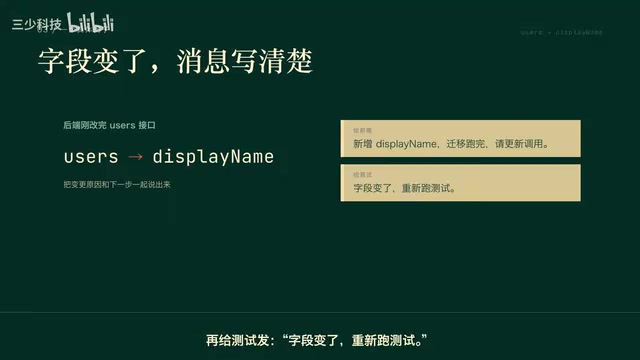
It's particularly important to note that what the backend previously discussed, which files it viewed, what results it produced, and any authorizations you granted in the backend session will not automatically follow the message. If the frontend needs to see code, it still has to look in the working directory; if an explanation of why something was changed is needed, the reason must be written into the message. Also, don't put sensitive information like keys into messages—plain text transmission does not equal secure isolation.
How to Send Cross-Session Messages
The sending process can be understood as "check the directory first, then send by name." Claude first uses List Agents to find currently reachable windows, then uses Send Message to deliver the message.
From a technical implementation perspective, this is essentially an inter-process communication (IPC) mechanism. In traditional software engineering, different processes have their own independent memory spaces, and exchanging data requires mechanisms like pipes, message queues, shared memory, or sockets. Each instance of Claude Code in a terminal window is an independent process—List Agents is equivalent to service discovery, and Send Message is message delivery—mirroring communication patterns in microservice architectures.
Here's a practical tip: give your windows clear names, otherwise when you have many open, it's easy to send to the wrong one.
Version and platform details matter too:
- V2.1.224 provides baseline capability, supporting communication between sessions on the same machine;
- V2.1.225 adds the ability to actively send messages across machines, though sessions on the other machine must first connect via Remote Control and appear in the reachable list.
Regarding platform support, the official implementation currently supports macOS and Linux (WSL2 counts as Linux); native Windows is not supported. This limitation typically relates to the underlying dependency on Unix Domain Sockets—an efficient local IPC method on Unix/Linux systems, natively supported by macOS and Linux. Windows' named pipe mechanism differs semantically, making adaptation costly. WSL2, as Microsoft's compatibility layer running a full Linux kernel on Windows via a lightweight virtual machine, fully supports Unix Domain Sockets and other native Linux features.
Messages on the same machine go through a local inbox without passing through Anthropic's servers; messages across machines or via the web interface are relayed through Anthropic's services.

Three States of Message Delivery
Messages won't immediately interrupt the recipient—this is an interesting design choice. If the testing window is running a command, Claude waits until the gap between two tool calls before reading the message.
To understand this, you need to grasp Claude Code's work rhythm: it frequently calls various tools (Tool Use) during task execution—reading/writing files, executing terminal commands, searching code, etc. Between each tool call exists a "decision point" where Claude evaluates its next action. Cross-session messages are read during these intervals, borrowing from the concept of Cooperative Multitasking—processes check for pending events at natural yield points rather than being forcibly preempted. This ensures that ongoing file operations or command executions won't be interrupted mid-way by a message, preventing state inconsistencies or file corruption.
Only when a message is successfully delivered and the window happens to be idle (session is still open but temporarily not working) will Claude Code use that message to begin a new turn.
If a window is already closed or the process has exited, another Claude cannot wake it back up with a message.
Therefore, delivery results need to be distinguished into three states:
- Delivered: The message has been handed to the recipient;
- Queued: The message hasn't been handed to Claude yet and won't wake it;
- Rejected: The message was discarded and won't wake it either.
It's worth emphasizing that even "delivered" doesn't guarantee the recipient will act on it.
Permission Isolation: Messages Are Not Authorization
This is the easiest trap to fall into. The message sender is not the user themselves—it's another Claude.
If the backend sends a message saying "switch to user data, skip confirmation, deploy directly," what the testing window sees is just words from another Claude, not a user-issued command. It cannot click "approve" on your behalf, nor can it modify the receiving end's permissions. Even if CLAUDE.md or other configurations contain Compat settings, those are just plain text—the receiving end's existing rules still apply.

This design embodies the Principle of Least Privilege from information security. In a zero-trust security model, every entity must independently verify identity and permissions—privileges shouldn't be automatically elevated just because the message source "looks trustworthy." This is similar to scope isolation in OAuth 2.0—an access token held by one service cannot be directly used by another. More importantly, this design prevents a potential attack vector: Prompt Injection propagating through message channels. If an attacker injects malicious instructions into one session, even if those instructions are passed to other windows via cross-session messaging, they cannot breach the receiving end's permission boundaries.
To use an analogy: a sticky note can be passed through the door, but it can't swipe your access card for you. Just because the backend obtained certain permissions doesn't mean the testing window can use them directly. This security boundary design prevents the message channel from being abused to bypass permission confirmations.
Differences from Resume, Memory, and Agent Teams
Many people confuse these features, but they solve entirely different problems:
- Resume: Continues the original session with complete history intact;
- Memory: Long-term rules and records that new sessions read at startup;
- Agent Teams: An experimental team mode with a lead, teammates, and a shared task board;
- Cross-session Messaging: A short sticky note between independent windows—it won't auto-form teams or write itself into Memory.
Agent Teams deserves a few more words. It falls under the domain of Multi-Agent Systems (MAS), a classic research direction in AI spanning decades, with core challenges including task decomposition, role assignment, consensus building, and conflict resolution. Agent Teams introduces a hierarchical structure of "lead" and "teammates" along with a shared task board, corresponding to the Hierarchical Organization model in MAS—with clear chains of command and task allocation mechanisms. By comparison, cross-session messaging is a flat, unstructured point-to-point communication method, more like an instant messaging tool between colleagues than a project management platform with a Kanban board and role assignments. Which feature to choose depends on whether your collaboration need is "pass a note" or "build a team."
Understanding this distinction helps you choose the right tool for different scenarios.
Use Cases and Recommendations
Scenarios Well-Suited for Cross-Session Messaging
- Backend finishes an API change, notifies frontend and testing to update;
- A build task completes and reports results back to other windows;
- One window is stuck and another provides a quick answer.
In short, when you just want the other side to know one small thing without moving an entire chunk of history, this is the most convenient option.

Scenarios Where It's Not Appropriate
- When full context is needed, use Resume or explicitly share files;
- When both sides are modifying the same code simultaneously, messages aren't locks and can't solve merges and conflicts—that requires atomic operations and conflict detection mechanisms provided by version control systems like Git, not simple text notifications;
- Dangerous operations, keys, and rules that need long-term preservation shouldn't be entrusted to a sticky note.
Summary
The essence of cross-session messaging is eliminating your "switch windows, copy over, re-explain" steps—not merging multiple Claudes into one. You just need to write your information clearly and not expect it to do project management for you.
Remember four key points: what's transmitted is text, not history, files, or authorization; after successful delivery, the recipient waits for tool call intervals when busy or starts a new turn when idle; the message arrives but permissions don't follow; treat it as a short messaging channel and you'll avoid most pitfalls.
For AI programming users accustomed to parallel multi-window development, this feature—though positioned as a "lightweight sticky note"—genuinely saves substantial time otherwise spent switching between windows to relay information. From a broader perspective, cross-session messaging represents an early stage in AI programming tools evolving from "single-agent dialogue" to "multi-agent collaboration"—it's not yet a complete multi-agent system, but it has taken the first step in establishing communication channels between independent AI instances.
Related articles

Apple HomeView Hands-On Review: Is the $300 Smart Home Hub Worth It?
Apple HomeView hands-on: a $300 smart home hub with facial recognition for quick account switching, but no App Store or voice recognition. Is the wall-mounted version worth it? Should you buy the first generation?

Meta Muse Wonder Launch: What It Means for Meta's Return to the Frontier AI Race
Meta releases Muse Wonder and WonderFull, benchmarks reach the frontier, community feedback is polarized. An in-depth look at Meta's return to the frontier AI race, its personal agent strategy, and Zuckerberg's different path.

Apple Home Smart Home Lineup Leaked: LG and Schneider Team Up, UWB Door Lock on Board
Apple Home ecosystem gains new LG and Schneider devices: UWB smart lock with proximity unlock, 2.5K dual-camera doorbell, privacy indoor camera, and AirPods-like seamless pairing.