Claude Code Getting Started: Installation, Anti-Ban Tips, and Effective Usage Guide

A practical guide to installing Claude Code, avoiding account bans with CC Switch, and using it effectively.
This article, based on a Claude Code beginner workshop, covers the full path from installation to effective use. It recommends NPM installation (requiring Node.js 22+ and Git, with a proxy active), and using the open-source CC Switch tool to bypass official account login and eliminate ban risk. For model selection, domestic models like DeepSeek are sufficient for daily development. The article also emphasizes moving beyond plain natural-language prompts by leveraging permission modes, MCP, Skills, Subagents, CLAUDE.md, and the Human in the Loop mechanism.
Claude Code (referred to as CC throughout this article) — Anthropic's command-line coding assistant — is becoming a daily driver for more and more developers. Yet many users remain stuck at the "just describe what I want in plain English" stage, never unlocking the tool's real capabilities while constantly running into account bans. This article is based on a Claude Code beginner workshop and systematically covers the complete path from installation and login safety to effective usage.
Why Your Claude Code Experience Isn't Great
Many people — whether at a company or on personal projects — use Claude Code in pure natural-language mode: write a one-liner requirement, wait for code. This approach is actually quite limited.
The instructor made this point clearly: relying solely on natural-language prompts for day-to-day development will almost always produce poor results — not just unstable output quality, but noticeably higher token consumption and longer turnaround times. The reason is that vague prompts provide no technical guardrails, leaving CC to "guess" what you actually want rather than making informed technology choices.
The smarter approach is to leverage Claude Code's built-in component ecosystem: permission modes, MCP, Skills, Subagents, and the CLAUDE.md config file. Using these components together is what actually drives up efficiency and output quality. This article tackles the two most fundamental — and most frustrating — steps first: installation and login.
A note on MCP and CLAUDE.md: MCP (Model Context Protocol) is an open protocol released by Anthropic in late 2024, designed to standardize how AI models connect to external data sources and tools. Think of it as "USB for AI": the server side (MCP Server) exposes resources like file systems, databases, browsers, and third-party APIs, while the client (Claude Code) calls those resources through a unified protocol — no custom integration code required per tool. With MCP enabled in Claude Code, the model can directly read and write local files, query databases, or trigger external services, dramatically expanding its capabilities in real engineering workflows. CLAUDE.md is a project-level configuration file that injects tech stack preferences, coding conventions, and off-limits items into CC — essentially a persistent "project brief" for the model that eliminates the need to re-explain context at the start of every conversation.
Installing Claude Code: The NPM Approach Is Recommended
First piece of advice before installing: read the official docs. The official site has a well-written Chinese version.
Windows users typically run the official install command directly in PowerShell or CMD. Due to China's network environment, success rates with these methods are inconsistent — it might work when ISP restrictions are looser, but fail when they tighten.
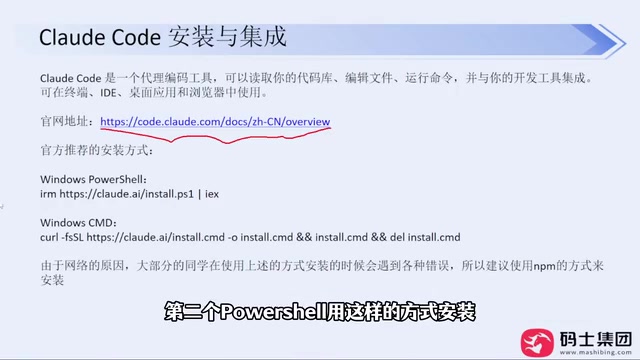
The instructor's core recommendation: use NPM to install — this is one of the standard methods listed under "Advanced Options" on the official site. As long as your proxy is configured properly, this command works reliably. In practice, it has been used to install CC for multiple colleagues with a very high success rate.
NPM installation has two prerequisites:
- Node.js: Version 22 or higher — just download the latest (e.g., v24) from the official site
- Git: Also available from its official site
Both are straightforward installs — download the installer and click through the defaults. If your C drive is tight on space, feel free to change the installation directory; everything else can stay default.
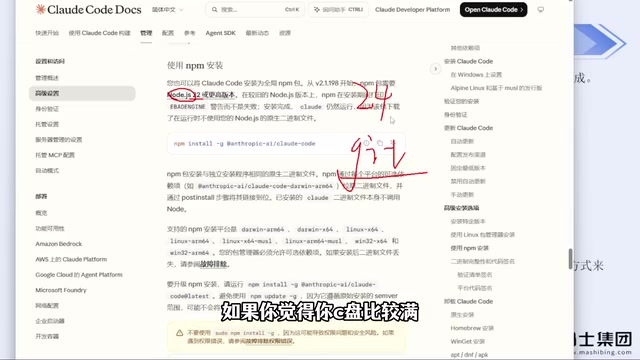
Once installed, open a terminal in your target directory and run claude --version to verify — if it outputs a version number, you're good. Note that your proxy must remain active throughout the entire installation process.
Avoiding Bans: Use CC Switch to Bypass the Official Account
This is the most practically valuable section of the tutorial. The first time you run CC, it will prompt you in sequence: whether to trust the current folder, choose a UI style, and select a login method.
The login step is where things go wrong. Signing in with an official account carries a significant ban risk — the instructor admitted to being banned many times before. Even configuring an API Key via environment variables to skip login has resulted in bans through the official route.
The solution is an open-source tool called CC Switch (available as a website and also downloadable as a GitHub release). Its approach is to bypass the official account login entirely and connect CC using a third-party model's API Key.
Setup steps:
- Download the installer for your OS from the GitHub releases page (Windows: select the MSI), then double-click to install
- Open the app and select your target tool (Claude Code / Codex / OpenClaude, etc.)
- Click the plus button to add a configuration, select your model provider (e.g., DeepSeekAd, Zhipu), and enter your API Key
- Click Save
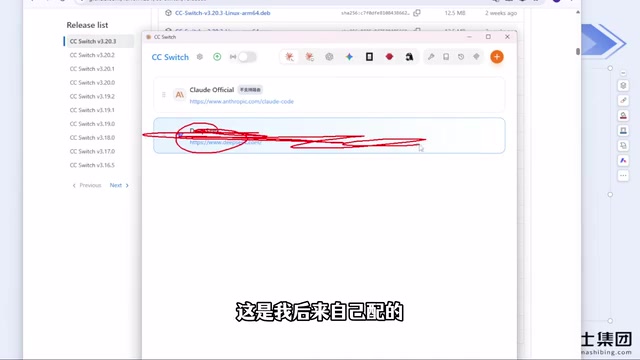
Once configured, restart CC — the login step is automatically skipped. No account means no ban. The instructor noted that after switching to this approach, there have been zero bans across several months of use. Even if you previously installed CC with an official account login, you can install CC Switch on top of that and skip the login step going forward.
A few important notes:
- CC Switch supports all mainstream model providers on the market; if yours isn't in the list, use the "Custom Configuration" option to enter the API Key and forwarding address for a third-party relay service
- CC Switch does not require manual editing of config files
- Codex is also recommended to use with CC Switch, but it tracks configurations per tool — when switching tools, remember to switch the corresponding configuration, otherwise you'll run into a "configured but not working" situation
- CC Switch does not currently support DeepSeek Harness; configure that one directly through its own config fields without CC Switch
- The NPM installation command is identical on Mac and Windows
Are Domestic Models Good Enough? Model Selection Advice
On the question of "should I pay for a foreign model account," the instructor's take is refreshingly pragmatic: if you just need to cover everyday work tasks, domestic Chinese models are entirely sufficient.
While model vendors are still engaged in capability races, existing models already handle the vast majority of typical development scenarios. Chasing foreign models at the cost of frequent bans and account-switching isn't worth it — the hassle isn't primarily the money, it's the time wasted dealing with bans.
One real-world observation: DeepSeek Harness tends to have a relatively higher cache hit rate; pairing other coding agents with DeepSeek doesn't produce the same cache efficiency. DeepSeek's recent price increase has nudged costs up slightly, but it remains within an acceptable range overall.
On VPN/proxy tools, the instructor added one more warning: current blocking intensity is high, so buying a one-year membership upfront is not recommended unless you've confirmed the service is reliably stable. Better to pay month-to-month — slightly more expensive, but far less risky.
What is "cache hit rate"? This is a cost optimization concept in LLM API usage. Most major model providers (including Anthropic, DeepSeek, etc.) offer prompt caching for identical or highly repetitive prompt prefixes: when the long system prompt or context in a request matches a previous one, the provider reuses the already-computed KV Cache and charges a lower token price for the cached portion (typically 10–50% of the standard rate). In agentic use cases like Claude Code, files like CLAUDE.md and long conversation histories are sent with every request. Cache hit rate therefore has a direct impact on your actual API bill. Different relay services and different invocation methods vary in how well they support caching — which explains why the instructor noticed a perceptible difference between DeepSeek Harness and other integration methods.
From Natural Language to Human in the Loop
Once installed and logged in, most people immediately ask CC to write code — something like "help me build a Snake game."
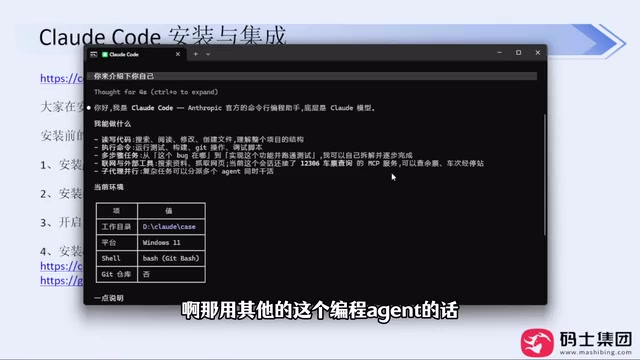
Worth noting: newer versions of Claude Code now proactively ask questions before generating — letting you choose the implementation approach, feature scope, technical direction, and so on. Older versions would dive straight into implementation; the newer behavior of clarifying requirements first is a positive change overall.
During generation, CC will periodically pop up confirmation prompts asking you to press Enter. If you have any background in large model technology, you'll recognize this mechanism as Human in the Loop (HITL) — and it's precisely the gateway to advanced capabilities like permission modes, MCP, and Skills. Mastering these components is what takes Claude Code from "usable" to "genuinely powerful."
Human in the Loop (HITL) is a core design paradigm in AI systems: introducing human judgment and confirmation at critical points in an automated workflow to prevent models from executing destructive or irreversible actions without authorization. In Claude Code specifically, this manifests as CC pausing before file writes, terminal command execution, external API calls, and other high-risk actions — presenting a summary of the planned operation and waiting for an explicit Enter confirmation. This design serves more than just a safety function: it's also the underlying logic of Permission Mode. Different permission levels determine which actions require per-operation confirmation and which can be bulk-approved. Understanding HITL is what allows you to configure permission scopes intentionally, striking the right balance between safety and efficiency for your own workflow.
Summary
The core value of this introductory content lies in thoroughly addressing the two pitfalls that turn new users away: first, prefer NPM for installation; second, use CC Switch to bypass the official account login and avoid bans. Beyond that, moving past crude natural-language prompting and making proper use of CC's built-in components is what actually unlocks Claude Code's full productivity potential.
Related articles

Python Crash Course for Beginners: A Full Breakdown of the 9.6-Douban-Rated Automation Masterpiece
A deep dive into the 9.6-Douban-rated Python automation book *Python Crash Course*: 18 chapters in two sections covering file management, Excel, web scraping, email automation, and more. Beginner-friendly and ideal for admin and operations staff.

Felix Rieseberg Personal Homepage
Felix Rieseberg's personal homepage sparks attention on Hacker News. This article covers the Slack engineer's technical background, the rise and fall of nativefier, and the value of a developer homepage as a tech calling card.

@ai-sdk/vue 3.0.306 Patch Release Syncs with [email protected] Update
@ai-sdk/vue 3.0.306 released, synced with [email protected]. A routine patch release for the Vercel AI SDK ecosystem with no public API changes; the Vue adapter layer stays version-aligned with the core package.