Claude Code in Practice: A Complete Guide from Installation to Project Development

A systematic guide covering Claude Code's complete onboarding path from environment setup to engineering collaboration.
Based on a hands-on Bilibili tutorial, this article systematically traces Claude Code's evolution from a command-line tool to an engineering AI collaborator. It first covers the shift in core capabilities: enhanced context awareness, multi-Agent orchestration, Skill customization, and a role change from conversational assistant to work partner. It then explains installation and environment setup, including Node.js preparation, mirror source switching, and connecting domestic models via CC Switch. The daily usage section demonstrates project analysis, the code modification approval process, and completing Git commit, push, and issue fixing through natural language. Finally, it presents a curriculum outline covering MCP, SubAgent, Hooks, and two enterprise-level project practices, emphasizing that understanding its engineering positioning is key to realizing its value.
Claude Code has evolved from a simple command-line tool into a genuine AI programming collaborator. Based on a hands-on Bilibili tutorial, this article systematically walks through the complete path from environment setup and core features to real-world project deployment, helping developers get up to speed quickly and avoid common pitfalls.
1. Core Capabilities of Claude Code: From Terminal Assistant to Engineering Collaborator
Claude Code initially had only a command-line version, used mainly to analyze project code, understand file relationships, and suggest modifications. As versions iterated rapidly, its capabilities have expanded significantly.
The most notable change today is improved context awareness. In the past it might have understood only a single file; now you can directly ask about details of the entire project structure and it will provide a very thorough analysis. On the other hand, Claude Code has clearly shifted toward an engineering orientation—no longer limited to writing code, it can now support the implementation of a complete methodology, including automated testing and custom Skill building. Developers can distill their real-world work experience into Skills, continuously improving efficiency.
Another key shift is its role positioning. Previously, using web-based AI was more about conversation; now Claude Code feels more like a real work partner: it can not only modify code but also run tests, handle deployment, and even accomplish diverse tasks like generating videos through integrated plugins. This means the human role is gradually shifting toward setting goals, defining constraints, making judgments, and aesthetic decisions, while AI handles execution, analysis, comparison, and repetitive labor.
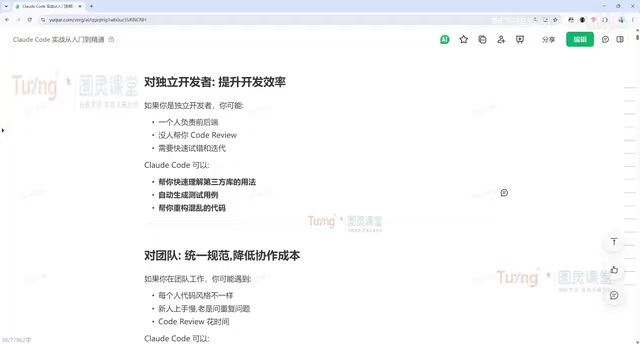
For programming beginners, Claude Code can help read hard-to-understand open-source project code, locate project errors, and tackle thorny issues in production environments. It not only explains code but can also discover legacy system bugs, identify performance problems, and fix them one by one. For independent developers, the efficiency gains are especially significant—previously, completing both front-end and back-end work was very time-consuming; now, through multi-Agent orchestration, it can launch multiple roles such as product, development, testing, and operations to work collaboratively.
For teams, Claude Code's value lies in unifying standards and reducing collaboration costs. By using CLAUDE.md to enforce development standards, or building Skills specifically for analyzing issues, checking code compliance, and doing code reviews, newcomers can quickly understand the project. Even without project documentation, Claude Code can rapidly analyze the entire project's details and help newcomers get onboarded.
Skill is a reusable capability encapsulation mechanism in Claude Code. Developers can write specific workflows—such as code review standards, issue analysis templates, and test generation steps—into structured instruction files, and Claude Code will automatically load and follow these Skills in subsequent tasks. Its value lies in crystallizing a team's accumulated best practices into AI-executable knowledge, avoiding the need to repeatedly describe requirements in every conversation and ensuring consistent output quality across different members.
Multi-Agent orchestration refers to breaking down complex tasks and dispatching them to multiple sub-agents (SubAgents) with different role configurations. For example, a product Agent breaks down requirements, a development Agent handles coding, and a testing Agent handles verification; each Agent has its own independent context and tool permissions, coordinated and scheduled by a main Agent. This approach isolates task contexts, reduces interference, and makes parallel processing possible.
2. Installation and Environment Setup: Building a Stable, Usable Development Environment from Scratch
Claude Code currently comes in three main forms: the Web version, the CLI command-line version, and plugin versions integrated into editors like VS Code and PyCharm. The Web version is suitable for simple conversations, while the plugin and CLI versions are used more in daily development.
CLI installation itself requires only one command, but a stable network is a prerequisite; otherwise errors may occur—just try a few more times. Before installation, you need to set up the Node.js environment—download the installer from the official website, follow the steps to complete installation, and run node -v to confirm the version.
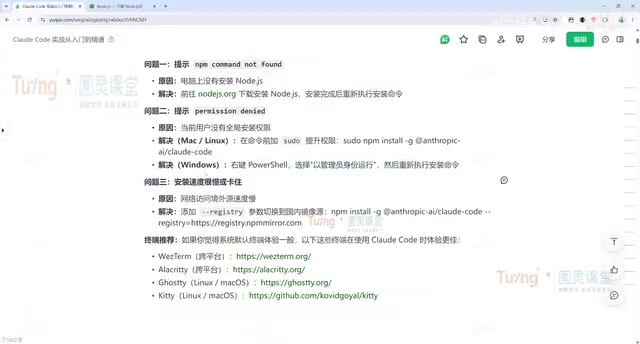
If npm installation fails, you can switch to a domestic mirror source for a noticeable speed boost. After installation, run claude -v—if you see the version number, installation was successful. To update, simply run claude update; it also supports automatic updates.
Since the official models have network access restrictions, the tutorial recommends using the CC Switch tool to switch to domestic large models. CC Switch offers a portable version and an installer version; Windows users can choose the portable version for extract-and-use, while ARM architecture requires the corresponding version. During configuration, simply enter the API key, select a domestic model such as DeepSeekAd, enable local routing, and restart Claude Code to use it normally. If using the official model, simply log in—but official accounts currently have some limitations, and the tutorial suggests domestic models are more stable.
Node.js is the runtime foundation for the Claude Code CLI. It allows JavaScript to execute outside the browser, and npm (Node Package Manager) is the entry point for installing Claude Code. Versions that are too old may cause dependency incompatibilities; installing the LTS long-term support version is recommended, and you can confirm the version with node -v.
CC Switch is a model routing switch tool that addresses restricted access to official models. It starts a local routing service that forwards requests from Claude Code to a configured third-party model API (such as DeepSeek). Users only need to fill in the API key and enable local routing; the way you interact with Claude Code stays the same, while the underlying model is replaced. This lowers the barrier to use and makes it easy to compare results across different models.
3. Daily Use and Git Workflow: Completing Development Tasks Through Conversation
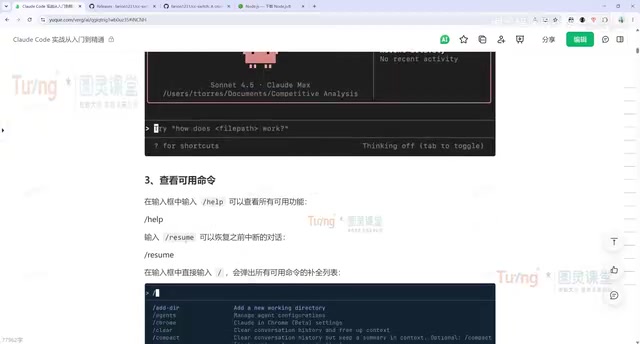
Mastering common commands is the first step to getting started. You can view the command list with --help, or simply ask in conversation—for example, if you don't know how to resume a conversation, just ask which command to use. Common commands include claude -c to resume the last conversation, claude --resume to display a list of historical conversations for selection, and claude -p for headless mode executing a single command.
In actual project development, the first step is usually to have Claude Code analyze the project structure. The tutorial demonstrates switching to the project directory and having it analyze the module composition of a Java backend management system. For beginners or interns who just joined, this is the most natural way to get started. You can also directly ask "What can I do with Claude Code?" and have it teach you how to use it.
Claude Code's modification workflow follows a fixed process: automatically locate relevant files, display the modifications, wait for human approval and confirmation, then execute the changes. You can approve one by one or choose to accept all.
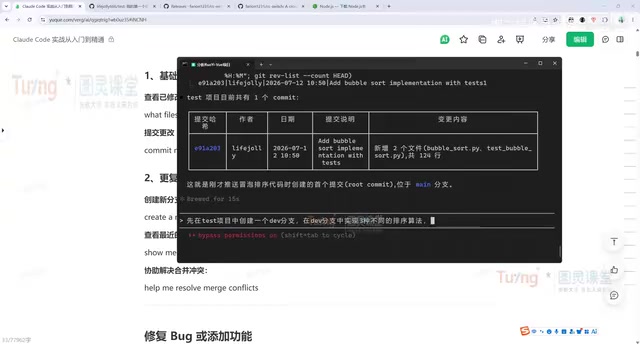
Git operations can also be completed using natural language. The tutorial demonstrates having Claude Code create a personal tech blog project, initialize a Git repository, commit and push to GitHub, as well as create a branch, implement three sorting algorithms on the branch, commit and push, analyze code issues, and output an issues.md file. Throughout the entire process, not a single line of code was manually edited—everything was completed through conversation.
The issue-handling process is also worth noting: Claude Code first locates the relevant code, understands the context, analyzes the root cause, then proposes a solution and displays the modifications; if the project has tests, it will also try running them to verify the fix. This same process applies to code review, refactoring, writing test documentation, and updating documentation.
Headless mode (claude -p) means running Claude Code without entering the interactive conversation interface, instead executing a single command and returning the result directly. It is suitable for scripting and automation scenarios, such as batch code analysis or report generation in CI pipelines. The opposite is interactive mode, where users can keep asking follow-up questions and approve modifications.
The human approval mechanism is the core safety design of Claude Code. Before modifying files or executing commands, it displays the content to be changed and waits for confirmation; developers can choose to accept one by one or accept all. This ensures every action taken by the AI is under human supervision, prevents accidental modification of critical files, and makes the code change process traceable and rollback-capable.
4. Full Curriculum Overview: From MCP to Project Practice
The complete outline of this tutorial covers multiple advanced topics in Claude Code, including: deep IDE integration (VS Code, IntelliJ IDEA, PyCharm, etc.), project initialization and efficient CLI interaction, CLAUDE.md configuration and project architecture design, context management and permission governance, MCP service building and business system integration, SubAgent collaboration and complex task distribution, plugin integration and connecting the memory system, output style control and Hooks workflow automation, slash commands and checkpoint mechanisms, parallel tasks, and Git engineering practice.
It concludes with two project practice sessions: one is a Java backend management system based on Claude Code combined with Hannes, and the other is a Python intelligent customer service application, both covering the complete AI engineering programming process from requirements to deployment.
Overall, Claude Code's learning curve is not steep, but truly realizing its value requires understanding its engineering positioning—it is not a simple code completion tool, but a collaboration platform where developers need to set goals, define constraints, and continuously distill Skills. For developers hoping to improve team efficiency and standardization, this path from installation to hands-on practice is worth following systematically.
Related articles
ChatGPT Plus Subscription Pitfall Guide: Go/Plus/Pro Tier Comparison and Quick Activation
A complete ChatGPT Plus subscription guide based on a Bilibili tutorial: from registering an account, comparing Go/Plus/Pro tiers, to the practical steps for quickly completing your subscription.

GPT-6.2 Sol/Astra Released! A Step-by-Step ChatGPT Plus Subscription Guide and Tier Comparison
GPT-6.2 Sol/Astra is out—here's a ChatGPT Plus subscription guide: register an account, compare Go/Plus/Pro tiers, and subscribe in a minute.
Comparing Three Channels for Subscribing to GPT Plus in China: Is Website Top-Up the Easiest?
How to subscribe to GPT Plus in China? This article compares website top-up, credit card, and mobile top-up channels—process, cost, and risk—with steps and tips to help you choose wisely.