Claude Code Installation, Configuration, and MCP/Skills in Practice

Claude Code practical guide: NPM install, ccswitch login bypass, and using permissions and built-in components well.
Based on a Bilibili public course and community practice, this article covers Claude Code from installation to practice. NPM installation requires Node.js 22+ and Git with VPN enabled. Use ccswitch to configure third-party API Keys and skip official login to reduce ban risk. Pure natural-language prompts perform poorly; the new version proactively asks follow-up questions. Permission modes involve human-in-the-loop confirmation. MCP, Skills, and Agents are key to efficiency. DeepSeek offers a high cache hit rate.
Title
Claude Code Installation, Configuration, and MCP/Skills in Practice
Meta Description
Starting from Claude Code installation and configuration, this guide covers NPM setup, using ccswitch to bypass login and avoid account bans, permission modes, and human-in-the-loop mechanics, plus the full workflow for MCP services, Skills, and Agents—helping developers move beyond inefficient natural-language-to-code generation.
Article Content
Claude Code is becoming a programming Agent that developers can't avoid, but many still use it at the level of "throwing out a natural-language request." A public course on Bilibili walked through the entire path from installation, permission modes, MCP, and Skills to file structure. This article combines that course content with community practice to distill a practical, deployable configuration and usage plan.
Installation: Avoiding the Two Pitfalls of Network and Account Bans
The official documentation provides two installation commands: PowerShell and CMD. However, the course instructor explicitly points out that due to the domestic network environment, the success rate of these two methods is not stable. He recommends installing via NPM instead, with the prerequisite of preparing two basic environments: Node.js (version 22 or above) and Git—both are straightforward installations that only require clicking Next.
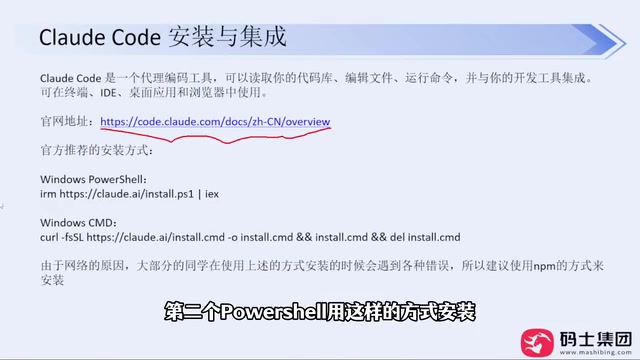
During installation, a VPN tool must be enabled—this is the key to a stable NPM installation. After installation, run claude --version in the command line; if the version number outputs normally, the installation is successful. The course mentions that this method has been used to install for multiple colleagues, and no failures have been encountered so far.
Login and Account: ccswitch Is the More Stable Choice
When starting Claude Code for the first time, it will sequentially ask whether to trust the folder, the interface style, and the login method. The course strongly recommends not using an official account login—even if you have an account, there is a risk of being banned.
The alternative is the open-source tool ccswitch. It was originally an open-source project on GitHub and is now available as a website. After downloading the Windows MSI installer, double-click to install, open it, click the plus sign, select a model provider (such as DeepSeekAd), and enter the API Key.
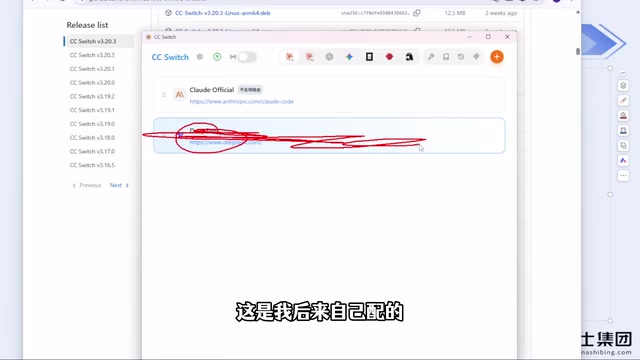
After configuration, restart Claude Code and the login step will be skipped entirely—no account means no ban risk. The instructor stated that after switching to this method, no bans occurred for several months. For custom relay stations, ccswitch also supports custom configuration; simply enter the API Key and request URL. Note that tools like Codex are separate configuration items in ccswitch, so be careful to select the corresponding entry when switching tools.
API Key and Relay Stations: Tools like Claude Code typically call models through the official Anthropic API or third-party services compatible with the OpenAI interface. An API Key is a calling credential issued by the service provider, billed by token; a relay station is a proxy service that forwards requests to the model provider, commonly used in scenarios with restricted domestic access. ccswitch's role is to centrally manage these provider configurations, allowing Claude Code to read local configuration instead of going through official OAuth login, thereby avoiding account ban risks. When using a custom relay station, you need to fill in both the Base URL and API Key, and ensure the service is compatible with the Anthropic Messages API format; otherwise, requests may fail or streaming output may be abnormal.
Why Natural-Language-to-Code Generation Performs Poorly
After installation, most people's first reaction is to ask Claude Code to "help me develop a Snake game." The course points out that such pure natural-language prompts perform very poorly because they don't frame any technical choices or scope—the model can only guess, ultimately consuming more tokens and time.
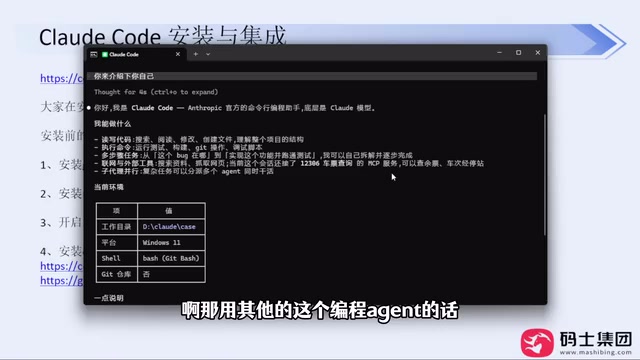
The new version of Claude Code proactively asks follow-up questions before generating, such as how to implement it, what features and technical gameplay to include—this actually helps users fill in requirement boundaries. This is notably different from the old version's direct output behavior. The course believes that this interactive confirmation is an effective means to improve generation quality, and users should answer carefully rather than just pressing Enter to skip.
Permission Modes and Built-in Capabilities
The course lists permission modes as one of the key points. When executing commands and reading/writing files, Claude Code requests manual confirmation—this mechanism involves the so-called human-in-the-loop intervention process. Understanding the meaning of these confirmation prompts is necessary to judge which operations can be allowed and which need to be tightened, avoiding losing control of the file system in automated workflows.
Regarding built-in capabilities, the course mentions that the new version has begun guiding users to make technical choices, which is related to the loading mechanism of components like Skills. The instructor specifically clarifies that the current questioning behavior is not triggered by Skills but is a new feature of the version itself—users should not confuse the two.
human-in-the-loop: A design pattern that retains manual confirmation steps in automated workflows. In Claude Code, when the Agent is about to execute shell commands, write or delete files, or access the network, a confirmation prompt pops up for the user to decide whether to allow or deny. The core value of this mechanism is keeping final control over irreversible operations in human hands, preventing the model from mistakenly deleting files or executing dangerous commands due to misunderstanding requirements. In practice, the confirmation granularity can be adjusted through permission mode settings: for example, automatically allow read-only operations while keeping manual confirmation for write operations and command execution; within trusted sandbox directories, it can also be moderately relaxed. Understanding the operation type corresponding to each prompt category is a prerequisite for safely using a programming Agent.
MCP, Skills, and File Structure
In the course outline, MCP services, Skills and Agents development, and the basic use of Claude Code-related files occupy the latter half. These components are exactly the core point the course repeatedly emphasizes: knowing only natural-language conversation means using only a small part of Claude Code's capabilities; using built-in components will significantly improve efficiency and generation quality.
MCP (Model Context Protocol): An open protocol proposed by Anthropic for connecting models to external tools and data sources in a standardized way. You can think of MCP as the "USB interface" for AI applications: an MCP Server exposes a set of tools (such as reading/writing databases, calling internal APIs, querying documents), and Claude Code acts as an MCP Client to discover and call these tools, thereby breaking through the model's own knowledge boundaries. Unlike tools hardcoded in prompts, MCP services can be independently deployed, reused, and permission-isolated.
Skills: Loadable instruction packages in Claude Code, usually organized as folders containing documentation and optional scripts, used to teach the Agent specific domain workflows or conventions. Skills are loaded on demand and do not occupy context all at once, making them suitable for accumulating team-internal coding standards, deployment steps, or domain knowledge. The difference from MCP is: MCP provides "capabilities," while Skills provide "methods and constraints."
Agents and CLAUDE.md: Claude Code reads the CLAUDE.md file in the project root as persistent context, used to record project structure, command conventions, and coding standards. Agents can be understood as sub-agents with specific roles and tool sets, used to split complex tasks among execution units with different specialties. Properly organizing these files is the foundation for stable Agent operation.
Model Selection and Cost Considerations
Regarding model configuration, the course mentions that DeepSeek has a relatively high cache hit rate in Claude Code scenarios, providing a good experience. The instructor also candidly states that current models from major vendors are already capable enough for daily development needs, and there is no need to over-pursue foreign models; if you just want to try them out, you should also weigh the account replacement cost caused by bans.
Regarding VPN tools, the course gives a pragmatic suggestion: prefer monthly purchases over annual payments to avoid losses from service instability.
Summary
The barrier to getting started with Claude Code is not the commands themselves but three areas: network environment, account strategy, and prompt quality. NPM installation combined with ccswitch to bypass login can significantly reduce ban risk; what truly creates an efficiency gap is whether you make good use of built-in components like permission modes, MCP, and Skills. Transforming natural-language requirements into bounded technical constraints is the correct way to use a programming Agent.
One-line Summary
Claude Code practical guide: NPM installation, ccswitch to bypass login, and making good use of permissions and built-in components.
Paragraph Summary
Based on a Bilibili public course and community practice, this article outlines the complete path of Claude Code from installation to实战. For installation, the NPM method is recommended, requiring Node.js 22+ and Git pre-installed with VPN enabled throughout; for login, the open-source tool ccswitch is suggested to configure third-party API Keys, skipping the official account to reduce ban risk. The article points out that pure natural-language-to-code generation performs poorly, and the new version proactively asks follow-up questions to fill in technical choices and requirement boundaries. Permission modes involve the human-in-the-loop confirmation mechanism; understanding the meaning of prompts is necessary for safe approval. Built-in components such as MCP, Skills, and Agents are the key to efficiency gaps—using only conversation wastes most of the capabilities. For model selection, DeepSeek has a higher cache hit rate, and there is no need to over-pursue foreign models.
Related articles

Random Pruning of the DPO Computation Graph: 1.4x Training Speedup and Lower Peak Memory
DPO training too slow and memory-hungry? This paper proposes a random pruning framework for the DPO computation graph, sampling independently across position, sequence, and branch dimensions; branch pruning achieves a 1.426x step-time speedup and cuts training time by about 30%, with in-depth attribution of memory and time gains.

Why Does JEPA Underperform MLM in Longitudinal EHR Representation Learning?
New study compares JEPA and MLM for longitudinal EHR representation learning on MIMIC-IV: three JEPA variants train stably without collapse but underperform MLM; target size, not heterogeneity, drives prediction error.

Transfer Learning + Visible Light Communication: A New Approach to Energy-Efficient Indoor Positioning
A study proposes a transfer learning-based visible light communication indoor positioning method, achieving 47% accuracy improvement on the BOSCH factory dataset, 67.5% model efficiency under high noise, and introducing the ME composite metric for energy-efficient positioning in energy-constrained industrial IoT scenarios.