Claude Code Installation Pitfall Guide: Bypassing Login, Avoiding Account Bans, and SDD in Practice
Claude Code installation pitfall guide: npm install, CC Switch to bypass login, upfront planning for efficiency.
Based on a Bilibili creator's hands-on walkthrough, this article covers workarounds for installing and using Claude Code. The official curl/PowerShell commands easily fail due to network issues, so npm installation (also officially supported) is more reliable—but Git, Node.js, and a proxy tool must be ready, and monthly plans reduce ban losses. Login is the ban risk source; the open-source CC Switch configures third-party API Keys to bypass account login, though Anthropic's own models still require login. The creator rates Claude Code and Codex above Trae and Cursor. Finally, clarify project rules and permissions and adopt an SDD process with CLAUDE.md, MCP, Skills, and subagents so the agent truly fits engineering workflows.
As a command-line AI coding agent, Claude Code is being adopted into more and more developers' toolkits thanks to its outstanding performance in code generation and project development. But network obstacles during installation, the risk of account bans, and how to correctly configure project rules remain three hurdles standing in many people's way. Based on a hands-on walkthrough shared by a Bilibili creator, this article compiles a reusable set of workarounds to avoid these pitfalls.
Three Preparations Before Installation
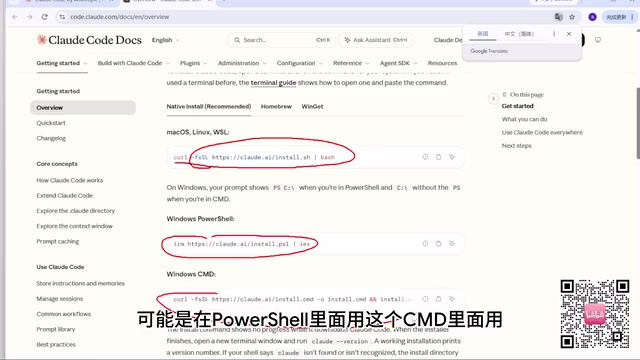
The official documentation provides installation commands based on curl or PowerShell, but most people who have actually run them encounter various errors and exceptions—the root cause is usually the network environment. The alternative the creator gives in the video is to install via npm—this isn't some hack; it's also clearly documented in the official docs.
Before typing the npm command, you need to complete three things: install Git, install Node.js, and get a VPN/proxy tool ready. All three are indispensable, and the installation step in particular has hard requirements on the network environment. The creator recommends buying proxy plans monthly rather than annually, because ban risk is uncontrollable, and short-term plans reduce potential losses.
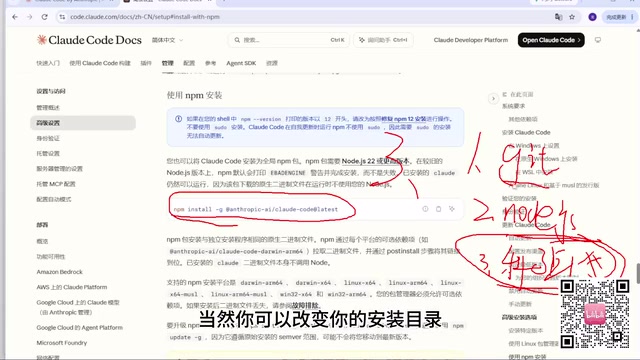
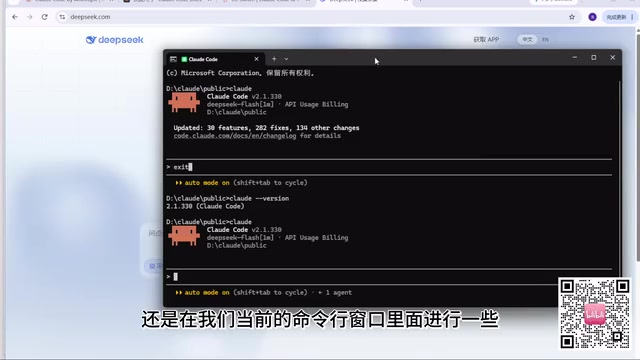
After completing the basic environment, run the npm install command—depending on network speed, it may take anywhere from a few minutes to tens of minutes. Once installation succeeds, don't rush to type claude to launch it. First use a version query command to confirm the installation result—as long as it outputs a version number, Claude Code is in place.
Bypassing Login: The CC Switch Configuration Approach
Launching Claude Code directly triggers three flows in sequence: asking whether to trust the current folder, selecting an interface theme, and logging into an account. The login step is precisely where the ban risk comes from. The creator's workaround is: instead of typing claude directly to launch, first install a configuration tool called CC Switch.
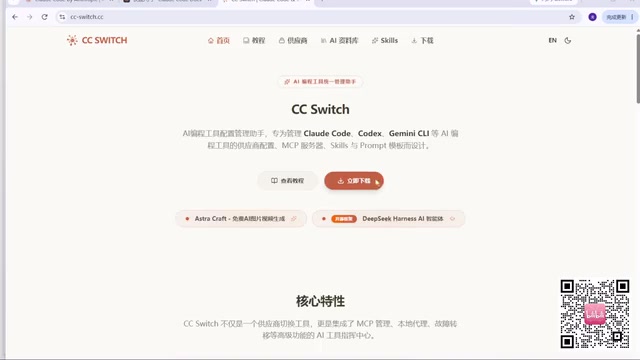
CC Switch started as an open-source project on GitHub and now has an official website where it can be downloaded directly. It supports provider configuration for Claude Code, Codex, and various other agents. The workflow is straightforward: click the plus sign to add a configuration, select the target provider (such as DeepSeekAd, Kimi, etc.), fill in the API Key generated on the corresponding platform, and save. After configuration is complete, type claude in the current window to bypass account login and use it directly.
To be clear, this method only lets you use the Claude Code coding agent itself; if you want to call Anthropic's models (such as the specific model version mentioned in the video), you still must go through account login, and ban risk cannot be fully avoided. The creator himself has used the above method to date without encountering a ban, for a simple reason—no account was ever bound at all.
As for relay/proxy services, the creator's attitude is cautious: some relay services pass off low-quality small models as large ones, and their stability is hard to guarantee. His habit is to top up small amounts and refill after use, avoiding large sums of money going down the drain due to a ban.
The essential difference between API Key and account login: Account login is an OAuth authorization flow. The Claude Code client obtains an access token bound to an Anthropic account, and all requests are billed and audited through the official server, so account status directly determines availability. An API Key, by contrast, is a credential issued by a third-party model provider (such as DeepSeek, Kimi). Requests go directly to that provider's endpoint and are completely decoupled from Anthropic's account system. What CC Switch does is modify Claude Code's underlying request address and authentication headers, redirecting traffic originally pointing to Anthropic to a third-party endpoint. This also explains why Anthropic's own models can't be called after bypassing login—the traffic no longer passes through Anthropic's servers at all, and model capability depends entirely on the level of the configured provider.
Agent Selection: Why Prioritize Claude Code and Codex
The creator compared several mainstream coding agents on the market, including Claude Code, Codex, Cursor, Trae, and DeepSeek Harness. His hands-on experience: for code generation and project development tasks, Claude Code and Codex clearly outperform tools like Trae and Cursor. Of course, this judgment is subjective—after using different tools, you'll form your own impressions. If your company has no special requirements, his advice is to prioritize the former two.
Before You Start: Clarify Project Rules, Permissions, and SDD
The original title points out an often-overlooked problem: diving straight into writing code as soon as you get a requirement often yields half the result for twice the effort. Before starting to code, several preparatory tasks need to be done—sorting out project rules, clarifying permission boundaries, and adopting an SDD (Spec-Driven Development) process. Combined with CLAUDE.md to define project context, MCP to extend capability boundaries, Skills to encapsulate reusable capabilities, and subagents to handle specialized tasks, the agent can produce efficiently within a controllable scope. The original material doesn't dwell much on this part, but it is precisely the key to whether Claude Code can truly integrate into engineering workflows.
CLAUDE.md, MCP, Skills, and Subagents: These four are the core mechanisms through which Claude Code integrates into engineering workflows. CLAUDE.md is a Markdown file placed in the project root directory, automatically loaded at startup, used to declare long-term context such as tech stack, coding standards, and directory conventions, avoiding repeated explanations in every conversation. MCP (Model Context Protocol) is an open protocol proposed by Anthropic that lets agents connect to external tools such as databases, browsers, and internal APIs in a standardized way, extending their capability boundaries. Skills are reusable instruction packages that encapsulate high-frequency tasks (such as generating tests or release checks) into one-click callable skills, reducing repetitive prompting. Subagents, meanwhile, split large tasks among multiple specialized instances for parallel processing, each with its own independent context, reducing the cognitive load of a single session. Only when the four work together can the agent produce stably within a controllable scope.
SDD (Spec-Driven Development): Spec-Driven Development is a development paradigm in which you write the spec first and then have the agent implement according to the spec. Unlike "handing requirements to AI to write code directly," SDD requires first breaking down requirements into verifiable spec documents—including interface definitions, data structures, boundary conditions, and acceptance criteria—and then using these as prompt input. The benefit: the agent's output has a clear right-or-wrong baseline, and review only requires checking against the spec rather than judging by feel; the spec itself also becomes the basis for team communication and subsequent maintenance. In long-context agents like Claude Code, SDD can significantly reduce the waste of "repeated rework after going off track," and is the key method for elevating AI coding from demo level to engineering level.
Final Thoughts
Installation is just the entry point; configuration is the real dividing line. Installing via npm together with CC Switch's provider configuration lets you stably use Claude Code's agent capabilities without binding an account; but what truly creates an efficiency gap is clear planning of project rules, permissions, and development workflows before you start. Tool selection has no absolute answer, but in the direction of coding agents, doing the preparation upfront is far more cost-effective than reworking afterward.
One-line Summary
Claude Code installation pitfall guide: npm install, CC Switch to bypass login, upfront planning for efficiency.
Paragraph Summary
Based on a Bilibili creator's hands-on walkthrough, this article lays out workarounds for installing and using Claude Code. For installation, the official curl/PowerShell commands easily fail due to network issues, so the npm installation (also officially supported) is more reliable—but Git, Node.js, and a proxy tool must be set up in advance, and monthly plans are recommended to reduce ban losses. The login step is the source of ban risk; the open-source tool CC Switch can configure third-party provider API Keys to bypass account login, though this cannot call Anthropic's own models. On selection, the creator believes Claude Code and Codex outperform Trae and Cursor on code generation tasks. The article concludes by emphasizing that before coding, you should clarify project rules and permission boundaries and adopt an SDD process, combined with CLAUDE.md, MCP, Skills, and subagents, so the agent can truly integrate into engineering workflows.
Related articles

Zero-Code Replication of a $10,000 3D Website with Claude Code: A Six-Tool Breakdown
Bilibili creator Yomi used Claude Code plus five free tools to build a 3D product landing page quoted at $10,000 overseas—zero code. Breakdown of the six-tool division of labor, image-to-3D workflow, and the core collaboration method: "give AI a reference, not 'make it look better.'"
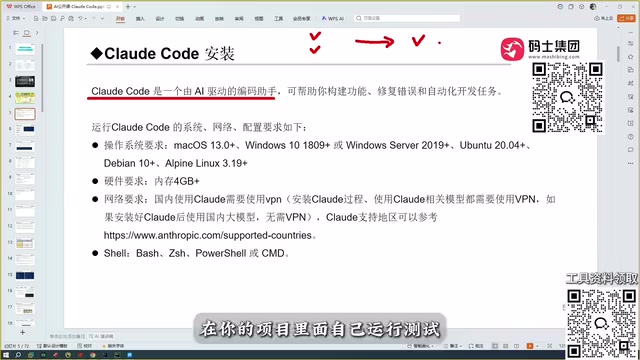
Claude Code in Practice: Install, Connect Models, Calculate Tokens, and Ship a Full-Stack Project with a Single Document
Based on a Bilibili public course demo, this covers Claude Code installation, model connection, token cost calculation, and the practical path of shipping a full-stack project with a single document, plus comparisons with Copilot, Cursor, Trae, and other coding assistants.
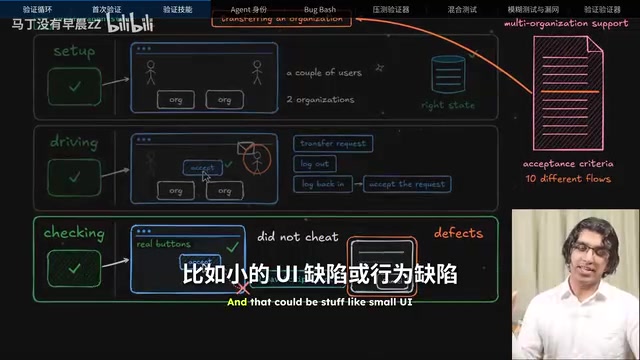
Who Accepts AI-Written Code? A 25-Minute Deep Dive into Verification Loops and the New Code Review Paradigm
After AI writes lots of code, how should Code Review verify it? This article breaks down the Claude Code team's verification loop framework: surface-level end-to-end verification, setup/drive/check three-stage skills, hybrid end-to-end testing and reliability checklists, and how to tighten the loop when issues slip through.