Claude Code Practical Guide: Environment Setup, Common Commands, and Git Workflow Explained
A practical guide to setting up Claude Code, using daily commands, and leveraging conversational Git workflows.
This guide covers Claude Code's evolution from a simple CLI chat tool to a full-fledged AI collaborator for software engineering. It walks through environment setup (CLI and IDE integration), using CC Switch to connect Chinese LLMs like DeepSeek V4, essential session commands, and a complete conversational Git workflow — from project analysis and code generation to branch management and automated bug fixing — all without writing a single line of code manually.
As Anthropic's AI programming tool, Claude Code is rapidly transforming the way developers work. From its origins as a simple command-line conversational tool, it has evolved into an "AI collaborator" capable of deeply understanding projects and executing engineering tasks. This article, based on a systematic hands-on tutorial, covers Claude Code's core capabilities, environment setup methods, and the most practical workflows for daily development.
The Evolution of Claude Code's Core Capabilities
Claude Code's initial positioning was quite narrow: a command-line conversational tool for analyzing project code, understanding file relationships, and suggesting modifications. However, with rapid iteration, its capability boundaries have expanded significantly.
Today's Claude Code features several key upgrades:
- Enhanced Context Awareness: Previously limited to understanding individual files, it can now directly answer detailed questions about entire project structures and provide thorough analysis. Behind this capability is the advancement of long context window technology — modern large language models have expanded their context length from an initial few thousand tokens to hundreds of thousands, enabling AI to "see" most code files of a medium-sized project at once and understand inter-module dependencies and data flows.
- Engineering-Oriented: No longer limited to code development, it can complete entire engineering processes including automated testing, SDD (Specification-Driven Development) implementation, and code review. SDD (Specification-Driven Development) is a development methodology driven by specification documents. Unlike traditional TDD (Test-Driven Development) which starts with writing test cases, SDD requires defining clear interface specifications, data models, and behavioral constraints before coding, then letting tools or AI automatically generate code and tests based on those specifications. In the AI programming era, SDD's value is further amplified — developers only need to describe "what the system should do" in natural language or structured formats, and AI can generate compliant code implementations accordingly, dramatically reducing communication overhead between humans and machines.
- Customizable (Skills): Developers can distill real-world experience into various Skills, forming unified team standards and significantly improving efficiency.
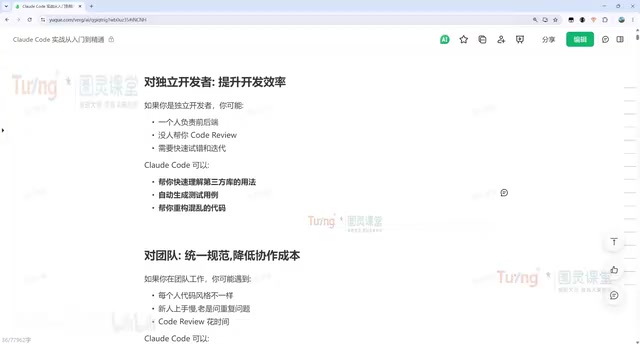
In other words, Claude Code has transformed from a "programming-focused assistant" into a true collaborator. Humans primarily need to establish goals, set constraints, make judgments, and maintain aesthetic standards, while execution, analysis, comparison, and repetitive labor are delegated to AI. For independent developers, it can simultaneously play the roles of product manager, developer, tester, and operations engineer through multi-Agent orchestration, dramatically reducing the time cost of full-stack development.
Multi-Agent orchestration refers to running multiple AI agents with different roles and responsibilities simultaneously within a workflow, enabling them to collaboratively complete complex tasks. In the context of Claude Code, this means one Agent can act as a product manager to break down requirements, another can write code, a third can perform code review, and a fourth can run tests — simulating a complete software development team. This pattern relies on underlying mechanisms such as task decomposition, context passing, and result aggregation, and represents one of the cutting-edge directions in AI engineering implementation.
Value for Different User Groups
For programming beginners, Claude Code can help read hard-to-understand open-source code, quickly locate errors, and fix tricky production issues. For team collaboration, it can unify development standards through CLAUDE.md, automatically perform code reviews, and help newcomers quickly understand project structures — even when projects lack documentation, it can fill in knowledge gaps by analyzing the code.
CLAUDE.md is a project-level configuration file introduced by Claude Code, placed in the project root directory, used to describe the project's tech stack, coding standards, architectural conventions, and special considerations to the AI. Its design philosophy is similar to .editorconfig or .eslintrc — codifying team consensus into machine-readable configuration. When Claude Code enters a project directory, it automatically reads the contents of CLAUDE.md as part of the context, ensuring all subsequent conversations follow these conventions. This is especially important for multi-person collaboration, essentially giving the AI a "team onboarding handbook" that ensures consistent code style and architectural decisions across different developers using Claude Code.
Setting Up the Claude Code Environment Quickly
Claude Code currently has three main usage modes:
- Web Version: Direct browser access, suitable for simple conversational scenarios.
- CLI Command Line: Basic but flexible, key to understanding the underlying capabilities.
- IDE Plugin Integration: Can be integrated into VS Code, Cursor, and JetBrains products (such as IDEA, PyCharm), and is the currently recommended high-efficiency approach.
CLI Installation Steps
Command-line installation is very straightforward — a single command is all it takes. Choose the corresponding command based on your operating system: Mac, Linux, or Windows WSL users can use the official one-click installation script, while native Windows users use the appropriate command. After installation, run claude -v to check the version number — seeing version information confirms a successful installation.
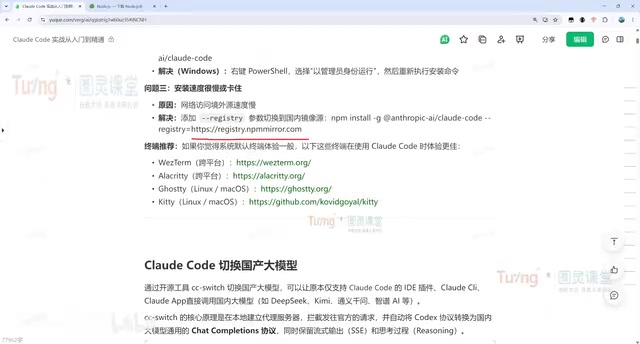
The prerequisite is having a properly configured Node.js environment. Node.js is a JavaScript runtime environment built on Chrome's V8 engine, enabling JavaScript to run on the server side outside of browsers. npm (Node Package Manager) is Node.js's default package manager and also the world's largest open-source software registry. You'll need to download and install it from the Node.js official website first, then verify the environment is ready by running node -v. If you encounter network issues during installation, it's recommended to switch to a domestic mirror repository. Since npm's official registry servers are located overseas, users in China often experience slow downloads or connection timeouts when installing dependency packages. By using the npm config set registry command to switch the registry to a domestic mirror source (such as npmmirror.com), download speeds can typically improve by orders of magnitude.
Using CC Switch to Connect to Chinese LLMs
Due to network access restrictions for Claude's official models, a practical alternative is using the CC Switch tool to switch to Chinese large language models.
Here are the specific steps:
- Download the corresponding version from the CC Switch project's release page (Windows users should choose the portable version, noting the difference between ARM and AMD64 architectures). ARM and AMD64 (also known as x86-64) are two different CPU instruction set architectures: AMD64 was designed by AMD and is compatible with Intel, serving as the mainstream architecture for traditional PCs and servers; ARM, designed under license from ARM Holdings, is known for low power consumption and is widely used in phones, tablets, and Apple Silicon Macs. Apple M-series chips and Qualcomm Snapdragon X series laptops should use the ARM version, while traditional Intel/AMD processors should use the AMD64 version.
- After installation, add model configurations in the interface — DeepSeek V4, Kimi, and other models are recommended, with Qwen (通义千问) also supported.
- During configuration, simply enter the API key and keep the default addresses.
- After adding, click "Enable," check "Local Routing" in settings, and restart Claude Code for it to work properly.
It's worth noting that the experience with Chinese LLMs is largely consistent with the official model, though there may be some performance gap. DeepSeek V4 is a large language model from DeepSeek, known for its exceptional cost-effectiveness and programming capabilities approaching international top-tier models; Kimi is a long-context model from Moonshot AI, excelling at processing ultra-long texts; Qwen is a general-purpose large model from Alibaba. These Chinese models provide services through interfaces compatible with the OpenAI API format, allowing middleware tools like CC Switch to route Claude Code's requests to these models through simple API address and key substitution — retaining Claude Code's toolchain capabilities while bypassing network access restrictions. For users prioritizing stable availability, this remains a very worthwhile trade-off.
Daily Development Workflow in Practice
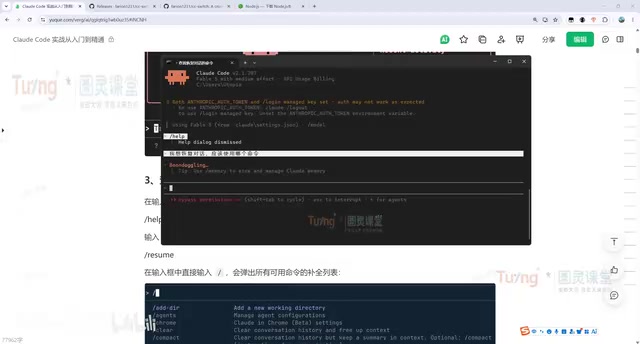
Mastering basic commands is a prerequisite for using Claude Code efficiently, but the most elegant aspect is — you can directly ask it about command usage through conversation, without memorizing anything or consulting official documentation.
Common Session Commands Quick Reference
| Command | Description |
|---|---|
claude --resume (or -r) | View history and select a conversation to resume |
claude --continue (or -c) | Directly resume the last conversation; most frequently used |
claude -p "analyze the test project structure" | Headless mode; executes once and outputs results to console |
/clear | Clear current conversation history and start a fresh session |
The -p parameter enables Headless Mode, where the program runs without an interactive session, directly receiving input parameters and outputting results before exiting. The greatest value of this mode is that it can be integrated into Shell scripts, CI/CD pipelines, or automation workflows, enabling batch and pipeline-based AI-assisted operations. For example, you could automatically trigger claude -p for static analysis of changed code on every Git commit, or use it to auto-generate changelogs in a continuous integration pipeline.
Project Analysis and Code Generation
The most common operation on a newcomer's first day with Claude Code is having it analyze a project structure. After switching to the project directory, simply type "help me analyze the project," and it will quickly identify the project type (e.g., a Vue-based admin management system) and analyze each module individually.
Code generation is equally simple — for example, "implement a bubble sort algorithm in Python." It will not only write the code but also automatically run test verification. When additional tests are needed, simply continue making requests based on the existing file.
Claude Code's Modification Approval Mechanism
For every modification, Claude Code follows a fixed workflow:
- Locate Files: Automatically finds the relevant files that need modification within the project.
- Display Changes: Presents the specific modifications.
- Await Approval: Executes only after the developer confirms; changes can be approved individually or rejected.
This "AI proposes, humans gatekeep" mechanism ensures controllability and safety of code changes. This design philosophy aligns closely with the "Human-in-the-Loop" principle advocated in the AI safety field — AI maximizes execution efficiency, but critical decision-making authority always remains with humans, preventing automated systems from introducing errors or security vulnerabilities without review.
Conversational Workflow with Deep Git Integration
One of Claude Code's most practical capabilities is making Git operations as simple as everyday conversation. Developers don't need to memorize complex Git commands — just describe what you need in natural language, and it will automatically invoke the appropriate commands. Git is currently the world's most widely used distributed version control system, created by Linux creator Linus Torvalds in 2005, and is virtually standard for all modern software projects. However, Git's command-line interface is notoriously complex — there are dozens of commonly used commands alone, plus advanced operations like branching strategies, conflict resolution, and choosing between rebase and merge, making the learning curve quite steep. Claude Code, through a natural language abstraction layer, encapsulates these complex operations into simple conversational commands, dramatically lowering the barrier to using Git.
Full-Process Git Conversation Example
Here's a complete workflow demonstration with zero hand-written code throughout:
- Have Claude Code create a personal tech blog project (HTML+CSS+JS);
- "Pull it for me" — automatically invokes Git commands to clone the remote empty repository;
- "Move to the test project, commit and push the code" — automatically completes file adjustments, commit, and push;
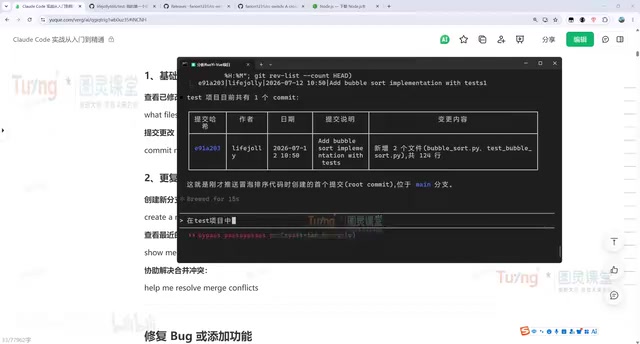
- "Query how many commits the test project has and display in a table" — automatically organizes and outputs the results.
Branch Management and Automated Bug Fixing
A more advanced use case is branch collaboration. For example, "create a dev branch, implement three different sorting algorithms in it, then commit and push." Claude Code will automatically complete the entire sequence — creating the branch, writing code, running tests (in the demo, all 12 tests passed), committing, and pushing.
The most engineering-valuable feature is the automated issue discovery and fix loop:
- Have it analyze what problems exist in the dev branch code and output to
issue.md— it will identify correctness issues, documentation-implementation mismatches, portability concerns, and more. - Have it "reference issue.md to fix all problems, then commit and push" — completing automatic location, fixing, verification, and commit.
Throughout the entire process, developers don't write a single line of code — everything is driven through conversation. Claude Code's problem-handling logic is: first understand the context, analyze the code logic, find the root cause, then implement the solution, and if test cases exist, run them to verify the fix. This closed-loop process perfectly mirrors the classic "discover-diagnose-fix-verify" four-step approach in software engineering, except that the executor at each stage switches from human to AI, while human developers step back to serve as the final approvers and quality gatekeepers.
Conclusion
Claude Code has evolved from a simple code generation tool into an engineering-grade AI collaborator covering requirements analysis, code generation, bug fixing, Git workflows, and code review. CC Switch solves access issues by enabling switching to Chinese LLMs, IDE plugin integration improves usage efficiency, and the conversational interaction style dramatically lowers the tool's learning curve.
For developers, mastering Claude Code's core workflows means delegating a large volume of repetitive work to AI, allowing them to focus on goal setting and critical judgment — this is precisely the most essential capability shift of the AI programming era. Future developer competitiveness will no longer depend solely on coding speed or language proficiency, but will increasingly be reflected in problem-defining ability, architectural thinking, and the ability to orchestrate AI toolchains.
Related articles

Fable 5.1 Hands-On: AI One-Click 3D Game Scene Generation Crushes GPT and Grok
Hands-on comparison of Fable 5.1, GPT-5.6 Sol, Grok 4.6, and Kimi K3 in 3D game scene generation — from Gothic architecture to Sekiro menus, analyzing real gaps in detail fidelity, speed, and interaction.
AFK Agent: Let AI Code Autonomously While You're Away From the Keyboard
Explore how AFK Agent mode elevates AI coding from Human-In-The-Loop to autonomous unattended execution through multi-phase plan decomposition and automation loops.

Free Data Science Learning Resources Guide: An Efficient Path to Getting Started on Zero Budget
How to learn data science on a tight budget? This guide covers free resources like Kaggle Learn, freeCodeCamp, and Fast.ai with a complete self-study roadmap from Python basics to machine learning.