Claude Code Practical Guide: From Installation Pitfalls to MCP, Skills, and SubAgent

Claude Code's efficiency bottleneck isn't installation—it's whether you properly use permission modes and orchestration components like MCP, Skills, SubAgent, and Hooks.
Based on a Bilibili hands-on video, this article lays out the complete path from installation to engineering-grade usage of Claude Code. At the installation level, the NPM method in the official site's advanced settings is recommended, requiring only Node.js 22+ and Git, along with ccswitch for configuring third-party API Keys to avoid official account suspension risks. At the usage level, permission modes (Human-in-the-Loop) determine human intervention frequency and token consumption, and the new version proactively asks about technical choices. The article notes that one-sentence natural language generation is suitable for small tool validation, but commercial projects still require technical background and Code Review. The core argument is to treat Claude Code as an orchestratable Agent framework—MCP, Skills, SubAgent, and Hooks, combined with permission modes, constitute its true design intent.
Why You're Only Getting 10% Efficiency Out of Claude Code
Many developers use Claude Code in an extremely limited way: open a terminal, type a natural language requirement, and wait for it to generate code. This approach works for small tools, but once you get into real projects, problems surface—no technical constraints, uncontrolled token consumption, and wildly inconsistent generation quality. The value of this Bilibili hands-on video is that it restores Claude Code from a "code generator that can chat" back to a configurable engineering toolchain, covering six aspects: installation, permission modes, MCP, Skills, SubAgent, and Hooks.
This article builds on the video's technical framework and combines it with the official documentation's installation path to lay out a directly actionable set of configuration and usage approaches.
Installation: Prefer the NPM Path to Avoid Account Login Risks
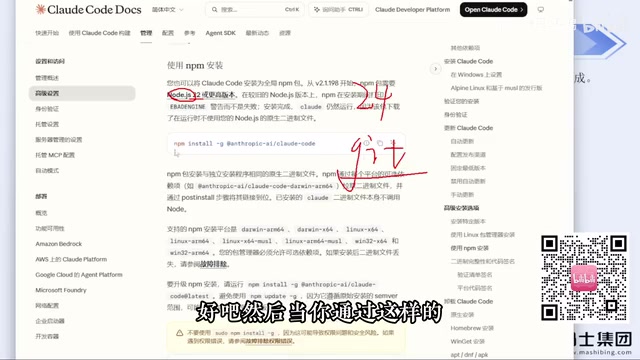
The first piece of advice from the video creator is very practical: go to the official website, read the Chinese documentation, and install according to what the official site provides. Windows users will see two installation commands—PowerShell and CMD—but due to network environment factors, the success rate of these two methods is unstable.
A more reliable option is the NPM installation method provided in the official site's "Advanced Settings." There are only two prerequisites: Node.js version 22 or above (the latest official release is already 24), and Git. Both are straightforward installations—just click Next all the way through. After installing, enter claude --version in the command line; if the version number outputs normally, it's installed correctly.
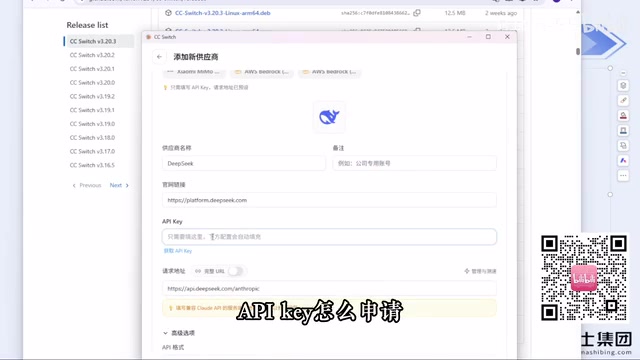
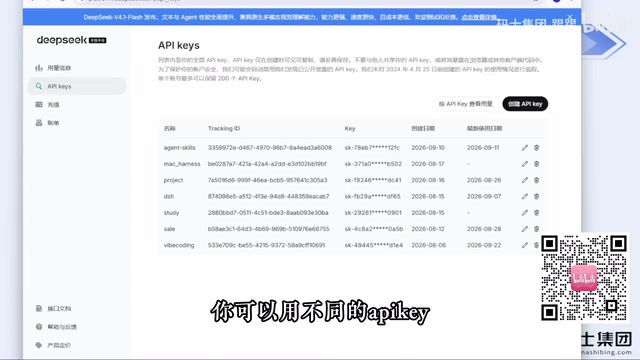
What's really easy to trip up on is the login step. The video creator explicitly states that logging in directly with a Claude account carries the risk of account suspension—he himself has been banned multiple times before. The alternative given in the video is ccswitch: an open-source tool that currently exists as a website. After downloading the installer for your platform from GitHub Releases, you simply enter the API Key of a third-party model provider in the software, with no need to log into the official account.
The essence of this approach is treating Claude Code as a general-purpose Agent runtime framework, where the underlying model can be swapped for domestic providers like DeepSeekAd or Zhipu, or you can fill in the address and Key of a third-party relay service. ccswitch has built-in configuration templates for mainstream providers on the market, and you can customize ones that aren't included. The video creator mentions using this approach for several months without being banned.
Two details to note: first, tools like Codex belong to different configuration entries in ccswitch, so remember to switch the corresponding configuration when switching tools; second, DeepSeek Harness currently does not depend on ccswitch and can be configured separately. Additionally, the video creator recommends buying VPN/proxy services monthly rather than annually, because such services carry high stability risks.
Permission Modes: How Many Times You'll Be Interrupted by "Human Intervention"
After installation, on the first conversation, Claude Code will sequentially ask whether to trust the current folder, the interface style, and the login method. Once in working mode, you'll encounter the experience mentioned in the video: while generating a Snake game, it keeps popping up confirmation dialogs.
This popup mechanism is called Human-in-the-Loop in the Agent context. It exists to prevent the model from performing dangerous operations, but frequent popups severely interrupt the development rhythm. Claude Code provides different permission modes to adjust this frequency—from confirming every operation to automatically executing within trusted scopes. The video creator's advice is to understand the boundaries of each mode before choosing, rather than defaulting to pressing Enter all the way through.
Another observation worth noting: the new version of Claude Code proactively asks about technical choices when receiving vague requirements—for example, what method to use for implementation and which features to include. Older versions would just start writing directly upon receiving the requirement. This change is positive for generation quality, but it also illustrates one thing: when directly issuing requirements in natural language, even if the model gets smarter, the final result still depends on whether the constraints you provide are sufficient.
Where the Ceiling of Natural Language Direct Output Lies
The video demonstrates the complete process of having Claude Code generate Snake with a single sentence—the code runs and the game is playable. The video creator uses this to draw a judgment: large models have brought about "technological equality," allowing non-programmers to build small tools without learning programming languages and frameworks.
But he immediately draws the boundary: this one-sentence generation is suitable for small tools to play with yourself, not for commercial projects. The reasons are concrete—things made by people without technical background have uncontrollable code quality and bugs; and the code generated in the demo also did not go through a Code Review process. To develop a medium-sized platform that can make money, technical background remains a hard threshold.
This view holds for two types of people: non-programmers shouldn't overestimate the commercial value of one-sentence development; programmers shouldn't underestimate the space for structured usage. The latter is exactly what the second half of the video addresses.
MCP, Skills, SubAgent, Hooks: Using the Agent as an Engineering System
The four components highlighted in the video title constitute the key to upgrading Claude Code from a "conversation tool" to an "orchestratable system."
MCP (Model Context Protocol) is responsible for connecting external tools and data sources into the model context, enabling Claude Code to read and write databases, call APIs, and access services beyond the file system.
Skills are pre-built capability modules that encapsulate best practices for specific tasks, so you don't have to re-describe them each time you invoke them.
SubAgent is used for task decomposition—the main Agent dispatches subtasks to independent sub-agents for execution, suitable for parallel processing and complex workflow orchestration.
Hooks insert custom logic at specific event points, such as executing validation or logging before and after tool calls.
These four components, used in conjunction with permission modes, are what the video creator emphasized at the beginning: "make good use of the components that Claude Code itself provides." Relying solely on natural language conversation leaves all these capabilities idle.
MCP (Model Context Protocol) is a standardized protocol open-sourced by Anthropic at the end of 2024, aimed at unifying the connection between large models and external tools and data sources. It uses a client-server architecture: Claude Code acts as the client and connects to various capabilities through MCP Servers, each exposing a set of Tools, Resources, and Prompts. Developers don't need to write separate adapter code for each integration—as long as they implement or reuse a protocol-compliant Server, the model can access databases, call third-party APIs, and operate services beyond the local file system. This "one protocol, reused everywhere" design is precisely the key infrastructure for Agents to move from closed conversations to orchestratable systems.
SubAgent is the core implementation of Claude Code's task decomposition mechanism. After receiving a complex task, the main Agent can create one or more sub-agents with independent context windows, dispatch subtasks to them for parallel execution, and finally aggregate the results. Each sub-agent has its own tool permissions and conversation history, and the main agent only receives its final output, thereby preventing the main context from being polluted by large amounts of intermediate processes. This pattern is particularly suitable for scenarios requiring parallel search, multi-file refactoring, or long-chain research, significantly reducing the context pressure of a single session and making the task flow closer to how human teams divide and collaborate.
Hooks are a custom script mechanism triggered by Claude Code at specific event points in the Agent lifecycle. Common events include before tool call (PreToolUse), after tool call (PostToolUse), when the user submits a prompt (UserPromptSubmit), and at session end (Stop). Developers can insert validation logic, logging, automatic formatting, or permission interception at these nodes, essentially equipping the Agent with programmable "guardrails" and an "audit layer." For example, intercepting dangerous shell commands at the PreToolUse stage, or automatically running lint on generated files at the PostToolUse stage. Hooks allow teams to embed engineering standards into the toolchain rather than relying on verbal constraints during each conversation.
A Few Practical Judgments
Regarding model selection, the video creator shared a personal observation: DeepSeek Harness has a higher cache hit rate than integrating DeepSeek into other Agent frameworks, resulting in lower actual costs. This is a single user's experience and may vary across scenarios, but cache hit rate is indeed an easily overlooked metric when measuring the long-term cost of Agent usage.
Regarding account risks, the video repeatedly emphasizes not to buy official accounts directly and not to configure API Keys via environment variables for login—the latter was recommended in early courses, but the video creator found in practice that it also carries account suspension risks, which is the direct reason he switched to ccswitch.
Regarding the learning path, the video's implicit advice is to first read the official Chinese documentation to build an overall understanding, then start configuring. Doing it in reverse—configuring first and then checking documentation—often leads to being misled by scattered online tutorials when installation fails, wasting more time.
Summary
The barrier to Claude Code isn't installation, but whether you're willing to spend time understanding its component system. At the installation level, NPM + ccswitch is a verified low-risk path; at the usage level, permission modes determine interaction efficiency, while MCP/Skills/SubAgent/Hooks determine capability boundaries. Natural language direct output lets you quickly validate ideas, but treating it as the only way to use the tool wastes the true design intent of this toolset.
Background Supplement
Claude Code's permission modes are typically divided into several levels: in default mode, sensitive operations like writing files and running commands require confirmation each time; Accept Edits mode automatically accepts file edits but still intercepts command execution; Plan mode only allows reading and analysis without making any modifications; Bypass Permissions mode skips all confirmations and executes fully automatically. Different levels correspond to different risk-efficiency trade-offs—the more automatic the level, the smoother the development rhythm, but the higher the risk of mishaps and uncontrolled token consumption. In practice, a common approach is to relax permissions within trusted project directories and maintain strict confirmation when involving production environments or sensitive paths.
Related articles

Amphibious Transforming Drone: Beyond 100x Power Savings, What Are the Real Needs?
Is the amphibious transforming drone just a gimmick? Starting from the 100x power difference of the M4 Morphobot, explore real application scenarios and thesis topic ideas, analyzing boundary conditions where pure drones and pure ground robots both fail.

Warhound Raises $200 Million: Genetically Engineered "War Dogs" Paired with Anduril Gear
Warhound raises $200M, backed by Ben Lamm and Palmer Luckey, to genetically engineer dogs for military and law enforcement use and equip them with Anduril gear. This article analyzes its technology direction, funding logic, and ethical controversy.

Claude API Comes to Google Cloud: IAM Integration and SDK Access Guide
Anthropic hosts the full Claude API on Google Cloud with IAM-controlled permissions and unified billing. This guide covers the Vertex AI and Anthropic-hosted entry points, IAM role configuration, and SDK access.