Claude Code with Coding Plan: Drive AI Coding with Chinese LLMs at Low Cost

A complete guide to configuring Claude Code with Coding Plan to use Chinese LLMs at low, fixed monthly cost.
This article introduces Coding Plan, a subscription service for AI coding tools in China that unifies models like Qwen, GLM, Kimi, and MiniMax under a single interface compatible with Cursor, Claude Code, and other assistants. It replaces expensive, risky pay-as-you-go APIs with a flat monthly fee (Lite at ¥40/month). The guide covers subscribing on VolcEngine Ark or Alibaba Bailian, creating an API Key, and configuring the three key environment variables in settings.json, including the critical step of mapping all Sonnet/Opus/Haiku tiers to the same endpoint.
While foreign AI model providers are powerful, developers in China have long struggled with two persistent pain points: restricted access and high costs. Services like Anthropic, OpenAI, Grok, and Gemini either require special network setups or charge per-token fees that are difficult to budget. Domestic alternatives like DeepSeek, Qwen, GLM, and MiniMax — paired with monthly subscription plans — are emerging as a more practical choice.
This article is based on Episode 6 of the Claude Code tutorial series on Bilibili. It walks through how to subscribe to and configure Coding Plan, helping you drive Claude Code and other mainstream AI coding tools using Chinese large language models.
What Is Coding Plan
Coding Plan is a subscription service designed specifically for AI coding tools. It bundles top-tier Chinese models — Qwen, GLM, Kimi, MiniMax, and more — into a single unified interface, compatible with mainstream coding assistants like Cursor, Claude Code, OpenCode, and others, all under a flat monthly fee.
Compared to pay-as-you-go APIs, Coding Plan's biggest advantage is cost predictability. Per-token billing is not only more expensive, it also carries the risk of service interruption if your balance runs out. A fixed monthly fee eliminates that problem entirely, making it especially appealing for developers who rely on AI coding tools heavily and regularly.
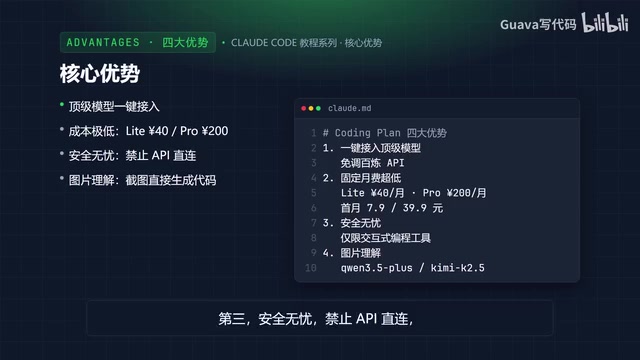
Coding Plan's core advantages can be summarized in four points:
- One-click access to top models: No need to call low-level APIs from platforms like Bailian yourself — use the best models directly inside your familiar coding tools.
- Extremely low cost: Lite plan at ¥40/month, Pro plan at ¥200/month, with limited-time discounts for the first month.
- Safe and compliant: Direct API connections are blocked; only interactive coding tools are supported, reducing the risk of abuse-related bans.
- Image understanding support: Some models (e.g., Kimi K2.5) can accept screenshots and design mockups and generate code from them.
VolcEngine Ark is ByteDance's large model service platform, and Alibaba Bailian is Alibaba Cloud's LLM application development platform. Both provide API access compatible with the OpenAI/Anthropic interface protocols. Coding Plan is essentially a monthly subscription package built on top of these platforms for AI coding use cases — it wraps the underlying model capabilities behind a unified endpoint. Developers don't need to register separate accounts with each model provider, manage multiple API keys, or deal with format differences between different model APIs. Coding Plan handles protocol adaptation at the middleware layer, enabling tools like Claude Code — which natively only supports the Anthropic protocol — to call Chinese models seamlessly.
Supported Tools and Models
Coding Plan's compatibility covers the current mainstream AI coding ecosystem. On the tool side, it supports Cursor, Claude Code, OpenCode, Cline (VS Code extension), Kilo Code, Kilo CLI, Codex, and more. On the model side, it covers popular series including DeepSeekAd, Kimi, GLM, MiniMax, and others.
One practical design choice worth noting: multiple tools can share the same plan quota and switch between models flexibly to suit different development scenarios. Even during peak usage periods, the service maintains stable and smooth performance — a critical guarantee for team collaboration or multi-project parallel development.
How to Subscribe and Create an API Key
Using VolcEngine Ark's Coding Plan as an example, the process is straightforward. Visit Ark's Coding Plan activity page and choose a plan based on your usage:
- Light usage: Choose Lite — normally ¥40/month, with a limited-time promo as low as ¥9.9.
- Heavy usage: Choose Pro — normally ¥200/month, promo at ¥49.9, with 5× the quota of Lite.
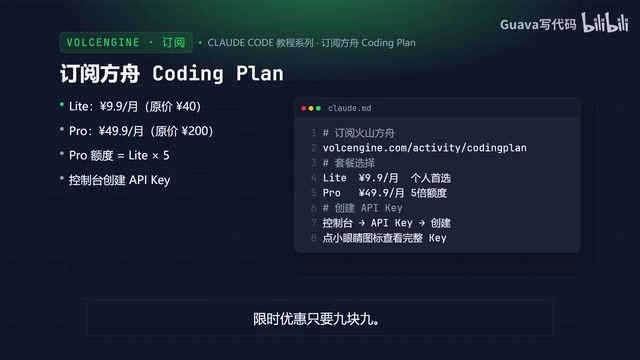
After purchasing, go to the console, click "Create API Key", then click the Create button. Click the eye icon to reveal the full key and copy it when needed. Keep it secure and don't share it with others.
Configuring Claude Code
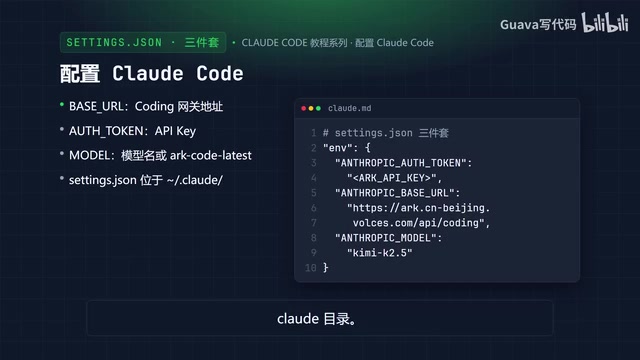
Configuring Claude Code requires three environment variables:
ANTHROPIC_BASE_URL: For tools using the Anthropic-compatible protocol, set this to Ark's Coding endpoint (e.g.,ark.cn-beijing.volces.com/api/coding).ANTHROPIC_AUTH_TOKEN: Enter the API Key you just created.ANTHROPIC_MODEL: You can specify a model by name (e.g., Kimi K2.5), or useark-code-latestand switch models from the console.
Write these into your settings.json file. On Windows, this file is located in the .claude directory under your user home folder on the C drive.
Here's a complete configuration example for DeepSeek V4: the Base URL points to Ark's Coding endpoint, the Auth Token is replaced with your own API Key, and the Model is set to DeepSeek V4 Pro. A key trick is to map the default Sonnet, Opus, and Haiku tiers to the same model (Haiku can be mapped to a lightweight model like Flash), so that regardless of which tier Claude Code internally requests, all calls go through the Coding Plan quota.
There's also a commonly missed detail: you need to add hasCompletedOnboarding: true to your .claude.json file, otherwise you'll get a "Unable to connect to Anthropic service" error on startup.
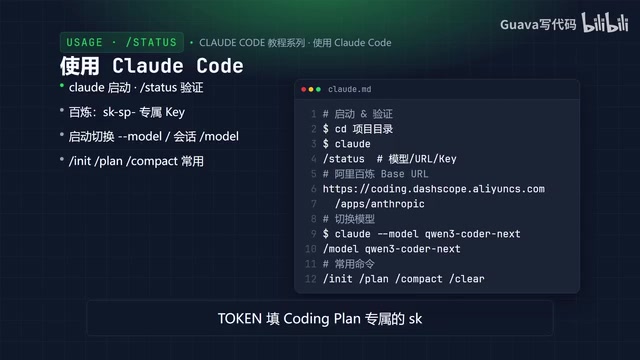
If you're subscribed to Alibaba Bailian instead, set the Base URL to Bailian's Coding endpoint and use the Coding Plan-specific key starting with sk- as the token.
Claude Code is natively designed to communicate with Anthropic's servers, and internally it automatically switches between three request tiers — Sonnet (medium), Opus (most capable), and Haiku (lightest) — depending on task complexity. Mapping all three tiers to the same Coding Plan model endpoint is the key to having a Chinese model fully take over Claude Code. If you only map Sonnet but miss Haiku, Claude Code will throw errors or fall back to default settings when it makes lightweight requests and can't find the corresponding model. settings.json is Claude Code's global configuration file and takes higher priority than command-line arguments at startup — it's ideal for locking in a long-term model setup. The --model flag or the in-session /model command are better suited for temporary switches and won't override the file configuration.
Starting Up and Common Commands
Once configured, open a terminal, navigate to your project directory, and run claude to start.
After startup, type /status to confirm that the model, Base URL, and API Key are all correctly set. To switch models, you can specify one at startup with claude --model, or use the /model command during a session.
Other commonly used commands include:
/init: Generate a project instruction file./plan: Enter planning mode (one of Coding Plan's core features — lets the AI plan before writing code)./compact: Compress conversation history to save context space.
Summary
Coding Plan offers Chinese developers a low-cost, high-availability path to AI-assisted coding: a flat monthly fee significantly cheaper than pay-as-you-go pricing, with multiple models and tools sharing the same quota and switching flexibly.
The configuration logic is straightforward — subscribe to an Ark or Bailian plan, create a dedicated API Key, then set three environment variables in settings.json: Base URL, Auth Token, and Model. Use /status after startup to verify everything is working.
For developers looking to break free from foreign API access restrictions while keeping costs as low as possible, this is a setup worth trying. The next episode will dive into hands-on Claude Code usage, showing how it performs on real-world projects.
Related articles

The Chaotic Aesthetics of Apple's HomeView Ad: A Marketing Code Only Parents Can Read
Apple's HomeView smart display ad ditches minimalist style for chaotic family mornings to win over parents. We analyze why it confuses most viewers but resonates instantly with families — and the trade-offs and risks of Apple's targeted marketing.

Cerebras CEO Pushes Back on AI Doomerism: Stop Spreading Panic
Cerebras CEO Andrew Feldman publicly pushes back on AI doomerism at TechCrunch Disrupt, arguing excessive risk focus drowns out AI's real opportunities.

Retooling in Minutes: Industrial Next Redefines Factory Robot Flexibility
Industrial Next aims to let factory robots retool in minutes instead of weeks, automating complex delicate tasks and advancing flexible manufacturing and small-batch production.