Claude Opus 5.5 Practical Guide: Goal-Driven Development and Five Real-World Case Studies

A practical guide to Claude Opus 5.5: Goal-Driven Development, four usage steps, and five real-world cases.
This article breaks down Claude Opus 5.5's three core traits — goal-oriented execution, always-on thinking, and stronger writing — then presents a four-step usage framework: set the right effort level (medium recommended), write clear goal prompts defining what "done" looks like, use traffic light rules and task files to let the model run autonomously, and verify with evidence packages. Five real business cases — UI building, blog migration, bookmark digests, research synthesis, and code-generated video — demonstrate the model's output quality in practice.
Claude Opus 5.5 has been called the new top model by many developers. It can be summed up in three words: smart, fast, and affordable. But compared to Anthropic's previous models — and competitors like OpenAI and Grok — it works quite differently. If you stick with old prompting habits, you won't get the most out of it.
This article is based on a YouTube creator's in-depth testing of Opus 5.5 and a review of Anthropic's official documentation. It systematically breaks down the model's core characteristics, the right way to use it, and the results across five real business scenarios.
What Actually Makes Opus 5.5 Different
Opus 5.5 is a frontier-level intelligence model that delivers capability comparable to top-tier models like GPT-6 Astra, but faster and cheaper. In official benchmarks, it outperforms Anthropic's previous flagship on most tasks while also beating OpenAI's GPT-6 Astra on the majority of benchmarks.
Three specific characteristics change how you should use it.
Goal-Oriented
The old way to build with AI looked like: Plan → Implement → Test, with constant back-and-forth at each step. Opus 5.5 is highly goal-oriented, which prompted the creator to develop a "Goal-Driven Development" methodology with just three steps: set a goal → delegate to the model → verify success. The core mindset shift is this: your job is to define what "done" looks like, then let the model run with it autonomously for as long as it takes.
The concept of Goal-Driven Development isn't something Anthropic invented, but Opus 5.5 is among the first models that can genuinely execute it in practice thanks to its long-chain autonomous capability. The traditional "waterfall" style of interacting with AI requires the user to step in at every decision point — essentially treating AI as an execution tool that needs constant supervision. The goal-oriented paradigm shifts the user's role from "step-by-step commander" to "requirements definer and outcome reviewer," similar to briefing an experienced contractor on project goals rather than teaching them how to use every tool. This approach demands strong task coherence and large context capacity — the model must maintain goal alignment across dozens of steps — which is why this approach wasn't truly viable before Opus 5.5.
Thinking Is Always On
Previous versions of Opus or Sonnet required you to manually enable thinking mode. Opus 5.5 has thinking always on, with adaptive thinking that automatically regulates how much it thinks. Anthropic now explicitly recommends: stop writing phrases like "think carefully" or "think step-by-step" — they're meaningless now and may actually interfere with the model.
Extended Thinking is a reasoning mechanism Anthropic introduced to the Claude family, allowing the model to generate an internal chain of thought before producing a final answer (similar to OpenAI's o-series Chain-of-Thought mechanism). In earlier versions, developers had to explicitly enable this in API calls and pay separately for thinking tokens. Opus 5.5 enables it by default and introduces "adaptive thinking" — the model dynamically allocates thinking based on task complexity rather than always using maximum compute. This means simple questions don't waste compute, and complex reasoning tasks won't fail due to insufficient thinking. The
effortparameter (low / medium / high / extra) is essentially a cap on thinking tokens, not a change in the model's underlying capabilities.
Better at Writing and Communication
Opus 5.5 expresses itself more naturally, leads with the most important information, and respects writing rules you specify — making long sessions easier to follow. The creator notes that from a UX standpoint, this makes it "more pleasant to use" and was the key reason he started trusting it with writing tasks.
Four Steps to Get the Most Out of Opus 5.5
The creator distilled Anthropic's documentation, usage guides, and his own hands-on testing into four phases: Setup, Goal, Let it Cook, and Verification.
Step 1: Set Up Correctly
Since thinking is always on, the key question becomes: what effort level should you set? Anthropic's documentation treats effort as the primary dial for controlling thinking, and recommends starting with medium — because Opus 5.5 on medium already matches or exceeds the previous Opus on high. There are even cases where Opus 5.5 on minimum effort caught more bugs than the previous generation on higher effort, with fewer false positives. The creator's default recommendation is medium, only switching to extra for the most demanding tasks requiring extremely careful reasoning.
Another important action is using the official /checkup-prompt-audit skill (formerly API Prompt Audit) to review your existing skills, agents.md, claude.md, and prompts — automatically removing anti-patterns that "hold back frontier models," such as emphasis phrases like "be maximally thorough," "critical," or "very important," forced process steps, outdated examples, and conflicting rules.
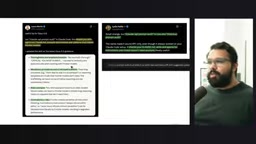
As for fast mode, the creator's conclusion is straightforward: it exists, but you probably won't need it. With medium effort, there's essentially no reason to enable fast mode in Claude Code.
Step 2: State Your Goal Clearly
Anthropic's advice is: "Describe what done looks like, then let it run." In practice, that means giving the model a complete task in a single message, naming the finish line (e.g., "all tests passing" or "every endpoint migrated"), and then stepping back. Opus 5.5's ability to sustain multi-step tasks over long chains is noticeably stronger than its predecessors.
The creator used his personal website migration as an example: a single prompt contained a clear goal (replicate the site), multiple concrete steps (start here page, blog, content updates, about page), constraints (easy to redesign later), and success criteria (provide a preview link, test on both mobile and desktop). These elements together form a high-quality goal prompt.
If you forget a step, don't restart — the cost of restarting is higher. Just add a follow-up while the model is working to course-correct. For tasks that require exploring multiple sources of context, ask the model to "explore sources before acting," including emails, documents, and spreadsheets that weren't explicitly mentioned but might be relevant.
A few quick tips: ask for finished files, not outlines; have it find errors in long documents or presentations; feed it screenshots, charts, and slides freely — its image comprehension is stronger; when building UI, don't just say "avoid generic AI style" — be specific about what you don't want (e.g., "no off-white backgrounds, no italic emphasis, no numbered sections, no pill-shaped buttons").
Step 3: Let the Model Run
This step seems the simplest, but the creator offers five key techniques.
The Traffic Light Rule: In your claude.md, specify clearly when to continue and when to stop and ask. For example: "Continue without my input unless you're stuck or about to take a destructive action like deleting data or force pushing; include status notes in the same message when you do."
Use Cloud Projects: The creator does 75–80% of his work inside Cloud Projects, where Opus 5.5 serves as both the orchestrating agent and individual worker agents. Long tasks are a natural fit.
Put Task Lists in a File: Use a tasks.md file so the model can check things off as it works. The checklist survives context window compression, and you can see progress at a glance without interrupting it.
Use Sub-Agents and Require Evidence: Break large tasks down to sub-agents and require each result to include an "evidence package" that demonstrates the work was actually completed.
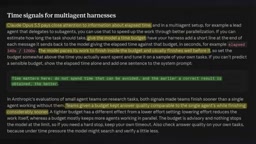
Give a Time Budget: Opus 5.5 pays attention to elapsed time. Give it a time budget and it will self-pace — it typically finishes early, and answer quality under a budget constraint remains on par with single-agent approaches.
"Cloud Projects" is a project-level conversation container on the Claude.ai platform that lets users store system prompts, files, tool configurations, and conversation history in a persistent workspace. Compared to regular conversations, Projects' key advantages are: cross-session context retention, multi-file uploads as a knowledge base, and support for a dedicated claude.md instruction file. "Cloud Code," mentioned by the creator, is Anthropic's CLI coding assistant tool that calls Claude directly from the terminal to write code, manipulate files, and run shell commands — built for long autonomous tasks. When used together, the traffic light rules in claude.md precisely control the model's behavior when running unsupervised, forming the foundational infrastructure for "letting the model run."
Step 4: Verify the Results
The preferred verification approach is having the model output an "evidence package." The creator has Opus 5.5 run live checks on the production site, taking screenshots at desktop and mobile widths, providing visual evidence directly — saving him the trouble of checking the live site himself.
You should also have it proactively tell you: what decisions it's waiting on you to make, and what content it couldn't confirm or find. You can even prescribe an end format — for example: "End every run with three headings: Blocked on me, Changed, Found." The creator found Opus 5.5's reporting to be more honest and clearer in this regard.
Five Real Business Case Studies
The creator applied Opus 5.5 to real workflows in his AI education and content creation business.
Frontend UI and Web Building
When building the stack page for ainativebuilder.com, the creator used the same prompt to compare Opus 5.5 against GPT-6 Astra. Opus 5.5 proactively came up with the idea of "rendering the page first, then overlaying an email capture modal with a blur effect" — rather than the creator's original concept of "enter email then redirect." The bottom CTA also used a black button for contrast to make it more prominent. The creator preferred Opus 5.5's first-pass output and needed fewer iterations.
Blog Migration from Squarespace to Cloudflare
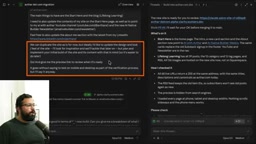
This is a textbook example of a goal-driven prompt. After Opus 5.5 ran in a worker thread for a while, it provided a preview link and a PR ready for review. It copied all 39 articles, 13 categories, and all images; verified titles, descriptions, and canonicals across 68 URLs; validated loading at phone, tablet, and desktop widths; and honestly flagged which parts needed input from the creator (such as being unable to access LinkedIn). The blog came out as close to a pixel-perfect replica as possible, loading faster on Cloudflare. The creator admitted this was a project he'd been putting off for a long time — Opus 5.5 finished it in a day, with most of the work driven by a single prompt.
Weekly Bookmark Digest
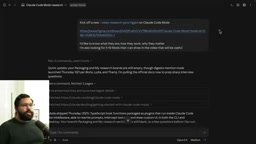
The creator has a Cloud Code cron job that compiles the 500+ bookmarks he saves on Twitter each week. He ran Opus 5.5 and GPT-6.1 in parallel on the same week's 567 raw bookmarks. The verdict: Opus 5.5's output had "a higher signal-to-noise ratio and was easier to understand" — it named specific companies and specific releases, and extracted deeper themes. Opus 5.5 grouped content into 8 themes; GPT-6 produced 5. The creator is leaning toward switching this daily digest to Opus 5.5.
Research and Video Topic Preparation
Using a skill called "Video Research + FigJam," the creator had Opus 5.5 complete a full workflow in one go: web search, source integration, generating a report with citations, and outputting a complete FigJam research board. Drawing on Andrej Karpathy's advice that "visuals are easier to understand than plain text," the model generated an illustrated visual research report for an upcoming Cloud Code Mods video, pulling eight notable mod examples from Twitter and the creator's bookmarks — all from a single prompt plus a few follow-ups.
Custom Explainer Video Generation
Inspired by Didi Das and Karpathy, the creator experimented with "generating video from code" using Opus 5.5. With a relatively short prompt, he asked the model to produce three versions of a 15-second explainer video simultaneously — one each using Hyperframes, Manim, and Remotion — providing an API key for voiceover. Without being told a specific style, the model automatically adopted the font and color scheme from the creator's website and created animations showing the skill running in action. The Manim version used a 3Blue1Brown-style aesthetic and became the creator's favorite. He plans to use these videos for courses and social media content.
The three video generation libraries mentioned each serve different purposes: Manim is a Python library developed by mathematician Grant Sanderson (of 3Blue1Brown) for creating mathematical animations, known for its precise math visualizations and clean blue-black aesthetic — ideal for explaining algorithms or mathematical concepts. Remotion is a React-based programmatic video framework that lets developers describe video content using frontend technology and export to MP4, suitable for UI demos and branded content. Hyperframes is an emerging AI-native video storytelling framework focused on structured storyboarding and multimodal content orchestration. Running all three in parallel is essentially a "style matrix" experiment — using the same script to evaluate how different visual languages perform — a typical methodology for content creators exploring AI video workflows.
Recommendations and Takeaways
The creator ends with one practical tip: using Opus 5.5 on the Claude Max plan ($200/month) is effectively unlimited tokens — the best value in his view. DHH, the creator of Ruby on Rails, also commented: "The hype is real. Anthropic has worked some magic with Opus 5.5."
For most users, getting the most out of Opus 5.5 isn't about writing more complex prompts — it's about a shift in mindset: moving from "hand-holding the model through every step" to "stating the goal clearly, setting up traffic light rules, defining success criteria, and then letting it run to completion." Keep effort at medium, clean up outdated emphasis-style prompts, and use evidence packages for verification — and you'll get frontier-level output quality at lower cost.
Related articles

Apple HomeView Hands-On Review: Is the $300 Smart Home Hub Worth It?
Apple HomeView hands-on: a $300 smart home hub with facial recognition for quick account switching, but no App Store or voice recognition. Is the wall-mounted version worth it? Should you buy the first generation?

Meta Muse Wonder Launch: What It Means for Meta's Return to the Frontier AI Race
Meta releases Muse Wonder and WonderFull, benchmarks reach the frontier, community feedback is polarized. An in-depth look at Meta's return to the frontier AI race, its personal agent strategy, and Zuckerberg's different path.

Apple Home Smart Home Lineup Leaked: LG and Schneider Team Up, UWB Door Lock on Board
Apple Home ecosystem gains new LG and Schneider devices: UWB smart lock with proximity unlock, 2.5K dual-camera doorbell, privacy indoor camera, and AirPods-like seamless pairing.