Cline Desktop Nightly Build Fix: Shipping Plugin SDK Packages in Production
A nightly commit reveals a typical bundling blind spot where desktop AI tools miss plugin SDK packages in production builds.
Using an inconspicuous `desktop-nightly-20261014011413` commit as a starting point, the article dissects a typical engineering problem: SDK packages that plugins can import in development aren't distributed in production builds, causing users to see 'plugin installed but unusable.' The root cause usually lies in bundler handling of externals, dynamic references, and indirect dependencies. The article highlights the value of nightly builds and the challenges of dependency distribution in plugin-based desktop AI tools.
A Seemingly Minor Nightly Commit Exposes a Production Build Blind Spot in Desktop AI Coding Tools
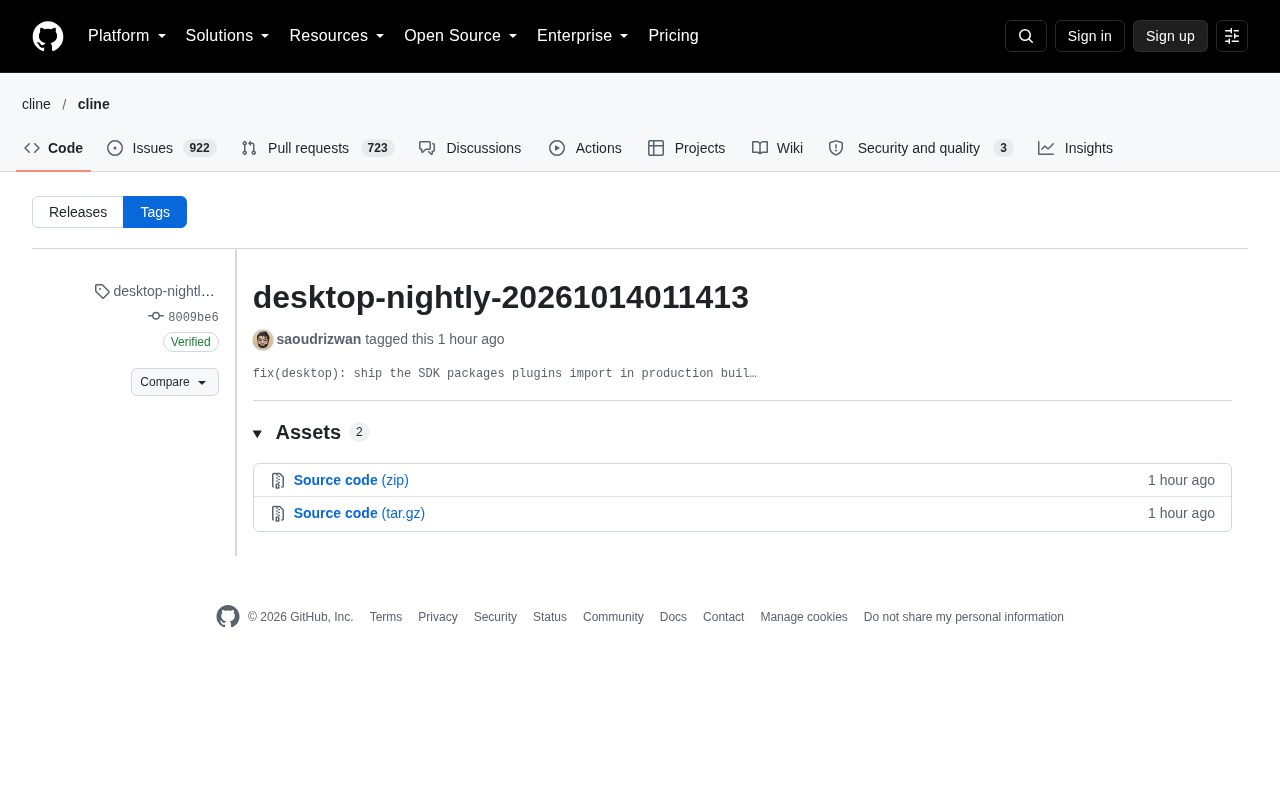
The desktop-nightly-20261014011413 commit, tagged on GitHub by developer saoudrizwan, looks like just another routine release from the daily automated build pipeline. But the truncated description in the commit message — "fix(desktop): ship the SDK packages plugins import in production buil…" — points to a fairly typical and easily overlooked engineering problem: it works in development, but in the production build, plugins can't find the SDK packages they depend on.
For tools that embed AI coding capabilities directly into a desktop client, when this kind of problem slips into an official release, what users experience is usually "the plugin is installed but doesn't work" rather than a clear error message.
The Essence of the Problem: Production Builds Miss Runtime Dependencies
The keywords in the commit message allow us to reconstruct the rough technical picture. When a desktop application runs in development mode, plugin loading paths and dependency resolution typically point directly to the source directory or local node_modules, so the SDK packages that plugins import are readily available.
But production builds follow a different logic: bundlers only include modules that are identified through static analysis, and packages involving dynamic references, indirect dependencies, or improperly handled externals are easily excluded. The result is that the plugin code references an SDK package in the build artifact, but that package was never shipped at all.
This type of fix usually means adjusting the bundling configuration — moving the SDK packages out of the external list, adding them to dependencies, or modifying artifact copy rules — so that plugins can actually import what they need at runtime. The commit is tagged as fix rather than feat, which also indicates this is about restoring an expectation that should have held all along, not adding new capability.
external is a configuration concept in bundlers (such as Webpack, esbuild, Vite): modules listed as external are not bundled into the artifact; instead, require or import statements are preserved and resolved at runtime from the external environment. This mechanism is common in library development — externalizing peer dependencies like React to avoid duplicate bundling. But in scenarios like desktop applications that need self-contained artifacts, misusing external can be disastrous: the build succeeds, the size looks great, but only when execution reaches that import path does it report "module not found."
In contrast, tree shaking and static analysis work as follows: bundlers by default only include modules that "can be statically identified as referenced." Dynamically constructed module names (such as require(someVar)), conditional loading, and packages imported on demand at plugin runtime can all be misjudged as "unused" and removed. This is the classic cause of "works in development, missing in production builds."
Therefore, this type of fix often requires a two-pronged approach: on one hand, moving the SDK packages that plugins depend on out of the external list or adding them to dependencies to ensure they are explicitly included in the artifact; on the other hand, explicitly declaring runtime dynamic import paths or copying at the directory level so the bundler "knows" these files must be shipped.
Why Nightly Builds Are Worth Paying Attention To
Nightly versions are often treated in open-source projects as synonymous with "unstable, ignorable," but for desktop AI tools, they are actually the most informative link in the release chain.
Daily builds mean that every change to bundling configuration and every dependency version drift gets realistically packaged and run through the pipeline within 24 hours. The kind of problem described above — "only appears in production builds" — is precisely what unit tests and development environments are least equipped to catch: it doesn't throw errors, it just silently ships fewer files.
This fix being tagged separately suggests the maintainers treat it as a node that users need to be aware of: users running nightly will regain working plugin loading capability because of this commit. For developers tracking the stability of such tools, nightly commit titles are a faster signal source than release notes.
A nightly build refers to a full build and release automatically triggered by the CI system every night (or at a fixed cadence), with artifacts typically carrying timestamps and versions in the form 0.0.0-nightly.20261014. Its value is not stability but coverage: before officially going through the release process, many configuration changes, dependency upgrades, and build script adjustments first run through a real pipeline in nightly.
Compared to unit tests, nightly's difference lies in that it validates the end-to-end artifact form — tests run against source code or mocks, while nightly runs against the actual binary/installer that users will install. For problems like "plugin dependencies weren't bundled in," module resolution paths in tests are often still connected to node_modules and won't fail; only after bundling into an artifact and stripping dependencies does the problem surface.
So mature desktop projects typically treat nightly as a pre-release early warning net: discovering problems here costs far less than letting users hit them in official releases and then needing emergency fixes. This is also why maintainers tag a single nightly patch separately — for users already on nightly, it's a real restoration of usability.
Engineering Discipline Revealed by the Commit Details
The metadata of this commit itself reveals quite a bit. The commit is GitHub-verified with GPG key B5690EEEBB952194, meaning there is basic integrity assurance from code to build artifact.
The tag naming also reflects the degree of automation: the combination of "product line + nightly + timestamp" in desktop-nightly-20261014011413 is a typical form automatically generated by CI systems — humans would almost never name things this way. The commit timestamp shows 14 Oct 01:07, indicating the nightly build window is relatively fixed.
Together, these details paint a picture of a project that has already smoothed out its continuous delivery process: automated builds, automated tagging, signature verification, and commit messages following conventional commits conventions. For users, this level of discipline says more about the project's maintenance quality than any single feature.
Implications for the Plugin Ecosystem
Desktop tools that turn SDK packages and plugin mechanisms into open interfaces are facing a common challenge: the versions and distribution of the host application, SDK, and third-party plugins must be strictly aligned.
During development, all three can share the same local dependencies, but in production, the host only ships what it has bundled, while plugins may come from arbitrary sources and update on their own schedule. Once the host fails to ship an SDK package, failures on the plugin side are delayed and scattered — not all plugins will immediately error out; only those that actually reach that import path will crash.
The value of this fix is not in the amount of code, but in the fact that it codifies the constraint that "plugin dependencies must be distributed alongside the host" into the build process. For AI coding tools that rely on third-party plugins to extend capabilities, whether this constraint can be upheld in every production build directly determines whether the plugin ecosystem can grow stably.
Practical Conclusions from a Developer's Perspective
If you are a regular user of such desktop tools and encounter a plugin that "installs but doesn't work," suspect a mismatch between the host version and the SDK required by the plugin first. Nightly users especially should check whether recent builds include the relevant fix.
If you are building a similar plugin-based desktop application, this commit offers at least two reminders: first, dependency validation for production builds cannot rely solely on bundler default behavior — packages imported at plugin runtime need explicit checks; second, treat nightly builds as a fallback net for catching such problems, which is more cost-effective than waiting for an official release.
One-line Summary
A nightly commit reveals a typical bundling blind spot where desktop AI tools fail to ship the SDK packages plugins need in production builds.
Paragraph Summary
Using an inconspicuous desktop-nightly-20261014011413 commit on GitHub as a starting point, the article dissects a typical engineering problem: SDK packages that plugins can import normally in development are not distributed in production builds, causing users to see "plugin installed but unusable." The root cause usually lies in how bundlers handle externals, dynamic references, and indirect dependencies, causing the artifact to silently miss runtime modules. The article further points out the value of nightly builds — they realistically package once within 24 hours, catching silent problems that development and unit tests struggle to cover, making them a faster signal source than release notes. The commit's GPG signature, automated tagging, and conventional commits naming also reflect the project's mature continuous delivery discipline. Finally, it lands on the plugin ecosystem: the versions and distribution of the host, SDK, and third-party plugins must be strictly aligned, and dependencies must ship alongside the host.
Related articles

Free Unlimited Claude Code Solution: Agnes AI + CC Switch Setup Guide
No paid subscription needed — pair the free AI platform Agnes AI with the open-source tool CC Switch to provide a backend for Claude Code, enabling unlimited free calls to text, image, and video models. This guide covers the full setup, test results, and usage boundaries.

A Complete Zero-Cost Guide to Getting Started with Claude Code for Beginners in China
A beginner's guide to Claude Code for users in China: two installation methods (command line and IDE plugin), full configuration steps for replacing the official API with the free domestic LongCat model, and a hands-on demo of building a small tool with natural language, plus tips.

When the NSA Gets Involved: The AI Supply Chain Crisis Behind Open-Source CVEs and API Key Hijacking
Multiple open-source projects disclosed severe CVEs in one day, PHP flaws alarmed the FBI, and Railway and OpenCode were breached with API keys stolen. This article breaks down the vulnerability window, AI-accelerated exploitation, and the AI supply chain crisis behind the API key black market, with a developer defense checklist.