Clink: The iOS Custom Keyboard You Actually Own

Clink is a privacy-first iOS custom keyboard that doubles as a platform for indie apps and brands.
Clink launches with the tagline "The iOS keyboard you actually own," differentiating itself through deep customization, privacy-first positioning, and a platform model that lets indie apps and brands live inside the keyboard. It aims to turn the high-frequency typing interface into a new distribution channel, especially appealing to long-tail developers. While its direction is clear, the depth of customization, verifiable privacy practices, and the balance between brand presence and user experience will determine whether the model holds up. Currently iOS-only, with Android on the way.
What Is Clink
Clink is an iOS custom keyboard app centered around the idea of "user ownership." It launched on Product Hunt with the tagline "The iOS keyboard you actually own," earning 69 upvotes and ranking 20th for the day, categorized under iOS, Productivity, and Privacy.
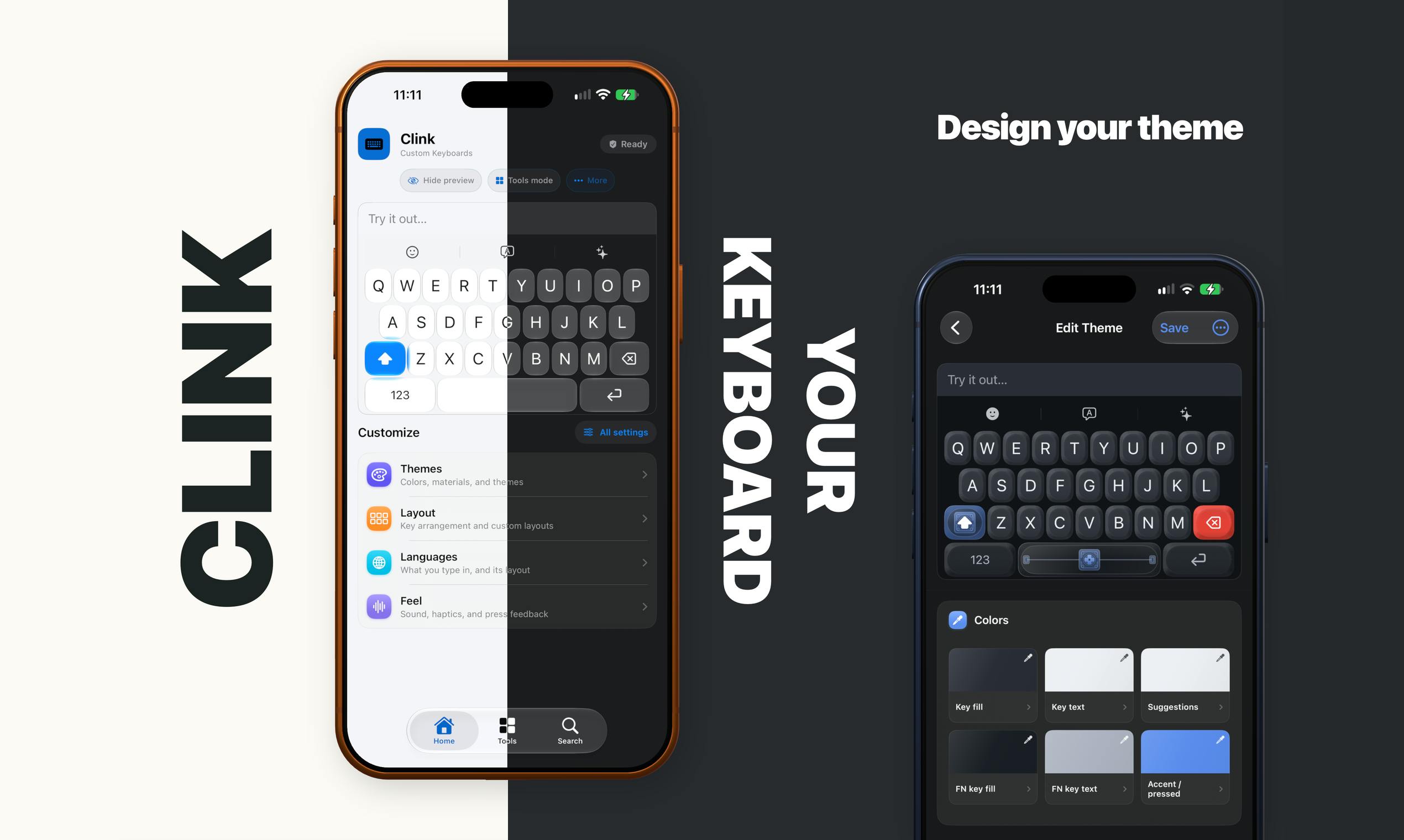
Unlike the system keyboard or keyboards from major tech companies, Clink's core value proposition is putting control over themes, layouts, and tools back in the hands of users. You can customize how your keyboard looks and functions, rather than passively accepting whatever the platform gives you. It's also designed as an open platform — indie apps and brands can "live" on the keyboard, placing their presence in the high-frequency input environment users engage with every day.
The Keyboard as a New Brand Gateway
Clink puts forward an intriguing idea: the keyboard isn't just an input tool — it's a space that can host brands and indie apps. The official description mentions "a place for indie apps and brands to live on it," signaling that Clink wants to convert the attention users spend typing every day into a new distribution and exposure channel.
This model is particularly appealing to independent developers. Mobile traffic is heavily concentrated among a handful of gatekeepers, making it difficult for indie apps to reach users organically. The keyboard, however, is an interface users open constantly throughout the day. If Clink can build a system that lets brands and small apps "move into" the keyboard, it could theoretically offer long-tail developers a differentiated placement opportunity.
That said, this path comes with a clear balancing challenge: brand integration and user experience require restraint. The keyboard is fundamentally an input tool, and any excessive commercial presence risks disrupting the core act of typing. How to be "present without being intrusive" will be an ongoing product challenge for Clink.
This "keyboard as platform" business model has historical precedents, but very few success stories. After iOS 8 opened up third-party keyboards around 2014, several products emerged attempting to embed search, GIFs, and ads at the keyboard layer — most were uninstalled precisely because they interfered with the typing experience. The keyboards that survived (like SwiftKey and Gboard) did so through pure input efficiency improvements, not added commercial features. Clink's challenge is therefore not just a product design problem — it's a deeply historical one rooted in user behavior: the tolerance threshold for keyboards is extremely low, and any perceived "ad-ification" triggers immediate uninstall impulses. Whether users can feel a brand's presence without feeling a commercial intent is the core assumption this model must validate.
A Privacy-First Positioning
In the keyboard category, privacy is an unavoidable sensitivity — keyboards inherently have access to everything a user types, including passwords, private messages, and payment information. Clink explicitly includes "Privacy focused" in its product positioning and is listed under the Privacy category, clearly acknowledging this user pain point.
For a custom keyboard, earning user trust is a prerequisite for adoption. Many users remain wary of third-party keyboards out of concern that their input data is being uploaded or misused. For Clink to genuinely differentiate on privacy, it needs to provide verifiable commitments around data handling transparency and local processing — not just a tagline. The publicly available information has yet to disclose technical details about its privacy implementation, which is something to watch closely when evaluating this product.
From a technical standpoint, iOS enforces two privacy modes for third-party keyboards: by default, the system does not grant custom keyboards "Full Access," meaning they cannot connect to the internet and input data cannot be uploaded. Once a user manually enables Full Access, the keyboard can access the network and shared data containers — but that also introduces data exposure risks. Many fully-featured third-party keyboards (such as predictive text and cloud dictionary sync) depend on Full Access, creating an inherent tension between functionality and privacy. For Clink to build real credibility on privacy, the key is being transparent about which features require network access, what data leaves the device, and whether it offers a usable experience without Full Access enabled.
Cross-Platform Plans and Current Status
According to its launch information, Clink is currently available on iOS, with Android described as "headed to Android soon." Cross-platform expansion signals that the team wants to cover a more complete mobile ecosystem — a logical strategy for a keyboard aiming to be a brand hosting platform, since sufficient user scale is necessary to attract indie apps and brands.
The product was built by maker William Whitehouse. Based on early Product Hunt data (69 upvotes, 3 comments), it's still in its early stages and has yet to build substantial community feedback. Its core value proposition — combining customization, brand platform, and privacy — has a clear direction, but the real test lies in execution: how well the product is refined and how successfully the ecosystem is built.
Key Things to Watch
For readers who follow mobile tools and the indie developer ecosystem, Clink offers a fresh product angle: redefining the keyboard from a pure utility into a controllable, brand-capable platform. Whether it can deliver on the promise of "the keyboard you actually own" depends on three variables: the depth of customization, the credibility of its privacy protection, and the balance between brand integration and user experience. It's too early to judge its success or failure, but the underlying idea of repurposing a high-frequency entry point is worth watching as a case study in the industry.
Related articles

Free Unlimited Claude Code Solution: Agnes AI + CC Switch Setup Guide
No paid subscription needed — pair the free AI platform Agnes AI with the open-source tool CC Switch to provide a backend for Claude Code, enabling unlimited free calls to text, image, and video models. This guide covers the full setup, test results, and usage boundaries.

A Complete Zero-Cost Guide to Getting Started with Claude Code for Beginners in China
A beginner's guide to Claude Code for users in China: two installation methods (command line and IDE plugin), full configuration steps for replacing the official API with the free domestic LongCat model, and a hands-on demo of building a small tool with natural language, plus tips.

When the NSA Gets Involved: The AI Supply Chain Crisis Behind Open-Source CVEs and API Key Hijacking
Multiple open-source projects disclosed severe CVEs in one day, PHP flaws alarmed the FBI, and Railway and OpenCode were breached with API keys stolen. This article breaks down the vulnerability window, AI-accelerated exploitation, and the AI supply chain crisis behind the API key black market, with a developer defense checklist.