Close Your Laptop and Let Claude Keep Coding: How AI Agents Take Over Tasks

Chatbots only answer; AI agents use tools in a loop to complete tasks autonomously.
The article distinguishes chatbots from AI agents: the former operates in Q&A mode and requires humans to act as "glue" connecting scattered steps; the latter only needs a goal and then autonomously plans, calls tools, checks results, and adjusts strategy, looping until completion. Citing Anthropic's definition that "an agent is a model using tools in a loop," it explains that loops and tool use are the technical foundation of agents, and uses Claude Code as an example to show the complete closed loop from reading projects and editing files to running tests and fixing failures. It also emphasizes safety boundaries: good agents still require human confirmation before irreversible operations like sending emails or completing payments—a proactive safety design, not a capability limitation. For developers, the agent model means handing the repetitive code-test-fix loop to AI and focusing on higher-level design decisions.
From Chatbot to AI Agent: A Fundamental Shift in How Work Gets Done
A chatbot answers you; an AI agent does things for you. That's the most essential difference between the two. A chatbot operates in a question-and-answer mode—you ask, it responds, then it stops and waits for your next instruction. To get real work done, you end up playing the role of "glue": searching for information, copy-pasting, checking calendars, writing emails, stitching scattered actions together.
An agent can handle this juggling act for you. According to the YouTube video "Close Your Laptop, Claude Keeps Coding," you just give it a goal, and it plans its own steps, calls tools, checks results, and makes adjustments—looping until the task is complete.
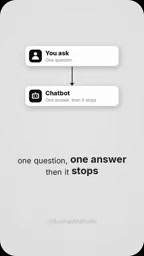
This difference becomes especially clear in real scenarios. For example, ask AI to arrange a Friday team lunch: an agent will automatically check everyone's calendar, find a suitable time slot, make the reservation, and draft the invitation. By contrast, a chatbot can only tell you "you can check the calendar and send an email"—you have to do every remaining step yourself.
The Core Mechanism of Agents: Using Tools in a Loop
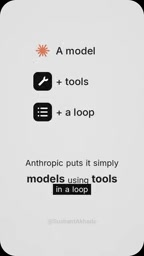
Anthropic's definition of an AI agent is concise and accurate: "An agent is a model using tools in a loop." This definition captures the key distinction between agents and traditional conversational AI—loops and tool use.
Traditional AI interaction is linear: input → output → done. Agent interaction is a loop: goal → plan → call tools → observe results → adjust strategy → call tools again → until complete. Each loop may involve different tools—file reading and writing, code execution, calendar APIs, email sending, and more.
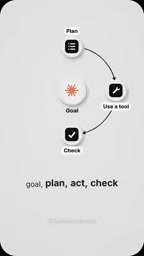
This loop mechanism gives agents the ability to self-correct. If the first attempt fails—say a test doesn't pass or there's a calendar conflict—the agent reads the error message, adjusts its approach, and tries again. This is precisely the technical foundation that enables agents to handle complex multi-step tasks.
"Tool use" (also called function calling) refers to a large language model's ability to output structured call requests when generating responses, which an external program executes to perform real operations and return the results to the model. Common tools include reading and writing files, executing shell commands, querying databases, and calling calendar or email APIs. The model itself does not directly operate these systems but completes operations indirectly through tool interfaces. Therefore, the quality of tool descriptions, parameter validation, and the readability of returned results directly determine whether the agent loop can proceed smoothly. The reason Anthropic's formulation emphasizes "using tools in a loop" is that a single tool call is merely an enhanced version of Q&A; only by connecting "call—observe—decide again" into a closed loop can the model correct its plans based on real-world feedback. This is also the technical watershed that distinguishes agents from ordinary conversational AI.
Claude Code in Practice: A Complete Closed Loop from Reading Code to Running Tests
This capability is already concretely demonstrated in Claude Code. The video mentions that Claude Code reads your project, edits files, runs tests, and fixes the parts that fail. The entire process doesn't require you to guide it step by step—you just tell it what to do, and it completes the full closed loop from understanding the codebase to verifying whether the changes are correct.

The potential impact of this way of working deserves serious consideration. It means developers can close their laptops and let the agent keep working—because the agent doesn't need you watching every step. Of course, this also raises an important question: to what extent can we trust agents to operate autonomously?
Claude Code is a command-line coding agent released by Anthropic that runs in the terminal and can directly access local codebases. Through tools such as reading files, searching code, editing content, and executing tests and build commands, it connects "understand—modify—verify" into a closed loop. Unlike code completion within an IDE, Claude Code is designed for cross-file, multi-step tasks, such as refactoring modules, fixing failing tests, or implementing a small feature. It typically requests permission before executing any command with side effects and supports configuring the scope of allowed operations through configuration files. Understanding this positioning helps grasp the meaning of "the agent keeps working after you close your laptop" in the text: the value of an agent lies not in the quality of a single code generation, but in its ability to autonomously drive the entire engineering loop.
Safety Boundaries: Important Operations Still Require Human Confirmation
The video specifically emphasizes a design principle: a good agent still seeks your consent before performing important operations, such as sending emails or completing payments.
This principle has practical considerations behind it. The more autonomous an agent is, the greater the cost when it makes a mistake. An agent that can automatically send emails and make payments could cause quite serious consequences if it misinterprets the goal. So the current best practice is: let agents handle information-intensive, reversible operations (reading, analyzing, testing, drafting), and leave irreversible key operations for humans to check.
This is not a limitation of technical capability but a proactive choice in safety design.
"Human-in-the-loop" is a common safety design pattern in autonomous systems, referring to introducing human confirmation or approval at key decision points. In AI agent scenarios, it typically manifests as explicit authorization before executing irreversible operations, as well as pre-constraining the scope of operations (such as read-only mode, sandboxed environments, command whitelists). The opposite is fully autonomous operation, at the cost of errors being hard to intercept and trace. Engineering practice often grades by "reversibility": reversible operations like reading, analyzing, and drafting can be left to the agent, while irreversible operations like sending, paying, deleting, and deploying require confirmation. This pattern both reduces the risk of errors and preserves an audit trail for agent behavior, making it the mainstream compromise in current agent product deployments.
What This Means for Developers
The shift from chatbot to agent changes not just the tools themselves but also the design philosophy of workflows. When you hand a task to an agent, what you need is not precise instructions but a clear goal. The value of an agent lies in its ability to fill in all the blank steps between goal and result.
For developers, the agent model demonstrated by Claude Code means you can hand the repetitive code-test-fix loop to AI and focus on higher-level design decisions. For non-developers, the agent model means that more software operations that previously required manual stitching can be automated.
The key change is this: you no longer need to be the "glue" that connects every step. Give the agent a goal and let it run the loop to completion.
Related articles

AI-Powered SRC Vulnerability Hunting: A Hands-On Guide to Building the Hermes Agent Workbench
Based on a hands-on Bilibili video: how to build an AI-powered SRC vulnerability hunting workbench—three-step method, four report elements, Agent mode vs web chat, and tool selection.

CLI-Anything Complete Beginner's Guide: How AI Operates Software — Principles and Practice
A complete beginner's guide to CLI-Anything: how AI Agents operate professional software via the command line, covering the three-layer architecture, CLI Hub installation, DrawIO practice, generator principles, and limits.

Carbon-X: A 14.8B Open-Source Model That Handles DNA and Text Simultaneously
Carbon-X is a 14.8B open-source multimodal model on Hugging Face where DNA and text share a token stream. 6-mer tokenization, 302B token mid-training, deployable on a single 80GB GPU, 66.7% average on five DNA benchmarks, Apache 2.0 license.