Codex CLI 0.169 Update: exec Trust Mechanism, Side-Chat Tabs, and Model Picker
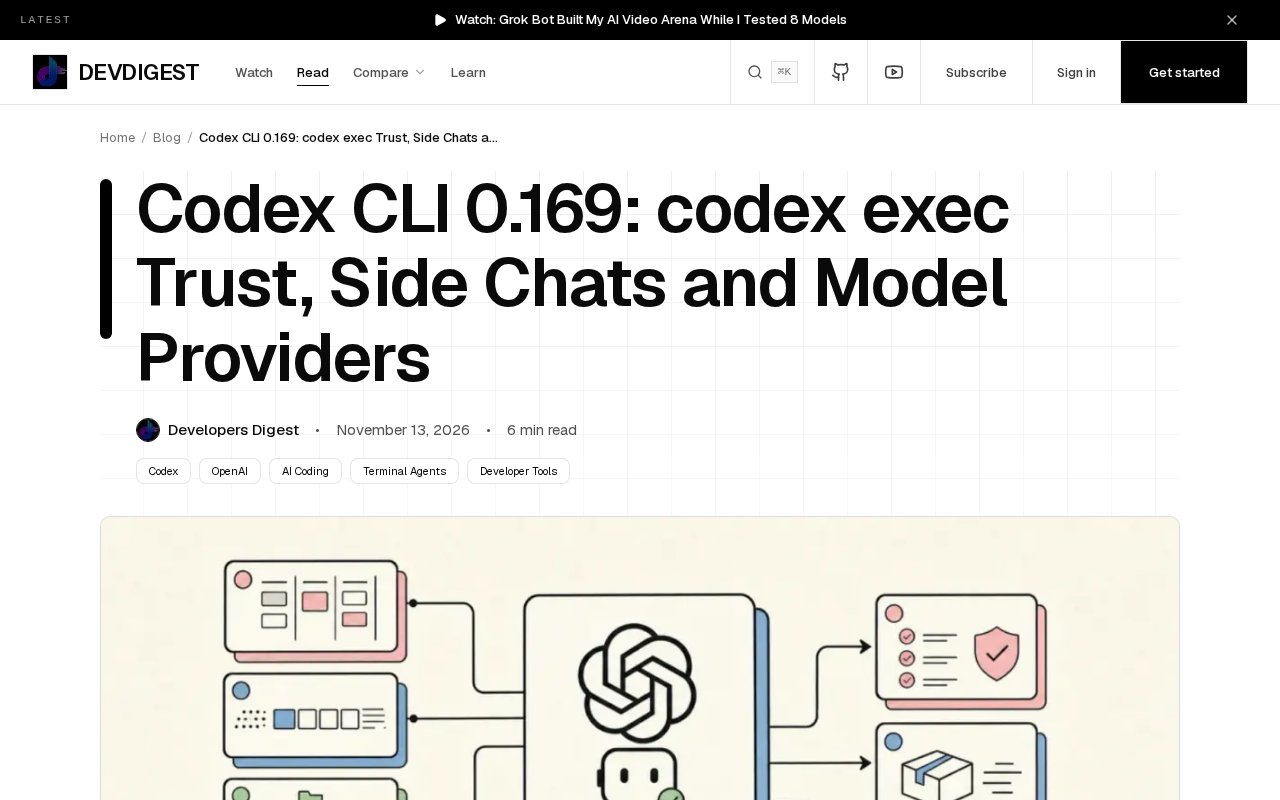
Codex CLI 0.169.0 tightens codex exec loading in untrusted directories, adds --trust, side-chat tabs, and a model provider picker.
Codex CLI 0.169.0's core change is a tighter security boundary: in untrusted directories, codex exec no longer loads project config or MCP servers by default, preventing unknown-origin directories from injecting external execution logic via configuration. A new --trust flag lets users explicitly restore the previous behavior, forming a 'secure by default, explicit authorization' pattern. On the experience side, the release adds side-chat tabs for managing multiple threads in one terminal and a model provider picker for switching models without editing config.
Codex CLI 0.169 Update: exec Trust Mechanism, Side-Chat Tabs, and Model Picker
Codex CLI 0.169.0 focuses on an easily overlooked yet critical scenario: the security boundary when running codex exec in untrusted directories. The new version excludes project configuration and MCP servers from untrusted directories by default, while introducing a --trust flag, side-chat tabs, and a model provider picker. For developers who rely on Codex CLI for automation tasks, these changes directly affect both day-to-day workflow and the security model.
The Trust Boundary of codex exec: Tighter by Default, Relaxed on Demand
codex exec is the entry point in Codex CLI for non-interactive task execution, commonly used in scripts, CI pipelines, or batch processing. Previously, it would load project configuration and MCP servers from the current directory regardless of whether that directory was trusted. Version 0.169.0 changes this default behavior: in untrusted directories, project configuration and MCP servers are no longer loaded.
The significance of this adjustment lies in reducing the attack surface. Both project configuration and MCP servers can introduce external dependencies or execution logic. If a directory's origin is unknown, automatically loading them amounts to handing control to unknown content. The new version chooses to disable this by default, returning the decision of whether to load to the user.
The --trust Flag: Explicit Authorization
The accompanying --trust flag lets users manually restore the original loading behavior once they've confirmed a directory is trustworthy. This is a classic "secure by default, explicit authorization" design — behavior is tightened when no flag is passed, and users must actively declare trust when full functionality is needed. For teams running automation workflows in fixed, controlled directories, simply appending --trust to the command preserves their existing workflow unchanged.
This design also comes with a practical reminder: if your CI scripts or local automation depend on MCP servers in project configuration, you'll need to check after upgrading whether commands are missing --trust, or you may encounter silent feature loss.
MCP (Model Context Protocol) is an open protocol that lets AI applications connect to external tools and data sources in a standardized way. In the context of Codex CLI, an MCP server refers to a process or service implemented according to this protocol that can be invoked by clients, exposing capabilities such as file systems, databases, and search interfaces to the model. Since MCP servers are typically launched as subprocesses or remote connections, their configuration often contains executable commands, launch parameters, and access credentials. Loading an MCP configuration of unknown origin is therefore effectively equivalent to allowing whoever provides that directory to specify code to run. This is exactly why 0.169.0 brings it under trust boundary management: both project configuration and MCP servers have the ability to "introduce and execute external logic," and not loading them by default keeps risk within the scope of explicit user authorization.
"Secure by default" is a fundamental principle in security engineering: a system's behavior with no configuration should be the most conservative, and relaxing restrictions must be actively and explicitly expressed by the user. The opposite is "open by default, tighten on demand," which easily leaves users stuck in an insecure state due to oversight. In this case, codex exec not loading project configuration and MCP servers without --trust is the conservative default; adding --trust is the user's explicit declaration that "the contents of this directory are trustworthy." This pattern is especially valuable in CI scenarios, where pipelines often run in shared runners or temporarily cloned directories whose reliability isn't always controllable. Tighter defaults prevent automation workflows from inadvertently becoming a channel for executing unknown logic.
Side-Chat Tabs: Organizing Multi-Threaded Conversations
Beyond security mechanisms, 0.169.0 also adds side-chat tabs. When handling multiple conversation threads simultaneously in a terminal interface, tabs provide a clearer way to organize them, preventing different task contexts from interfering with each other.
From a product perspective, this feature addresses a real pain point developers face when using Codex CLI: one session for debugging code, another for consulting on architecture questions, and yet another for executing script tasks. Previously this required switching between different terminal windows; now they can coexist as tabs within the same interface. For users accustomed to doing most of their work in the terminal, this reduces the cost of context switching.
Model Provider Picker: Switching Models More Directly
The update also includes a model provider picker. Codex CLI supports connecting to different model providers, and the picker turns switching from manually editing configuration into an in-interface operation.
The value of this change lies in lowering the barrier to multi-model workflows. Developers can choose different providers based on task type — for example, using one model for code generation and another for long-document analysis — without repeatedly editing configuration files. Although the source material doesn't disclose which providers are supported or the switching details, the picker itself signals that Codex CLI is moving multi-model support from "configurable" toward "usable day-to-day."
Model provider in Codex CLI refers to the configuration unit for connecting to different large model services, typically including fields such as API endpoint, authentication method, and model name. Different providers differ in context length, coding ability, response latency, and billing. Multi-provider support lets users flexibly choose based on task characteristics. The significance of the picker isn't just saving the step of editing configuration files — it's turning "switching" from a one-time setup into a session-level daily operation. Users can quickly experiment and compare actual outputs from different models for the current task without interrupting their workflow to change global configuration. This is also a signal that command-line AI tools are moving from single-backend binding toward multi-backend orchestration.
What These Updates Mean
The three changes correspond to three levels: the trust mechanism of codex exec addresses the balance between security and automation; side-chat tabs address interaction efficiency; the model provider picker addresses the model ecosystem onboarding experience.
Looking at the pace of version evolution, Codex CLI is moving from a single command-line tool toward a more complete workbench. Tighter security defaults are a sign of maturity — as more teams use the tool for automation workflows, risk control in default behavior becomes more important than feature richness. Tabs and the picker, meanwhile, reinforce the experience layer, letting the tool absorb some of the convenience of graphical interfaces while retaining its command-line form.
For developers already using Codex CLI, the most important thing to watch after upgrading to 0.169.0 is the behavior change in codex exec: check whether existing scripts depend on project configuration or MCP servers in untrusted directories, and add --trust as needed. For those who haven't tried it yet, this version offers a concrete sample of how command-line AI tools are evolving — security boundaries, interaction organization, and model integration are becoming three foundational dimensions of competition among similar tools.
One-line Summary
Codex CLI 0.169.0 tightens codex exec's loading behavior in untrusted directories and adds --trust, side-chat tabs, and a model provider picker.
Paragraph Summary
Codex CLI 0.169.0's core change is a tighter security boundary: when running codex exec in untrusted directories, project configuration and MCP servers are no longer loaded by default, preventing directories of unknown origin from introducing external execution logic through configuration. The accompanying --trust flag lets users explicitly restore the original behavior after confirming a directory is trustworthy, forming a "secure by default, explicit authorization" pattern — but it also reminds CI scripts that depend on MCP to check after upgrading whether the flag is missing. On the experience side, the new version adds side-chat tabs, enabling parallel management of multiple conversation threads in the same terminal interface and reducing window-switching costs, while introducing a model provider picker that turns multi-model switching from manual config edits into an in-interface operation. The three correspond to security, interaction efficiency, and model integration respectively.
Related articles
Claude Code Practical Guide: Installation, Permission Modes, and Productivity Tips
Based on a Bilibili creator's hands-on sharing, this guide covers Claude Code installation (NPM recommended), permission modes, slash commands, CLAUDE.md configuration, context management, and practical tips for stable use and avoiding account bans.
The Essential Difference Between AI Agents and Traditional AI: From Functions to Autonomous Task Executors
What is the essential difference between AI Agents and traditional AI? This article systematically breaks down the nature of Agents from six core components, dynamic decision-making authority, boundaries with Chatbots and Workflows, safety boundaries, and observability, helping you understand key concepts in LLM application development.
Dify Low-Code AI in Practice: RAG and Agents Made Easy
Based on a Bilibili Dify course, this article systematically covers Dify's five application types (Chat Assistant, Text Generation, Agent, Chat Flow, Workflow), Windows + Docker deployment, MySQL connection configuration, model integration strategies, and application publishing methods, helping beginners quickly build their own intelligent assistants.