Dify Low-Code AI in Practice: RAG and Agents Made Easy
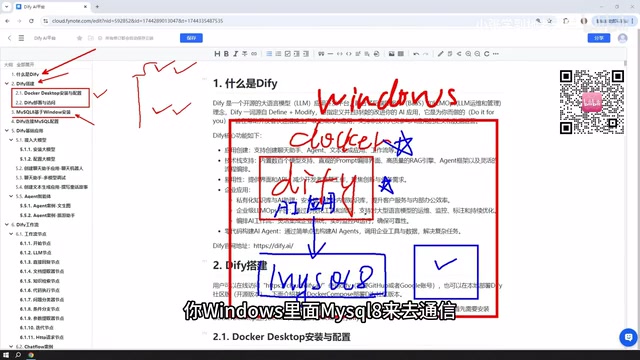
A systematic overview of Dify's five application types, local Docker deployment, model integration, and workflow publishing.
Based on a Bilibili creator's course series, this article systematically introduces the core capabilities of the low-code AI platform Dify. It explains the five application types (Chat Assistant, Text Generation, Agent, Chat Flow, Workflow), recommends Windows + Docker local deployment for communication with host MySQL 8 and virtual machine services, suggests prioritizing low-cost paid APIs or free tokens for model integration, and covers workflow nodes and publishing methods (website, embedding, API), while reminding readers that low-code lowers the engineering barrier, not the application design barrier.
As the barrier to AI application development keeps dropping, low-code platforms are becoming important tools for individual developers and enterprises to quickly launch intelligent assistants. Dify is one of the most talked-about. According to a Bilibili creator's series of courses, Dify can be understood as an AI platform through which you can quickly and easily build AI applications, whether for enterprise or personal use. This article, based on that course content, systematically sorts out Dify's core application types, deployment methods, and advanced capabilities, helping you decide whether it fits your next AI project.
What Is Dify? Five Application Types Cover Mainstream Scenarios
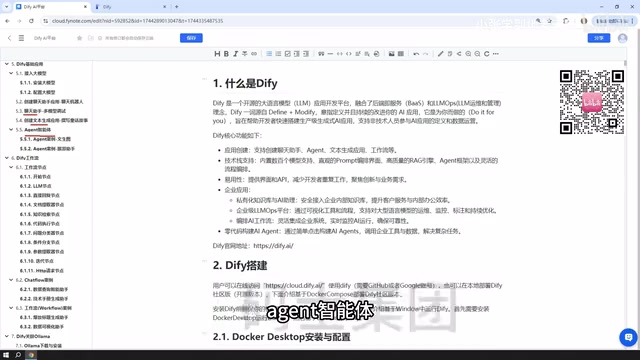
Dify positions itself as a low-code AI application development platform. When creating an application, the platform offers five main directions: Chat Assistant, Text Generation, Agent, Chat Flow, and Workflow.
Chat Assistant and Text Generation are the easiest to get started with. The former is for conversational interaction with AI models, while the latter is suitable for generating articles, documents, novels, or stories. The Agent is an advanced form, and its core difference is that it can call tools to complete user instructions—for example, first crawling a webpage and then performing some kind of analysis.
The workflow part includes two subtypes: Chat Flow and Workflow. The creator summarized the difference in one sentence: Chat Flow supports chat-style interaction with the workflow, while Workflow can only produce a one-time output result. For beginners unfamiliar with Dify, this concept may be hard to grasp at first, but the course later provides detailed cases to demonstrate how to build and use both.
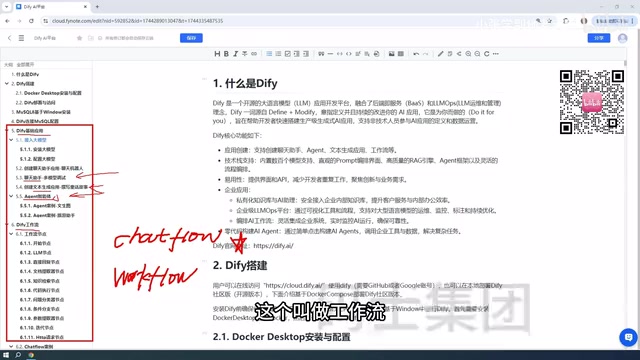
It is worth noting that during the demo, the creator mentioned that workflows were still in a testing phase in the version being used, but were already relatively stable. This also reflects how the Dify platform is continuously improving its workflow capabilities amid rapid iteration.
Agent is an application form that gives large language models the ability to "act autonomously": the model no longer only outputs text, but decides on its own which external tools to call based on the user's goal (such as web crawling, search, code execution, or database queries), and continues reasoning based on the tool results until the task is complete. This process is commonly called "Tool Calling / Function Calling." Therefore, an Agent's performance depends not only on the model itself, but also on whether tool definitions are clear, whether parameters are accurate, and on constraints such as the maximum number of iteration rounds.
Chat Flow and Workflow both belong to Dify's visual orchestration capabilities. Workflow is oriented toward batch-style tasks: input once, execute nodes in sequence, output the result once—suitable for scenarios such as content generation and data cleaning. Chat Flow adds a conversation loop on top of Workflow, preserving multi-turn context so users can ask questions repeatedly within the same flow—suitable for customer service assistants, interactive Q&A, and other scenarios that require continuous dialogue. The two share the same node system (such as LLM nodes, conditional branches, code nodes, and knowledge retrieval nodes), and the main difference lies in whether they are driven in a conversational way.
Deployment Options: Windows + Docker Local Deployment Is the Recommended Path
Regarding setting up Dify, the course offers three choices: deployment based on Windows Docker, deployment from source code, or directly using the official online page.
The online version and the self-hosted version have basically the same interface, but there is one key limitation: when your AI application needs to access a local database or local environment, the online version requires an intranet penetration tool to expose your local IP to the public internet. Therefore, for production environments or internal company applications, the creator recommends self-deploying locally.
The course's approach is to install Docker on Windows to deploy Dify. The reason is that the AI applications subsequently built in Dify need to interact with databases, while MySQL 8 is installed on the Windows host. The Docker-deployed Dify network can communicate with MySQL 8 on Windows and can also communicate with services in a VMware virtual machine on the Windows host. In other words, the database can be placed either on the host machine or in a virtual machine.
The practical value of this deployment architecture is that it makes connecting a low-code platform with a local data environment simple, avoids concerns about data leakage, and retains the efficiency advantages of low-code development.
Docker is a containerization technology that packages an application and its dependencies into isolated "containers," enabling software to run consistently across different machines. Dify officially provides a docker-compose orchestration file, and a single command can bring up the web frontend, API service, background tasks, and dependent components such as PostgreSQL, Redis, and a vector database, greatly reducing environment configuration costs.
After installing Docker Desktop on Windows, containers communicate with the host machine through a bridged network by default. Therefore, Dify in Docker can use host.docker.internal (or the host machine's LAN IP) to access MySQL 8 running on Windows, and can also access services in a VMware virtual machine (the virtual machine network needs to be set to bridged or NAT and ports must be open). Pay attention to port mapping and firewall rules, otherwise connection timeouts will occur. In addition, Docker Desktop's WSL2 backend consumes a certain amount of memory, so it is recommended to allocate no less than 4GB of memory to Docker to ensure stable operation of Dify's components.
Model Integration: Paid APIs First, Local Models as a Supplement
The core of a Dify application is interaction with large models, so model integration is the first step. The course recommends prioritizing paid models such as DeepSeekAd, whose cost is extremely low—the creator showed that after topping up ten yuan, the account had been used for a long time with less than one yuan consumed. In addition, Baidu's ERNIE Bot and Alibaba's Tongyi Qianwen also provide free tokens after registration, reportedly at the million level, which is enough for learning.
The course is cautious about local models: although Dify can integrate models deployed locally via Ollama, local models are usually smaller in scale and their performance is not ideal. However, if the machine is powerful enough to download and run very large models (for example, DeepSeek's open-source large model, whose download size may reach over 400 GB), then enterprise-level deployment of local large models is also feasible.
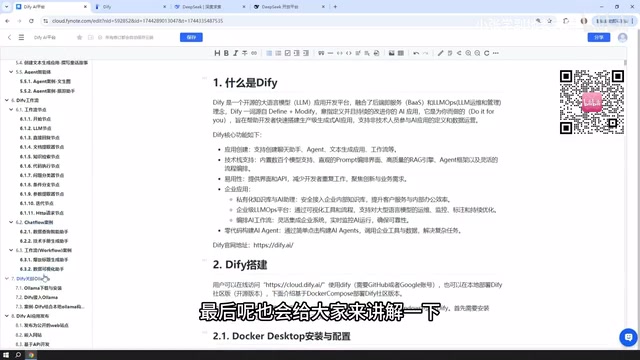
The trade-off logic here is clear: paid APIs offer the best cost-effectiveness for learning and lightweight applications, while local large models should be considered for data-sensitive or compute-rich enterprise scenarios.
Ollama is a local large model runtime tool that provides a simple command line and HTTP interface, allowing one-click download and execution of open-source models such as Llama, Qwen, and DeepSeek. Dify has built-in Ollama integration in the "Model Provider" settings; you only need to fill in the Ollama service address (default http://localhost:11434) to call local models.
When choosing a local model, parameter count and VRAM/memory are the core constraints: 7B-level models usually require more than 8GB of VRAM, while 70B-level models often require multiple GPUs or quantization to run, and quantization brings some performance loss. This is also the technical reason behind the course's recommendation that "small models have limited performance, and only large-parameter models are suitable for enterprise level." In practice, you can first try running a quantized version on a consumer-grade GPU, evaluate its performance on specific tasks, and then decide whether to invest in more compute.
Workflow Nodes and Publishing: A Complete Loop from Building to Launch
A workflow consists of nodes, each module being a node. The course says it will explain common and frequently used nodes, covering almost most of the nodes provided on Dify's official website, with detailed cases for each node.
Once an application is built, it is not limited to use within the Dify interface. The platform supports publishing applications as public websites, generating accessible links; they can also be embedded in self-developed websites or called via API. Of course, publishing to the public internet also involves network configuration such as intranet penetration.
This publishing capability means Dify is not just a prototyping tool but can also support actual delivery. For small teams hoping to quickly validate AI product ideas, this complete loop from building to launch is quite attractive.
Who Is It For? A Few Practical Judgments
From the course plan, Dify's learning path covers the complete chain from zero deployment, MySQL configuration, and model integration to the five application types and workflow nodes, accompanied by many cases. For developers without complex coding experience who want to build their own intelligent assistants, this is a relatively gentle path.
What needs to be viewed rationally is this: low-code lowers the engineering barrier, not the application design barrier. The actual performance of workflows such as RAG retrieval augmentation and Agent tool calling still depends on data quality, node orchestration logic, and model selection. Dify provides an efficiency tool; the real differentiation comes from your understanding of the business scenario.
One-line Summary
A systematic overview of Dify's five application types, local Docker deployment, model integration, and the full workflow publishing process.
Paragraph Summary
Based on a Bilibili creator's course series, this article systematically introduces the core capabilities of the low-code AI platform Dify. It first explains that Dify offers five application types—Chat Assistant, Text Generation, Agent, Chat Flow, and Workflow—covering mainstream scenarios from simple conversation to tool calling; then compares the online and self-hosted versions and recommends Windows + Docker local deployment to communicate with MySQL 8 on the host and services in virtual machines; for model integration, it recommends prioritizing extremely low-cost paid APIs or free tokens, noting that local Ollama models have limited performance and only large-parameter models are suitable for enterprise level; finally, it introduces the workflow node system and application publishing methods (website, embedding, API), and reminds readers that low-code lowers the engineering barrier, not the application design barrier.
Related articles

DeepSeek SuperAgent Architecture Explained: A New Multi-Task Concurrent Agent Paradigm
DeepSeek Harness proposes SuperAgent architecture: a Router+Worker two-layer team model solving context confusion, loop blocking, and local sleep in multi-task Agents.

AI Now Generates GIFs Directly: The Era of Unlimited Custom Stickers Has Arrived
AI can now generate GIFs directly. Learn how to use GPT's Images 2.6 to create sticker GIFs with reference images and story prompts, plus sprite sheet frame-level editing, real-person performances, and chat log generation.

Burned Through 1.3 Billion Tokens and Tens of Thousands of Yuan to Build 500 Websites with AI
Bilibili creator Yu Pi built Vibefather, an AI website template library with 270+ templates and 500+ live sites, consuming over 1.3 billion tokens. Each template includes full prompts and design docs, open-sourced and integrable via Claude Code, Cursor, and more.