OpenHands v1.28.0: OpenCode and PI Added as Built-in Agents, API Keys Requestable In-Conversation
OpenHands shipped 5 releases in 21 days with nearly 40K lines added, core change being OpenCode and PI added to built-in agents.
In 21 days OpenHands released 5 versions with 310 commits, adding 39,847 lines while deleting only 44—feature stacking rather than refactoring. The key change: v1.27.0 adds OpenCode and PI as built-in agents, communicating via ACP over JSON-RPC on stdio, turning manual command and credential setup into out-of-the-box usability. Credentials follow login-over-key, with the local backend reusing provider login state; since v1.28.0 agents can request keys in-conversation, stored in Secrets. Model lists are now reported by the agent, fixing stale hard-coded entries. Also new: automation draft flow, browser screen recording, and DeepSeek entering the official verification pipeline.
Built-in Agents: From Manual Configuration to Out-of-the-Box
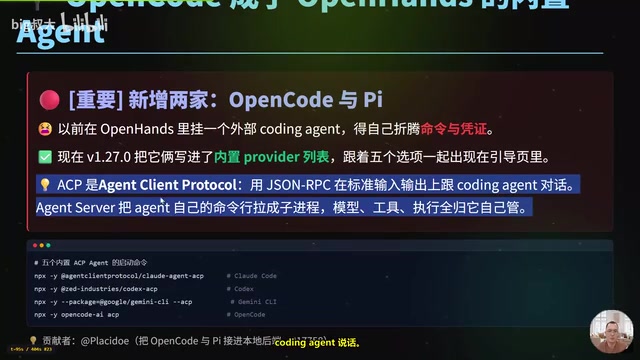
Previously, if you wanted to attach an external coding agent to OpenHands, you had to assemble the command yourself and configure credentials yourself—one mistake and all your effort was wasted. v1.27.0 writes OpenCode and PI directly into the built-in provider list, with five options side by side on the onboarding page: Claude Code, Codex, Gemini CLI, OpenCode, and PI.
This mechanism runs on the ACP protocol (Agent Client Protocol), which essentially uses JSON-RPC to communicate with the coding agent over standard input/output. The agent server launches the agent's own command line as a subprocess, and the model, tools, and execution permissions are all managed by the agent itself. The startup commands for all four follow the same pattern—using npx with the corresponding parameters to pull up the ACP package: Claude Code pulls Claude Agent ACP, Codex pulls Codex ACP, Gemini CLI pulls Gemini CLI ACP, and OpenCode is simply opencode-ai followed by ACP parameters.
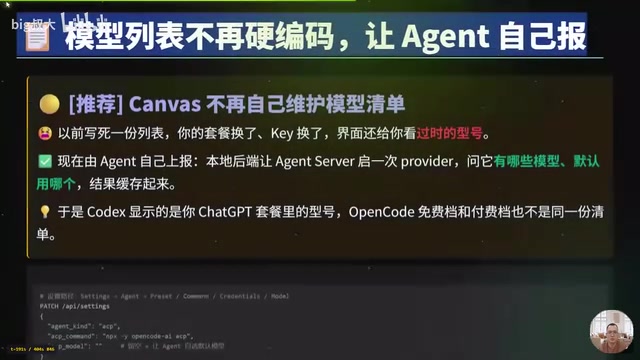
The configuration entry point is on the agent page in settings, with five items: preset, command, credentials, and model. After selecting a preset and saving, it is written to /api-settings via the PATCH method, containing three fields: agent-kind (agent type), acp-command (startup command), and acp-model (left blank means the agent decides the default model).
ACP (Agent Client Protocol) is an open protocol designed to standardize communication between code editors/IDEs and AI coding agents. It was proposed and led by Zed Industries, uses the JSON-RPC 2.0 message format, and transmits requests and notifications between the client and the agent subprocess over standard input/output (stdio). The protocol defines core methods such as session initialization, model selection, tool invocation, and permission confirmation, enabling different agent implementations (such as Claude Code and Gemini CLI) to be driven by a host program in a unified way. OpenHands uses ACP to launch external agents as subprocesses, thereby completing integration without modifying the agent's internal logic—this is also the technical foundation of its "orchestration layer" positioning.
Credential Rules: Login Takes Precedence Over Keys
Many people stumble here. The rule is simple: if you have logged in through the provider's own command line, OpenHands will directly reuse the login state—leave both Key fields on the onboarding page blank, and the local backend will automatically look up the login records saved by the provider.
The login state locations differ by provider: Claude Code stores it in the system keychain on macOS and in ~/.claude/.credentials.json on Linux; Codex writes to ~/.codex/auth.json; Gemini CLI uses ~/.gemini/oauth_creds.json; PI uses ~/.pi/agent-auth.json; and OpenCode uses ~/.local/share/opencode/auth.json.
The corresponding environment variables are also independent: Claude Code and PI use ANTHROPIC_API_KEY, Codex uses OPENAI_API_KEY, Gemini CLI uses GEMINI_API_KEY, and OpenCode uses OPENCODE_API_KEY. Two exceptions are worth remembering: OpenCode's free models via Zen require no credentials at all, so that step will never block you; PI, however, will throw an error demanding authentication if credentials are missing.
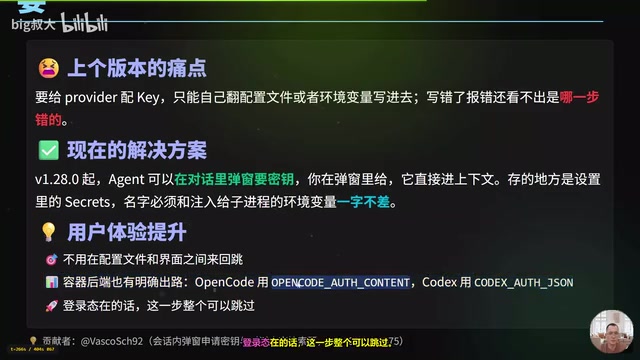
v1.28.0 further moves key requests into the conversation—the agent can pop up a dialog asking for a key, and you fill it in directly with the context in the dialog. It is stored in Secrets in settings, and the name must exactly match the environment variable injected into the execution layer. Container backends do not have the host machine's login state and require credentials to be passed explicitly; OpenCode uses OPENCODE_AUTH_CONTENT, whose value is the content of the auth.json file.
The system keychain (Keychain) is a secure credential storage service provided by macOS for centrally saving passwords, tokens, and certificates, and it restricts which applications can read specific entries via access control lists. On macOS, Claude Code writes OAuth login tokens to the keychain rather than a regular file, so when OpenHands reuses the login state, it needs to call the system API to read the keychain entry rather than simply reading a JSON file. This also means that in CI environments or containers without a graphical interface, the keychain is unavailable and you must use environment variables or explicitly pass the credential file content. Understanding this helps troubleshoot the problem of "it says unauthenticated even though I clearly logged in on this machine."
Model List Now Reported by the Agent
Previously, Canvas hard-coded its own list, so after switching plans or keys, the interface still displayed outdated model names. Now the local backend launches an agent server once, asks which models it has and which is the default, and caches the result. As a result, Codex displays the models you actually subscribe to, and OpenCode's free and paid tiers no longer share the same list.
The model router (Model Router) is a mechanism introduced in v1.25.0, referring to a middleware layer that automatically selects and dispatches requests among multiple models or providers based on task type, cost, or availability. It differs from a simple default model setting: the router can switch backends for different requests within a single session, for example routing lightweight tasks to a free model and complex reasoning to a paid model. Now that the model list is reported by the agent, the router's selectable set also becomes dynamic and no longer depends on a hard-coded static list in Canvas, thereby avoiding the inconsistency between the interface and the actually available models after a plan change.
The 21-Day Version Timeline
- v1.25.0 (October 6): Model router, voice dictation, configurable workspace file discovery.
- v1.26.0 (October 8): Explanation and one-click switching when the backend is suspended, official verification skills rolled out.
- v1.27.0 (October 12): OpenCode and PI enter the built-in list, model list handed over to agent reporting.
- v1.27.1: Hotfix, entry file completion, warning styles follow the theme.
- v1.28.0: In-conversation key requests, output changed to a character-by-character fade-in streaming effect.
Three Changes Beyond the Built-in Agents
On the automation side, a draft flow was added: drafts can be managed persistently, settings are organized into columns, the agent can help fill in forms, and when draft saving fails, the reason given by the server is displayed. The browser gained screen recording capability in v1.27.0, so verification flows can leave video evidence directly instead of just a line of log. DeepSeekAd entered the official verification pipeline—since v1.26.0, the official team has been running end-to-end behavior with simulated models, and v1.27.0 runs this process on DeepSeek and even maps the gaps into a checklist. This is a signal to domestic users: domestic models are already running in the official verification pipeline.
Six Fixes Worth Noting
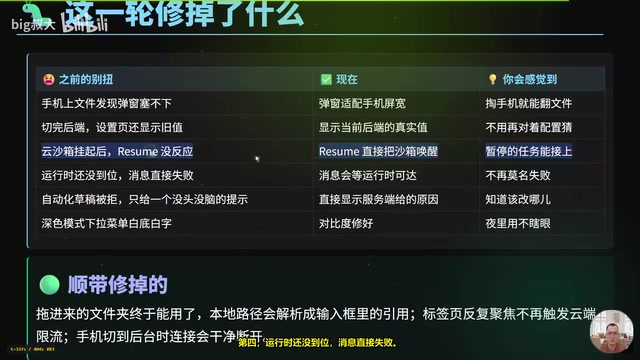
The file discovery dialog on mobile now adapts to screen width; after switching backends, the settings page shows real values instead of old ones; after a cloud sandbox is suspended, resume can wake it directly and paused tasks can pick up where they left off; when the runtime is not ready, messages wait instead of failing immediately; rejected automation drafts show the server-side reason; and the contrast of the dark mode dropdown menu has been fixed. In addition, dragged-in folders are now truly usable, with local paths resolved into reference tags in the input box; repeatedly focusing a tab no longer triggers cloud rate limiting; and connections disconnect cleanly when a phone switches to the background.
Upgrade Recommendations
If you run OpenHands locally, there is only one reason to upgrade: OpenCode and PI can now serve directly as backends. If you only use the cloud service, you get those three mainstream providers, so the benefit is limited. Incidentally, you can also switch models to domestic ones—OpenCode itself supports DeepSeek, Qwen (Tongyi Qianwen), Zhipu GLM, and Moonshot Kimi. Log in within OpenCode, and OpenHands will automatically reuse the login state; to provide the key explicitly, add an entry in Secrets whose name exactly matches the environment variable.
This round of updates reflects a clear direction for OpenHands: it does not build the agent itself, but rather the orchestration layer for agents, uniformly integrating external coding agents through ACP. For developers already using Claude Code or OpenCode, the migration cost is becoming negligible.
Related articles
LLaMA-Factory in Practice: A Complete No-Code Guide to Fine-Tuning Large Models
An introduction to LLaMA-Factory, the open-source fine-tuning tool: its 60.1K-star background, supported models and algorithms, local vs. cloud deployment, and CUDA setup steps.

Zeng Ming's Deep Retrospective: Why OpenAI May Not Be the Ultimate Winner — and Why the Corporate System Will Disappear
Zeng Ming's deep retrospective on the AI endgame: model companies are just infrastructure, OpenAI and Anthropic won't be the final winners; the next battle is the Agent entry point standard; the corporate system will disappear as AI restructures collaboration, and only mission-driven companies can survive the cycle.
systemd-nspawn Containers at a Glance: A Lightweight Linux Container Solution
systemd-nspawn is a lightweight Linux system container tool bundled with systemd that boots isolated distribution environments without a daemon. This article covers core usage, networking and permission configuration, and compares it with Docker/Podman for suitable scenarios.