Codex++ Complete Guide: Three-Layer Architecture & 13 Core Feature Modules Explained

Complete guide to Codex++ architecture, 13 feature modules, and configuration for AI-assisted programming.
This comprehensive tutorial explains Codex++, a third-party enhancement tool for the Codex AI programming assistant. It covers the three-layer architecture (management, service/core, model layers), all 13 management console modules including provider configuration, health checks, script marketplace, and Computer Use. The guide also details the main interface features, dual work modes for developers and non-technical users, and advanced settings like WSL support and Hooks.
Introduction: What is Codex++?
In the previous tutorial, we completed the full process of configuring Codex++ with the DeepSeekAd API and verified its functionality by building a Snake game. This article will take you deep into Codex++'s overall architecture and core feature modules, helping both developers and non-technical users quickly get started with this powerful AI programming assistant.
Simply put, Codex++ is a third-party enhancement management tool built on top of the Codex application. Think of it as Codex's "management panel" — Codex itself is an editor, but it doesn't provide a centralized interface for managing model configurations, plugins, scripts, or health checks. Codex++ fills that gap while also breaking through OpenAI's ecosystem limitations, allowing users to freely connect to various AI models from around the world.
Background: Codex was originally a code generation model released by OpenAI, which later evolved into a command-line and editor-based AI programming assistant tool. OpenAI's Codex tool is bound to its proprietary model ecosystem by default, limiting users to OpenAI's own APIs. While this closed design ensures experience consistency, it creates access difficulties and higher costs for users in certain regions. The emergence of Codex++ as a third-party enhancement tool is essentially the community's breakthrough response to the official tool's ecosystem limitations, similar to how VS Code serves as a lightweight alternative to Visual Studio.
1. Codex++ Three-Layer Architecture Explained
To understand how Codex++ works, you first need to grasp its layered design. The entire system consists of three layers from top to bottom:
Codex++'s three-layer architecture draws from the classic MVC (Model-View-Controller) layered philosophy and microservices architecture principles. The core advantage of this layered design is loose coupling — swapping out the underlying model won't affect upper-layer functionality, and adding new management features doesn't require modifying core interaction logic.
Management Layer: The Configuration Hub
The top layer is the Codex++ management tool, which is the interface we primarily worked with in the previous lesson. It's responsible for overseeing the entire system's configuration and management, serving as the hub for user interaction with underlying capabilities. The management layer acts as the controller in the architecture, coordinating communication between components and synchronizing configurations.
Service Layer & Core Layer: Scheduling and Interaction
The middle service layer is a Codex++ launcher responsible for scheduling and execution, while the core layer is the actual Codex++ interactive interface — the editor's main interface itself. The service layer serves as middleware, handling process scheduling and lifecycle management to ensure stable editor operation.
Model Layer: Flexible AI Model Integration
The bottom layer is the model layer, which provides API relay services or local model support. For example, the DeepSeek model we connected in the previous lesson was integrated through this layer. This layered design makes model integration extremely flexible, freeing users from being locked into a single ecosystem. The model layer implements the Adapter Pattern, abstracting differences between AI models through a unified interface. Whether you're connecting DeepSeek, Qwen, or a locally deployed open-source model, the upper-layer application requires no modifications.
About DeepSeek: DeepSeek is a large language model series developed by DeepSeek AI, renowned for its excellent code generation capabilities and exceptional cost-effectiveness. DeepSeek-V3 and the DeepSeek-Coder series have demonstrated outstanding performance across multiple programming benchmarks, with some metrics approaching or even surpassing GPT-4. More importantly, DeepSeek provides API services directly accessible in China at prices far below OpenAI's (approximately ¥1/million input tokens, ¥2/million output tokens), making it one of the preferred models for domestic developers integrating AI programming tools.
2. The 13 Feature Modules of the Management Console
Open the Codex++ management tool, and the sidebar reveals 13 core feature modules. These modules cover the complete pipeline from configuration to maintenance.
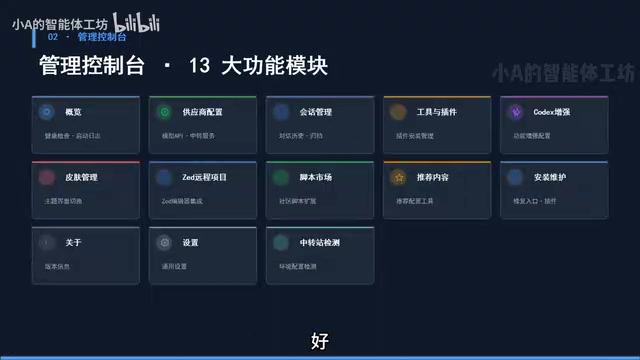
Overview & Health Check
At the top of the sidebar is the Official Relay Station entry, with the Health Check function in the middle, which can repair the entry point and repair the plugin marketplace. Here's a practical detail: Codex installed by directly extracting a compressed archive often has a broken plugin marketplace, which needs to be fixed through the "Repair Plugin Marketplace" option in Health Check.
Provider Configuration & Session Management
Provider Configuration is where we configured the DeepSeek API in the previous lesson — it's the key entry point for model integration. Session Management allows you to centrally manage all conversation records in Codex, where you can view historical conversations and perform operations like deletion.
Tools & Plugins, Codex Enhancement Features
In the Tools & Plugins module, you can add MCP, SQL, or other plugins.
What is MCP? MCP (Model Context Protocol) is an open standard protocol proposed by Anthropic, designed to provide AI models with a unified interface for interacting with external tools and data sources. Through MCP, AI assistants can access databases, call APIs, manipulate file systems, and more without writing separate integration code for each tool. Supporting MCP plugins in Codex++ means users can connect the AI assistant to more external services — such as database queries, web scraping, project management tools — greatly expanding its capability boundaries.
Codex Enhancement Features is a highlight: once enabled, it unlocks capabilities like deleting, exporting, and moving projects.
Particularly noteworthy is the Windows Computer Use option, which provides a virtual cursor to control your computer, enabling true automated operations. If you're using a domestically configured API, the "Full Enhancement" mode is recommended.
Computer Use Technical Explanation: Computer Use is a technology that allows AI models to directly control computer graphical interfaces. It works by capturing screen images for the AI to understand the current interface state, then the AI outputs mouse movement, click, and keyboard input commands to complete operations. Anthropic's Claude pioneered this capability. The Windows Computer Use feature in Codex++ uses a similar principle, simulating user operations through a virtual cursor to complete tasks like opening applications, filling forms, and clicking buttons. It's essentially a combination of RPA (Robotic Process Automation) and AI visual understanding.
3. Script Marketplace & Installation Maintenance
Script Marketplace: Enhancing Daily Usage
The Script Marketplace is a favorite module among veteran users. Here you can install various utility scripts, such as:
- Display context window remaining capacity
- Display token consumption
- Various Chinese localization patches
These scripts significantly improve daily usability, especially token consumption monitoring, which is very helpful for controlling API costs.
Understanding Tokens & API Costs: Tokens are the basic units that large language models use to process text. Chinese characters typically correspond to 1-2 tokens each, while English words average about 1-1.5 tokens. Every AI conversation consumes input tokens (the content you send) and output tokens (the AI's response), with APIs charging by token count. In programming scenarios, code files can be quite long, and the context window may consume a very large number of tokens. Monitoring token consumption helps users optimize prompts, control context length, and avoid unnecessary costs.
Remote Projects
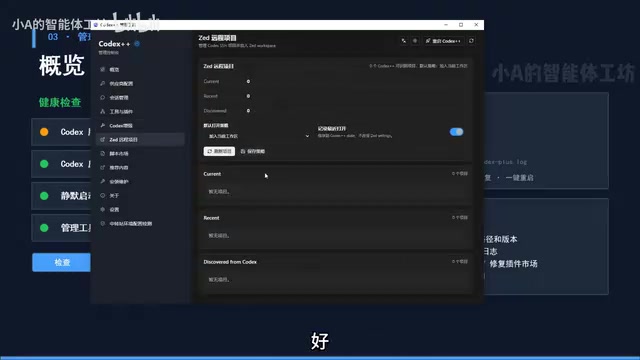
For users who need to work with remote projects, Codex++ also provides a dedicated Remote Projects feature. Additionally, there are conversation and input settings, including Chinese interface localization options.
Installation Maintenance Module
In the Installation Maintenance module, you can view Codex's installation status and perform operations like repairing, installing, or uninstalling entry points. This is also where you select the codex.exe file path — an important tool for troubleshooting installation issues.
4. Codex++ Main Interface Features In-Depth
Sidebar Navigation & Main Interaction Area
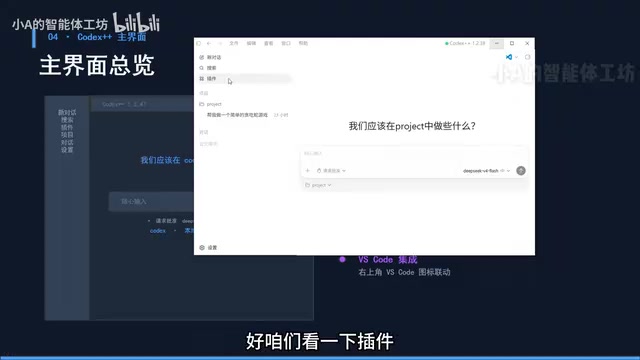
Opening the main interface, the leftmost sidebar contains six entries: New Chat, Search, Plugins, Projects, Conversations, and Settings. The center is the main interaction area where you can give the AI tasks using natural language.
Regarding permissions, Codex++ offers two modes:
- Request Approval: The AI asks for your confirmation before executing sensitive operations — safer and more controllable
- Full Access: Grants the AI complete permissions to work fully autonomously without asking questions
For beginners, it's recommended to start with "Request Approval" mode and consider granting full access once you're comfortable. This permission tiering reflects the "principle of least privilege" in AI safety — only granting the AI the minimum permissions necessary to complete tasks, preventing accidental operations that could cause data loss or system damage.
Model Selection & Project Management
In the model selection area, official models appear at the top, while your custom-configured models (like DeepSeek) appear below. The project folder selection feature lets you conveniently manage different projects.
Plugin Marketplace Repair Method
As mentioned earlier, the plugin marketplace for Codex installed via compressed archive needs repair. After repair and restarting Codex++, the plugin marketplace will display a large number of available plugins that you can freely add based on your needs.
5. Settings Interface: Work Modes & Permission Management
Switching Between Two Work Modes
Codex++ provides two distinctly different work modes, a thoughtful design catering to different user groups:
- For Programming: AI responses are more detailed and technical, showing underlying implementation details — ideal for developers
- For Daily Work: Less technical detail, suitable for non-technical users or lightweight usage scenarios
If you're a product manager or operations professional who wants to use Codex for handling documents, spreadsheets, and other daily tasks, the "For Daily Work" mode is more appropriate. This also demonstrates that you don't need coding skills to accomplish real work with Codex++. The essence of this mode switching is adjusting the System Prompt content, thereby guiding the AI to respond with different styles and levels of detail.
Terminal & Personalization Settings
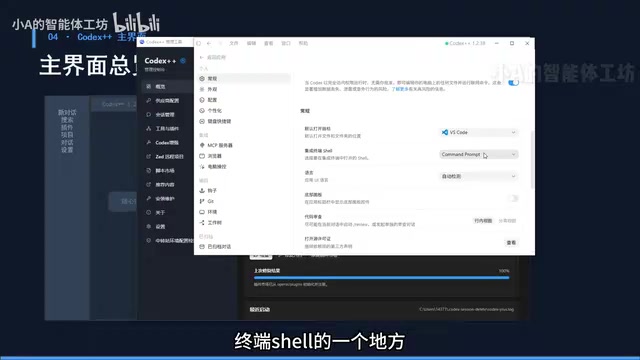
In settings, you can choose your terminal Shell, with support for CMD, PowerShell, WSL, and more. Language is automatically detected as Chinese.
About WSL: WSL (Windows Subsystem for Linux) is a compatibility layer provided by Microsoft in Windows 10/11 that allows users to run native Linux binary executables directly on Windows. For developers, WSL means you can use Linux command-line tools, package managers, and development environments without leaving Windows. Codex++'s support for WSL terminal means users can have the AI execute commands directly in a Linux environment, which is crucial for projects requiring Linux-specific toolchains (such as Docker, Node.js native module compilation, etc.).
The Personalization feature is equally practical: you can add custom instructions and save them. After that, every time you assign a task to the AI, the system will automatically append these prompt instructions after your command — essentially setting up a global behavioral guideline. For example, you can set rules like "All code must include Chinese comments" or "Prefer TypeScript over JavaScript."
Advanced Configuration
The settings interface also contains advanced configurations for MCP servers, browser computer control, Hooks, Git integration, environment variables, and more.
Hooks Mechanism Explained: Hooks are a programming pattern that allows users to automatically execute predefined code or scripts when specific events occur. In the context of Codex++, Hooks can trigger custom logic at specific moments during AI operations (such as before executing a command, after modifying a file, when a conversation starts, etc.). For example, you can set up a Hook to automatically run lint checks every time the AI modifies a code file, or automatically load project context information at the start of each conversation. This mechanism provides advanced users with powerful automation customization capabilities.
These features will be covered in detail in subsequent hands-on project tutorials.
Side Toolbar
The main interface also has a sidebar on the right, integrating utility tools like File Browser, Side Chat, Built-in Browser, and Terminal. The built-in browser deserves special attention — Codex comes with a browser plugin that lets you directly verify project results within it, forming a complete development loop. This means you don't need to constantly switch between the editor and browser — from writing code to previewing results, everything can be done in a single window, dramatically improving development efficiency.
Summary
In this article, we systematically reviewed the core content of Codex++:
Starting with the three-layer architecture (Management Layer, Service/Core Layer, Model Layer) to understand its design philosophy; then familiarizing ourselves with the 13 feature modules of the management console, with emphasis on provider configuration, Codex enhancement features, and the script marketplace; and finally diving into the Codex++ main interface and settings, covering work modes, permission management, and coding configurations.
The greatest value of Codex++ lies in lowering the barrier to using AI programming tools — through third-party enhancement, it breaks through ecosystem limitations while providing suitable usage modes for both technical and non-technical users. In the next installment, we'll further explore its various features through a hands-on project.
Key Takeaways
Related articles

Apple HomeView Hands-On Review: Is the $300 Smart Home Hub Worth It?
Apple HomeView hands-on: a $300 smart home hub with facial recognition for quick account switching, but no App Store or voice recognition. Is the wall-mounted version worth it? Should you buy the first generation?

Meta Muse Wonder Launch: What It Means for Meta's Return to the Frontier AI Race
Meta releases Muse Wonder and WonderFull, benchmarks reach the frontier, community feedback is polarized. An in-depth look at Meta's return to the frontier AI race, its personal agent strategy, and Zuckerberg's different path.

Apple Home Smart Home Lineup Leaked: LG and Schneider Team Up, UWB Door Lock on Board
Apple Home ecosystem gains new LG and Schneider devices: UWB smart lock with proximity unlock, 2.5K dual-camera doorbell, privacy indoor camera, and AirPods-like seamless pairing.