Complete Beginner's Guide to Codex: How OpenAI's AI Agent Actually Gets Work Done for You

Codex is OpenAI's AI Agent, now built into ChatGPT desktop, that executes complex tasks like coding and web building.
Codex is an AI Agent built by OpenAI for task execution — unlike ordinary chatbots, it calls tools, operates browsers, and reads/writes local files to take ideas all the way to finished products. Two real-world examples (a digital avatar website and a 3D flip game) show what non-technical users can achieve with clear prompts. Now merged into the ChatGPT desktop app, Codex edges out rivals like Claude Code on quota, feature breadth, and account safety. The main barrier is overseas phone verification during signup; once past that, Skill plugins and persistent memory make it a powerful everyday assistant.
What Exactly Is Codex
Plenty of people have heard that Codex is powerful, but get stuck at installation, registration, and overseas phone number verification — and never actually get started. To understand why it's worth working through those hurdles, you first need to understand what Codex actually is.
Put simply, Codex is an AI Agent (intelligent agent) built specifically by OpenAI. Its biggest difference from ordinary conversational AI is that it doesn't just "talk" — it can genuinely roll up its sleeves and "do." It can write code, create presentations, generate images, operate a browser, and read and process local files. This shift from "conversation" to "execution" is exactly what separates Agent-type tools from traditional chatbots.
In one sentence: Codex is an AI Agent that doesn't just understand what you need — it actually gets it done.
The core difference between an AI Agent and a standard large language model lies in tool-calling and task planning capabilities. An ordinary chat model only generates text responses. An Agent framework allows the model to actively call external tools during a task — such as running terminal commands, reading and writing files, or calling browser APIs — and then decide the next step based on the results, forming a "perceive → plan → act → feedback" loop. This architecture transforms AI from a passive Q&A system into an executor that can autonomously drive multi-step tasks forward. OpenAI's previously released models like GPT-4o and o3 provide the underlying reasoning capability; Codex builds a complete Agent execution layer on top of that, connecting model capabilities with OS-level tool calls so it can genuinely "get hands-on" in the user's local environment — rather than simply offering suggestions or code snippets.
Two Real-World Examples of What It Can Do
Concepts alone aren't convincing. Here are two real outputs.
The first example is a digital avatar IP website built with Codex. The process is straightforward — provide a prompt and materials on the left side, and after a short processing window, Codex completes the entire site's design, production, and deployment. The finished product features a cohesive color palette and page layout, polished visuals, and plenty of dynamic, interactive details: images can be clicked to enlarge, the small tags at the bottom flip on hover, and drag-and-drop is supported. The overall interactivity and level of polish are impressively high.
The second example is a 3D flip puzzle game. Again, all it takes is a clear prompt, and Codex handles the entire build. After clicking Start, you can control movement with the keyboard — and whether you look at the UI design, the color scheme, or the feel of the controls, the result exceeds expectations.

These two examples illustrate one key point: for non-developers, Codex dramatically shortens the distance from "idea" to "finished product." You describe what you need and provide the materials; it handles the execution.
How Codex Differs from Other AI Agents
There's no shortage of AI Agent tools on the market — Claude Code, for example, has been widely discussed. Codex stands out thanks to a few practical advantages:
- Higher usage quota: You're much less likely to hit limits in everyday use.
- More comprehensive features: Code, documents, images, browser control, and local file handling — all in one place.
- Faster onboarding: Accessible through the official client with a legitimate account.
- Safer account: Using the official channel means no risk of getting banned.
One key product change: OpenAI has merged the standalone Codex (which ran independently for nearly a year) into the new ChatGPT desktop app. This means the path to using Codex is now very clear — visit the OpenAI website, download the installer for your operating system or the ChatGPT desktop app, and sign in with your existing ChatGPT account.
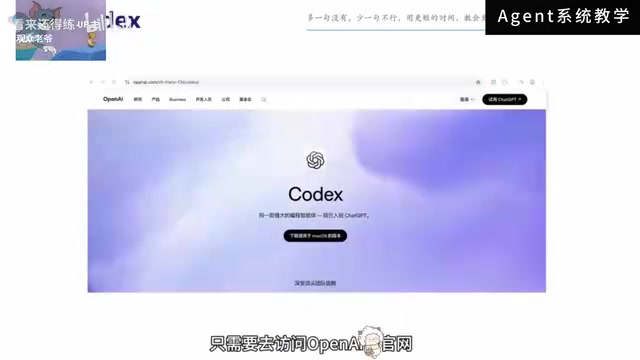
How ChatGPT and Codex Divide the Work
The new interface provides both ChatGPT and Codex as separate entry points, each with its own role:
- For quick questions or brainstorming, use ChatGPT's chat function.
- For working with local files and projects, running sustained tasks, or editing content, switch to Codex.
This way, conversation history, project files, and final outputs are all consolidated within a single app, making the entire workflow more cohesive. The design reduces the overhead of constantly switching between multiple tools.
Claude Code is a terminal-based AI coding assistant from Anthropic aimed at developers. It works primarily through a command-line interface and excels at deep engagement with code repositories — understanding and modifying them extensively. However, its core positioning skews toward professional developer scenarios, making the learning curve relatively steep for non-technical users. By contrast, Codex is integrated into ChatGPT's graphical desktop interface, bringing file management, task execution, and conversational interaction together in a single window, which lowers operational complexity. Other similar tools on the market include Microsoft's Copilot Studio and Google's Project Mariner, each with strengths within their respective ecosystems (Office and Chrome). But in terms of cross-scenario general execution capability and account accessibility, Codex remains a relatively practical choice for users in China.
Learning Path: From Setup to Finished Product
Many people have known about Codex for a while but never actually started using it. The biggest roadblocks are almost always the installation, registration, and login steps — especially the overseas phone number verification.
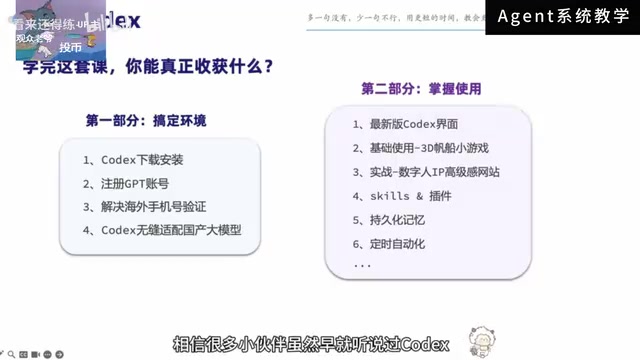
A structured learning path typically breaks into two main phases:
Phase 1: Get your environment set up. This step looks basic but is the most likely to turn beginners away. The complete process includes downloading and installing Codex, creating an account, overseas phone number verification (using a virtual SMS service), and logging in. Getting the environment working is the real threshold to cross.
Phase 2: Learn how to use it. Once you're familiar with the new Codex interface, learn through project-driven practice — for example, building the 3D flip game and the digital avatar IP website hands-on. Advanced capabilities are woven in naturally through these projects, including:
- Skill plugins: Extend Codex's functional boundaries.
- Persistent memory: Let Codex remember project context so you don't start from scratch every session.
Learning through projects is far more effective than memorizing feature lists, and it's much easier to turn the tool into genuine productivity.
"Virtual SMS" (receiving one-time SMS verification codes) is a common method for bypassing the overseas phone number verification requirement. Popular platforms include sms-activate and 5sim. The basic process: purchase a virtual number for a specific country (such as the US or UK) on the platform, enter that number on OpenAI's registration page, and wait for the platform to receive the verification code. Note that virtual numbers have a time limit (typically 10–20 minutes), and some number ranges have already been flagged and blocked by OpenAI — if verification fails, simply try a different number. Skill plugins are Codex's built-in functionality extension mechanism, similar to loading a new "toolbox" for the Agent — for example, connecting to specific APIs, enabling image generation, or activating a PowerPoint creation module to go beyond baseline capabilities. Persistent memory allows Codex to retain project background information across conversations and sessions, avoiding the need to re-explain context every time you start up — particularly valuable for long-running collaborative projects.
Final Thoughts
Codex represents the evolution of AI tools from "can chat" to "can do." For everyday users, its value isn't about showing off — it's about automating complex execution steps so you only need to express your needs clearly. With its integration into the ChatGPT desktop app, the barrier to entry has dropped even further. The remaining friction is concentrated in the registration and verification process. Clear that hurdle, and Codex has every potential to become a genuinely useful assistant in your daily work.
Related articles
Claude Code Adds Mods and AGENTS.md Support: A Deep Dive
Anthropic adds Mods plugin system and AGENTS.md support to Claude Code, alongside Projects redesign, background computer use, Diff panel, and Skills evaluation tools.

DeepSeek Harness Goes Open Source: An AI Agent Foundation Where Everything Is a Plugin
DeepSeek Harness is now open source. Built on an "everything is a plugin" philosophy, it supports 20+ LLM providers and launches a local Web UI with a single command.
AI Large Language Model Learning Roadmap: From Theoretical Foundations to Agent Development
A complete AI large model learning roadmap: from Transformer theory and PyTorch/Hugging Face frameworks to API calls, fine-tuning, Agents, and LangChain — a clear path from beginner to job-ready.