Complete Codex Beginner's Guide: From Installation to a Real AI-Powered Coding Workflow

OpenAI's execution-focused coding agent Codex is now part of the ChatGPT desktop app — moving AI from chat to action.
Codex is OpenAI's execution-oriented AI Agent capable of completing real tasks like writing code, building websites, and developing 3D games — not just answering questions. Compared to tools like Claude Code, it offers higher usage limits, broader features, and easier onboarding. Since September 9th, Codex has been merged into the ChatGPT desktop app, making it accessible with an existing account. The unified interface supports both ChatGPT chat and Codex execution modes, while advanced features like Skill plugins and persistent memory help it serve as a long-term development partner.
What Exactly Is Codex
Codex is a dedicated AI-powered programming tool built by OpenAI. Its biggest difference from a typical conversational AI is that it doesn't just "talk" — it actually "does". That distinction defines its role: not a chatbot companion, but an AI Agent that executes tasks.
Specifically, Codex's capabilities span code writing, slide deck creation, image generation, browser operation, and reading and processing local files. In other words, what you hand off to it isn't just a question — it's an entire task that needs to be completed end-to-end.

The shift from conversational AI to execution-oriented Agent is precisely why Codex deserves attention. When an AI can autonomously handle the full pipeline — from understanding requirements to delivering results — it upgrades from an "information tool" to a genuine "productivity tool".
What is an AI Agent? The AI Agent paradigm is one of the most significant shifts in the field in recent years. Unlike traditional large language models that can only "answer questions," an Agent can perceive its environment, form a plan, call tools, and execute in a loop — the classic "perceive–reason–act" cycle. Codex belongs to the "coding agent" category, which typically runs code autonomously in a sandboxed environment, reads and writes files, calls APIs, and even controls a browser until the goal is achieved. This is fundamentally different from asking ChatGPT a question, manually copying the code, and debugging it yourself. An Agent runs on its own, encounters errors on its own, and fixes them on its own — the entire iteration loop requires no human intervention.
Two Real-World Cases That Show What It Can Do
The most direct way to judge an AI tool is to look at what it actually produces. The tutorial demonstrates two representative cases.
The first is a digital avatar IP website built with Codex. The user simply provides a prompt and some assets on the left side, and Codex handles the entire design, build, and publishing process based on that description. In practice, the site's color scheme and layout are well-coordinated with strong overall visuals. What's more noteworthy are the interactive details — clicking an image expands it, small tags at the bottom flip on hover, and elements are draggable. The polish of these dynamic effects shows that Codex isn't just stitching pages together; it can handle relatively complex frontend interaction logic.
The second case is a 3D flip mini-game. Again, a single clear and concise prompt was all it took for Codex to produce a working game. The final product supports click-to-start and keyboard-controlled movement, with solid execution across UI design, visual style, and feel.

Both cases reinforce the same conclusion: Codex is an AI Agent that not only understands requirements but actually rolls up its sleeves and gets the work done. The quality of your prompt matters enormously here — a clear, specific description tends to directly determine the quality of the output.
How Codex Differs From Other AI Agents
There are already quite a few AI Agents on the market — some earlier tools that generated buzz, as well as Claude Code and others in the same category. So what sets Codex apart?
Based on the comparisons in the tutorial, Codex's advantages come down to a few key areas: higher available usage limits, more comprehensive features, and a lower barrier to entry. Using it through the official client with a legitimate account also means you don't have to worry about account bans — a very real concern for many users.
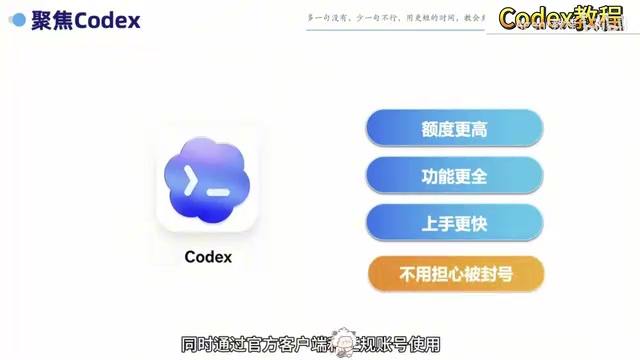
One important product change: starting September 9th, OpenAI officially merged Codex — which had been running as a standalone product for nearly a year — into the new version of the ChatGPT desktop app. This lowers the barrier to access even further. Users simply visit the OpenAI website, download the installer for their operating system or the ChatGPT desktop app, and sign in with their existing ChatGPT account.
Codex vs. the competition: Claude Code is Anthropic's terminal-native coding agent that runs directly in the user's local command line, capable of reading and writing files, executing shell commands, and managing Git repositories. Compared to Codex, Claude Code skews toward developers who are comfortable with the command line — the learning curve is steeper, but the level of control over a local codebase is more granular. Devin (developed by Cognition AI), which drew widespread attention earlier, was an early proof-of-concept for the "fully autonomous software engineer" — capable of independently completing the entire software development lifecycle from requirements analysis to deployment, but at a steep price point aimed at enterprise users. Codex brings similar capabilities into the ChatGPT ecosystem, taking a different path that prioritizes ease of use and broad accessibility.
Two Modes in One App
The merged new-version interface offers two distinct working entry points — ChatGPT and Codex — each with its own role.
If you just want to quickly brainstorm or talk through an idea, ChatGPT's chat function is enough. If you need to work with local files and projects, execute tasks continuously, or make iterative changes, you switch to Codex. The benefit of this design is that conversation context, project files, and final outputs are all centralized in a single app, making the entire workflow more coherent.

For developers, this model — where "discussion" and "execution" are separated in function but unified in environment — reduces the cost of context-switching between multiple tools, and is a practical design choice for improving efficiency.
Getting Started From Scratch: Two Phases
For many people, the biggest obstacle with Codex isn't knowing how to use it — it's getting stuck during installation, registration, and login. The overseas phone number verification step in particular causes many would-be users to give up before they've even truly started.
The full onboarding path can be broken into two phases:
Phase 1: Set Up Your Environment
This is the most critical — and most likely to discourage — part of the process. You'll need to work through downloading and installing Codex, creating an account, verifying with an international phone number, and logging in to get your entire environment up and running. How smoothly this phase goes will directly determine whether you can actually start using Codex.
Phase 2: Learn to Use It
Once your environment is ready, you move into hands-on practice. This covers navigating the new Codex interface and walking through complete development workflows using two example projects: the 3D flip game and the digital avatar IP website. The case studies also touch on more advanced topics — such as Skill plugins and persistent memory — which are the features that take Codex from "usable" to "genuinely useful".
Skill plugins and persistent memory explained: Skill plugins are Codex's extensibility modules, allowing users or third parties to predefine operation templates for specific domains — for example, "auto-deploy to Vercel" or "call a specific API" — so Codex can handle repetitive tasks without needing the workflow re-explained each time. Persistent memory means the Agent can retain the user's preferences, project context, and past decisions across sessions, avoiding the need to re-explain everything from scratch every time — especially valuable for long-running projects in continuous iteration. Together, these two features address the classic AI Agent pain point of "forgets everything after each session," and are the key design elements that transform Codex from a one-off task tool into a long-term working partner.
Final Thoughts
Codex represents one direction in AI's evolution — from conversation toward execution. Its value isn't in how fluently it responds, but in whether it can actually get the job done. For users who want to turn AI into real productivity, once you've cleared the setup and registration hurdle, the project-level execution capabilities Codex offers are genuinely worth trying. And with its integration into the ChatGPT desktop app, getting access and getting started has never been easier.
Related articles

iPhone Duo Review Controversy: Why Apple's First Foldable Is Said to 'Should Be Called an iPad'
The Vergecast debates the iPhone Duo review controversy: is a 7 fair? Why are apps struggling? Why critics say it 'should be called an iPad'? We unpack Apple's first foldable's positioning mismatch and first-gen compromises, plus AI security flaws and agentic shopping.

Meta vs. Publishers: The AI Data Battle Over Terms of Service Changes and the Future of the Internet
Meta changed its business account terms to allow AI training on linked website data, sparking backlash from publishers and creators. Industry groups demanded negotiations, forcing Meta to remove 'training' wording and delay the effective date. The dispute reveals the deeper battle over data authorization and the future of the internet in the AI era.

When Outside Xbox Meets Blood on the Clocktower: A Legion Match in Minecraft
Outside Xbox guests Ellen and Mike play Minecraft Blood on the Clocktower in a Legion game. How can three good players fight an evil majority amid information noise? This article breaks down Legion mechanics, information-role mind games, and the endgame reversal.